
Overview
ABB CPM810 Maintenance-Proven Spare Part for Factory Uptime
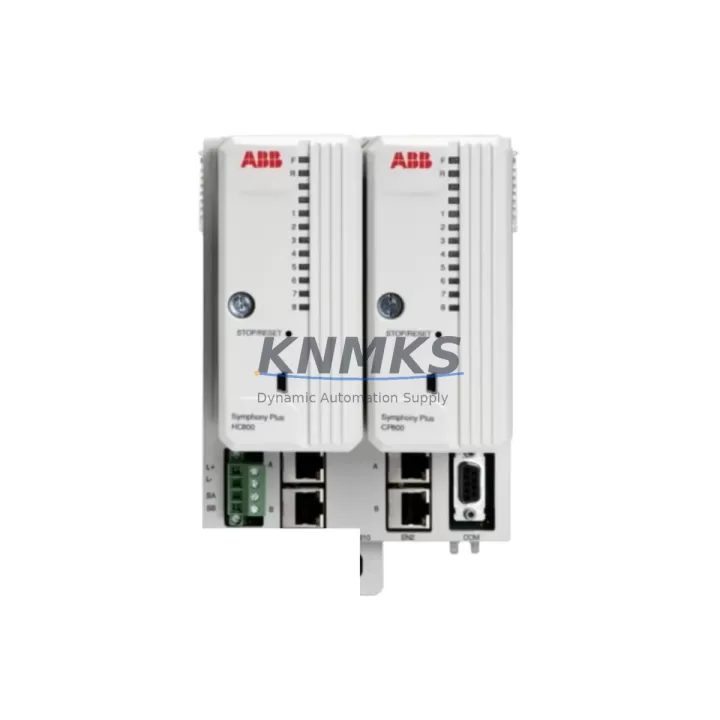
The ABB CPM810 is a Central Processor Module designed for the ABB AC800M Distributed Control System (DCS) platform — one of the most widely deployed process automation architectures in the chemical, oil & gas, power generation, pulp & paper, and pharmaceutical industries. As a maintenance-proven spare part, the CPM810 is a critical component for facilities that depend on continuous production and cannot afford unplanned downtime caused by processor failure or degraded module performance.
Sourced as an original ABB spare, each CPM810 unit stocked by KNMKS undergoes pre-shipment functional verification to confirm module integrity before dispatch. With a support terms confirmed by quotation and documented compatibility with the AC800M controller family, this module supports both emergency replacement scenarios and planned annual maintenance cycles. Whether you are a maintenance engineer responding to a fault alarm or a procurement engineer building a strategic spare parts inventory, the CPM810 is a reliable, long-term supply solution.
Spare Maintenance Table
| Parameter | Specification / Detail |
|---|---|
| Part Number / SKU | CPM810 |
| Manufacturer | ABB |
| Series / Platform | AC800M DCS |
| Module Type | Central Processor Module (CPM) |
| Country of Origin | Germany |
| Compatible Controllers | AC800M PM810, PM851, PM856, PM860, PM861, PM864, PM866 series |
| Communication Interface | Ethernet (MMS / IEC 61850), ModuleBus |
| Backplane Compatibility | AC800M S800 I/O backplane and TB820 ModuleBus modem |
| Operating Temperature | 0°C to +55°C (standard industrial environment) |
| Power Supply Requirement | 24 VDC via controller backplane (SS822 / SD821 power supply) |
| Mounting | DIN rail / controller rack, standard AC800M form factor |
| Application Environment | Process automation, DCS control cabinets, continuous production lines |
| Pre-Shipment Testing | Yes — functional verification before dispatch |
| Support terms | 12 Months from date of shipment |
| Supply Lead Time | In-stock / short lead time available; long-term supply agreements supported |
| Condition | Original spare (new or refurbished-to-spec, clearly stated at order) |
Maintenance Planning for Continuous Operation
When a CPM810 processor module is flagged for replacement — whether due to a watchdog fault, communication dropout, memory error, or scheduled lifecycle swap — the replacement workflow should extend beyond the module itself. A thorough site inspection at the time of CPM810 replacement is the most efficient opportunity to audit the surrounding control architecture and prevent secondary failures.
Begin with the power supply modules. The AC800M controller relies on stable 24 VDC input, typically delivered through an ABB SD821 or SS822 power supply unit. A degraded power supply is a common root cause of intermittent processor faults and should be tested or replaced concurrently. Inspect the power supply output voltage under load and check for capacitor aging or thermal discoloration on the PCB.
Next, audit the I/O modules connected via the S800 I/O backplane. Modules such as the AI810, AO810, DI810, and DO810 are frequently co-located with the CPM810 in the same control cabinet. Signal drift, channel failures, or firmware mismatches in these I/O modules can cause the replacement CPM810 to report faults immediately after installation if not addressed. Verify that all I/O module firmware versions are compatible with the CPM810 firmware revision being installed.
The TB820 ModuleBus Modem and associated backplane communication links should also be inspected. A faulty TB820 can prevent the CPM810 from correctly enumerating I/O modules during startup, leading to misdiagnosis of the processor as the fault source. Check the ModuleBus cable connections and modem LED status indicators before and after CPM810 installation.
For facilities running redundant AC800M configurations, the CI854 or CI858 communication interface modules (PROFIBUS DP / FOUNDATION Fieldbus) should be verified for correct operation after the CPM810 swap. Redundancy switchover events during processor replacement can expose latent faults in communication modules that were previously masked by the primary controller.
Finally, inspect the fuse protection on the 24 VDC distribution rail feeding the controller rack, and review the terminal block wiring (TB series) for corrosion, loose connections, or insulation degradation — particularly in high-humidity or high-vibration environments. These low-cost components are frequently overlooked during major module replacements and are a common source of post-maintenance faults.
Building a strategic spare parts inventory that includes the CPM810 alongside these associated components — power supplies, I/O modules, communication interfaces, and ModuleBus modems — significantly reduces mean time to repair (MTTR) and supports a proactive maintenance posture for long-term system uptime.
Site Replacement Workflow
Step 1 — Pre-Replacement Preparation: Download and archive the current controller configuration using ABB Control Builder M before any hardware change. Confirm the CPM810 firmware version required for your AC800M system revision. Verify that the replacement CPM810 SKU matches the original part number exactly, including any hardware revision suffix.
Step 2 — Safe Isolation: Follow your site’s lockout/tagout (LOTO) procedure. For hot-standby redundant systems, initiate a controlled switchover to the standby controller before removing the faulty CPM810 to maintain process continuity. For simplex systems, coordinate with operations for a planned shutdown window.
Step 3 — Module Removal and Inspection: Remove the CPM810 from the controller rack. Inspect the backplane connector for bent pins, corrosion, or debris. Clean the connector with appropriate contact cleaner if required. Inspect the rack slot for mechanical damage.
Step 4 — Installation and Configuration Restore: Insert the replacement CPM810 into the correct rack slot. Power up the controller and confirm LED status indicators show normal boot sequence. Restore the archived configuration via Control Builder M. Verify all I/O module assignments and communication links are correctly re-established.
Step 5 — Functional Verification: Confirm all process signals are reading correctly across AI, AO, DI, and DO channels. Test communication links to SCADA, historian, and any fieldbus segments. Document the replacement in the site maintenance log with the new CPM810 serial number and installation date.
This structured workflow minimizes downtime, reduces the risk of configuration errors, and ensures full system compatibility is maintained after the CPM810 replacement — whether you are retiring an end-of-life module or responding to an unplanned fault event.
Spare Parts Support FAQ
Q1: Is the CPM810 compatible with all AC800M controller variants?
The CPM810 is designed for the ABB AC800M platform and is compatible with the PM810, PM851, PM856, PM860, PM861, PM864, and PM866 processor families. Compatibility depends on the hardware revision and firmware version of your specific controller. KNMKS recommends confirming your controller’s hardware revision before ordering to ensure a direct fit replacement. Our technical team can assist with compatibility verification based on your existing system documentation.
Q2: What does the support terms confirmed by quotation cover, and how is it supported?
The support terms confirmed by quotation cover manufacturing defects and functional failures under normal operating conditions from the date of shipment. Each CPM810 unit is functionally tested before dispatch to confirm module integrity. In the event of a support terms claim, KNMKS provides replacement or repair support. Support requests should be initiated through admin@knmks.com with the original order reference and a description of the fault observed.
Q3: Can KNMKS support long-term supply agreements for the CPM810?
Yes. KNMKS supports long-term spare parts supply agreements for the CPM810 and associated AC800M components, with contract terms available from 12 to 36 months. This is particularly relevant for facilities managing aging AC800M installations where OEM supply has become unreliable or lead times have extended significantly. Long-term agreements provide price stability, guaranteed stock reservation, and priority dispatch for emergency orders.
Q4: How should the CPM810 be stored as a standby spare?
The CPM810 should be stored in its original anti-static packaging in a dry, temperature-controlled environment (recommended: 10°C to 40°C, relative humidity below 75% non-condensing). Avoid storage near strong electromagnetic fields or in environments with high vibration. Inspect the module annually for any signs of physical degradation. For facilities maintaining a strategic spare inventory, KNMKS recommends rotating standby modules into service during planned shutdowns to verify functionality and prevent long-term storage degradation.
© 2026 KNMKS. All rights reserved.
Original Source: https://knmks.com
Contact: admin@knmks.com | +86 18359268345
Product Identification
- Brand / Ecosystem
-
ABB
ABB - Model / Series
-
CPM810
AC800M Series - Product Family
- PLCs & Controllers
- Availability Status
- Available on request after model and quantity confirmation
- Inquiry Type
- B2B RFQ, replacement inquiry and project spare-part request
- Pre-Quote Check
- Exact SKU, brand, series, quantity, nameplate photos and destination country are checked before quotation
System Path
Where this product fits in the KNMKS automation structure.
Specification & Inquiry Focus
- Control platform
- PLC, PAC and modular controllers
- Common needs
- CPU, rack, power and I/O expansion
- Project support
- Replacement, cabinet build and maintenance
Buyer Confirmation
Information KNMKS checks before replying.
- Exact model
- CPM810
- Brand / ecosystem
- ABB
- Product family
- PLCs & Controllers
- Application note
- Replacement, maintenance, project build or spare-part list
- Useful photos
- Nameplate, installed unit, cabinet layout or connector side
- Delivery details
- Quantity, destination country and target schedule
Document Support
Files and notes can be confirmed during quotation.
- Product photos or nameplate confirmation when available
- Packing and delivery notes before quotation confirmation
- Support scope and delivery terms confirmed per inquiry
- Export document coordination for qualified B2B requests
Inquiry Support
- Model cross-checking before quotation
- CPU, power, rack and expansion module matching
- Support for replacement and project inquiry
What to Send Us
- Brand and exact model number: ABB CPM810
- Quantity and required delivery time
- Application, replacement requirement or nameplate photo
- Destination country and shipping preference
RFQ Preparation
This is a product inquiry page built for RFQ communication.
Fast Model Check
Send this model to KNMKS for confirmation.
Include quantity, destination country and photos if this is a maintenance replacement. The inquiry will be saved with a reference number after submission.
Brand & Compatibility Note
KNMKS displays automation product information for well-known industrial brand ecosystems and compatible replacement references. Brand names are used for product identification and compatibility reference only; final availability and commercial terms are confirmed per quotation.
 Manufacturing
 Machine Tools
 Packaging
 Energy & Power



 HMI & Displays
 Servo Systems
 Variable Frequency Drives
 Sensors