
Overview
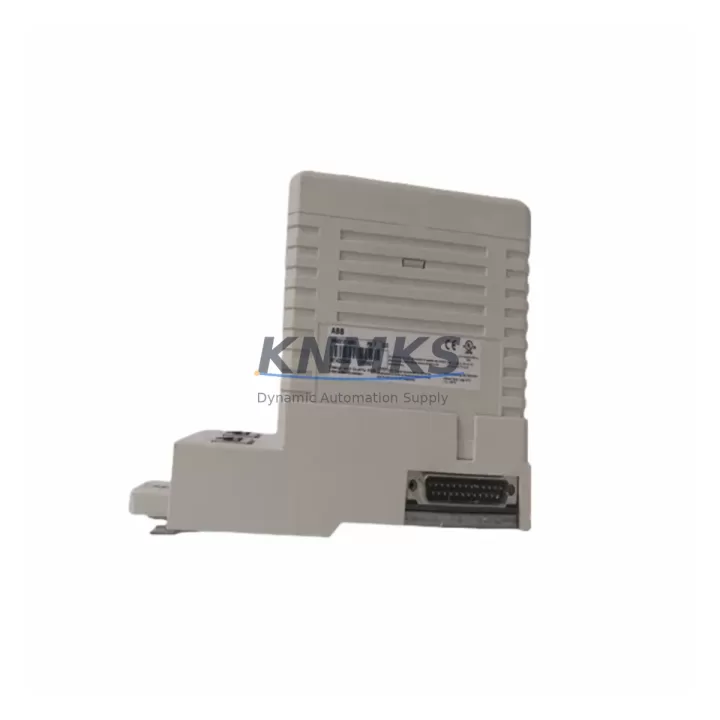
ABB CI855K01 3BSE018106R1 Spare Part for AC800M Uptime
The ABB CI855K01 (part number 3BSE018106R1) is an Ethernet communication interface module designed for the ABB AC800M Modular Controller platform — one of the most widely deployed DCS architectures in process automation, power generation, oil & gas, and chemical manufacturing. As a critical communication backbone component, the CI855K01 manages real-time data exchange between the AC800M controller and plant-level Ethernet networks, SCADA systems, and engineering workstations. When this module fails or degrades, the consequences extend beyond a single controller — they can cascade into full process shutdowns, loss of supervisory visibility, and extended unplanned downtime.
Maintaining a verified, tested spare of the CI855K01 3BSE018106R1 is a foundational element of any responsible maintenance strategy for AC800M-based control systems. Whether you are managing a single controller cabinet or a multi-node DCS architecture, having this module available on the shelf — tested, documented, and ready to install — is the difference between a two-hour recovery and a two-day outage.
Spare Maintenance Table
| SKU | CI855K01 |
| Part Number | 3BSE018106R1 |
| Brand | ABB |
| Series | AC800M Modular Controller |
| Module Type | Ethernet Communication Interface Module |
| Communication Protocol | Ethernet (10/100 Mbps), TCP/IP |
| Compatible Controllers | ABB AC800M (PM851, PM856, PM860, PM861, PM864, PM866 series) |
| Backplane Interface | AC800M S800 I/O backplane compatible |
| Operating Voltage | 24 VDC (supplied via controller backplane) |
| Operating Temperature | 0°C to +55°C |
| Mounting | DIN rail / AC800M controller rack slot |
| Origin | Germany |
| Weight | 1,580 g (packaged) |
| Condition | Original, New or Tested Surplus |
| Pre-shipment Test | Yes — powered-on functional verification |
| Support terms | 12 Months from date of shipment |
| Application Environment | Process automation, DCS, power generation, oil & gas, chemical plant |
| Maintenance Recommendation | Inspect RJ45 port integrity, firmware version compatibility, and LED status indicators during annual shutdown; replace if communication errors exceed threshold |
Maintenance Planning for Continuous Operation
The CI855K01 3BSE018106R1 does not operate in isolation. In a functioning AC800M control cabinet, it works in concert with a tightly integrated set of components — and a failure in any one of them can mask or amplify symptoms that appear to originate from the Ethernet module itself. Experienced maintenance engineers know that when a CI855K01 is replaced, the surrounding system must be inspected with equal rigor.
Begin with the AC800M processor module (such as the PM864 or PM866) — verify firmware version compatibility with the CI855K01 and confirm that the processor is not logging communication faults that predate the module failure. Next, inspect the TB807 or TB840 terminal base units and associated S800 I/O modules: a degraded I/O backplane can generate spurious Ethernet errors that are incorrectly attributed to the communication module. Check the SD802 or SD803 power supply modules for output voltage stability — undervoltage conditions on the 24 VDC rail are a common root cause of intermittent communication module resets.
On the network side, inspect the industrial Ethernet switch connected to the CI855K01’s RJ45 port. Verify port negotiation settings (auto-negotiation vs. fixed 100 Mbps full-duplex), check for excessive CRC errors or packet loss, and confirm that VLAN configurations have not drifted. If the AC800M system includes a CI854 or CI856 PROFIBUS communication module in the same rack, verify that the fieldbus master is not generating bus errors that are loading the controller’s communication stack and indirectly degrading Ethernet throughput.
For sites running ABB Freelance or System 800xA as the supervisory layer, confirm that the OPC server or connectivity server can re-establish communication with the replaced module without requiring a full project download. In many installations, the AF100 or INSUM communication interface modules share the same controller rack — these should be inspected for firmware currency and connector integrity during the same maintenance window. Finally, review the cabinet fusing and surge protection on the Ethernet port: unprotected RJ45 connections in industrial environments are vulnerable to ground loop transients that can damage the CI855K01’s PHY layer over time, making a transient voltage suppressor (TVS) diode module a worthwhile addition to the spare parts list.
Site Replacement Workflow
Step 1 — Pre-replacement documentation: Before removing the CI855K01, record the module’s current IP address, subnet mask, gateway, and MAC address from the AC800M engineering tool (Control Builder M or Control Builder Plus). Export the current controller configuration as a backup. Note the firmware version displayed on the module’s front panel LED sequence or via the engineering tool.
Step 2 — Safe isolation: Place the AC800M controller in a controlled stop state if process conditions permit. If hot-swap is required, verify that the CI855K01 supports hot insertion in your specific firmware version — earlier firmware revisions may require a controller restart after module replacement. Notify the control room operator before proceeding.
Step 3 — Physical replacement: Release the module locking lever, slide the CI855K01 out of its rack slot, and inspect the backplane connector for bent pins or contamination. Insert the replacement module, ensuring the locking lever engages fully. Connect the Ethernet cable and verify the LINK LED illuminates within 10 seconds.
Step 4 — Configuration restore: Using Control Builder, download the communication configuration to the new module. Verify that the IP address, node name, and network parameters match the pre-replacement documentation. Confirm that the supervisory system (800xA or equivalent) re-establishes communication and that all I/O tags are updating correctly.
Step 5 — Post-replacement verification: Monitor the module for 30 minutes under normal process load. Check for communication error counters in the diagnostic log. Confirm that no alarms related to communication loss or module fault are active. Document the replacement in the site maintenance log, including the new module’s serial number and the date of installation.
This workflow is designed to minimize downtime and ensure system compatibility. For legacy AC800M installations running older firmware, consult the ABB AC800M Hardware Unit Installation and Replacement guide (document 3BSE036351) before proceeding.
Spare Parts Support FAQ
Q1: Is the CI855K01 3BSE018106R1 compatible with all AC800M processor versions?
The CI855K01 is compatible with the AC800M controller family including PM851, PM856, PM860, PM861, PM864, and PM866 processor modules. Compatibility with specific firmware versions should be verified against the ABB AC800M release notes. We recommend confirming your controller’s current firmware version before ordering to ensure seamless integration.
Q2: What pre-shipment testing is performed on the CI855K01?
Each CI855K01 3BSE018106R1 unit undergoes a powered-on functional verification prior to shipment. This includes confirmation of Ethernet link establishment, LED status verification, and backplane connector inspection. Units are shipped with anti-static packaging and include a test report upon request. All units are covered by a support terms confirmed by quotation from the date of shipment.
Q3: Can you support long-term or blanket order supply for the CI855K01?
Yes. For customers managing multi-site AC800M installations or planning annual maintenance shutdowns, we support blanket purchase orders and scheduled delivery programs. This ensures you maintain a consistent spare parts inventory without the risk of sourcing delays for this increasingly scarce module. Contact our team to discuss volume pricing and delivery scheduling.
Q4: What is the support terms coverage and return policy?
All CI855K01 3BSE018106R1 units are covered by a support terms confirmed by quotation from the date of shipment. If a unit fails under normal operating conditions within the confirmed support period, we will provide a replacement or documented resolution support. Units must be returned in original packaging with the test report. Support terms does not cover damage caused by incorrect installation, overvoltage, or physical impact.
© 2026 KNMKS. All rights reserved.
Original Source: https://knmks.com
Contact: admin@knmks.com | +86 18359268345
Product Identification
- Brand / Ecosystem
-
ABB
ABB - Model / Series
-
CI855K01 3BSE018106R1
AC800M Series - Product Family
- PLCs & Controllers
- Availability Status
- Available on request after model and quantity confirmation
- Inquiry Type
- B2B RFQ, replacement inquiry and project spare-part request
- Pre-Quote Check
- Exact SKU, brand, series, quantity, nameplate photos and destination country are checked before quotation
System Path
Where this product fits in the KNMKS automation structure.
Specification & Inquiry Focus
- Control platform
- PLC, PAC and modular controllers
- Common needs
- CPU, rack, power and I/O expansion
- Project support
- Replacement, cabinet build and maintenance
Buyer Confirmation
Information KNMKS checks before replying.
- Exact model
- CI855K01 3BSE018106R1
- Brand / ecosystem
- ABB
- Product family
- PLCs & Controllers
- Application note
- Replacement, maintenance, project build or spare-part list
- Useful photos
- Nameplate, installed unit, cabinet layout or connector side
- Delivery details
- Quantity, destination country and target schedule
Document Support
Files and notes can be confirmed during quotation.
- Product photos or nameplate confirmation when available
- Packing and delivery notes before quotation confirmation
- Support scope and delivery terms confirmed per inquiry
- Export document coordination for qualified B2B requests
Inquiry Support
- Model cross-checking before quotation
- CPU, power, rack and expansion module matching
- Support for replacement and project inquiry
What to Send Us
- Brand and exact model number: ABB CI855K01 3BSE018106R1
- Quantity and required delivery time
- Application, replacement requirement or nameplate photo
- Destination country and shipping preference
RFQ Preparation
This is a product inquiry page built for RFQ communication.
Fast Model Check
Send this model to KNMKS for confirmation.
Include quantity, destination country and photos if this is a maintenance replacement. The inquiry will be saved with a reference number after submission.
Brand & Compatibility Note
KNMKS displays automation product information for well-known industrial brand ecosystems and compatible replacement references. Brand names are used for product identification and compatibility reference only; final availability and commercial terms are confirmed per quotation.
 Manufacturing
 Machine Tools
 Packaging
 Energy & Power



 HMI & Displays
 Servo Systems
 Variable Frequency Drives
 Sensors