
Overview
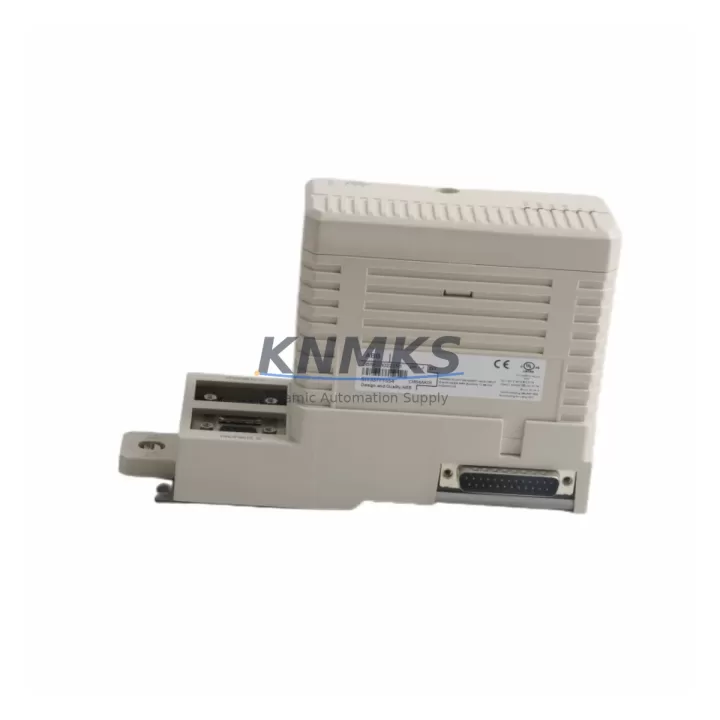
ABB CI854AK01 3BSE030220R1 Migration-Ready PROFIBUS DP Module for Legacy Control Systems
The ABB CI854AK01 (3BSE030220R1) is a PROFIBUS DP communication module designed for the ABB AC 800M Distributed Control System platform. As industrial facilities worldwide accelerate the retirement of aging DCS infrastructure, the CI854AK01 has become a critical component in legacy system migration, discontinued spare part replacement, and control cabinet modernization projects. Whether you are replacing a failed CI854 variant, expanding an existing AC 800M rack, or bridging a PROFIBUS DP network during a phased migration to a newer control architecture, this module provides the communication backbone required to maintain field device connectivity without disrupting production continuity.
Sourced from verified inventory channels and subjected to pre-shipment functional testing, each CI854AK01 unit shipped by KNMKS is confirmed operational against ABB’s published electrical and communication specifications. A support terms confirmed by quotation is included with every unit, covering manufacturing defects and functional failures under normal operating conditions.
Migration Compatibility Table
| Parameter | CI854AK01 3BSE030220R1 | Migration / Retrofit Notes |
|---|---|---|
| Communication Protocol | PROFIBUS DP (DP-V0, DP-V1) | Compatible with existing PROFIBUS DP field device networks; no re-wiring of field bus required in most retrofit scenarios |
| Host Platform | ABB AC 800M (PM851, PM856, PM860, PM861, PM864, PM866) | Verify controller firmware version supports CI854AK01; update controller firmware before module swap if required |
| Backplane Interface | AC 800M S800 I/O bus / ModuleBus | Direct slot replacement on TB820V2 or TB840A termination boards; confirm slot addressing in Control Builder M |
| Termination / Wiring | 9-pin D-sub PROFIBUS connector (standard) | Existing PROFIBUS cable and termination resistors are reusable; inspect cable shielding and bus termination at both ends |
| Power Consumption | Supplied via AC 800M backplane (no external 24 VDC required) | Verify rack power supply (e.g., SD821, SD822, SD823) capacity before adding modules to an existing rack |
| Module Address / Configuration | Configured in ABB Control Builder M software | Export existing hardware configuration before replacement; re-import after module swap to preserve I/O mapping and program logic |
| Installation Space | Single-slot AC 800M module | Confirm available slot in existing rack (TB810, TB811, TB820V2, TB840A); no additional mounting hardware required |
| Firmware Compatibility | Requires AC 800M firmware ≥ 5.0 (verify with ABB release notes) | Mismatched firmware versions are the most common cause of post-swap communication faults; verify before installation |
| HMI / SCADA Impact | Transparent to HMI layer if hardware configuration is preserved | No HMI screen rebuild required if module address and I/O mapping are maintained; verify OPC/DA tags after restart |
| Support terms | support terms confirmed by quotation — functional defects covered under normal operating conditions | |
Retrofit Planning for Existing Automation Systems
Successful integration of the CI854AK01 into a legacy or partially modernized control system requires a structured pre-installation review. The following planning considerations apply to the most common retrofit scenarios encountered in process plants, utilities, and discrete manufacturing facilities.
Rack and Power Capacity Verification: Before installing the CI854AK01, audit the existing AC 800M rack configuration. The rack’s power supply module — commonly an ABB SD821, SD822, or SD823 — must have sufficient headroom to support the additional communication module load. In aging installations where multiple I/O modules such as the ABB AI810, AO810V2, or DI810 are already populated, the rack may be operating near its rated power budget. A power audit using ABB’s rack load calculation tool in Control Builder M is recommended before proceeding.
Backplane Slot and Termination Board Compatibility: The CI854AK01 installs into the AC 800M backplane via a compatible termination board. In most legacy installations, the TB820V2 or TB840A termination boards are already present and fully compatible. Confirm that the target slot is physically unoccupied and that the termination board’s bus connectors are free of corrosion or mechanical damage — a common issue in older control cabinets operating in humid or chemically aggressive environments.
PROFIBUS Network Integrity: Before swapping the communication module, perform a PROFIBUS network diagnostic using a bus analyzer or the diagnostic functions available in Control Builder M. Verify that all slave devices — including ABB S800 remote I/O stations, PROFIBUS-enabled drives, and third-party field instruments — are responding correctly. Document the GSD files and slave addresses currently in use. This baseline will be essential for post-swap verification and will significantly reduce commissioning time.
Controller Firmware and Software Backup: Export a full backup of the AC 800M controller application, hardware configuration, and communication parameters from Control Builder M before any hardware change. If the existing controller — such as a PM856AK01 or PM864AK01 — is running firmware that predates the CI854AK01’s supported range, a firmware update must be planned and executed during a scheduled maintenance window. Attempting a module swap without firmware alignment is the leading cause of extended unplanned downtime in AC 800M retrofit projects.
Signal Isolation and Grounding: In older control cabinets where the PROFIBUS segment spans long cable runs or crosses electrical noise sources such as variable frequency drives, the addition of a PROFIBUS signal isolator or repeater may be required to maintain signal integrity after the module replacement. Review the existing cable routing and shielding continuity as part of the pre-installation survey.
Programming Cable and Commissioning Access: Ensure that a compatible ABB TK212A or USB-to-serial programming cable is available on-site for direct controller access during commissioning. Remote commissioning via the plant network is possible but introduces additional variables; direct local access is strongly recommended for the initial post-swap verification sequence.
Downtime Control During System Migration
Minimizing production interruption is the primary operational constraint in any live-system retrofit. The CI854AK01 replacement procedure, when properly planned, can be completed within a single scheduled maintenance window — typically two to four hours for an experienced controls engineer familiar with the AC 800M platform.
Pre-Shutdown Preparation: Complete all software backups, firmware verification, and PROFIBUS network documentation before the maintenance window begins. Prepare the replacement CI854AK01 unit, verify its physical condition, and confirm that all required tools and access credentials are available. Pre-stage the Control Builder M project with the updated hardware configuration so that it can be downloaded to the controller immediately after the module swap.
Controlled Shutdown Sequence: Follow ABB’s recommended controller shutdown procedure to ensure that all field outputs are placed in a safe state before power is removed from the rack. In process applications where field devices must remain energized during the swap, coordinate with the process control team to implement manual overrides or bypass logic where applicable. Document the pre-shutdown state of all PROFIBUS slave devices for post-restart comparison.
Module Swap and Restart: The CI854AK01 is a single-slot module with no field wiring connections — all PROFIBUS connectivity is via the front-panel D-sub connector, which can be disconnected and reconnected without disturbing field cable terminations. After installing the replacement module, download the pre-staged hardware configuration from Control Builder M, restart the controller, and monitor the PROFIBUS diagnostic view for slave device reconnection. In a well-prepared retrofit, all slave devices should return to normal communication within the controller’s startup cycle.
Post-Restart Verification: Verify all PROFIBUS slave addresses, I/O signal values, HMI tag readings, and alarm states against the pre-shutdown baseline. Confirm that the OPC server or DCS historian is receiving valid data from all previously configured points. Document the post-restart state and retain the Control Builder M backup as the new baseline configuration. KNMKS recommends retaining the replaced module as a spare for a minimum of 90 days following the retrofit, pending full operational verification.
Retrofit Support FAQ
Q1: Is the CI854AK01 3BSE030220R1 a direct replacement for the CI854 or CI854A?
The CI854AK01 is the current production variant of the CI854 PROFIBUS DP module family for the AC 800M platform. It is functionally compatible with applications previously served by the CI854 and CI854A in most configurations, but firmware version alignment and hardware configuration re-download in Control Builder M are required after the swap. Verify the specific compatibility matrix in ABB’s release notes for your controller firmware version before proceeding.
Q2: What pre-shipment testing does KNMKS perform on the CI854AK01?
Each CI854AK01 unit undergoes functional verification prior to shipment, including power-on testing and communication interface checks. Units are inspected for physical damage, connector integrity, and firmware label consistency. A support terms confirmed by quotation covering functional defects under normal operating conditions is included with every unit. Test records are available upon request for quality-critical procurement processes.
Q3: Can the CI854AK01 be installed in a rack that is currently running without a full system shutdown?
The AC 800M platform does not support hot-swap of communication modules in standard configurations. A controlled shutdown of the affected controller is required before removing or installing the CI854AK01. Attempting a live swap risks communication faults, I/O data corruption, and potential damage to the module or backplane. Plan the replacement within a scheduled maintenance window and follow ABB’s documented shutdown and restart procedure.
Q4: What is the typical lead time and stock availability for the CI854AK01 3BSE030220R1?
KNMKS maintains inventory of the CI854AK01 3BSE030220R1 to support urgent replacement and planned retrofit projects. Standard orders are processed and shipped within 1–3 business days. For large-quantity procurement or project-based supply agreements, contact our sales team directly to confirm availability and arrange priority allocation. All units are supplied with a support terms confirmed by quotation and full documentation support.
© 2026 KNMKS. All rights reserved.
Original Source: https://knmks.com
Contact: admin@knmks.com | +86 18359268345
Product Identification
- Brand / Ecosystem
-
ABB
ABB - Model / Series
-
CI854AK01 3BSE030220R1
AC800M Series - Product Family
- PLCs & Controllers
- Availability Status
- Available on request after model and quantity confirmation
- Inquiry Type
- B2B RFQ, replacement inquiry and project spare-part request
- Pre-Quote Check
- Exact SKU, brand, series, quantity, nameplate photos and destination country are checked before quotation
System Path
Where this product fits in the KNMKS automation structure.
Specification & Inquiry Focus
- Control platform
- PLC, PAC and modular controllers
- Common needs
- CPU, rack, power and I/O expansion
- Project support
- Replacement, cabinet build and maintenance
Buyer Confirmation
Information KNMKS checks before replying.
- Exact model
- CI854AK01 3BSE030220R1
- Brand / ecosystem
- ABB
- Product family
- PLCs & Controllers
- Application note
- Replacement, maintenance, project build or spare-part list
- Useful photos
- Nameplate, installed unit, cabinet layout or connector side
- Delivery details
- Quantity, destination country and target schedule
Document Support
Files and notes can be confirmed during quotation.
- Product photos or nameplate confirmation when available
- Packing and delivery notes before quotation confirmation
- Support scope and delivery terms confirmed per inquiry
- Export document coordination for qualified B2B requests
Inquiry Support
- Model cross-checking before quotation
- CPU, power, rack and expansion module matching
- Support for replacement and project inquiry
What to Send Us
- Brand and exact model number: ABB CI854AK01 3BSE030220R1
- Quantity and required delivery time
- Application, replacement requirement or nameplate photo
- Destination country and shipping preference
RFQ Preparation
This is a product inquiry page built for RFQ communication.
Fast Model Check
Send this model to KNMKS for confirmation.
Include quantity, destination country and photos if this is a maintenance replacement. The inquiry will be saved with a reference number after submission.
Brand & Compatibility Note
KNMKS displays automation product information for well-known industrial brand ecosystems and compatible replacement references. Brand names are used for product identification and compatibility reference only; final availability and commercial terms are confirmed per quotation.
 Manufacturing
 Machine Tools
 Packaging
 Energy & Power



 HMI & Displays
 Servo Systems
 Variable Frequency Drives
 Sensors