
Overview
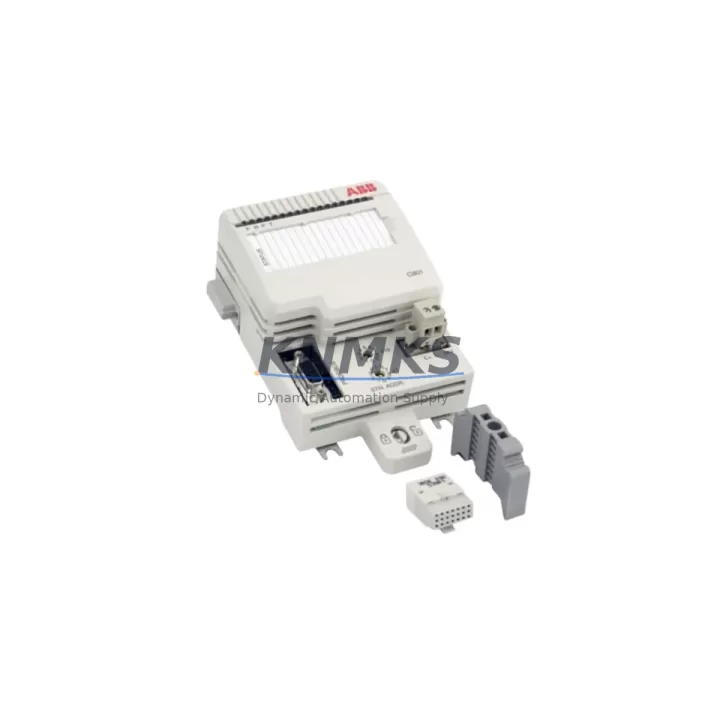
ABB CI801 3BSE038540R1 Migration-Ready PROFIBUS DP Module for Legacy Control Systems
The ABB CI801 (3BSE038540R1) is a PROFIBUS DP communication interface module designed for the AC800M controller platform. As legacy DCS and PLC installations approach end-of-life, the CI801 serves as a critical migration component — enabling engineers to extend the operational life of existing AC800M-based control architectures without requiring a full platform replacement. Whether you are retrofitting a petrochemical process unit, upgrading a power generation control cabinet, or restoring a decommissioned mining automation system, the CI801 provides a validated, drop-in communication path between the AC800M processor and PROFIBUS DP field devices.
Each unit supplied by KNMKS is sourced from verified inventory channels, subjected to pre-shipment functional testing, and backed by a support terms confirmed by quotation. Our stock is maintained to support both emergency spare part requirements and planned system upgrade projects across multi-site industrial deployments.
Migration Compatibility Table
| Parameter | CI801 3BSE038540R1 Details |
|---|---|
| Compatible Controller | ABB AC800M (PM851, PM856, PM860, PM861, PM864, PM866) |
| Communication Protocol | PROFIBUS DP (EN 50170 / IEC 61158) |
| Backplane Interface | AC800M S800 I/O bus / ModuleBus |
| Installation Slot | AC800M controller unit — communication port slot |
| Baud Rate Support | 9.6 kbps to 12 Mbps (auto-detect) |
| Max DP Slaves | Up to 125 PROFIBUS DP slave devices |
| Firmware Compatibility | AC800M firmware 5.0 and above recommended; verify with Control Builder M |
| Replacement Scope | Direct replacement for failed or end-of-life CI801 units in existing AC800M cabinets |
| Wiring Adaptation | Standard DB9 PROFIBUS connector; verify cable shielding and termination resistors |
| Commissioning Tool | ABB Control Builder M (CBM) — GSD file import required for new DP slaves |
| Pre-Shipment Test | Yes — functional communication verification performed before dispatch |
| Support terms | 12 Months from date of shipment |
Retrofit Planning for Existing Automation Systems
Integrating the CI801 3BSE038540R1 into an existing AC800M control system requires a structured retrofit approach. Before installation, engineers should audit the current controller configuration using Control Builder M to confirm the firmware version running on the PM856 or PM864 processor module. Firmware mismatches between the processor and the CI801 can prevent the module from being recognized on the ModuleBus backplane, so a firmware alignment step is often necessary before physical installation begins.
On the PROFIBUS DP network side, the CI801 assumes the role of DP master. All connected field devices — including ABB S800 I/O stations such as the AI810 analog input module or the DO810 digital output module — must have their GSD files correctly imported into the Control Builder M project. If the existing project was built on an older CI801 revision, the hardware configuration tree in CBM may need to be updated to reflect the replacement unit’s firmware baseline.
Power supply capacity within the control cabinet must also be verified. The AC800M system typically draws power from an ABB SD802 or SD803 power supply unit. When adding or replacing communication modules, confirm that the total current draw across all installed modules — including the CI801, any CI854 PROFINET modules, and the processor itself — remains within the rated output of the installed power supply. Overloading the cabinet power rail is a common cause of intermittent communication faults after retrofit work.
For installations where the PROFIBUS DP segment connects to third-party field devices such as Siemens ET 200 distributed I/O or Endress+Hauser field instruments, verify that the DP slave addresses are correctly assigned and that no address conflicts exist on the segment. A PROFIBUS segment diagnostic tool or a handheld tester can be used to scan the bus and confirm all slaves are responding before the control system is brought back online.
In control cabinets where space is constrained, confirm that the CI801 module can be seated in the designated communication slot without interference from adjacent wiring ducts or terminal blocks. The module occupies a standard AC800M communication port position and does not require additional DIN rail space, but cable routing for the DB9 PROFIBUS connector should be planned to maintain minimum bend radius and avoid signal degradation on long cable runs.
Downtime Control During System Migration
Minimizing unplanned downtime during a CI801 replacement is achievable with proper pre-migration preparation. The most effective approach is to export and archive the full Control Builder M project — including all hardware configuration, function block diagrams, and PROFIBUS DP slave assignments — before any physical work begins. This archived project serves as the rollback baseline if the replacement module requires configuration adjustments.
Where process conditions allow, a hot-standby or redundant controller configuration using a paired PM866 processor with a CI857 HSR/PRP communication module can maintain field control continuity while the PROFIBUS DP segment is temporarily isolated for the CI801 swap. In non-redundant systems, coordinate the replacement window with the operations team to align with a planned process shutdown or low-demand period.
After physical installation of the replacement CI801, the commissioning sequence should follow this order: power-on the controller, allow the ModuleBus to enumerate all installed modules, open Control Builder M and perform a hardware scan to confirm the CI801 is recognized, then download the archived project configuration to the controller. Monitor the PROFIBUS DP diagnostic view in CBM to confirm all slave devices return to data exchange state before releasing the system to operations. This structured sequence typically allows a CI801 replacement to be completed within a two-to-four hour maintenance window, significantly reducing the risk of extended production interruption.
KNMKS maintains ready stock of the CI801 3BSE038540R1 to support both emergency dispatch and planned procurement cycles. All units are pre-tested and shipped with documentation to support site acceptance testing and maintenance records.
Retrofit Support FAQ
Q1: Is the CI801 3BSE038540R1 a direct replacement for an existing CI801 in my AC800M system?
Yes. The CI801 3BSE038540R1 is the standard part number for the AC800M PROFIBUS DP communication module. It installs in the same communication slot and uses the same DB9 PROFIBUS connector as previous CI801 units. After installation, a firmware version check in Control Builder M is recommended to confirm compatibility with your current processor firmware baseline.
Q2: What commissioning steps are required after installing the replacement CI801?
After seating the module, power on the AC800M controller and allow the ModuleBus to complete its enumeration cycle. Open Control Builder M, perform a hardware scan, and verify the CI801 appears in the hardware configuration tree. Download the existing project to the controller and monitor the PROFIBUS DP diagnostic view to confirm all slave devices return to data exchange state. If new DP slaves are being added as part of the upgrade, import the relevant GSD files before downloading the project.
Q3: Can the CI801 communicate with third-party PROFIBUS DP devices from other manufacturers?
Yes. The CI801 operates as a standard PROFIBUS DP master and is compatible with any IEC 61158-compliant DP slave device, provided the correct GSD file is imported into the Control Builder M project. This includes field instruments, variable frequency drives, distributed I/O stations, and motor control centers from third-party manufacturers.
Q4: What support terms and testing does KNMKS provide with the CI801 3BSE038540R1?
Every CI801 3BSE038540R1 supplied by KNMKS is covered by a support terms confirmed by quotation from the date of shipment. Prior to dispatch, each unit undergoes functional pre-shipment testing to verify communication interface integrity. Test documentation is available upon request to support site acceptance procedures and maintenance records.
© 2026 KNMKS. All rights reserved.
Original Source: https://knmks.com
Contact: admin@knmks.com | +86 18359268345
Product Identification
- Brand / Ecosystem
-
ABB
ABB - Model / Series
-
CI801 3BSE038540R1
AC800M Series - Product Family
- PLCs & Controllers
- Availability Status
- Available on request after model and quantity confirmation
- Inquiry Type
- B2B RFQ, replacement inquiry and project spare-part request
- Pre-Quote Check
- Exact SKU, brand, series, quantity, nameplate photos and destination country are checked before quotation
System Path
Where this product fits in the KNMKS automation structure.
Specification & Inquiry Focus
- Control platform
- PLC, PAC and modular controllers
- Common needs
- CPU, rack, power and I/O expansion
- Project support
- Replacement, cabinet build and maintenance
Buyer Confirmation
Information KNMKS checks before replying.
- Exact model
- CI801 3BSE038540R1
- Brand / ecosystem
- ABB
- Product family
- PLCs & Controllers
- Application note
- Replacement, maintenance, project build or spare-part list
- Useful photos
- Nameplate, installed unit, cabinet layout or connector side
- Delivery details
- Quantity, destination country and target schedule
Document Support
Files and notes can be confirmed during quotation.
- Product photos or nameplate confirmation when available
- Packing and delivery notes before quotation confirmation
- Support scope and delivery terms confirmed per inquiry
- Export document coordination for qualified B2B requests
Inquiry Support
- Model cross-checking before quotation
- CPU, power, rack and expansion module matching
- Support for replacement and project inquiry
What to Send Us
- Brand and exact model number: ABB CI801 3BSE038540R1
- Quantity and required delivery time
- Application, replacement requirement or nameplate photo
- Destination country and shipping preference
RFQ Preparation
This is a product inquiry page built for RFQ communication.
Fast Model Check
Send this model to KNMKS for confirmation.
Include quantity, destination country and photos if this is a maintenance replacement. The inquiry will be saved with a reference number after submission.
Brand & Compatibility Note
KNMKS displays automation product information for well-known industrial brand ecosystems and compatible replacement references. Brand names are used for product identification and compatibility reference only; final availability and commercial terms are confirmed per quotation.
 Manufacturing
 Machine Tools
 Packaging
 Energy & Power



 HMI & Displays
 Servo Systems
 Variable Frequency Drives
 Sensors