
Overview
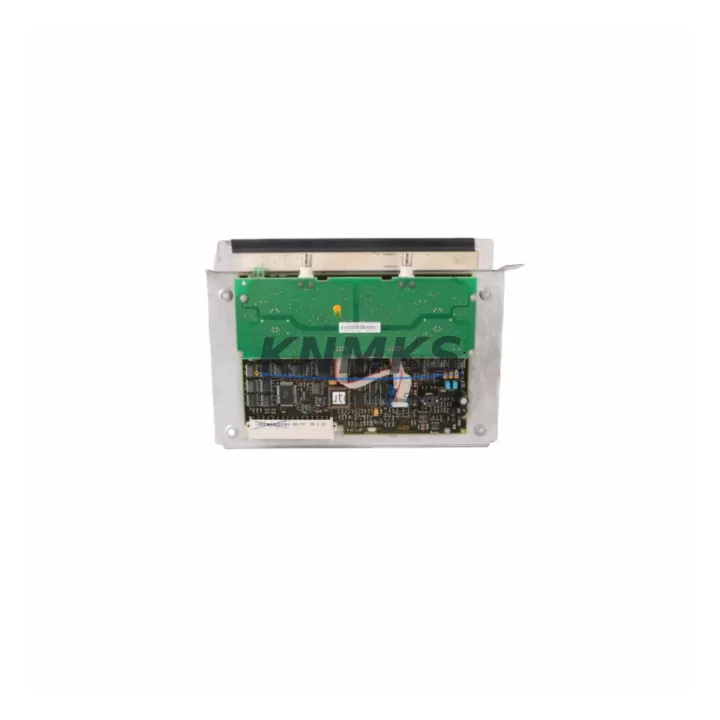
ABB CI626A 3BSE005023R1 Migration-Ready ModuleBus Interface for Legacy Control Systems
The ABB CI626A (part number 3BSE005023R1) is a ModuleBus communication interface module designed for the ABB AC800M Distributed Control System platform. As legacy DCS installations approach end-of-life and original spare parts become increasingly scarce, the CI626A remains a critical component for engineers managing system continuity, planned retrofits, and unplanned failure recovery across process industries including oil & gas, power generation, pulp & paper, and chemical manufacturing.
This module serves as the communication backbone between the AC800M controller and field-side I/O clusters via the ModuleBus optical or electrical interface. When a CI626A fails or becomes unavailable through standard OEM channels, the impact on production continuity is immediate. Sourcing a verified, tested replacement unit is the fastest path to restoring control system integrity without committing to a full platform migration.
Our inventory of CI626A 3BSE005023R1 units is sourced from decommissioned systems, factory-sealed surplus, and authorized redistribution channels. Every unit undergoes functional verification prior to shipment, and all sales are backed by a support terms confirmed by quotation covering hardware defects and communication failures under normal operating conditions.
Migration Compatibility Table
| Parameter | CI626A 3BSE005023R1 | Notes for Retrofit Engineers |
|---|---|---|
| Platform Compatibility | ABB AC800M DCS | Verify controller firmware version supports CI626A revision |
| Communication Interface | ModuleBus (optical / electrical) | Confirm cable type: optical fiber vs. copper ModuleBus segment |
| Backplane / Rack | AC800M S800 I/O rack | Check rack slot assignment and module address configuration |
| Power Supply Requirement | 24 VDC via backplane | Verify PM856 or PM861 power module capacity before installation |
| Terminal Wiring | Backplane-connected, no field terminals | No re-wiring required; confirm backplane connector condition |
| Firmware Compatibility | AC800M firmware 5.x / 6.x | Confirm Control Builder M project version before hot-swap |
| Module Address | Configured via Control Builder M | Retain original address to avoid I/O remapping in application |
| HMI / SCADA Impact | Tag-transparent replacement | No HMI tag changes required if address is preserved |
| Installation Space | Standard AC800M module slot | Single-slot; confirm no adjacent module clearance conflict |
| Support terms | 12 Months | Covers hardware defects and communication failures |
Retrofit Planning for Existing Automation Systems
Successful CI626A replacement begins well before the module arrives on site. Engineers should start by auditing the full AC800M rack configuration, documenting the slot position, ModuleBus segment number, and the number of S800 I/O modules — such as AI810, AO810, DI810, and DO810 — connected downstream. These I/O modules communicate exclusively through the ModuleBus interface provided by the CI626A, so any interruption in the interface module’s operation immediately orphans the entire downstream I/O cluster.
Power budget verification is equally important. The PM856 or PM861 power supply module feeding the rack must have sufficient headroom to support the CI626A alongside co-installed modules. In aging installations, power modules may already be operating near capacity, and adding a replacement CI626A without a power audit risks nuisance trips or brownout conditions during commissioning.
For sites running the ABB AC800M with a CI857 PROFIBUS interface or a CI854 PROFIBUS DP module on adjacent slots, the retrofit team must confirm that the ModuleBus segment served by the CI626A does not overlap with PROFIBUS node addressing. Misconfigured node addresses are a common source of communication faults during post-replacement commissioning and can be avoided by exporting the Control Builder M hardware configuration before any physical work begins.
Where the original installation includes an TP830 or TB820 ModuleBus termination panel, engineers should inspect the optical fiber connectors or copper ModuleBus cable for degradation. A failing CI626A is sometimes a symptom of a deteriorated cable segment rather than a module defect, and replacing the module without addressing the cable will result in repeat failures. Cleaning or replacing the ModuleBus cable as part of the retrofit is strongly recommended.
Finally, if the control system includes an ABB Operator Workplace or a third-party SCADA connected via OPC, verify that the OPC server’s tag database references module addresses rather than physical slot positions. This distinction determines whether the replacement CI626A can be brought online without any SCADA-side configuration changes — a critical factor for minimizing total downtime during the retrofit window.
Downtime Control During System Migration
Minimizing downtime during a CI626A replacement requires a structured pre-outage preparation protocol. The single most effective measure is exporting a full backup of the AC800M application from Control Builder M before any hardware is touched. This backup preserves the complete program logic, hardware configuration, and communication parameters, and serves as the recovery baseline if the replacement module requires re-commissioning from scratch.
Where process conditions allow, a cold-swap procedure — powering down the affected rack, replacing the CI626A, and restoring power — is the safest approach. The module will re-initialize on the ModuleBus segment and the AC800M controller will re-establish communication with downstream S800 I/O modules automatically, provided the module address and firmware version are compatible. In most AC800M installations, this process takes under 15 minutes from power-down to confirmed I/O communication.
For installations where a full rack power-down is not acceptable, partial isolation of the ModuleBus segment — using the AC800M’s built-in diagnostic tools to force the affected I/O cluster into a safe state — can allow the physical swap to proceed with the controller remaining in run mode. This approach requires careful coordination with the process control team and should only be attempted by engineers familiar with AC800M forced-value and override procedures.
Post-replacement, the commissioning checklist should include: confirmation of ModuleBus communication status in Control Builder M, verification of all downstream I/O module status LEDs, a functional test of at least one analog input and one digital output in the affected cluster, and a review of the AC800M event log for any communication fault records generated during the swap. Documenting this checklist and retaining it with the site’s maintenance records supports future audits and reduces troubleshooting time for subsequent interventions.
Retrofit Support FAQ
Q: Is the CI626A 3BSE005023R1 a direct drop-in replacement for a failed CI626A in my AC800M rack?
A: Yes. The CI626A 3BSE005023R1 is the standard part number for this module and is a direct slot-compatible replacement. No mechanical modification or re-wiring is required. Confirm that your AC800M firmware version is compatible with the hardware revision of the replacement unit before installation.
Q: Do I need to reconfigure my Control Builder M project after replacing the CI626A?
A: In most cases, no. If the replacement module is installed in the same rack slot and the ModuleBus segment address is unchanged, the AC800M controller will recognize the module automatically upon power restoration. A full download of the application is only required if the hardware configuration in Control Builder M has been modified or if the module address has changed.
Q: What pre-shipment testing is performed on CI626A units?
A: Each CI626A 3BSE005023R1 unit is functionally tested for ModuleBus communication integrity, backplane connector condition, and LED status response prior to shipment. Units that do not pass functional verification are not offered for sale. All shipped units are covered by a support terms confirmed by quotation.
Q: What is your lead time and do you maintain stock of the CI626A 3BSE005023R1?
A: We maintain inventory of CI626A 3BSE005023R1 units and can typically ship within 1–3 business days of order confirmation. For urgent breakdown situations, contact us directly at admin@knmks.com or +86 18359268345 to confirm real-time stock availability and expedited shipping options.
© 2026 KNMKS. All rights reserved.
Original Source: https://knmks.com
Contact: admin@knmks.com | +86 18359268345
Product Identification
- Brand / Ecosystem
-
ABB
ABB - Model / Series
-
CI626A 3BSE005023R1
AC800M Series - Product Family
- PLCs & Controllers
- Availability Status
- Available on request after model and quantity confirmation
- Inquiry Type
- B2B RFQ, replacement inquiry and project spare-part request
- Pre-Quote Check
- Exact SKU, brand, series, quantity, nameplate photos and destination country are checked before quotation
System Path
Where this product fits in the KNMKS automation structure.
Specification & Inquiry Focus
- Control platform
- PLC, PAC and modular controllers
- Common needs
- CPU, rack, power and I/O expansion
- Project support
- Replacement, cabinet build and maintenance
Buyer Confirmation
Information KNMKS checks before replying.
- Exact model
- CI626A 3BSE005023R1
- Brand / ecosystem
- ABB
- Product family
- PLCs & Controllers
- Application note
- Replacement, maintenance, project build or spare-part list
- Useful photos
- Nameplate, installed unit, cabinet layout or connector side
- Delivery details
- Quantity, destination country and target schedule
Document Support
Files and notes can be confirmed during quotation.
- Product photos or nameplate confirmation when available
- Packing and delivery notes before quotation confirmation
- Support scope and delivery terms confirmed per inquiry
- Export document coordination for qualified B2B requests
Inquiry Support
- Model cross-checking before quotation
- CPU, power, rack and expansion module matching
- Support for replacement and project inquiry
What to Send Us
- Brand and exact model number: ABB CI626A 3BSE005023R1
- Quantity and required delivery time
- Application, replacement requirement or nameplate photo
- Destination country and shipping preference
RFQ Preparation
This is a product inquiry page built for RFQ communication.
Fast Model Check
Send this model to KNMKS for confirmation.
Include quantity, destination country and photos if this is a maintenance replacement. The inquiry will be saved with a reference number after submission.
Brand & Compatibility Note
KNMKS displays automation product information for well-known industrial brand ecosystems and compatible replacement references. Brand names are used for product identification and compatibility reference only; final availability and commercial terms are confirmed per quotation.
 Manufacturing
 Machine Tools
 Packaging
 Energy & Power



 HMI & Displays
 Servo Systems
 Variable Frequency Drives
 Sensors