
Overview
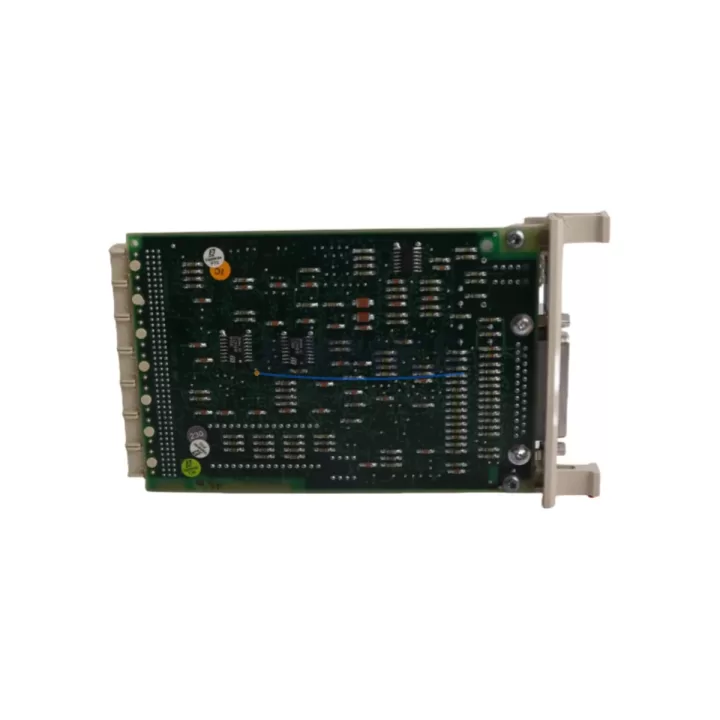
ABB CI570 3BSE001440R1 Migration-Ready PROFIBUS DP Master for Legacy Control Systems
The ABB CI570 (3BSE001440R1) is a PROFIBUS DP Master communication module designed for the ABB AC800M controller platform. As industrial facilities worldwide accelerate the migration of aging DCS and PLC architectures, the CI570 has become a critical component in retrofit projects where PROFIBUS DP field networks must be preserved while the control backbone is upgraded or restored. Whether you are replacing a failed module in an active production line, extending the service life of an existing AC800M system, or bridging legacy field devices into a modernized control cabinet, the CI570 provides a proven, wiring-compatible solution with minimal engineering overhead.
The CI570 mounts directly onto the AC800M controller rack and communicates with the PM851, PM856, PM860, or PM864 processor modules via the internal CEX-Bus backplane. It supports up to 125 PROFIBUS DP slave devices per segment and operates at baud rates from 9.6 kbps up to 12 Mbps, making it compatible with a wide range of field instruments, variable frequency drives, remote I/O stations, and intelligent motor control centers. During retrofit planning, engineers must confirm that the existing PROFIBUS segment topology, termination resistors, cable shielding, and repeater configuration are preserved to avoid communication faults after module swap.
Before installation, verify the firmware version of the target AC800M processor. The CI570 requires a compatible Control Builder M software version to ensure correct GSD file loading and DP slave address mapping. If the existing project was built on an older Control Builder M release, a controlled firmware upgrade of the PM8xx processor may be required prior to commissioning the CI570. This step is particularly important in multi-controller systems where the AC800M communicates upstream via MMS or OPC to an ABB System 800xA DCS environment.
Migration Compatibility Table
| Parameter | CI570 3BSE001440R1 | Notes / Retrofit Guidance |
|---|---|---|
| Compatible Controllers | PM851, PM856, PM860, PM864 | Confirm CEX-Bus slot availability on target rack |
| Backplane Interface | CEX-Bus (AC800M internal bus) | Not compatible with S800 I/O FieldBus or CI840 rack |
| Communication Protocol | PROFIBUS DP (Master Class 1 & 2) | Verify GSD files for all connected DP slaves |
| Max Slave Devices | 125 per segment | Check segment load and repeater count |
| Baud Rate | 9.6 kbps – 12 Mbps | Match existing network baud rate before swap |
| Power Supply | Supplied via CEX-Bus backplane | No external 24 VDC wiring required for module power |
| Installation Space | 1 CEX-Bus slot on AC800M rack | Confirm free slot; document existing slot assignments |
| Firmware Compatibility | Control Builder M 5.0 and above | Upgrade PM8xx firmware if running older CBM release |
| Replacement for | CI570 (all prior revisions) | Direct drop-in; re-download application after swap |
| Pre-Shipment Testing | Yes – functional test performed | Each unit tested before dispatch |
| Support terms | 12 Months | Covers manufacturing defects and functional failure |
Retrofit Planning for Existing Automation Systems
A successful CI570 retrofit begins well before the module arrives on site. Start by auditing the existing AC800M rack configuration: document which CEX-Bus slots are occupied by CI532V01 Ethernet modules, CI541V1 PROFINET interfaces, or CI858 DNP3 communication modules, and confirm that at least one slot is available for the CI570. If the control cabinet houses an S800 I/O cluster connected via an AF100 FieldBus, note that the CI570 operates independently on the PROFIBUS DP network and does not replace the TB840A or TB842 termination boards used in the S800 I/O bus architecture.
For sites running mixed communication architectures — for example, where PROFIBUS DP field devices coexist with HART-enabled AI810 or AO810 analog I/O modules — the CI570 handles only the PROFIBUS DP master function. HART pass-through and analog signal conditioning remain managed by the respective I/O modules and their associated SM811 or SM812 signal conditioners. Ensure that the PROFIBUS cable DB9 connector pinout at the CI570 port matches the existing field wiring: pin 3 (B-line / RxD/TxD-P) and pin 8 (A-line / RxD/TxD-N) must be correctly terminated, and the bus termination switch on the last device in each segment must be enabled.
When the replacement CI570 is installed and the AC800M processor is restarted, the Control Builder M project must be re-downloaded to re-establish the DP master configuration. All slave addresses, I/O mapping tables, and watchdog timeout settings are stored in the application project, not in the CI570 module itself. This means that a correctly backed-up CBM project eliminates the risk of losing slave configuration data during the module exchange. For sites without a current project backup, a full DP network re-scan using the Control Builder M hardware configuration tool is required before the system can return to automatic mode.
Downtime Control During System Migration
Minimizing unplanned downtime during a CI570 replacement requires a structured pre-outage checklist. Before powering down the AC800M rack, export the current Control Builder M project and verify the backup against the running configuration. Capture a screenshot or printout of the DP slave address table and the current diagnostic status of each slave device. If the production process allows, switch the affected control loop to manual mode at the DCS operator station or HMI panel — whether that is an ABB System 800xA graphics display, a Panel 800 PP886 operator terminal, or a third-party SCADA screen — to maintain process visibility during the swap.
The physical module exchange on a powered-down AC800M rack typically takes under ten minutes. After seating the new CI570 and restoring rack power, the PM8xx processor will perform a self-test and CEX-Bus enumeration before the application download can proceed. Allow the processor to complete its boot sequence — indicated by the RUN LED status — before initiating the project download from Control Builder M. Once the download completes, verify that all PROFIBUS DP slaves return to DATA_EXCHANGE state and that no BF (Bus Fault) or SF (Station Failure) LEDs are active on the CI570 front panel. A structured commissioning log recording slave addresses, diagnostic codes, and signal spot-checks against the original process values confirms that the migration is complete and the system is ready to return to automatic control.
For sites where a cold swap is not acceptable, consult your ABB system integrator about hot-standby AC800M configurations using the PM864 redundant processor pair, which can sustain PROFIBUS DP master operation on the active controller while the standby rack is serviced. This approach is particularly valuable in continuous process industries where even a brief interruption to the PROFIBUS network can trigger interlock shutdowns or product quality deviations.
Retrofit Support FAQ
Q1: Is the CI570 3BSE001440R1 a direct replacement for older CI570 revisions?
Yes. The 3BSE001440R1 is the current production revision of the CI570 and is a direct drop-in replacement for all earlier CI570 hardware revisions. No wiring changes or rack modifications are required. After installation, re-download the Control Builder M application to restore the DP master configuration.
Q2: What commissioning steps are required after swapping the CI570?
After physical installation, restore rack power and allow the PM8xx processor to complete its boot sequence. Download the Control Builder M project to the controller. Verify that all PROFIBUS DP slaves reach DATA_EXCHANGE state, check the CI570 diagnostic LEDs, and perform spot-checks on critical I/O signals against known process values before returning the system to automatic mode.
Q3: Does the CI570 support both PROFIBUS DP-V0 and DP-V1 slave devices?
Yes. The CI570 supports PROFIBUS DP-V0 (cyclic data exchange) and DP-V1 (acyclic parameter access) slave classes. This makes it compatible with a broad range of field devices including ABB drives, remote I/O stations, valve positioners, and intelligent transmitters that use DP-V1 for extended diagnostics and parameter write functions.
Q4: What support terms and stock availability does KNMKS provide for the CI570?
Every CI570 3BSE001440R1 shipped by KNMKS carries a support terms confirmed by quotation covering manufacturing defects and functional failure. Each unit undergoes a pre-shipment functional test before dispatch. We maintain dedicated inventory of ABB AC800M communication modules to support urgent replacement and planned maintenance schedules. Contact admin@knmks.com or +86 18359268345 for lead time and volume pricing.
© 2026 KNMKS. All rights reserved.
Original Source: https://knmks.com
Contact: admin@knmks.com | +86 18359268345
Product Identification
- Brand / Ecosystem
-
ABB
ABB - Model / Series
-
CI570 3BSE001440R1
AC800M Series - Product Family
- PLCs & Controllers
- Availability Status
- Available on request after model and quantity confirmation
- Inquiry Type
- B2B RFQ, replacement inquiry and project spare-part request
- Pre-Quote Check
- Exact SKU, brand, series, quantity, nameplate photos and destination country are checked before quotation
System Path
Where this product fits in the KNMKS automation structure.
Specification & Inquiry Focus
- Control platform
- PLC, PAC and modular controllers
- Common needs
- CPU, rack, power and I/O expansion
- Project support
- Replacement, cabinet build and maintenance
Buyer Confirmation
Information KNMKS checks before replying.
- Exact model
- CI570 3BSE001440R1
- Brand / ecosystem
- ABB
- Product family
- PLCs & Controllers
- Application note
- Replacement, maintenance, project build or spare-part list
- Useful photos
- Nameplate, installed unit, cabinet layout or connector side
- Delivery details
- Quantity, destination country and target schedule
Document Support
Files and notes can be confirmed during quotation.
- Product photos or nameplate confirmation when available
- Packing and delivery notes before quotation confirmation
- Support scope and delivery terms confirmed per inquiry
- Export document coordination for qualified B2B requests
Inquiry Support
- Model cross-checking before quotation
- CPU, power, rack and expansion module matching
- Support for replacement and project inquiry
What to Send Us
- Brand and exact model number: ABB CI570 3BSE001440R1
- Quantity and required delivery time
- Application, replacement requirement or nameplate photo
- Destination country and shipping preference
RFQ Preparation
This is a product inquiry page built for RFQ communication.
Fast Model Check
Send this model to KNMKS for confirmation.
Include quantity, destination country and photos if this is a maintenance replacement. The inquiry will be saved with a reference number after submission.
Brand & Compatibility Note
KNMKS displays automation product information for well-known industrial brand ecosystems and compatible replacement references. Brand names are used for product identification and compatibility reference only; final availability and commercial terms are confirmed per quotation.
 Manufacturing
 Machine Tools
 Packaging
 Energy & Power



 HMI & Displays
 Servo Systems
 Variable Frequency Drives
 Sensors