
Overview
ABB BC810K02 3BSE031155R1 Migration-Ready CEX-Bus for AC800M: Legacy System Retrofit & Upgrade Guide
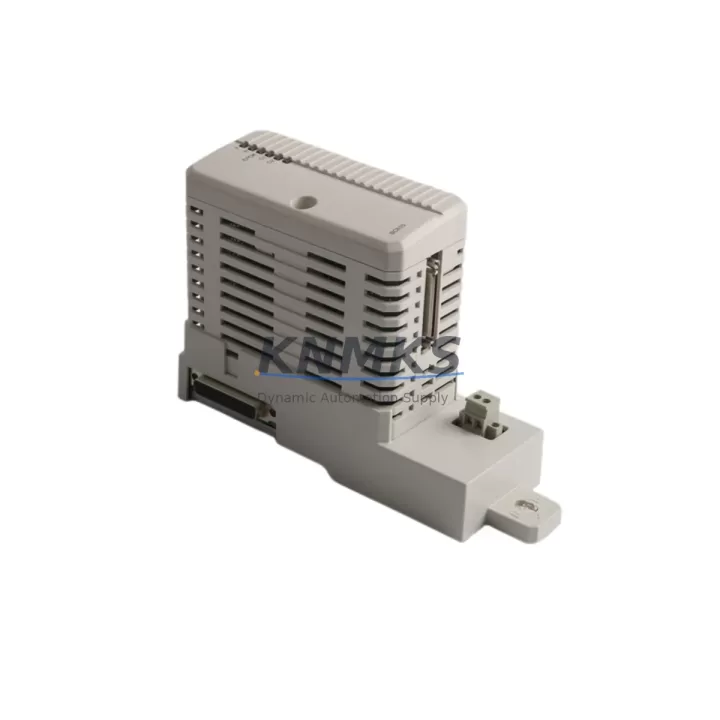
The ABB BC810K02 (part number 3BSE031155R1) is a CEX-Bus communication module designed for the AC800M controller platform. As legacy DCS and PLC installations age beyond their supported lifecycle, the BC810K02 serves as a critical migration component — enabling engineers to restore, extend, or modernize AC800M-based control architectures without full system replacement. Whether you are replacing a failed unit in a running plant, upgrading a control cabinet, or executing a phased migration from an older S800 I/O configuration, the BC810K02 provides a verified, drop-in compatible path forward.
Before installation, engineers must confirm the following: backplane slot assignment and CEX-Bus address configuration, power rail capacity within the existing PM865 or PM891 controller module, firmware version compatibility between the BC810K02 and the active AC800M controller revision, and terminal wiring continuity from the existing field I/O marshalling panel. In retrofit scenarios where the original module has failed, preserving the existing program logic in the AC800M controller memory is the first priority — the BC810K02 does not carry application logic and can be swapped without reprogramming the controller, provided the CEX-Bus address and slot position are maintained.
For installations migrating from older communication architectures, the BC810K02 supports PROFIBUS DP integration, allowing it to bridge legacy field devices — including drives, valve positioners, and remote I/O stations — into the AC800M control loop. Engineers transitioning from a standalone PROFIBUS master to an AC800M-integrated topology should verify the DP baud rate settings, GSD file compatibility, and node address assignments before commissioning. In multi-drop PROFIBUS segments, the BC810K02 must be the sole master on its assigned DP port; parallel master configurations are not supported and will cause bus conflicts.
Migration Compatibility Table
| Parameter | Specification / Recommendation |
|---|---|
| Compatible Controller | ABB AC800M (PM865, PM891, PM856) |
| Bus Interface | CEX-Bus (internal backplane) |
| Communication Protocol | PROFIBUS DP (master) |
| Slot Requirement | Dedicated CEX-Bus slot on AC800M rack |
| Firmware Compatibility | Verify AC800M firmware ≥ 5.1 for full feature support |
| Replaces / Supersedes | BC810K01 (3BSE031154R1) — direct functional replacement |
| Installation Clearance | Standard 19″ rack or DIN-rail cabinet; confirm slot depth |
| Power Consumption | Confirm available backplane power budget before insertion |
| HMI Compatibility | No HMI screen changes required for module swap; verify tag mapping |
| Commissioning Focus | CEX-Bus address, DP node scan, I/O force-release sequence |
| Pre-Shipment Testing | Functional test performed before dispatch |
| Support terms | support terms confirmed by quotation — all units covered from date of shipment |
Retrofit Planning for Existing Automation Systems
A successful BC810K02 retrofit begins with a thorough audit of the existing control cabinet. In most AC800M installations, the BC810K02 occupies a dedicated slot adjacent to the PM865 or PM891 processor module. Before removal of the failed or obsolete unit, engineers should document the current CEX-Bus slot address using ABB Control Builder M, export the current hardware configuration, and confirm that the replacement module carries the same hardware revision index where possible.
In systems where the BC810K02 interfaces with S800 I/O modules — such as the AI810, AO810, DI810, or DO810 — the I/O module addresses and channel assignments must be verified against the existing Control Builder M project before the new module is powered. Mismatched I/O addressing is the most common source of post-replacement faults in AC800M retrofits. If the installation also includes an SC510 serial communication module or a CI854 PROFIBUS interface module on a separate rack, the bus topology diagram should be updated to reflect the new BC810K02 position before the PROFIBUS master scan is re-executed.
For control cabinets that also house an TP830 or PP836 operator panel, the HMI tag database should be reviewed to confirm that no tags are directly bound to the BC810K02 module address. In most configurations, HMI tags reference controller variables rather than module hardware addresses, so a module swap does not require HMI screen modifications — but this must be verified in the project documentation before the cutover window begins. Where a PM891 redundant controller pair is in use, the BC810K02 replacement should be performed during a planned switchover to the standby controller to maintain process continuity.
Downtime Control During System Migration
Minimizing unplanned downtime during a BC810K02 replacement requires a structured pre-outage checklist. The recommended sequence is: (1) confirm the replacement module is on-site and tested; (2) export and archive the current AC800M hardware configuration from Control Builder M; (3) notify the DCS operator and place the affected control loop in manual mode; (4) de-energize the CEX-Bus slot using the controller’s hot-swap procedure if supported by the installed firmware version; (5) remove the failed BC810K02 and insert the replacement, ensuring the module is fully seated in the backplane connector; (6) power the slot and allow the controller to re-enumerate the CEX-Bus; (7) verify PROFIBUS DP node status in the diagnostic view; (8) release the control loop from manual mode and confirm process variable tracking.
In plants where the AC800M controls a continuous process — such as a boiler, compressor, or chemical reactor — the entire swap sequence should be rehearsed in a staging environment using a spare rack before the live cutover. If a spare PM865 or PM891 controller is available, loading the archived project onto the spare and performing a full I/O verification with the new BC810K02 before the live outage will significantly reduce the risk of extended downtime. All field wiring should remain connected throughout the module swap; the BC810K02 does not carry field terminals and its replacement does not require disconnection of field cables.
Every BC810K02 unit supplied by KNMKS is functionally tested prior to shipment. This pre-shipment test covers CEX-Bus enumeration, PROFIBUS DP master initialization, and basic I/O communication verification. The support terms confirmed by quotation cover all units from the date of shipment, providing assurance for both immediate installation and inventory-held spares.
Retrofit Support FAQ
Q1: Can the BC810K02 (3BSE031155R1) directly replace the BC810K01 (3BSE031154R1)?
Yes. The BC810K02 is the direct successor to the BC810K01 and is functionally compatible as a drop-in replacement in the same CEX-Bus slot. No changes to the Control Builder M hardware configuration are required in most installations, though the hardware revision should be confirmed in the project’s module properties after replacement.
Q2: What commissioning steps are required after installing the BC810K02?
After insertion, the AC800M controller will automatically re-enumerate the CEX-Bus. The engineer should verify the module status LED, confirm PROFIBUS DP node detection in Control Builder M’s online diagnostic view, and perform a forced I/O scan to confirm all downstream devices are communicating. If any nodes are missing, verify DP baud rate and node address settings against the original configuration.
Q3: Is stock available, and what is the lead time?
Yes, the BC810K02 (3BSE031155R1) is held availability confirmed by RFQ. Orders are dispatched promptly after pre-shipment functional testing. Contact admin@knmks.com or call +86 18359268345 for current availability and delivery timelines to your location.
Q4: What support terms and testing does KNMKS provide?
All BC810K02 units are covered by a support terms confirmed by quotation from the date of shipment. Each unit undergoes pre-shipment functional testing covering CEX-Bus communication, PROFIBUS DP initialization, and basic I/O verification before dispatch. Support requests are handled directly by KNMKS with priority response for production-critical applications.
© 2026 KNMKS. All rights reserved.
Original Source: https://knmks.com
Contact: admin@knmks.com | +86 18359268345
Product Identification
- Brand / Ecosystem
-
ABB
ABB - Model / Series
-
BC810K02 3BSE031155R1
AC800M Series - Product Family
- PLCs & Controllers
- Availability Status
- Available on request after model and quantity confirmation
- Inquiry Type
- B2B RFQ, replacement inquiry and project spare-part request
- Pre-Quote Check
- Exact SKU, brand, series, quantity, nameplate photos and destination country are checked before quotation
System Path
Where this product fits in the KNMKS automation structure.
Specification & Inquiry Focus
- Control platform
- PLC, PAC and modular controllers
- Common needs
- CPU, rack, power and I/O expansion
- Project support
- Replacement, cabinet build and maintenance
Buyer Confirmation
Information KNMKS checks before replying.
- Exact model
- BC810K02 3BSE031155R1
- Brand / ecosystem
- ABB
- Product family
- PLCs & Controllers
- Application note
- Replacement, maintenance, project build or spare-part list
- Useful photos
- Nameplate, installed unit, cabinet layout or connector side
- Delivery details
- Quantity, destination country and target schedule
Document Support
Files and notes can be confirmed during quotation.
- Product photos or nameplate confirmation when available
- Packing and delivery notes before quotation confirmation
- Support scope and delivery terms confirmed per inquiry
- Export document coordination for qualified B2B requests
Inquiry Support
- Model cross-checking before quotation
- CPU, power, rack and expansion module matching
- Support for replacement and project inquiry
What to Send Us
- Brand and exact model number: ABB BC810K02 3BSE031155R1
- Quantity and required delivery time
- Application, replacement requirement or nameplate photo
- Destination country and shipping preference
RFQ Preparation
This is a product inquiry page built for RFQ communication.
Fast Model Check
Send this model to KNMKS for confirmation.
Include quantity, destination country and photos if this is a maintenance replacement. The inquiry will be saved with a reference number after submission.
Brand & Compatibility Note
KNMKS displays automation product information for well-known industrial brand ecosystems and compatible replacement references. Brand names are used for product identification and compatibility reference only; final availability and commercial terms are confirmed per quotation.
 Manufacturing
 Machine Tools
 Packaging
 Energy & Power



 HMI & Displays
 Servo Systems
 Variable Frequency Drives
 Sensors