
Overview
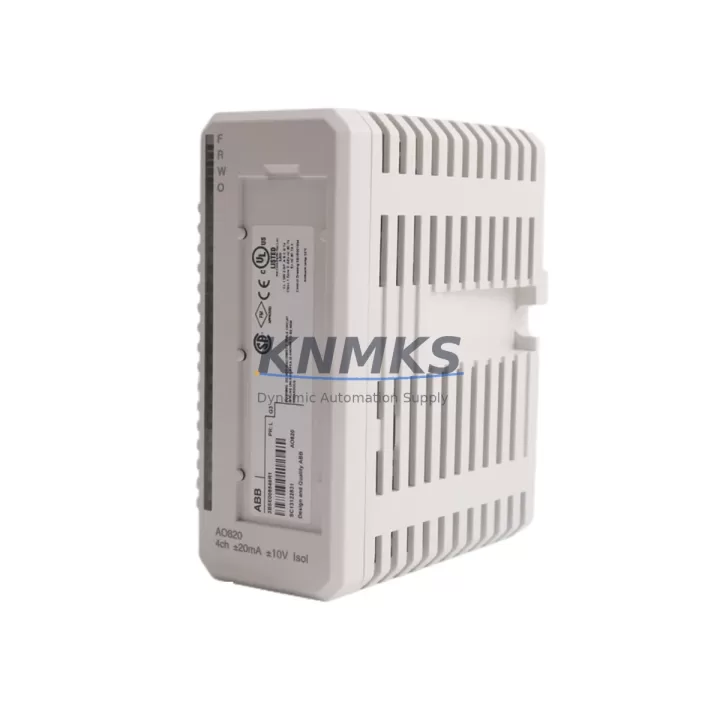
ABB AO820 3BSE008546R1 Maintenance-Proven Spare Part for Factory Uptime
The ABB AO820 (part number 3BSE008546R1) is an 8-channel analog output module engineered for the ABB S800 I/O system and AC800M Distributed Control System (DCS). Designed for continuous industrial operation in process automation, power generation, chemical processing, and pulp & paper plants, this module delivers precision 4–20 mA or 0–10 V analog output signals to field instruments, control valves, and actuators. Maintaining a verified spare of the AO820 3BSE008546R1 in your parts inventory is a proven strategy for minimizing unplanned downtime and protecting production continuity.
As a maintenance engineer or procurement specialist sourcing replacement modules for aging AC800M control systems, the AO820 3BSE008546R1 represents a direct, plug-compatible replacement that requires no firmware reconfiguration when swapped within the same S800 I/O station. Each unit supplied by KNMKS is sourced from verified channels, function-tested prior to dispatch, and backed by a support terms confirmed by quotation — giving your maintenance team confidence in every replacement cycle.
Spare Maintenance Table
| Parameter | Specification |
|---|---|
| Part Number | 3BSE008546R1 |
| Model | AO820 |
| Brand | ABB |
| Series | S800 I/O / AC800M DCS |
| Module Type | Analog Output Module |
| Output Channels | 8 Channels |
| Output Signal | 4–20 mA / 0–10 V (configurable) |
| Resolution | 12-bit |
| Supply Voltage | 24 V DC (via S800 I/O backplane) |
| Communication | PROFIBUS-DP / Modulebus (via CI820/CI830 coupler) |
| Compatibility | AC800M, AC800F, S800 I/O Station |
| Country of Origin | Germany |
| Operating Temperature | 0°C to +55°C |
| Mounting | S800 I/O Baseplate (TB820/TB840) |
| Weight | 240 g |
| Support terms | 12 Months |
| Condition | Original, Factory-Tested |
| Shipping | Global Express, ESD-Safe Packaging |
Maintenance Planning for Continuous Operation
When replacing the AO820 3BSE008546R1 in an S800 I/O station, a disciplined maintenance engineer will not stop at the module itself. The analog output circuit extends from the DCS controller through the communication coupler, across the backplane, and out to field wiring terminals — each element a potential point of failure that can mask or mimic a faulty output module.
Begin by inspecting the TB820 or TB840 baseplate on which the AO820 is mounted. Corroded or damaged baseplate connectors are a common cause of intermittent channel faults that are incorrectly attributed to the module. If the baseplate shows signs of oxidation or mechanical stress, plan its replacement alongside the AO820.
Next, verify the CI820 or CI830 PROFIBUS communication interface module in the same I/O station. A degraded coupler can cause all modules in the station to report communication errors, making it essential to confirm coupler health before concluding that the AO820 is the root cause of the fault. Keeping a spare CI820 in your cabinet inventory is strongly recommended for any plant running multiple S800 stations.
Check the SD821 or SD822 24 V DC power supply module feeding the I/O station. Voltage ripple or under-voltage conditions on the station power rail will cause analog output drift and channel alarms on the AO820 — symptoms that are frequently misdiagnosed as module failure. Measure rail voltage under load before condemning the output module.
Inspect all field wiring terminals and cable shields connected to the AO820’s output channels. Loose terminal screws, broken cable shields, or incorrect grounding at the marshalling cabinet are leading causes of 4–20 mA loop errors in process plants. Tighten all terminations and verify shield continuity as part of the replacement workflow.
For plants using AI820 or AI830 analog input modules in the same control loop — for example, where the AO820 drives a control valve and an AI module reads the position feedback — confirm that the input module is also functioning correctly. A failed AI module can create a false impression of an output fault when the control loop fails to close.
Finally, review the AC800M controller module (PM860 or PM865) event log for any persistent hardware fault codes associated with the I/O station. Controller-side diagnostics will confirm whether the fault is isolated to the AO820 channel or reflects a broader station communication issue requiring coupler or backplane attention.
Site Replacement Workflow
Step 1 — Isolate and document. Before removing the AO820 3BSE008546R1, place the affected control loops in manual mode at the AC800M controller. Record all channel configurations, output ranges, and engineering unit assignments from the Control Builder M project file. This ensures rapid recommissioning after the replacement module is installed.
Step 2 — Power-down procedure. De-energize the S800 I/O station following your plant’s lockout/tagout procedure. The AO820 is hot-swap capable in most AC800M configurations, but confirm this with your site safety procedure before attempting live replacement. If hot-swap is not permitted, shut down the station power via the SD821/SD822 supply module.
Step 3 — Module extraction. Press the release latch on the AO820 and slide the module clear of the TB820/TB840 baseplate. Inspect the baseplate connector pins for damage or contamination before inserting the replacement unit.
Step 4 — Install replacement AO820 3BSE008546R1. Slide the new module firmly onto the baseplate until the latch engages. Restore station power and observe the module status LED. A solid green LED confirms successful initialization and communication with the AC800M controller.
Step 5 — Verify outputs. From the AC800M Control Builder M environment, force each output channel to a known value and verify the corresponding 4–20 mA or voltage signal at the field terminal. Confirm that all eight channels respond correctly before returning loops to automatic control.
Step 6 — Update maintenance records. Log the replacement date, module serial number, and any associated baseplate or coupler inspections in your CMMS. Schedule the next inspection interval based on your plant’s preventive maintenance program.
This workflow applies equally to emergency breakdown replacements and planned annual shutdown maintenance, ensuring that the AO820 swap is completed safely, quickly, and with full system verification — minimizing the risk of a repeat fault after restart.
Spare Parts Support FAQ
Q1: Is the ABB AO820 3BSE008546R1 compatible with both AC800M and AC800F controllers?
Yes. The AO820 is part of the S800 I/O family, which is compatible with AC800M and AC800F controllers via the appropriate communication interface module (CI820 for PROFIBUS-DP or CI830 for Modulebus). Confirm your coupler type before ordering to ensure seamless integration.
Q2: How is the AO820 3BSE008546R1 tested before shipment?
Every AO820 unit supplied by KNMKS undergoes functional testing to verify channel output accuracy, communication response, and LED status indication before dispatch. Units are packed in ESD-safe materials with inspection documentation included. A support terms confirmed by quotation cover all supplied modules against manufacturing and functional defects.
Q3: Can the AO820 replace older ABB S800 analog output modules with the same baseplate?
The AO820 3BSE008546R1 is designed for direct installation on TB820 and TB840 baseplates. If you are replacing an earlier S800 analog output module, verify that the baseplate type and firmware version of your AC800M controller are compatible. KNMKS technical support can assist with compatibility confirmation prior to purchase.
Q4: What is your lead time and long-term supply capability for the AO820 3BSE008546R1?
KNMKS maintains stock of the AO820 3BSE008546R1 for immediate dispatch. For plants requiring long-term supply agreements or bulk procurement for annual shutdown kits, we offer scheduled delivery programs to ensure your spare parts inventory remains current. Contact our team to discuss volume pricing and supply continuity arrangements.
© 2026 KNMKS. All rights reserved.
Original Source: https://knmks.com
Contact: admin@knmks.com | +86 18359268345
Product Identification
- Brand / Ecosystem
-
ABB
ABB - Model / Series
-
AO820 3BSE008546R1
AC800M Series - Product Family
- PLCs & Controllers
- Availability Status
- Available on request after model and quantity confirmation
- Inquiry Type
- B2B RFQ, replacement inquiry and project spare-part request
- Pre-Quote Check
- Exact SKU, brand, series, quantity, nameplate photos and destination country are checked before quotation
System Path
Where this product fits in the KNMKS automation structure.
Specification & Inquiry Focus
- Control platform
- PLC, PAC and modular controllers
- Common needs
- CPU, rack, power and I/O expansion
- Project support
- Replacement, cabinet build and maintenance
Buyer Confirmation
Information KNMKS checks before replying.
- Exact model
- AO820 3BSE008546R1
- Brand / ecosystem
- ABB
- Product family
- PLCs & Controllers
- Application note
- Replacement, maintenance, project build or spare-part list
- Useful photos
- Nameplate, installed unit, cabinet layout or connector side
- Delivery details
- Quantity, destination country and target schedule
Document Support
Files and notes can be confirmed during quotation.
- Product photos or nameplate confirmation when available
- Packing and delivery notes before quotation confirmation
- Support scope and delivery terms confirmed per inquiry
- Export document coordination for qualified B2B requests
Inquiry Support
- Model cross-checking before quotation
- CPU, power, rack and expansion module matching
- Support for replacement and project inquiry
What to Send Us
- Brand and exact model number: ABB AO820 3BSE008546R1
- Quantity and required delivery time
- Application, replacement requirement or nameplate photo
- Destination country and shipping preference
RFQ Preparation
This is a product inquiry page built for RFQ communication.
Fast Model Check
Send this model to KNMKS for confirmation.
Include quantity, destination country and photos if this is a maintenance replacement. The inquiry will be saved with a reference number after submission.
Brand & Compatibility Note
KNMKS displays automation product information for well-known industrial brand ecosystems and compatible replacement references. Brand names are used for product identification and compatibility reference only; final availability and commercial terms are confirmed per quotation.
 Manufacturing
 Machine Tools
 Packaging
 Energy & Power



 HMI & Displays
 Servo Systems
 Variable Frequency Drives
 Sensors