
Overview
ABB AI950S 3KDE175521L9500 Migration-Ready Temp Input Module: Legacy System Migration and Compatible Upgrade
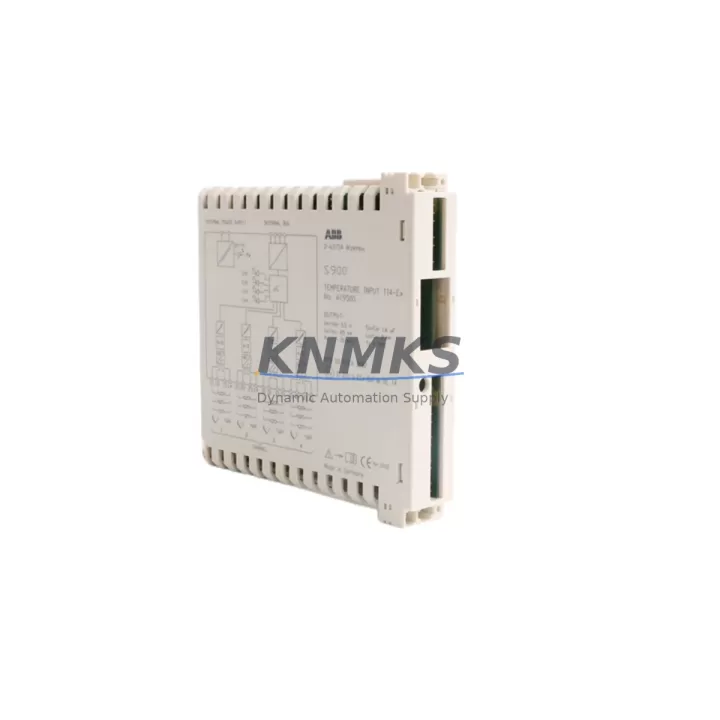
The ABB AI950S (3KDE175521L9500) is an 8-channel analog temperature input module designed for the ABB AC800M distributed control system and the S800 I/O platform. As legacy DCS installations age and original spare parts become increasingly difficult to source, the AI950S serves as a critical migration-ready replacement for discontinued temperature input modules within the same S800 I/O family. Whether you are retrofitting an aging control cabinet, extending the service life of an existing AC800M system, or executing a phased upgrade from an older ABB Advant or MOD 300 platform, the AI950S provides a verified drop-in solution that minimizes engineering rework and reduces commissioning risk.
Before proceeding with any replacement, engineers must confirm several key parameters. Power supply capacity on the S800 I/O bus must be verified to support the AI950S current draw alongside existing modules. Terminal wiring should be cross-referenced against the original module’s channel assignments — RTD 2-wire, 3-wire, and 4-wire configurations as well as thermocouple types (J, K, T, E, R, S, B) must be mapped accurately to avoid signal errors after swap. The backplane interface on the S800 I/O rail is mechanically and electrically compatible, but the module address set via the MTU (Module Termination Unit) must match the address previously assigned in the AC800M Control Builder project. Failure to align the module address will result in a hardware mismatch fault at startup.
Program compatibility is a primary concern during migration. The AI950S uses the same function block library as other S800 I/O analog input modules, meaning existing AC800M application code referencing AI_HART or standard analog input function blocks typically requires no modification. However, if the legacy installation used an older firmware revision of the CI854 or CI858 communication interface module, a firmware update may be required to ensure full compatibility with the AI950S hardware revision. Always verify the firmware version of the communication interface before installation.
For sites migrating from older Advant Controller 450 or AC70 platforms, the transition to AC800M with S800 I/O requires careful attention to HMI screen mapping. Tag names, engineering unit scaling, and alarm limits previously configured in the legacy SCADA or Operator Station must be re-mapped to the new AC800M signal database. The AI950S supports standard PROFIBUS DP communication via the CI854 interface module, and sites using older PROFIBUS configurations should confirm that the GSD file version matches the installed CI854 firmware.
During retrofit planning, the following related components are commonly required alongside the AI950S: the ABB TB820V2 ModuleBus modem for remote I/O extension, the ABB CI854A PROFIBUS DP interface module for communication link continuity, the ABB SD821 or SD822 power supply module to ensure adequate bus power for expanded I/O racks, the ABB MTU212 module termination unit for field wiring connection, and the ABB S800 I/O baseplate for physical module mounting. In control cabinets where installation space is constrained, confirm the physical dimensions of the AI950S against the available slot count on the existing baseplate before ordering.
Migration Compatibility Table
| Parameter | Detail |
|---|---|
| SKU / Part Number | AI950S / 3KDE175521L9500 |
| Compatible Platform | ABB AC800M, S800 I/O |
| Channels | 8-channel RTD / Thermocouple input |
| Sensor Types | RTD (Pt100, Pt1000, Ni100, Ni1000); TC (J, K, T, E, R, S, B) |
| Communication Interface | S800 ModuleBus (via CI854 / CI858) |
| Backplane Compatibility | S800 I/O baseplate (standard slot) |
| Wiring Connection | MTU (Module Termination Unit) — field-side terminal block |
| Power Supply Requirement | Supplied via S800 I/O bus; verify SD821/SD822 capacity |
| Module Address Setting | Hardware address via MTU; must match AC800M project configuration |
| Firmware Compatibility | Verify CI854 / CI858 firmware version before installation |
| Legacy Replacement Path | Replaces discontinued S800 I/O temperature input modules; compatible with Advant migration projects |
| Installation Space | Standard S800 I/O module footprint; confirm baseplate slot availability |
| Commissioning Note | Verify tag mapping, scaling, and alarm limits in AC800M Control Builder after replacement |
| Support terms | support terms confirmed by quotation — all units tested prior to shipment |
Retrofit Planning for Existing Automation Systems
A successful retrofit begins with a complete audit of the existing S800 I/O rack. Document the current module slot assignments, baseplate part numbers, and the firmware revision of each CI854A or CI858 communication interface module installed in the system. If the site is running multiple I/O stations connected via TB820V2 ModuleBus modems, confirm that the optical fiber or copper link between the AC800M controller and each remote I/O station is functioning correctly before beginning the swap.
Power budget verification is non-negotiable. The SD821 (24 VDC, 3A) and SD822 (24 VDC, 6A) power supply modules each have defined current limits for the S800 I/O bus. Adding or replacing modules — including the AI950S — requires recalculating the total bus current draw to confirm the existing power supply is not overloaded. In high-density racks, a second power supply module may be required.
Field wiring termination is handled through the MTU212 or equivalent MTU for the AI950S. The MTU provides the physical terminal block for connecting RTD or thermocouple field cables. During replacement, label all field cables before disconnecting from the old MTU, and verify polarity and shielding continuity after reconnection. For thermocouple inputs, use appropriate compensating cable to the MTU to avoid cold junction compensation errors.
If the retrofit involves migrating HMI graphics from an older Operator Station to a modern ABB 800xA or third-party SCADA system, plan for a parallel run period where both the legacy and new systems operate simultaneously. This allows operators to verify that temperature readings, alarm setpoints, and trend displays match before the legacy system is decommissioned. Signal isolators may be required at certain field junction points to prevent ground loops when interfacing with new I/O hardware.
Downtime Control During System Migration
Minimizing unplanned downtime is the primary operational constraint in any live plant retrofit. For the AI950S replacement, the physical module swap can typically be completed in under 30 minutes per module if pre-commissioning steps are completed in advance. The following approach is recommended:
Pre-migration: Export the current AC800M application project from Control Builder. Verify that the hardware configuration matches the installed physical modules. Prepare a backup of the project on a separate engineering workstation. Confirm that the replacement AI950S has been bench-tested and that the module address is pre-set to match the slot being replaced.
During migration: Place the affected I/O station in a safe state using the AC800M forced value function to hold critical outputs at their last known good values. Remove the old module and MTU, install the AI950S and reconnect the MTU field wiring. Power up the station and verify that the AC800M hardware scan recognizes the new module without faults.
Post-migration: Release forced values and monitor all 8 channels for correct engineering unit readings. Compare live values against the legacy historian or DCS trend to confirm signal integrity. Document the firmware version, module serial number, and commissioning date for the site maintenance record. All units supplied by KNMKS are pre-tested and include a support terms confirmed by quotation, reducing the risk of infant failure after installation.
Retrofit Support FAQ
Q1: Is the ABB AI950S (3KDE175521L9500) a direct drop-in replacement for older S800 I/O temperature input modules?
A: In most cases, yes. The AI950S uses the standard S800 I/O backplane interface and MTU wiring system. However, you must verify the module address setting and confirm that the CI854 or CI858 firmware version supports the AI950S hardware revision. Minor configuration updates in AC800M Control Builder may be required.
Q2: What wiring changes are needed when replacing a legacy temperature input module with the AI950S?
A: If the MTU part number is compatible, field wiring can be transferred directly from the old MTU to the new one without re-termination. If the MTU must also be replaced, label all field cables before removal and verify RTD wire configuration (2/3/4-wire) and thermocouple type assignments against the original engineering drawings.
Q3: How do you verify compatibility before ordering?
A: Provide your existing module part number, AC800M firmware version, CI854/CI858 firmware version, and baseplate part number to our technical team at admin@knmks.com. We will confirm compatibility and advise on any required ancillary components such as MTU, power supply, or communication interface modules.
Q4: What does the support terms confirmed by quotation cover, and how are units tested before shipment?
A: All AI950S units supplied by KNMKS are functionally tested prior to shipment, including channel-by-channel signal verification. The support terms confirmed by quotation cover hardware defects and functional failures under normal operating conditions. Units are shipped with original or equivalent packaging to prevent transit damage. Replacement or repair is arranged promptly to minimize impact on your production schedule.
© 2026 KNMKS. All rights reserved.
Original Source: https://knmks.com
Contact: admin@knmks.com | +86 18359268345
Product Identification
- Brand / Ecosystem
-
ABB
ABB - Model / Series
-
AI950S 3KDE175521L9500
AC800M Series - Product Family
- PLCs & Controllers
- Availability Status
- Available on request after model and quantity confirmation
- Inquiry Type
- B2B RFQ, replacement inquiry and project spare-part request
- Pre-Quote Check
- Exact SKU, brand, series, quantity, nameplate photos and destination country are checked before quotation
System Path
Where this product fits in the KNMKS automation structure.
Specification & Inquiry Focus
- Control platform
- PLC, PAC and modular controllers
- Common needs
- CPU, rack, power and I/O expansion
- Project support
- Replacement, cabinet build and maintenance
Buyer Confirmation
Information KNMKS checks before replying.
- Exact model
- AI950S 3KDE175521L9500
- Brand / ecosystem
- ABB
- Product family
- PLCs & Controllers
- Application note
- Replacement, maintenance, project build or spare-part list
- Useful photos
- Nameplate, installed unit, cabinet layout or connector side
- Delivery details
- Quantity, destination country and target schedule
Document Support
Files and notes can be confirmed during quotation.
- Product photos or nameplate confirmation when available
- Packing and delivery notes before quotation confirmation
- Support scope and delivery terms confirmed per inquiry
- Export document coordination for qualified B2B requests
Inquiry Support
- Model cross-checking before quotation
- CPU, power, rack and expansion module matching
- Support for replacement and project inquiry
What to Send Us
- Brand and exact model number: ABB AI950S 3KDE175521L9500
- Quantity and required delivery time
- Application, replacement requirement or nameplate photo
- Destination country and shipping preference
RFQ Preparation
This is a product inquiry page built for RFQ communication.
Fast Model Check
Send this model to KNMKS for confirmation.
Include quantity, destination country and photos if this is a maintenance replacement. The inquiry will be saved with a reference number after submission.
Brand & Compatibility Note
KNMKS displays automation product information for well-known industrial brand ecosystems and compatible replacement references. Brand names are used for product identification and compatibility reference only; final availability and commercial terms are confirmed per quotation.
 Manufacturing
 Machine Tools
 Packaging
 Energy & Power



 HMI & Displays
 Servo Systems
 Variable Frequency Drives
 Sensors