
Overview
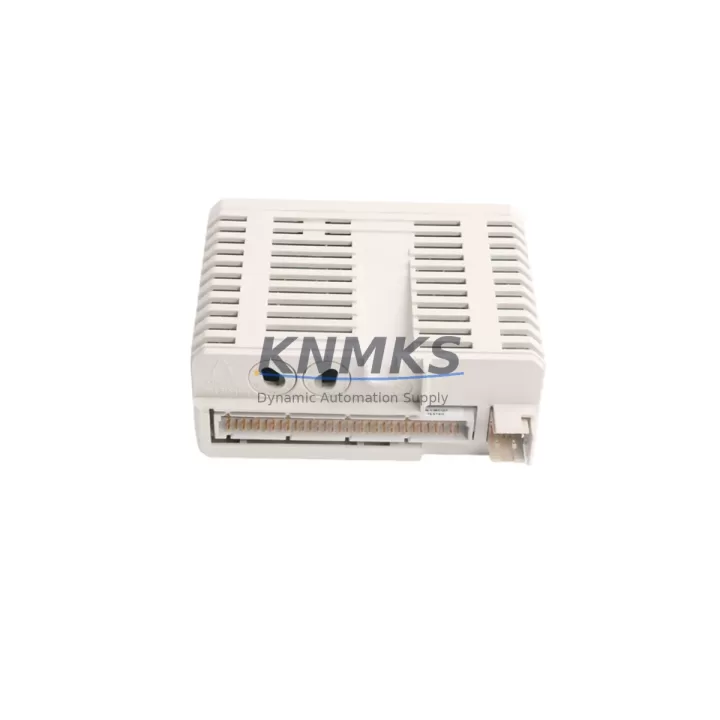
ABB AI830 3BSE008518R1 Migration-Ready RTD Input for Legacy DCS: Retrofit and Upgrade for Aging Control Systems
The ABB AI830 (3BSE008518R1) is an 8-channel RTD analog input module designed for the ABB S800 I/O system, fully compatible with the AC800M distributed control platform. As legacy DCS installations age and original spare parts reach end-of-life, the AI830 3BSE008518R1 has become a critical migration-ready replacement for engineers managing brownfield retrofits, control cabinet upgrades, and system life extension projects across process industries including oil & gas, pulp & paper, power generation, and chemical manufacturing.
Whether you are replacing a discontinued analog input card, expanding an existing S800 I/O rack, or migrating from an older third-party control platform to ABB’s AC800M architecture, the AI830 3BSE008518R1 delivers the signal accuracy, backplane compatibility, and firmware stability required for mission-critical process control continuity.
Migration Compatibility Table
| Parameter | Specification / Retrofit Guidance |
|---|---|
| Module SKU | AI830 / 3BSE008518R1 |
| Brand & Series | ABB — S800 I/O Series |
| Compatible Controller | AC800M (PM851, PM856, PM860, PM864, PM866) |
| Input Channels | 8 channels, RTD (Pt100, Pt200, Pt500, Pt1000, Ni100, Cu10) |
| Backplane Interface | S800 I/O ModuleBus — direct plug-in, no adapter required |
| Installation Requirement | Mounts on TB820V2 or TB840A termination unit; verify terminal block compatibility before swap |
| Communication Compatibility | ModuleBus (optical or electrical); PROFIBUS DP via CI840A coupler |
| Power Supply | Powered via backplane; confirm SA811F or SD821 PSU capacity ≥ module load |
| Replacement Recommendation | Direct replacement for AI830 variants; verify firmware revision on AC800M controller before hot-swap |
| Commissioning Focus | Module address assignment in Control Builder M; RTD sensor type configuration; channel scaling verification |
| Support terms | support terms confirmed by quotation — tested and verified before shipment |
Retrofit Planning for Existing Automation Systems
A successful retrofit using the AI830 3BSE008518R1 requires systematic pre-migration planning across hardware, software, and field wiring layers. Before removing the legacy module, engineers should document all existing channel assignments, RTD sensor types, and scaling parameters stored in the ABB Control Builder M project. The AI830 slots directly into the S800 I/O rack without mechanical modification, but the termination unit — typically a TB820V2 or TB840A — must be confirmed compatible with the existing field wiring layout to avoid re-termination work during the maintenance window.
Power budget verification is a mandatory step. The SA811F or SD821 power supply modules feeding the S800 rack must have sufficient headroom to support the AI830’s operating load alongside other installed I/O modules. In high-density racks where multiple analog input, analog output, and digital I/O modules share a common backplane, adding or replacing a module without checking the aggregate current draw can cause intermittent power faults that are difficult to diagnose under live process conditions.
For installations where the S800 I/O communicates over PROFIBUS DP via a CI840A coupler, the module address must be correctly assigned in the hardware configuration before the replacement module is powered on. Mismatched node addresses are a common source of commissioning delays. Similarly, if the plant is migrating from an older Advant OCS or MOD 300 platform to AC800M, the AI830 3BSE008518R1 provides a stable landing point for RTD signal chains that previously terminated on legacy analog input cards with incompatible backplane connectors.
HMI screen updates should be planned in parallel with the hardware swap. If the existing ABB 800xA or third-party SCADA system references specific I/O tags tied to the old module’s channel addresses, those tag bindings must be verified and updated in the graphics and alarm configuration before the new module goes live. Failure to align HMI tag references with the new module’s channel mapping is a leading cause of extended commissioning time during brownfield upgrades.
For I/O expansion projects — where the AI830 is being added to an existing rack rather than replacing a failed unit — confirm that the S800 I/O baseplate has available slots and that the ModuleBus segment has not reached its maximum node count. In multi-rack configurations connected via TB807 or TB811 bus extenders, signal integrity across the optical ModuleBus should be verified after installation using the diagnostic tools available in Control Builder M.
Downtime Control During System Migration
Minimizing unplanned downtime is the primary operational constraint in any live-plant retrofit. For the AI830 3BSE008518R1, the recommended approach is to complete all software-side preparation — including Control Builder M project backup, hardware configuration export, and tag documentation — before the physical swap begins. This ensures that if an unexpected issue arises during the hardware change, the original configuration can be restored quickly without relying on memory or incomplete field notes.
Where process conditions allow, the replacement should be performed during a scheduled maintenance window with the affected control loop placed in manual mode at the AC800M controller level. This protects the process from responding to spurious input signals during the module removal and reinsertion sequence. For critical loops — such as reactor temperature control or boiler feed regulation — a temporary hardwired bypass or a portable signal simulator connected to the termination unit can maintain process visibility while the module is offline.
After the AI830 3BSE008518R1 is seated and powered, the controller will perform an automatic module recognition sequence. Engineers should monitor the diagnostic LEDs on the module face and confirm healthy status in the Control Builder M online view before returning the loop to automatic control. Channel-by-channel signal verification against a calibrated RTD reference or a precision resistance decade box is strongly recommended before sign-off, particularly for temperature-critical applications where a misconfigured sensor type (e.g., Pt100 vs. Pt200) would produce a systematic measurement error that may not trigger an immediate alarm.
All replacement modules supplied by KNMKS are pre-tested against functional specifications prior to shipment, reducing the risk of receiving a non-functional unit during a time-sensitive maintenance window. The support terms confirmed by quotation cover functional defects identified after installation under normal operating conditions.
Retrofit Support FAQ
Q1: Is the AI830 3BSE008518R1 a direct drop-in replacement for an existing AI830 in my S800 rack?
Yes. The AI830 3BSE008518R1 is the standard catalog variant of the AI830 module and is mechanically and electrically compatible with all S800 I/O baseplates. Confirm that your termination unit (TB820V2 or TB840A) matches the existing field wiring before swapping. No firmware changes are required on the AC800M controller for a like-for-like replacement.
Q2: What commissioning steps are required after installing the AI830 3BSE008518R1?
After physical installation, verify module recognition in Control Builder M online mode. Confirm channel addresses, RTD sensor type assignments, and scaling parameters match the original configuration. Perform a live signal check on each active channel using a calibrated reference before returning loops to automatic control. Check PROFIBUS DP node status if the rack communicates via a CI840A coupler.
Q3: Can the AI830 3BSE008518R1 be used in a migration from an older ABB Advant or MOD 300 system?
Yes, with engineering effort. The AI830 is native to the S800 I/O / AC800M platform. Migrating from Advant OCS or MOD 300 requires remapping existing I/O tags, updating the hardware configuration in Control Builder M, and re-terminating field wiring to the S800-compatible termination unit. KNMKS can supply the AI830 3BSE008518R1 with lead times suitable for phased migration projects.
Q4: What support terms and pre-shipment testing does KNMKS provide?
All AI830 3BSE008518R1 modules supplied by KNMKS carry a support terms confirmed by quotation covering functional defects under normal operating conditions. Each unit undergoes functional verification testing prior to shipment. In-stock units are available for same-week dispatch to support urgent maintenance and unplanned outage recovery scenarios.
© 2026 KNMKS. All rights reserved.
Original Source: https://knmks.com
Contact: admin@knmks.com | +86 18359268345
Product Identification
- Brand / Ecosystem
-
ABB
ABB - Model / Series
-
AI830 3BSE008518R1
AC800M Series - Product Family
- PLCs & Controllers
- Availability Status
- Available on request after model and quantity confirmation
- Inquiry Type
- B2B RFQ, replacement inquiry and project spare-part request
- Pre-Quote Check
- Exact SKU, brand, series, quantity, nameplate photos and destination country are checked before quotation
System Path
Where this product fits in the KNMKS automation structure.
Specification & Inquiry Focus
- Control platform
- PLC, PAC and modular controllers
- Common needs
- CPU, rack, power and I/O expansion
- Project support
- Replacement, cabinet build and maintenance
Buyer Confirmation
Information KNMKS checks before replying.
- Exact model
- AI830 3BSE008518R1
- Brand / ecosystem
- ABB
- Product family
- PLCs & Controllers
- Application note
- Replacement, maintenance, project build or spare-part list
- Useful photos
- Nameplate, installed unit, cabinet layout or connector side
- Delivery details
- Quantity, destination country and target schedule
Document Support
Files and notes can be confirmed during quotation.
- Product photos or nameplate confirmation when available
- Packing and delivery notes before quotation confirmation
- Support scope and delivery terms confirmed per inquiry
- Export document coordination for qualified B2B requests
Inquiry Support
- Model cross-checking before quotation
- CPU, power, rack and expansion module matching
- Support for replacement and project inquiry
What to Send Us
- Brand and exact model number: ABB AI830 3BSE008518R1
- Quantity and required delivery time
- Application, replacement requirement or nameplate photo
- Destination country and shipping preference
RFQ Preparation
This is a product inquiry page built for RFQ communication.
Fast Model Check
Send this model to KNMKS for confirmation.
Include quantity, destination country and photos if this is a maintenance replacement. The inquiry will be saved with a reference number after submission.
Brand & Compatibility Note
KNMKS displays automation product information for well-known industrial brand ecosystems and compatible replacement references. Brand names are used for product identification and compatibility reference only; final availability and commercial terms are confirmed per quotation.
 Manufacturing
 Machine Tools
 Packaging
 Energy & Power



 HMI & Displays
 Servo Systems
 Variable Frequency Drives
 Sensors