
Overview
ABB AC800M Migration-Ready Process Controller for Legacy Control Systems
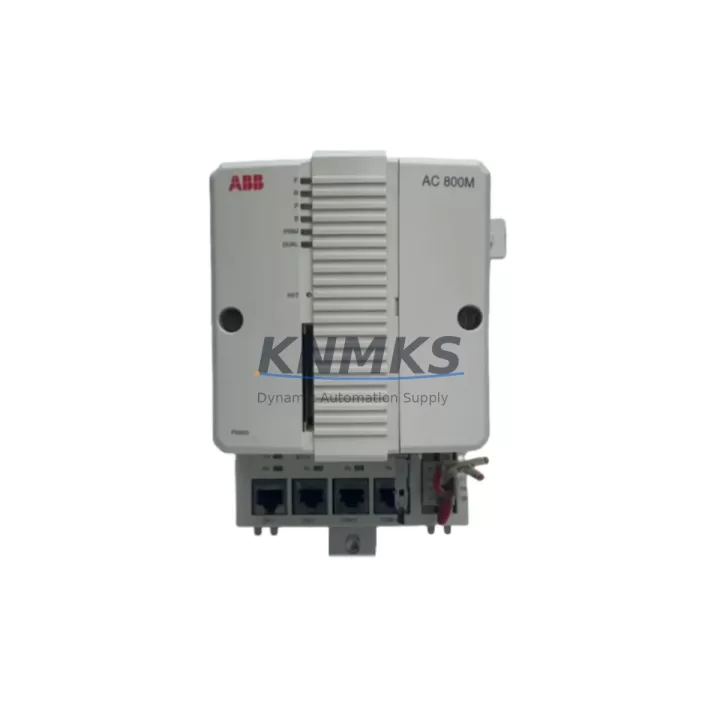
The ABB AC800M is a high-performance, migration-ready process controller engineered for seamless integration into existing ABB Freelance, Symphony Plus, and 800xA distributed control system environments. As legacy AC800M units approach end-of-life or become increasingly difficult to source through standard supply channels, the AC800M serves as a validated, drop-in replacement that preserves existing program logic, I/O mapping, and communication architecture without requiring a full system redesign. For maintenance engineers managing aging control infrastructure in oil and gas, power generation, pulp and paper, or chemical processing facilities, the AC800M offers a reliable path to system continuity with minimal disruption to ongoing operations.
When planning a retrofit around the AC800M, engineers must verify several critical compatibility parameters before committing to a replacement schedule. Power supply capacity is a primary concern: the AC800M operates on a 24 VDC rail and requires confirmation that the existing PM891 or PM865 power module can sustain the load profile of the replacement controller alongside connected I/O modules. Terminal wiring on the backplane must be inspected for pin-for-pin compatibility, particularly when migrating from earlier AC800M hardware revisions where connector pinouts may differ by one or two positions. Backplane interface slots — typically TB820 or TB840 termination units — must be confirmed as physically and electrically compatible before installation begins.
Module addressing is another area requiring careful pre-migration audit. The AC800M uses a node-based addressing scheme within the MMS (Manufacturing Message Specification) and PROFIBUS DP communication layers. If the legacy system used hardcoded node addresses in the application program, those addresses must be preserved or remapped in Control Builder M before the replacement controller is commissioned. Engineers should also confirm that the firmware version loaded on the replacement AC800M is compatible with the existing Control Builder M project file — mismatched firmware revisions can prevent successful program download and may require a firmware upgrade cycle before commissioning can proceed.
HMI screen compatibility is frequently overlooked during AC800M replacements. If the facility runs ABB Operate IT or a third-party SCADA platform connected via OPC DA or OPC UA, the tag database must be validated against the replacement controller’s exported symbol table to ensure no tag name changes or address shifts have occurred. Communication links — including Ethernet-based MMS, PROFIBUS DP master/slave chains, and any HART pass-through modules — must be tested under live conditions before the legacy controller is decommissioned. Installation space within the control cabinet should also be measured: while the AC800M form factor is standardized, rack mounting depth and DIN rail clearance requirements may vary depending on the cabinet generation in use.
Migration Compatibility Table
| Parameter | Specification / Requirement |
|---|---|
| SKU | AC800M |
| Brand | ABB |
| Series | AC800M / 800xA / Freelance / Symphony Plus |
| Product Type | Process Controller (DCS) |
| Power Supply | 24 VDC (confirm PM891 / PM865 capacity) |
| Backplane Interface | TB820 / TB840 termination unit compatible |
| Communication Protocols | MMS (IEC 61850), PROFIBUS DP, Ethernet, OPC DA/UA |
| Programming Environment | ABB Control Builder M (firmware version match required) |
| I/O Compatibility | Compatible with AI810, AO810, DI810, DO810 I/O modules |
| HMI Integration | ABB Operate IT, 800xA HMI, third-party SCADA via OPC |
| Installation | DIN rail / rack mount; verify cabinet depth clearance |
| Replacement Recommendation | Direct replacement for legacy AC800M revisions; firmware audit required |
| Commissioning Focus | Node address mapping, tag validation, PROFIBUS chain continuity |
| Origin | Germany |
| Support terms | support terms confirmed by quotation — tested and verified before shipment |
Retrofit Planning for Existing Automation Systems
A successful AC800M retrofit begins well before the replacement unit arrives on site. The first step is a full audit of the existing control cabinet, including the PM891 power module output capacity, the TB840 termination unit wiring condition, and the physical state of the S800 I/O modules connected to the legacy controller. In many aging installations, the AI810 analog input modules and DI810 digital input modules will have accumulated wiring wear that should be addressed during the same maintenance window as the controller replacement — combining these tasks reduces total downtime and avoids a second cabinet outage within a short interval.
Communication architecture must be mapped before the replacement AC800M is configured. If the legacy system uses a PROFIBUS DP network with multiple slave devices — such as ABB drives, valve positioners, or remote I/O stations — the master configuration file must be exported from the existing Control Builder M project and re-imported into the replacement controller’s project environment. Any CI854 PROFIBUS communication interface modules installed in the existing rack must be confirmed as compatible with the replacement controller’s firmware baseline. Similarly, if the system includes a CI857 HART communication interface for field device diagnostics, its configuration must be preserved during the migration.
For facilities running ABB 800xA with integrated asset monitoring, the replacement AC800M must be re-enrolled in the 800xA system domain after installation. This involves updating the controller’s IP address assignment in the 800xA connectivity server, re-establishing the OPC server tag subscriptions, and validating alarm and event routing through the system event log. Engineers should also confirm that any SC510 signal conditioners or signal isolators in the field junction boxes remain within calibration tolerance, as a controller replacement is an appropriate trigger point for a full field instrument verification cycle.
Downtime Control During System Migration
Minimizing downtime during an AC800M replacement requires a structured pre-migration checklist and a clearly defined cutover window. The recommended approach is to perform a full backup of the existing Control Builder M project — including all application programs, hardware configuration files, and communication parameter sets — at least 48 hours before the planned cutover. This backup should be stored on an isolated engineering workstation and verified by performing a simulated download to a test controller or a software emulation environment if available.
During the cutover window, the sequence should follow a defined order: power down the legacy controller, remove the existing unit from the backplane, install the replacement AC800M, restore power, download the verified application program, and perform a systematic I/O check against the pre-migration signal list. PROFIBUS DP continuity should be verified by confirming that all slave devices return to active status within the expected scan cycle time. HMI screens should be monitored for tag update activity to confirm that the OPC communication link has been re-established successfully.
To protect original program logic, engineers should avoid making any application changes during the cutover window itself. All program modifications — including any address remapping or firmware-driven function block updates — should be completed and tested in the engineering environment before the cutover begins. This approach ensures that the replacement controller enters service running a validated, unchanged program, which significantly reduces the risk of process upsets during the initial post-replacement operating period. With proper preparation, a well-executed AC800M replacement can be completed within a four-to-six hour planned maintenance window, preserving field control continuity and minimizing production impact.
Retrofit Support FAQ
Q: Is the AC800M a direct drop-in replacement for all legacy AC800M hardware revisions?
A: The AC800M is compatible with the majority of AC800M series installations, but engineers should verify the specific hardware revision and firmware baseline of the legacy unit before ordering. Minor differences in backplane connector pinouts and firmware-dependent function block libraries may require a pre-migration compatibility check using ABB’s published hardware revision matrix.
Q: What commissioning steps are required after installing the replacement AC800M?
A: After physical installation, the replacement controller requires a verified program download from Control Builder M, a full I/O signal check, PROFIBUS DP slave device confirmation, and OPC tag validation against the connected HMI or SCADA system. Firmware version alignment between the replacement controller and the existing project file should be confirmed before the download is initiated.
Q: How should terminal wiring be handled during the replacement?
A: Terminal wiring connected to TB820 or TB840 termination units does not need to be disturbed during a standard AC800M controller replacement, as the termination units remain in place on the backplane. Engineers should photograph and document the existing wiring configuration before beginning work and perform a continuity check on all signal circuits after the replacement controller is powered up.
Q: What support terms and pre-shipment testing does this unit include?
A: Every AC800M unit supplied by KNMKS is covered by a support terms confirmed by quotation and undergoes functional testing prior to shipment. Units are verified for power-on operation, communication interface activity, and basic I/O response before dispatch. In-stock units are available for same-week shipment to minimize lead time for urgent replacement requirements. Contact admin@knmks.com or +86 18359268345 for availability confirmation and expedited shipping options.
© 2026 KNMKS. All rights reserved.
Original Source: https://knmks.com
Contact: admin@knmks.com | +86 18359268345
Product Identification
- Brand / Ecosystem
-
ABB
ABB - Model / Series
-
AC800M
AC800M Series - Product Family
- PLCs & Controllers
- Availability Status
- Available on request after model and quantity confirmation
- Inquiry Type
- B2B RFQ, replacement inquiry and project spare-part request
- Pre-Quote Check
- Exact SKU, brand, series, quantity, nameplate photos and destination country are checked before quotation
System Path
Where this product fits in the KNMKS automation structure.
Specification & Inquiry Focus
- Control platform
- PLC, PAC and modular controllers
- Common needs
- CPU, rack, power and I/O expansion
- Project support
- Replacement, cabinet build and maintenance
Buyer Confirmation
Information KNMKS checks before replying.
- Exact model
- AC800M
- Brand / ecosystem
- ABB
- Product family
- PLCs & Controllers
- Application note
- Replacement, maintenance, project build or spare-part list
- Useful photos
- Nameplate, installed unit, cabinet layout or connector side
- Delivery details
- Quantity, destination country and target schedule
Document Support
Files and notes can be confirmed during quotation.
- Product photos or nameplate confirmation when available
- Packing and delivery notes before quotation confirmation
- Support scope and delivery terms confirmed per inquiry
- Export document coordination for qualified B2B requests
Inquiry Support
- Model cross-checking before quotation
- CPU, power, rack and expansion module matching
- Support for replacement and project inquiry
What to Send Us
- Brand and exact model number: ABB AC800M
- Quantity and required delivery time
- Application, replacement requirement or nameplate photo
- Destination country and shipping preference
RFQ Preparation
This is a product inquiry page built for RFQ communication.
Fast Model Check
Send this model to KNMKS for confirmation.
Include quantity, destination country and photos if this is a maintenance replacement. The inquiry will be saved with a reference number after submission.
Brand & Compatibility Note
KNMKS displays automation product information for well-known industrial brand ecosystems and compatible replacement references. Brand names are used for product identification and compatibility reference only; final availability and commercial terms are confirmed per quotation.
 Manufacturing
 Machine Tools
 Packaging
 Energy & Power



 HMI & Displays
 Servo Systems
 Variable Frequency Drives
 Sensors