
Overview
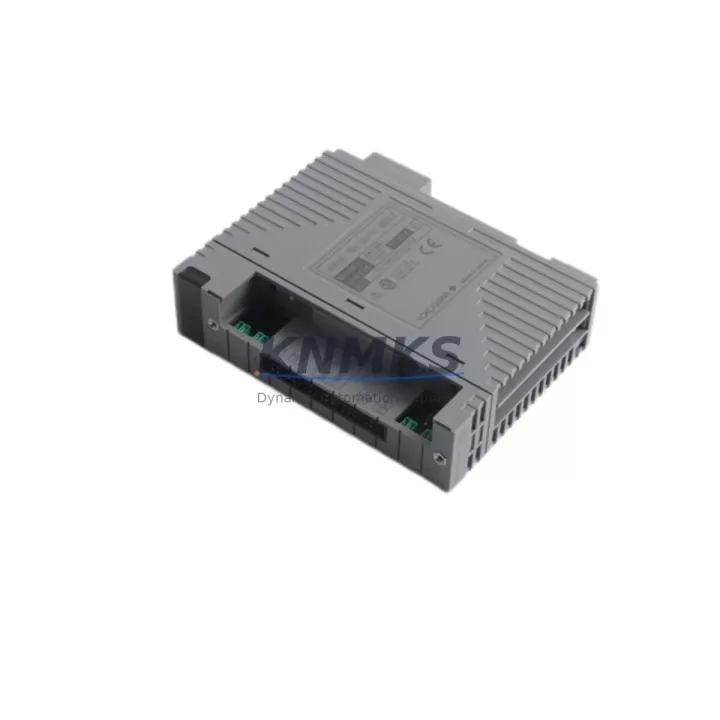
ABB AAI841-H00 S1 Maintenance-Proven Spare Part for Factory Uptime
The ABB AAI841-H00 S1 is an original analog input module designed for the ABB S800 I/O system, widely deployed in AC800M DCS environments across process industries including oil & gas, chemical, pulp & paper, and power generation. As a field-proven component in continuous-process control architectures, the AAI841-H00 S1 delivers reliable 4–20 mA signal acquisition with high channel density, making it a critical element in any maintenance engineer’s spare parts strategy.
When a process loop goes silent or a DCS alarm flags an analog input fault, the ability to swap in a tested, original AAI841-H00 S1 module within minutes — rather than waiting weeks for procurement — is the difference between a controlled maintenance window and an unplanned production shutdown. KNMKS maintains ready stock of the AAI841-H00 S1 to support emergency replacement, scheduled turnaround, and long-term inventory replenishment for facilities running legacy and current-generation S800 I/O racks.
Every unit shipped by KNMKS undergoes functional verification prior to dispatch. A support terms confirmed by quotation is included on all AAI841-H00 S1 modules, covering defects in materials and workmanship under normal industrial operating conditions. Our supply chain is structured for long-term continuity, ensuring that facilities committed to ABB AC800M platforms can source critical I/O spares without being forced into premature system migration.
Spare Maintenance Table
| Part Number | AAI841-H00 S1 |
| Brand | ABB |
| Series | S800 I/O |
| Compatible System | AC800M DCS, S800 I/O Rack |
| Module Type | Analog Input Module |
| Signal Type | 4–20 mA / 0–10 V (configurable per channel) |
| Channel Count | 8 channels (single-ended) |
| Resolution | 16-bit |
| Communication Interface | S800 I/O bus (ModuleBus) |
| Operating Temperature | 0°C to +55°C |
| Mounting | S800 I/O baseplate (TB820, TB840 series) |
| Country of Origin | Germany |
| Condition | Original, New / Surplus |
| Pre-shipment Testing | Functional verification completed |
| Support terms | 12 Months |
| Delivery | In-stock, ships within 1–3 business days |
Maintenance Planning for Continuous Operation
Replacing the AAI841-H00 S1 in a live S800 I/O rack is rarely an isolated task. Experienced maintenance engineers know that an analog input fault often signals stress on adjacent components in the same electrical loop. Before returning the control loop to service, a thorough site inspection should cover the following areas:
Power Supply Integrity: Verify the S800 rack power supply — typically an ABB SD821 or SD822 power supply module — is delivering stable 24 VDC within tolerance. A degraded power supply is a common root cause of intermittent analog input errors and can damage replacement modules if not addressed first.
Baseplate and Backplane Connections: Inspect the TB820 or TB840 baseplate for corrosion, bent connector pins, or mechanical damage. A faulty baseplate will cause the new AAI841-H00 S1 to report communication errors on the ModuleBus even if the module itself is fully functional.
Field Wiring and Terminal Blocks: Check all field-side terminal connections for loose wires, oxidation, or moisture ingress. In high-humidity or chemically aggressive environments, terminal block degradation is a frequent contributor to signal drift and channel faults. Replacing terminal blocks during the same maintenance window prevents repeat callouts.
Signal Isolators and Barriers: Where Zener barriers or galvanic isolators are installed in the 4–20 mA loop — particularly in hazardous-area installations — verify that these signal conditioning components are within specification. A failed isolator will corrupt the analog signal regardless of the module’s condition.
Fusing and Surge Protection: Confirm that loop fuses and any installed surge protection devices on the field cable entry are intact. Blown fuses are often the first casualty of a field-side fault and should be replaced as a matter of course during any analog input module swap.
Communication Module Health: If the AAI841-H00 S1 is part of a larger S800 cluster connected via an ABB CI854 or CI858 PROFIBUS/Modbus communication interface module, verify that the communication module is reporting healthy status in the AC800M controller. A degraded CI854 can cause multiple I/O modules to appear faulty simultaneously.
Adjacent I/O Modules: During the maintenance window, perform a visual and diagnostic check on neighboring modules in the same rack — including analog output modules such as the AAO841 and digital I/O modules such as the DI810 or DO810. Thermal stress and power fluctuations affect all modules in a rack, and proactive inspection reduces the risk of secondary failures shortly after the primary repair.
Site Replacement Workflow
The AAI841-H00 S1 is a hot-swap-capable module within the S800 I/O architecture, allowing replacement without powering down the entire rack in most AC800M configurations. The recommended replacement procedure is as follows:
1. Confirm module address and configuration: Before removal, record the module’s channel configuration, engineering unit scaling, and alarm limits from the AC800M Control Builder project. This ensures the replacement module is configured identically and avoids process upsets on loop restoration.
2. Isolate field loops: Place affected control loops in manual mode at the DCS operator station. Notify the process operator and obtain a permit-to-work if required by site safety procedures.
3. Remove the faulty module: Unlatch the AAI841-H00 S1 from the baseplate using the module ejector lever. The ModuleBus will detect the removal and flag the slot as empty in the controller diagnostics.
4. Insert the replacement module: Seat the new AAI841-H00 S1 firmly onto the baseplate until the latch engages. The AC800M controller will automatically recognize the module and download the stored configuration within seconds.
5. Verify channel readings: Confirm that all 8 analog input channels are reporting expected process values within engineering unit range. Check for any diagnostic alarms in Control Builder or the operator HMI.
6. Return loops to automatic: Once all channels are verified, return control loops to automatic mode and monitor for stability. Document the replacement in the site maintenance management system (CMMS).
This workflow minimizes process disruption and ensures the replacement AAI841-H00 S1 is fully validated before the maintenance window is closed. For facilities running older S800 hardware revisions, KNMKS can advise on cross-compatibility between AAI841 hardware variants to ensure seamless substitution.
Spare Parts Support FAQ
Q1: Is the AAI841-H00 S1 still in production, and can I source it long-term?
The S800 I/O platform has an extended product lifecycle, but specific hardware revisions such as the AAI841-H00 S1 may transition to limited availability as ABB evolves its portfolio. KNMKS maintains surplus and new-old-stock inventory specifically to support facilities that cannot migrate to newer hardware on short notice. We recommend establishing a standing spare parts agreement to guarantee supply continuity for critical I/O modules.
Q2: How do I verify compatibility between different AAI841 hardware revisions?
ABB publishes hardware revision compatibility notes in the S800 I/O Product Manual (3BSE020520). In general, AAI841 modules with the same base part number are backward-compatible within the same S800 I/O generation. KNMKS technical staff can cross-reference your existing hardware revision against available stock before shipment to confirm compatibility.
Q3: What does the support terms confirmed by quotation cover, and what is the claims process?
The support terms confirmed by quotation cover manufacturing defects and functional failures under normal industrial operating conditions. It does not cover damage caused by incorrect installation, overvoltage events, or environmental conditions outside the module’s rated specifications. To initiate a support terms claim, contact KNMKS at admin@knmks.com with the order reference, module serial number, and a description of the fault. Replacement or repair will be arranged promptly.
Q4: Can KNMKS support emergency same-day or next-day dispatch for the AAI841-H00 S1?
Yes. For in-stock units, KNMKS can arrange same-day dispatch for orders confirmed before 14:00 CST, with international express freight options available. Contact our sales team at admin@knmks.com or +86 18359268345 to confirm stock availability and arrange expedited shipment for emergency maintenance situations.
© 2026 KNMKS. All rights reserved.
Original Source: https://knmks.com
Contact: admin@knmks.com | +86 18359268345
Product Identification
- Brand / Ecosystem
-
ABB
ABB - Model / Series
-
AAI841-H00 S1
AC800M Series - Product Family
- PLCs & Controllers
- Availability Status
- Available on request after model and quantity confirmation
- Inquiry Type
- B2B RFQ, replacement inquiry and project spare-part request
- Pre-Quote Check
- Exact SKU, brand, series, quantity, nameplate photos and destination country are checked before quotation
System Path
Where this product fits in the KNMKS automation structure.
Specification & Inquiry Focus
- Control platform
- PLC, PAC and modular controllers
- Common needs
- CPU, rack, power and I/O expansion
- Project support
- Replacement, cabinet build and maintenance
Buyer Confirmation
Information KNMKS checks before replying.
- Exact model
- AAI841-H00 S1
- Brand / ecosystem
- ABB
- Product family
- PLCs & Controllers
- Application note
- Replacement, maintenance, project build or spare-part list
- Useful photos
- Nameplate, installed unit, cabinet layout or connector side
- Delivery details
- Quantity, destination country and target schedule
Document Support
Files and notes can be confirmed during quotation.
- Product photos or nameplate confirmation when available
- Packing and delivery notes before quotation confirmation
- Support scope and delivery terms confirmed per inquiry
- Export document coordination for qualified B2B requests
Inquiry Support
- Model cross-checking before quotation
- CPU, power, rack and expansion module matching
- Support for replacement and project inquiry
What to Send Us
- Brand and exact model number: ABB AAI841-H00 S1
- Quantity and required delivery time
- Application, replacement requirement or nameplate photo
- Destination country and shipping preference
RFQ Preparation
This is a product inquiry page built for RFQ communication.
Fast Model Check
Send this model to KNMKS for confirmation.
Include quantity, destination country and photos if this is a maintenance replacement. The inquiry will be saved with a reference number after submission.
Brand & Compatibility Note
KNMKS displays automation product information for well-known industrial brand ecosystems and compatible replacement references. Brand names are used for product identification and compatibility reference only; final availability and commercial terms are confirmed per quotation.
 Manufacturing
 Machine Tools
 Packaging
 Energy & Power



 HMI & Displays
 Servo Systems
 Variable Frequency Drives
 Sensors