
Overview
ABB 3HAC037084-001 DSQC697 Migration-Ready DeviceNet Board IRC5: Legacy System Retrofit & Compatibility Upgrade
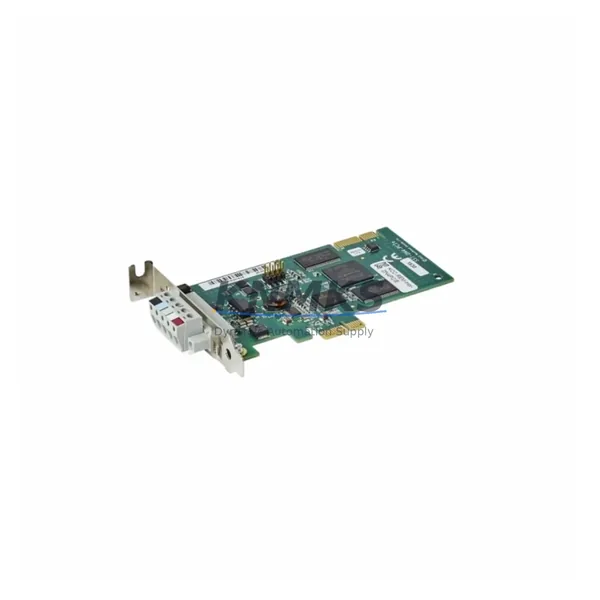
The ABB DSQC697 (part number 3HAC037084-001) is a DeviceNet communication board designed for the ABB IRC5 robot controller platform. As automation facilities continue to operate aging IRC5 cabinets alongside newer S4C+ and IRC5P systems, the DSQC697 serves as a critical fieldbus interface enabling DeviceNet master/slave communication between the robot controller and peripheral I/O devices, safety PLCs, and distributed control networks. This board is a direct retrofit replacement for facilities managing legacy DeviceNet topologies where the original communication hardware has reached end-of-life or has been discontinued by the OEM.
When planning a replacement or upgrade involving the DSQC697, engineers must verify several key parameters before installation. Power supply capacity within the IRC5 cabinet — typically provided by the DSQC608 or DSQC662 power distribution unit — must be confirmed to support the additional board load. Terminal wiring on the DeviceNet trunk line, including the 24 VDC bus power, CAN_H, CAN_L, shield, and ground conductors, must be inspected and re-terminated if insulation degradation is present. The backplane slot assignment within the IRC5 computer unit must match the original board position to ensure correct module addressing during RobotWare initialization.
Program compatibility is a primary concern during any IRC5 communication board swap. The RAPID program logic referencing DeviceNet I/O signals — including digital inputs mapped to safety interlocks, conveyor triggers, and gripper feedback — must be validated against the new board’s node address configuration. If the facility also operates a FlexPendant or IRC5 Panel Board (DSQC679) for operator interaction, the HMI screen signal mapping must be re-verified after the board replacement to confirm that all I/O aliases resolve correctly. Communication link integrity between the DSQC697 and downstream DeviceNet slaves — such as remote I/O blocks, vision system interfaces, or servo drive nodes — should be tested using the DeviceNet diagnostic tools available within RobotStudio before returning the cell to production.
Installation space within the IRC5 controller is fixed by the computer unit chassis. The DSQC697 occupies a standard PCI-format slot and does not require additional mounting hardware beyond the original retention bracket. Firmware version compatibility between the DSQC697 board firmware and the installed RobotWare version (typically 5.x or 6.x) must be confirmed prior to commissioning. Mismatched firmware revisions can result in bus initialization failures or intermittent node dropouts that are difficult to diagnose without access to the controller event log.
Field commissioning of the DSQC697 replacement follows a structured sequence: power down the IRC5 cabinet, discharge the capacitor bank, seat the board in the correct slot, restore power, confirm LED status indicators (MS and NS LEDs on the board face), run a DeviceNet network scan from the teach pendant, verify all node addresses, and execute a controlled program restart. This process typically requires two to four hours of planned downtime when performed by a qualified ABB-certified technician.
For facilities managing broader IRC5 cabinet upgrades, the DSQC697 is commonly replaced or supplemented alongside the DSQC688 Ethernet board for EtherNet/IP migration paths, the DSQC652 digital I/O board for expanded discrete signal capacity, and the DSQC378B serial measurement board where resolver-based axis feedback is involved. Spare parts lifecycle planning should account for the fact that several DSQC-series boards have been discontinued, making pre-tested, in-stock units essential for minimizing unplanned downtime.
Every DSQC697 unit supplied by KNMKS undergoes pre-shipment functional testing to verify DeviceNet bus initialization, node enumeration, and communication stability. Units are supplied with a support terms confirmed by quotation covering manufacturing defects and functional failures under normal operating conditions.
Migration Compatibility Table
| Parameter | Specification / Retrofit Guidance |
|---|---|
| Part Number | 3HAC037084-001 |
| Board Designation | DSQC697 |
| Compatible Controller | ABB IRC5 (all variants including IRC5P, IRC5C, IRC5 Compact) |
| Communication Protocol | DeviceNet (CAN-based, ISO 11898) |
| Interface Type | PCI slot, IRC5 computer unit backplane |
| Firmware Compatibility | RobotWare 5.x / 6.x — confirm revision before installation |
| Replaces / Supersedes | DSQC590, DSQC378 (DeviceNet function), earlier IRC5 fieldbus boards |
| Installation Space | Standard PCI form factor; no additional bracket required |
| Power Requirement | Supplied via IRC5 backplane; verify DSQC608/DSQC662 capacity |
| Terminal Wiring | 5-pin DeviceNet connector: V+, CAN_H, Shield, CAN_L, V− |
| Commissioning Time | 2–4 hours planned downtime (qualified technician) |
| Pre-Shipment Testing | Yes — bus initialization, node scan, communication stability |
| Support terms | 12 months from shipment date |
| Stock Status | availability confirmed by RFQ — available for immediate dispatch |
Retrofit Planning for Existing Automation Systems
A successful DSQC697 retrofit begins well before the maintenance window opens. The engineering team should pull the IRC5 cabinet layout drawing to confirm the computer unit slot map and identify whether any adjacent slots are occupied by the DSQC652 digital I/O board or the DSQC688 Ethernet board, as physical clearance between boards affects heat dissipation and cable routing. The DeviceNet trunk cable — typically a thick or thin media trunk with drop lines to each node — should be inspected for impedance continuity and termination resistor integrity (120 Ω at each end of the trunk) before the new board is seated.
Where the facility is also managing a protocol migration from DeviceNet to EtherNet/IP, the DSQC697 replacement may be a transitional step while the broader network infrastructure is upgraded. In such cases, the DSQC688 Ethernet board is installed in parallel, and I/O signal mapping is migrated progressively to avoid a full cutover during a single maintenance window. Signal isolators may be required at the interface between legacy 24 VDC discrete I/O and newer differential-input modules to prevent ground loop interference during the transition period.
For cells where the IRC5 controller also manages a DSQC679 FlexPendant interface or an external operator panel wired through the DSQC643 customer I/O board, the retrofit plan must include a signal continuity check on all emergency stop chains and safety relay circuits. The DSQC697 does not carry safety-rated signals directly, but its DeviceNet network may include safety slaves — such as safety I/O modules from third-party vendors — that must be re-commissioned after any bus topology change. Programming cables and RobotStudio licenses should be confirmed available on-site before the maintenance window begins to avoid delays during the commissioning phase.
Downtime Control During System Migration
Minimizing downtime during a DSQC697 replacement requires a structured pre-work package completed before the cabinet is de-energized. This includes backing up the IRC5 system image — including RAPID programs, I/O configuration, and safety parameters — to a USB drive or network share using the FlexPendant backup function. The backup preserves the complete system state and allows rapid restoration if the new board requires a different configuration approach.
During the physical swap, the IRC5 cabinet should be isolated from the production network and the DeviceNet trunk should be disconnected at the board connector rather than at the trunk termination points to avoid disturbing the network topology. After seating the DSQC697 and restoring power, the controller boot sequence should be monitored for any hardware fault codes before the RAPID program is restarted. If the board is recognized correctly, the DeviceNet network scan can be initiated from the teach pendant within approximately five minutes of power-up.
Program logic protection during the migration is achieved by maintaining the original I/O signal names and node address assignments from the replaced board. If the node address of the DSQC697 differs from the previous board configuration, the I/O configuration file must be updated before the RAPID program is executed to prevent signal mapping errors that could trigger safety stops or incorrect actuator commands. Keeping the original program logic intact and only updating the hardware configuration layer is the lowest-risk approach to maintaining field control continuity throughout the replacement process.
Retrofit Support FAQ
Q: Is the DSQC697 (3HAC037084-001) a direct drop-in replacement for earlier IRC5 DeviceNet boards?
A: Yes, the DSQC697 is designed for the IRC5 computer unit PCI slot and is compatible with RobotWare 5.x and 6.x. It replaces earlier DeviceNet interface boards in the DSQC series. Confirm the firmware revision of your RobotWare installation before commissioning to ensure full compatibility.
Q: What wiring changes are required when installing the DSQC697?
A: The DeviceNet connector pinout follows the standard 5-pin DeviceNet specification (V+, CAN_H, Shield, CAN_L, V−). If the existing trunk cable and drop line connectors are in good condition, no rewiring is required. Inspect insulation and connector contacts before re-terminating.
Q: Has the DSQC697 been tested before shipment?
A: Yes. Every unit supplied by KNMKS undergoes pre-shipment functional testing covering DeviceNet bus initialization, node address enumeration, and sustained communication stability. A support terms confirmed by quotation is included from the date of shipment.
Q: What is the lead time and stock availability?
A: The DSQC697 (3HAC037084-001) is held availability confirmed by RFQ and available for immediate dispatch. Contact our team to confirm current inventory levels and shipping options for your region.
© 2026 KNMKS. All rights reserved.
Original Source: https://knmks.com
Contact: admin@knmks.com | +86 18359268345
Product Identification
- Brand / Ecosystem
-
ABB
ABB - Model / Series
-
3HAC037084-001
IRC5 Series - Product Family
- Communication Modules
- Availability Status
- Available on request after model and quantity confirmation
- Inquiry Type
- B2B RFQ, replacement inquiry and project spare-part request
- Pre-Quote Check
- Exact SKU, brand, series, quantity, nameplate photos and destination country are checked before quotation
System Path
Where this product fits in the KNMKS automation structure.
Specification & Inquiry Focus
- Network range
- Ethernet, fieldbus and gateway modules
- Common needs
- Protocol, port and controller family
- Project support
- Machine networking and data integration
Buyer Confirmation
Information KNMKS checks before replying.
- Exact model
- 3HAC037084-001
- Brand / ecosystem
- ABB
- Product family
- Communication Modules
- Application note
- Replacement, maintenance, project build or spare-part list
- Useful photos
- Nameplate, installed unit, cabinet layout or connector side
- Delivery details
- Quantity, destination country and target schedule
Document Support
Files and notes can be confirmed during quotation.
- Product photos or nameplate confirmation when available
- Packing and delivery notes before quotation confirmation
- Support scope and delivery terms confirmed per inquiry
- Export document coordination for qualified B2B requests
Inquiry Support
- Industrial Ethernet and fieldbus module inquiry
- Protocol compatibility review
- Integration project inquiry support
What to Send Us
- Brand and exact model number: ABB 3HAC037084-001
- Quantity and required delivery time
- Application, replacement requirement or nameplate photo
- Destination country and shipping preference
RFQ Preparation
This is a product inquiry page built for RFQ communication.
Fast Model Check
Send this model to KNMKS for confirmation.
Include quantity, destination country and photos if this is a maintenance replacement. The inquiry will be saved with a reference number after submission.
Brand & Compatibility Note
KNMKS displays automation product information for well-known industrial brand ecosystems and compatible replacement references. Brand names are used for product identification and compatibility reference only; final availability and commercial terms are confirmed per quotation.
 Manufacturing
 Machine Tools
 Packaging
 Energy & Power
 PLCs & Controllers
 HMI & Displays
 Servo Systems
 Variable Frequency Drives