
Overview
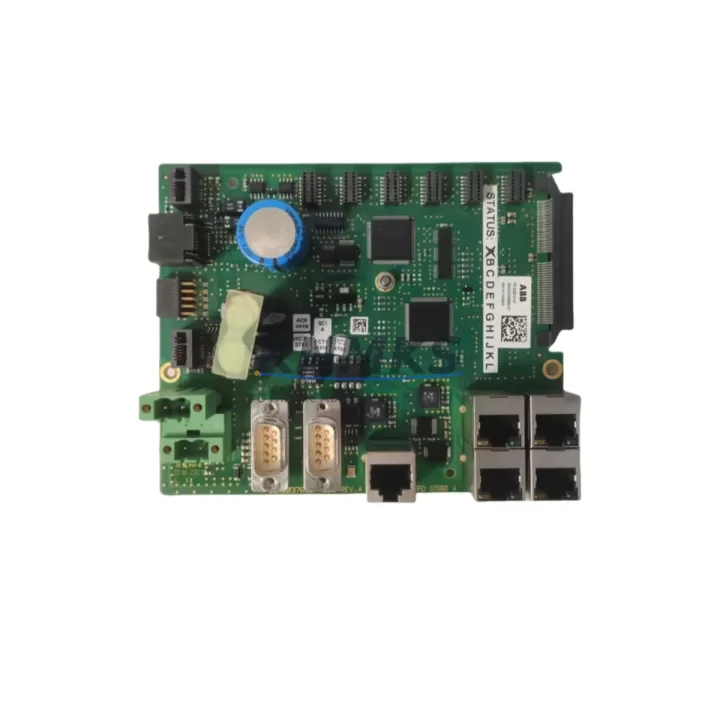
ABB 3BHE037649R0101 PDD500 A101 Migration-Ready DCS Module: Legacy System Retrofit & Compatibility Upgrade
The ABB 3BHE037649R0101, commercially designated as the PDD500 A101, is a processor and communication interface module designed for ABB’s AC800M controller platform and Symphony Plus distributed control system architecture. As legacy DCS installations age beyond their supported lifecycle, plant engineers and automation integrators increasingly rely on verified replacement units like the 3BHE037649R0101 to extend operational continuity without committing to a full system overhaul. This module serves as a migration-ready drop-in replacement for discontinued or end-of-life control hardware, enabling facilities to maintain production uptime while planning phased modernization programs.
When sourcing a replacement for an aging or failed DCS processor module, the 3BHE037649R0101 addresses the most critical engineering concerns: backplane slot compatibility, firmware revision alignment, I/O channel mapping continuity, and communication protocol integrity. Whether the existing installation runs on an older AC800M rack configuration or an earlier Symphony Plus cabinet layout, this module is engineered to restore control functionality with minimal re-engineering effort.
Migration Compatibility Table
| Parameter | Details |
|---|---|
| SKU / Part Number | 3BHE037649R0101 (PDD500 A101) |
| Brand / Manufacturer | ABB |
| Compatible Platform | AC800M Controller Series, Symphony Plus DCS |
| Backplane Interface | Standard AC800M module backplane; verify slot position and rack revision before installation |
| Communication Protocol | PROFIBUS, Ethernet-based fieldbus (confirm with site network topology) |
| Power Supply Requirement | 24 VDC nominal; confirm cabinet power budget with PM856 or PM864 power module capacity |
| Firmware Compatibility | Verify firmware version against existing AC800M CPU firmware; update via Control Builder M if required |
| Installation Footprint | Standard single-slot AC800M module form factor; confirm physical clearance in existing control cabinet |
| Terminal / Wiring Adaptation | Use existing field terminal blocks; verify signal wiring against original I/O list before reconnection |
| Replacement Recommendation | Direct replacement for failed or end-of-life PDD500 A101 units in AC800M and Symphony Plus environments |
| Commissioning Focus | Module address configuration, I/O channel verification, HMI tag mapping, communication link test |
| Support terms | support terms confirmed by quotation — covers manufacturing defects and functional failure under normal operating conditions |
Retrofit Planning for Existing Automation Systems
A successful retrofit begins well before the replacement module arrives on site. Engineers planning to install the 3BHE037649R0101 into an existing AC800M rack should first audit the current cabinet configuration, documenting the installed PM856 or PM864 power module capacity to confirm that the existing 24 VDC rail can support the additional load. In multi-rack installations, the TB820 PROFIBUS DP fieldbus module or CI854 PROFIBUS DP interface module may also require firmware alignment to ensure seamless communication with the replacement processor card.
Terminal wiring is one of the most time-sensitive steps in any DCS module replacement. Before removing the failed unit, technicians should photograph or document all field wiring connections at the terminal block level. If the existing installation uses TU810 or TU830 termination units, these can typically remain in place, significantly reducing rewiring time and the risk of signal transposition errors. The 3BHE037649R0101 is designed to interface with the standard AC800M backplane, so physical installation is straightforward once the rack slot is confirmed.
For facilities running Symphony Plus with integrated HMI environments, the replacement of a processor module like the PDD500 A101 may require a review of operator station tag databases. If the original module was mapped to specific HMI display pages or alarm groups, those associations should be verified in the Symphony Plus engineering environment before the new module is brought online. In some cases, a partial download of the control application via Control Builder M is sufficient to restore full functionality without requiring a complete program reload.
I/O expansion considerations are equally important. If the retrofit is part of a broader system upgrade that includes adding new analog or digital I/O channels, the AI810 analog input module or DI810 digital input module may be introduced alongside the 3BHE037649R0101 to expand the control system’s field connectivity. These additions should be planned in the I/O list and reflected in the updated control application before commissioning begins.
Downtime Control During System Migration
Minimizing unplanned downtime is the primary operational concern when replacing a DCS processor module in a live production environment. For the 3BHE037649R0101, the recommended approach is to pre-configure the replacement module offline using Control Builder M before the scheduled maintenance window. This allows the engineering team to load the correct application version, set the module address, and verify communication parameters without consuming valuable production time.
Where the process permits, a hot-standby or redundant controller configuration should be leveraged to maintain field control continuity during the swap. In AC800M installations with redundant PM864 controller pairs, the replacement of one module can often be performed while the redundant unit maintains process control, reducing the effective downtime to the time required for a controlled switchover rather than a full process shutdown.
Before the replacement module is powered up in the rack, the engineering team should confirm that the existing PROFIBUS or Ethernet communication links are intact and that all field devices — including remote I/O stations, variable frequency drives, and smart transmitters — are responding normally on the network. This pre-check prevents the common scenario where a module replacement is completed successfully but communication faults mask underlying network issues that existed before the failure.
Post-installation, a structured commissioning sequence should include: module address verification, I/O channel loop checks against the original signal list, HMI display validation, alarm setpoint confirmation, and a timed observation period under normal operating load before the maintenance window is formally closed. All findings should be documented in the site’s maintenance management system to support future lifecycle planning and spare parts inventory decisions.
Retrofit Support FAQ
Q1: Is the 3BHE037649R0101 a direct replacement for the original PDD500 A101 installed in my AC800M rack?
Yes. The 3BHE037649R0101 is the ABB part number for the PDD500 A101 module. It is designed as a direct form-fit-function replacement for units of the same designation installed in AC800M controller racks and Symphony Plus DCS cabinets. Confirm the rack revision and firmware version before installation to ensure full compatibility.
Q2: What commissioning steps are required after installing the replacement module?
After physical installation, connect to the module via Control Builder M to verify the application version and module address assignment. Perform a full I/O channel check against the original signal list, confirm PROFIBUS or Ethernet communication link status, validate HMI tag mapping, and run a timed observation period under normal process load before closing the maintenance window.
Q3: Can I reuse the existing field wiring and terminal blocks when installing the 3BHE037649R0101?
In most cases, yes. If the existing installation uses standard AC800M termination units such as the TU810 or TU830, these can remain in place and the replacement module connects directly to the backplane without requiring field wiring changes. Always verify the wiring documentation against the original I/O list before reconnecting signals.
Q4: What support terms and supply assurance does KNMKS provide for this module?
All 3BHE037649R0101 units supplied by KNMKS carry a support terms confirmed by quotation covering manufacturing defects and functional failure under normal operating conditions. Each unit undergoes pre-shipment functional testing before dispatch. KNMKS maintains stock inventory to support urgent replacement requirements, with global delivery details confirmed by RFQ available. Contact our team at admin@knmks.com or +86 18359268345 to confirm current stock availability and lead time.
© 2026 KNMKS. All rights reserved.
Original Source: https://knmks.com
Contact: admin@knmks.com | +86 18359268345
Product Identification
- Brand / Ecosystem
-
ABB
ABB - Model / Series
-
3BHE037649R0101 PDD500 A101
AC800M Series - Product Family
- PLCs & Controllers
- Availability Status
- Available on request after model and quantity confirmation
- Inquiry Type
- B2B RFQ, replacement inquiry and project spare-part request
- Pre-Quote Check
- Exact SKU, brand, series, quantity, nameplate photos and destination country are checked before quotation
System Path
Where this product fits in the KNMKS automation structure.
Specification & Inquiry Focus
- Control platform
- PLC, PAC and modular controllers
- Common needs
- CPU, rack, power and I/O expansion
- Project support
- Replacement, cabinet build and maintenance
Buyer Confirmation
Information KNMKS checks before replying.
- Exact model
- 3BHE037649R0101 PDD500 A101
- Brand / ecosystem
- ABB
- Product family
- PLCs & Controllers
- Application note
- Replacement, maintenance, project build or spare-part list
- Useful photos
- Nameplate, installed unit, cabinet layout or connector side
- Delivery details
- Quantity, destination country and target schedule
Document Support
Files and notes can be confirmed during quotation.
- Product photos or nameplate confirmation when available
- Packing and delivery notes before quotation confirmation
- Support scope and delivery terms confirmed per inquiry
- Export document coordination for qualified B2B requests
Inquiry Support
- Model cross-checking before quotation
- CPU, power, rack and expansion module matching
- Support for replacement and project inquiry
What to Send Us
- Brand and exact model number: ABB 3BHE037649R0101 PDD500 A101
- Quantity and required delivery time
- Application, replacement requirement or nameplate photo
- Destination country and shipping preference
RFQ Preparation
This is a product inquiry page built for RFQ communication.
Fast Model Check
Send this model to KNMKS for confirmation.
Include quantity, destination country and photos if this is a maintenance replacement. The inquiry will be saved with a reference number after submission.
Brand & Compatibility Note
KNMKS displays automation product information for well-known industrial brand ecosystems and compatible replacement references. Brand names are used for product identification and compatibility reference only; final availability and commercial terms are confirmed per quotation.
 Manufacturing
 Machine Tools
 Packaging
 Energy & Power



 HMI & Displays
 Servo Systems
 Variable Frequency Drives
 Sensors