
Overview
ABB 3BHE030579R0003 Migration-Ready Excitation Unit: Legacy System Retrofit and Control Upgrade
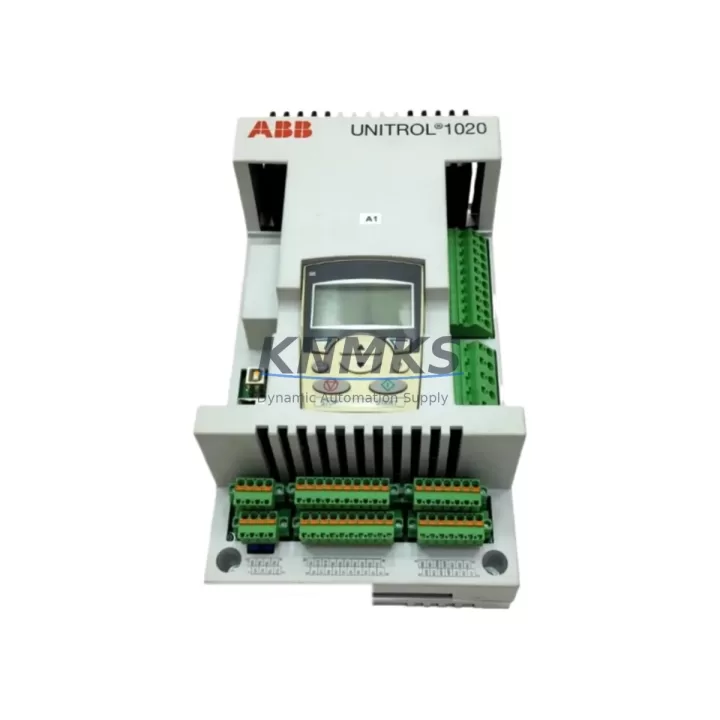
The ABB 3BHE030579R0003 is a migration-ready excitation control unit engineered for direct replacement of discontinued UNS0119 A-Z V3 modules in legacy ABB excitation and drive control systems. As industrial facilities face increasing pressure to modernize aging automation infrastructure, this unit provides a validated, drop-in upgrade path that minimizes engineering risk, reduces downtime, and extends the operational life of existing control cabinets without requiring full platform replacement.
Designed for compatibility with ABB’s UNITROL and Symphony Plus excitation platforms, the 3BHE030579R0003 supports seamless integration into existing backplane architectures. Engineers undertaking retrofit projects must verify several critical parameters before installation: confirm available power rail capacity on the existing power supply module (typically the PP D113 A101 or equivalent), inspect terminal block wiring assignments against the updated I/O map, and validate backplane slot addressing to avoid module address conflicts with adjacent I/O modules or communication cards already installed in the rack.
Program logic compatibility is a primary concern during any excitation unit replacement. The 3BHE030579R0003 retains functional parity with its predecessor, but site engineers should export and archive the existing control program from the legacy unit before removal. If the system runs on an AC800M controller platform, confirm that the firmware version loaded on the controller supports the updated module descriptor file (MDF) for this unit. Mismatched firmware versions are a common source of commissioning delays and should be resolved prior to scheduled maintenance windows.
HMI screen mappings linked to excitation status signals, fault codes, and setpoint references must be reviewed and updated where tag names or data types differ between the old and new module. Facilities using ABB’s Panel 800 or CP600 operator panels should coordinate HMI project updates in parallel with the hardware swap to avoid operator confusion during the transition period.
Communication link integrity is equally critical. Verify that PROFIBUS DP or Modbus RTU segment termination remains correct after module removal, and confirm that the replacement unit’s communication address matches the original configuration. Where the legacy system used a CI854 PROFIBUS interface module or a CI840 fieldbus adapter, no reconfiguration of the communication segment should be required, provided the module address is preserved.
Physical installation space should be confirmed before ordering. The 3BHE030579R0003 occupies a standard ABB S800 I/O-compatible slot footprint. Verify rack unit height clearance, DIN rail mounting depth, and cable routing space within the control cabinet. In retrofit scenarios where the original cabinet was designed for an older module generation, additional cable management hardware may be required to accommodate updated connector positions.
All units supplied by KNMKS are subject to pre-shipment functional testing, including power-on verification, communication handshake confirmation, and output signal integrity checks. Each unit ships with a support terms confirmed by quotation covering manufacturing defects and functional failures under normal operating conditions.
Migration Compatibility Table
| Parameter | Legacy Module (UNS0119 A-Z V3) | Replacement: 3BHE030579R0003 | Retrofit Notes |
|---|---|---|---|
| Backplane Interface | ABB S800 / UNITROL rack | ABB S800 / UNITROL rack | Direct slot-compatible; no rack modification required |
| Power Supply Requirement | 24 VDC, verify rail capacity | 24 VDC nominal | Confirm existing PSU headroom before installation |
| Communication Protocol | PROFIBUS DP / Modbus RTU | PROFIBUS DP / Modbus RTU | Preserve original module address; check segment termination |
| Terminal Wiring | Legacy terminal block layout | Updated connector positions possible | Cross-reference wiring diagram; label all conductors before removal |
| Firmware Compatibility | Legacy MDF version | Updated MDF required | Confirm AC800M firmware supports new MDF prior to commissioning |
| HMI Tag Mapping | Original tag set | Verify tag alignment | Update Panel 800 / CP600 project if tag names differ |
| Installation Footprint | Standard S800 slot | Standard S800 slot | Confirm DIN rail depth and cable routing clearance |
| Support terms | — | 12 Months | Covers manufacturing defects and functional failures |
Retrofit Planning for Existing Automation Systems
A successful retrofit begins with a structured pre-installation audit. Before removing the legacy UNS0119 module, document the existing rack layout, including the positions of all adjacent modules such as the ABB AI810 analog input module, DI810 digital input module, and any installed CI854 PROFIBUS interface cards. Photograph terminal block wiring and label each conductor with its corresponding signal tag before disconnection.
Power budget verification is a non-negotiable step. Calculate the total current draw of all modules on the shared 24 VDC rail, including the replacement 3BHE030579R0003, and confirm that the installed SD823 or SD831 power supply module can sustain the load with adequate margin. Undersized power supplies are a leading cause of intermittent faults in retrofitted control cabinets.
For systems that include TB820 ModuleBus modem modules or MB510 ModuleBus optical link modules, verify that the optical fiber connections and modem addressing remain undisturbed during the module swap. Any disruption to the ModuleBus segment can cause cascading communication faults across the entire I/O cluster.
Where the control system interfaces with a Panel 800 series HMI or a legacy Operator Panel OP516, coordinate the HMI project update with the hardware installation schedule. Uploading an updated HMI project during a planned maintenance window, rather than after the hardware swap, reduces the risk of operator interface gaps during the transition.
Signal isolation requirements should also be assessed. If the excitation unit interfaces with high-voltage field signals, confirm that appropriate signal isolators or galvanic barriers are installed between the field wiring and the module terminals. This is particularly important in petrochemical and power generation environments where ground loops and transient voltages can damage sensitive control electronics.
Downtime Control During System Migration
Minimizing production downtime during an excitation unit replacement requires disciplined pre-planning and a clear rollback procedure. Begin by scheduling the replacement during a planned maintenance window with sufficient time allocated for installation, commissioning, and functional verification — typically a minimum of four hours for an experienced team familiar with the ABB UNITROL platform.
Before powering down the control cabinet, export and securely store the current control program from the AC800M controller. Verify that the backup is readable and complete before proceeding. This backup serves as the rollback baseline if commissioning of the new module encounters unexpected issues.
During the physical swap, maintain continuity of any hardwired safety interlocks that bypass the PLC logic. Confirm with the site safety officer that all energy isolation procedures are followed and that field devices connected to the excitation unit are in a safe state before terminal disconnection.
After installation, power up the rack in stages: confirm 24 VDC rail stability first, then verify that the AC800M controller recognizes the new module and loads the correct MDF. Check communication link status on the CI854 or equivalent interface card before enabling excitation output. Conduct a full I/O check against the site’s loop test procedure before returning the system to automatic control.
KNMKS provides pre-shipment functional test reports for all units, which can be used to accelerate site acceptance testing and reduce the time required for commissioning verification. Units are available from stock for fast dispatch, supporting urgent replacement scenarios where extended downtime is not acceptable.
Retrofit Support FAQ
Q: Is the ABB 3BHE030579R0003 a direct replacement for the UNS0119 A-Z V3?
A: Yes. The 3BHE030579R0003 is the current migration-ready replacement for the discontinued UNS0119 A-Z V3 excitation control unit. It is slot-compatible with the existing ABB S800 and UNITROL rack architecture. Minor wiring and firmware verification steps are required before commissioning, as detailed in the compatibility table above.
Q: What firmware version is required on the AC800M controller to support this module?
A: The AC800M controller must be running a firmware version that supports the updated module descriptor file (MDF) for the 3BHE030579R0003. Confirm the required MDF version with your ABB system documentation or contact KNMKS technical support for guidance specific to your installed firmware baseline.
Q: Does KNMKS perform pre-shipment testing on this unit?
A: Yes. All units undergo pre-shipment functional testing including power-on verification, communication handshake confirmation, and output signal integrity checks. A test report is available upon request and can be used to support site acceptance testing and reduce commissioning time.
Q: What support terms coverage is provided?
A: Each ABB 3BHE030579R0003 supplied by KNMKS carries a support terms confirmed by quotation covering manufacturing defects and functional failures under normal operating conditions. Support requests are processed directly through KNMKS. Contact admin@knmks.com for support terms registration and support.
© 2026 KNMKS. All rights reserved.
Original Source: https://knmks.com
Contact: admin@knmks.com | +86 18359268345
Product Identification
- Brand / Ecosystem
-
ABB
ABB - Model / Series
-
3BHE030579R0003
AC800M Series - Product Family
- Other Components
- Availability Status
- Available on request after model and quantity confirmation
- Inquiry Type
- B2B RFQ, replacement inquiry and project spare-part request
- Pre-Quote Check
- Exact SKU, brand, series, quantity, nameplate photos and destination country are checked before quotation
System Path
Where this product fits in the KNMKS automation structure.
Specification & Inquiry Focus
- Component range
- Breakers, terminals and cabinet accessories
- Common needs
- Model, photo and installation requirement
- Project support
- Maintenance and mixed spare-part inquiry
Buyer Confirmation
Information KNMKS checks before replying.
- Exact model
- 3BHE030579R0003
- Brand / ecosystem
- ABB
- Product family
- Other Components
- Application note
- Replacement, maintenance, project build or spare-part list
- Useful photos
- Nameplate, installed unit, cabinet layout or connector side
- Delivery details
- Quantity, destination country and target schedule
Document Support
Files and notes can be confirmed during quotation.
- Product photos or nameplate confirmation when available
- Packing and delivery notes before quotation confirmation
- Support scope and delivery terms confirmed per inquiry
- Export document coordination for qualified B2B requests
Inquiry Support
- Mixed automation spare parts inquiry
- Cabinet component and accessory support
- Model identification from photos or labels
What to Send Us
- Brand and exact model number: ABB 3BHE030579R0003
- Quantity and required delivery time
- Application, replacement requirement or nameplate photo
- Destination country and shipping preference
RFQ Preparation
This is a product inquiry page built for RFQ communication.
Fast Model Check
Send this model to KNMKS for confirmation.
Include quantity, destination country and photos if this is a maintenance replacement. The inquiry will be saved with a reference number after submission.
Brand & Compatibility Note
KNMKS displays automation product information for well-known industrial brand ecosystems and compatible replacement references. Brand names are used for product identification and compatibility reference only; final availability and commercial terms are confirmed per quotation.
 Manufacturing
 Machine Tools
 Packaging
 Energy & Power
 PLCs & Controllers
 HMI & Displays
 Servo Systems
 Variable Frequency Drives