
Overview
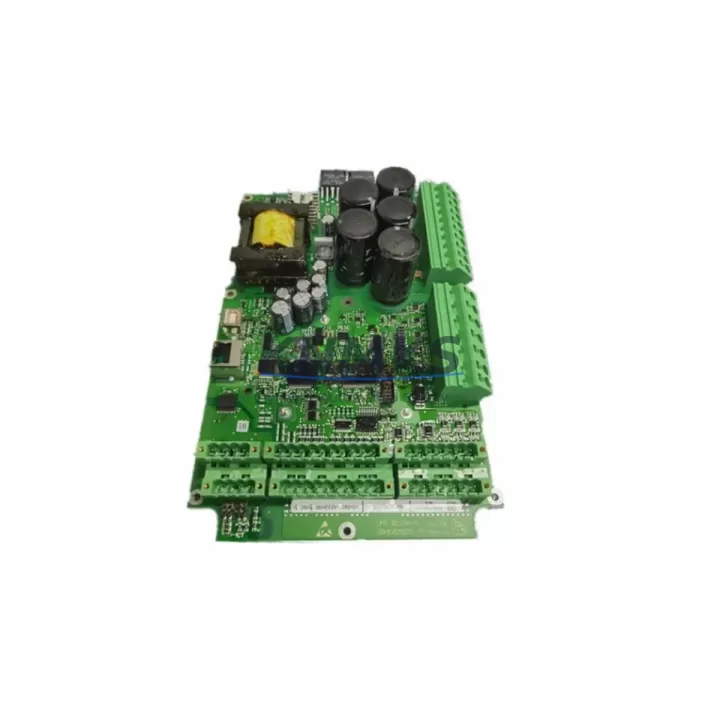
ABB 3BHE029153R0101 Migration-Ready DCS Board for Legacy Control Systems
The ABB 3BHE029153R0101 (variant: 0119A-P V101) is a processor and control board designed for the ABB AC800M distributed control system platform — one of the most widely deployed DCS architectures in power generation, oil & gas, pulp & paper, and chemical processing facilities. As ABB progressively phases out legacy hardware support for earlier AC800M revisions, maintenance engineers and automation managers face increasing pressure to source verified replacement boards that maintain full backward compatibility with existing rack configurations, I/O bus structures, and application software.
This unit is supplied as a migration-ready replacement, meaning it has been inspected, functionally tested under load conditions, and validated against the original ABB hardware specification prior to shipment. Each board undergoes pre-shipment testing covering power rail integrity, communication link verification, and firmware boot sequence confirmation. A support terms confirmed by quotation is included as standard, covering hardware defects and functional failures under normal operating conditions.
Migration Compatibility Table
| Parameter | Details |
|---|---|
| SKU / Part Number | 3BHE029153R0101 0119A-P V101 |
| Brand | ABB |
| Series / Platform | AC800M DCS |
| Product Type | DCS Control / Processor Board |
| Backplane Interface | AC800M standard module rack (S800 I/O bus compatible) |
| Communication Compatibility | PROFIBUS-DP, Modbus RTU/TCP, OPC DA/UA (via AC800M controller) |
| Power Supply Requirement | 24 VDC nominal (verify rack PSU capacity before installation) |
| Firmware Compatibility | Compatible with AC800M firmware revisions; verify Control Builder M version |
| Installation Form Factor | Standard AC800M module slot; confirm physical slot clearance in existing cabinet |
| Replacement Scope | Direct replacement for failed or end-of-life 3BHE029153R0101 boards |
| Pre-Shipment Testing | Yes — power, communication, and boot sequence verified |
| Support terms | 12 months from date of shipment |
| Origin | China (inspected and tested) |
| Dispatch | Global express shipping; typically 3–7 business days |
Retrofit Planning for Existing Automation Systems
Replacing the 3BHE029153R0101 board within an active AC800M control cabinet requires careful pre-work to avoid unplanned downtime and configuration loss. Before removing the existing board, engineers should export the full application program from ABB Control Builder M and confirm the project version is archived to a secure location. The AC800M controller — typically a PM861, PM864, or PM866 unit — must be placed in a safe state, and all connected S800 I/O modules should be verified as non-critical or placed in manual override where process safety permits.
Terminal wiring on the associated TB820 or TB840 termination boards does not require modification for a like-for-like board swap, but technicians should photograph and document all field wiring connections before proceeding. If the retrofit involves upgrading from an earlier board revision to the 0119A-P V101 variant, a firmware compatibility check against the installed Control Builder M version is essential — mismatched firmware can prevent the controller from recognizing the new module during the boot sequence.
For sites running redundant AC800M configurations, the standby controller should be confirmed healthy before initiating the swap on the primary unit. Communication links — including PROFIBUS-DP segments connected to remote I/O stations and any Modbus TCP links to SCADA or historian systems — should be monitored throughout the replacement process. If the control cabinet also houses an ABB CI854 or CI857 communication interface module, verify that fieldbus segment addressing is not disrupted during the board exchange.
Cabinet space is rarely a constraint for like-for-like replacements, but if the retrofit is part of a broader upgrade that introduces additional modules — such as an S800 I/O expansion unit or a redundant power supply module — rack slot availability and PSU load capacity must be recalculated. The AC800M rack PSU typically supports a defined maximum module load; adding modules without verifying headroom can cause intermittent resets or communication faults post-commissioning.
Downtime Control During System Migration
Minimizing control system downtime during a board replacement on a live AC800M platform requires a structured approach. The most effective strategy is to pre-stage the replacement 3BHE029153R0101 board at the site before scheduling the maintenance window, confirming its physical condition and firmware label against the installed unit. This eliminates the risk of discovering a mismatch during the outage window itself.
Where process conditions allow, a cold-standby swap is preferred: the controller is shut down in a controlled sequence, the board is exchanged, and the system is restarted with the previously archived application loaded via Control Builder M. For redundant AC800M systems, a bumpless switchover to the standby controller can be executed first, allowing the primary board to be replaced while the process continues under standby control — effectively reducing the impact window to the time required for the primary controller to resynchronize after restart.
Field technicians should confirm that HMI faceplates and alarm displays connected to the AC800M via OPC DA or OPC UA remain stable during the switchover. Any HMI screens that reference controller-specific tags should be validated post-swap to ensure data continuity. Communication links to upstream SCADA systems should be monitored for reconnection latency, particularly on Modbus TCP connections that may require a session re-establishment after the controller restarts. Keeping the maintenance window to under two hours is achievable with proper pre-staging, archived programs, and a verified replacement board on hand.
Retrofit Support FAQ
Q1: Is the 3BHE029153R0101 0119A-P V101 a direct drop-in replacement for earlier 3BHE029153R0101 revisions?
In most cases, yes. The 0119A-P V101 variant is functionally equivalent to earlier revisions of the same part number for standard AC800M rack installations. However, firmware version compatibility with your installed Control Builder M release should be confirmed before installation, particularly on systems running older software baselines.
Q2: What commissioning steps are required after installing the replacement board?
After physical installation, reload the archived application program via Control Builder M and perform a full I/O scan to confirm all S800 I/O modules are recognized. Verify PROFIBUS-DP segment status, check communication link health to any CI854 or CI857 interface modules, and confirm HMI tag data is updating correctly before returning the system to automatic control.
Q3: How is the board tested before shipment, and what does the support terms confirmed by quotation cover?
Each 3BHE029153R0101 unit undergoes pre-shipment functional testing covering power rail verification, communication interface checks, and firmware boot sequence validation. The support terms confirmed by quotation cover hardware defects and functional failures under normal operating conditions from the date of shipment. Units that fail on arrival or develop faults within the confirmed support period are eligible for replacement or refund.
Q4: What is the typical lead time, and is stock available for emergency orders?
Stock is maintained for immediate dispatch. Standard global express shipping delivers within 3–7 business days depending on destination. For emergency replacement requirements, expedited dispatch options are available — contact the sales team directly to confirm current stock levels and fastest available routing.
© 2026 KNMKS. All rights reserved.
Original Source: https://knmks.com
Contact: admin@knmks.com | +86 18359268345
Product Identification
- Brand / Ecosystem
-
ABB
ABB - Model / Series
-
3BHE029153R0101 0119A-P V101
AC800M Series - Product Family
- Other Components
- Availability Status
- Available on request after model and quantity confirmation
- Inquiry Type
- B2B RFQ, replacement inquiry and project spare-part request
- Pre-Quote Check
- Exact SKU, brand, series, quantity, nameplate photos and destination country are checked before quotation
System Path
Where this product fits in the KNMKS automation structure.
Specification & Inquiry Focus
- Component range
- Breakers, terminals and cabinet accessories
- Common needs
- Model, photo and installation requirement
- Project support
- Maintenance and mixed spare-part inquiry
Buyer Confirmation
Information KNMKS checks before replying.
- Exact model
- 3BHE029153R0101 0119A-P V101
- Brand / ecosystem
- ABB
- Product family
- Other Components
- Application note
- Replacement, maintenance, project build or spare-part list
- Useful photos
- Nameplate, installed unit, cabinet layout or connector side
- Delivery details
- Quantity, destination country and target schedule
Document Support
Files and notes can be confirmed during quotation.
- Product photos or nameplate confirmation when available
- Packing and delivery notes before quotation confirmation
- Support scope and delivery terms confirmed per inquiry
- Export document coordination for qualified B2B requests
Inquiry Support
- Mixed automation spare parts inquiry
- Cabinet component and accessory support
- Model identification from photos or labels
What to Send Us
- Brand and exact model number: ABB 3BHE029153R0101 0119A-P V101
- Quantity and required delivery time
- Application, replacement requirement or nameplate photo
- Destination country and shipping preference
RFQ Preparation
This is a product inquiry page built for RFQ communication.
Fast Model Check
Send this model to KNMKS for confirmation.
Include quantity, destination country and photos if this is a maintenance replacement. The inquiry will be saved with a reference number after submission.
Brand & Compatibility Note
KNMKS displays automation product information for well-known industrial brand ecosystems and compatible replacement references. Brand names are used for product identification and compatibility reference only; final availability and commercial terms are confirmed per quotation.
 Manufacturing
 Machine Tools
 Packaging
 Energy & Power
 PLCs & Controllers
 HMI & Displays
 Servo Systems
 Variable Frequency Drives