
Overview
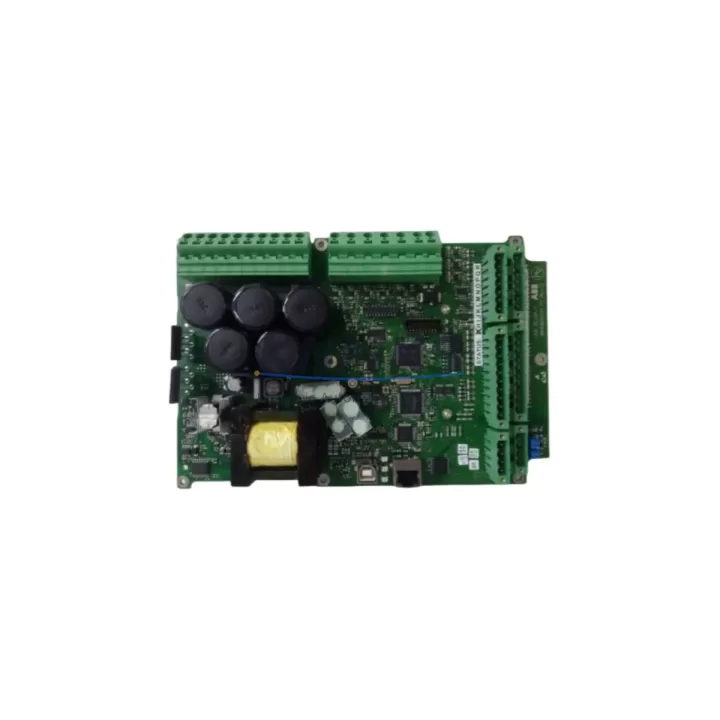
ABB 3BHE016011R0006 UNS0118A-Z Spare Part for AC800M: Maintenance-Proven Component for Factory Uptime
The ABB 3BHE016011R0006 (UNS0118A-Z) is a critical control module designed for ABB’s AC800M distributed control system platform — one of the most widely deployed DCS architectures in power generation, oil & gas, chemical processing, and heavy manufacturing. For maintenance engineers managing aging AC800M cabinets, this module represents a high-priority spare: its failure directly impacts controller redundancy, I/O communication integrity, and process loop stability. Sourced as an original ABB component, this unit is pre-tested, function-verified, and shipped with a support terms confirmed by quotation to support both emergency replacement and planned maintenance inventory programs.
Whether you are responding to an unplanned trip, executing a scheduled turnaround, or building a resilient spare parts buffer for a multi-year service contract, the 3BHE016011R0006 UNS0118A-Z delivers the compatibility assurance and supply reliability that industrial procurement teams require. Each unit undergoes outgoing inspection prior to dispatch, with documentation available upon request to support site acceptance procedures.
Spare Maintenance Table
| Parameter | Specification |
|---|---|
| Part Number | 3BHE016011R0006 |
| Variant / Suffix | UNS0118A-Z |
| Brand | ABB |
| Compatible Platform | AC800M DCS (PM861, PM864, PM866 controller family) |
| Module Series | UNS0118A Series |
| Product Type | DCS Control Module / Processor Board |
| Origin | Germany (ABB Automation) |
| Operating Voltage | 24 VDC (backplane supplied) |
| Communication Interface | MMS / IEC 61850 / Modulebus (platform-dependent) |
| Operating Temperature | 0°C to +55°C |
| Humidity | 5–95% RH, non-condensing |
| Mounting | DIN rail / AC800M backplane slot |
| Compatibility Verification | Confirmed against AC800M firmware baseline; consult revision notes for specific firmware versions |
| Condition | Original, tested, function-verified |
| Support terms | 12 Months from date of shipment |
| Lead Time | availability confirmed by RFQ — ships within 1–3 business days |
| Application Environment | Power plants, petrochemical, pulp & paper, water treatment, heavy manufacturing |
| Maintenance Category | Critical spare — recommend minimum 1 unit on-site buffer |
Maintenance Planning for Continuous Operation
When the 3BHE016011R0006 UNS0118A-Z is identified as a fault source or flagged during a preventive inspection cycle, experienced maintenance engineers know that a module-level replacement rarely occurs in isolation. The AC800M control cabinet is an integrated system, and restoring full operational confidence requires a systematic check of adjacent components in the same electrical and communication circuit.
Begin with the AC800M backplane and rack assembly: inspect connector pins for oxidation, mechanical damage, or thermal stress marks that may have contributed to the module fault. A compromised backplane slot can damage replacement modules if not addressed before reinsertion. Next, verify the PM861 or PM864 processor module — the CPU that communicates directly with the UNS0118A-Z — is operating within normal parameters and that its firmware version is compatible with the replacement unit’s hardware revision.
Check the 24 VDC power supply module (such as the ABB SD831 or SD832 series) feeding the controller rack. Voltage ripple or transient spikes are a common root cause of module degradation in long-running installations. If the power supply is original equipment from the initial plant commissioning and has not been replaced within the last 8–10 years, treat it as a concurrent maintenance item.
For sites using S800 I/O modules (AI810, AO810, DI810, DO810) connected via Modulebus to the AC800M controller, validate that all I/O fieldbus segments are communicating cleanly after the module swap. A controller module fault can sometimes mask underlying I/O communication errors that only surface once the primary fault is cleared. Similarly, inspect TB820 Modulebus Modem or equivalent communication interface modules for firmware alignment and physical connector integrity.
If the installation includes CI854 or CI857 PROFIBUS/PROFINET communication interface modules, confirm that the fieldbus master configuration is intact and that no address conflicts were introduced during the fault event. Communication module misalignment after a controller replacement is a frequent source of extended downtime that can be avoided with a pre-restoration checklist.
Finally, review the cabinet-level fusing and surge protection: check miniature circuit breakers and fuse holders on the 24 VDC distribution rail, and inspect any signal isolators or barriers on analog input channels for drift or damage. Documenting these checks as part of your site replacement workflow creates an auditable maintenance record and reduces the risk of repeat failures within the same maintenance cycle.
Site Replacement Workflow
Step 1 — Fault Isolation: Use the AC800M Control Builder or System 800xA diagnostic tools to confirm the 3BHE016011R0006 UNS0118A-Z as the fault source. Record the fault code, timestamp, and any associated I/O or communication alarms before powering down the affected rack segment.
Step 2 — Safe Removal: Follow ABB’s lockout/tagout procedure for the AC800M rack. Remove the faulty module by releasing the front-panel locking lever and sliding the card out along the backplane guides. Avoid touching the backplane connector pins directly.
Step 3 — Compatibility Confirmation: Before inserting the replacement unit, verify that the hardware revision and firmware baseline of the 3BHE016011R0006 UNS0118A-Z match the system’s current configuration file. If a firmware update is required, perform it offline using ABB’s recommended tool chain prior to installation.
Step 4 — Installation and Restart: Insert the replacement module, secure the locking lever, and restore power to the rack segment. Monitor the System 800xA or Control Builder status display for module initialization confirmation. Allow a full communication handshake cycle before releasing the process loop back to automatic control.
Step 5 — Post-Replacement Validation: Run a loop check on all I/O channels associated with the replaced module. Confirm that all fieldbus segments, redundancy links, and HMI data points are updating correctly. Log the replacement in the site CMMS with the new module’s serial number and support terms start date.
This workflow is designed to minimize mean time to repair (MTTR) and ensure that the restored system meets the same reliability standard as the original installation — without requiring a full system restart or extended process interruption.
Spare Parts Support FAQ
Q1: Is the 3BHE016011R0006 UNS0118A-Z compatible with all AC800M controller revisions?
The UNS0118A-Z suffix designates a specific hardware revision within the 3BHE016011R0006 family. Compatibility with your specific AC800M firmware version should be confirmed against ABB’s hardware/firmware compatibility matrix. In most cases, this module is interchangeable across PM861, PM864, and PM866 controller generations, but we recommend sharing your system’s current firmware baseline with our technical team before ordering if you have any revision-specific concerns.
Q2: What testing is performed before shipment?
Each 3BHE016011R0006 UNS0118A-Z unit undergoes a function verification test prior to dispatch, including power-on self-test confirmation and communication interface check. Units that do not pass outgoing inspection are not shipped. A test report can be provided upon request for sites with incoming inspection requirements.
Q3: What does the support terms confirmed by quotation cover, and how is a claim processed?
The support terms confirmed by quotation cover manufacturing defects and functional failures under normal operating conditions from the date of shipment. It does not cover damage resulting from incorrect installation, overvoltage events, or physical mishandling. To initiate a support terms claim, contact admin@knmks.com with the order reference, serial number, and a description of the fault. Replacement or repair will be arranged within the confirmed support period without additional charge.
Q4: Can you support long-term or blanket order arrangements for this part?
Yes. For maintenance programs requiring guaranteed supply over a 12–36 month horizon, KNMKS offers blanket order arrangements with reserved stock allocation. This is particularly relevant for sites managing multiple AC800M cabinets or operating under a long-term service agreement where the 3BHE016011R0006 UNS0118A-Z is a recurring maintenance item. Contact our team to discuss volume pricing and supply commitment terms.
© 2026 KNMKS. All rights reserved.
Original Source: https://knmks.com
Contact: admin@knmks.com | +86 18359268345
Product Identification
- Brand / Ecosystem
-
ABB
ABB - Model / Series
-
3BHE016011R0006 UNS0118A-Z
AC800M Series - Product Family
- PLCs & Controllers
- Availability Status
- Available on request after model and quantity confirmation
- Inquiry Type
- B2B RFQ, replacement inquiry and project spare-part request
- Pre-Quote Check
- Exact SKU, brand, series, quantity, nameplate photos and destination country are checked before quotation
System Path
Where this product fits in the KNMKS automation structure.
Specification & Inquiry Focus
- Control platform
- PLC, PAC and modular controllers
- Common needs
- CPU, rack, power and I/O expansion
- Project support
- Replacement, cabinet build and maintenance
Buyer Confirmation
Information KNMKS checks before replying.
- Exact model
- 3BHE016011R0006 UNS0118A-Z
- Brand / ecosystem
- ABB
- Product family
- PLCs & Controllers
- Application note
- Replacement, maintenance, project build or spare-part list
- Useful photos
- Nameplate, installed unit, cabinet layout or connector side
- Delivery details
- Quantity, destination country and target schedule
Document Support
Files and notes can be confirmed during quotation.
- Product photos or nameplate confirmation when available
- Packing and delivery notes before quotation confirmation
- Support scope and delivery terms confirmed per inquiry
- Export document coordination for qualified B2B requests
Inquiry Support
- Model cross-checking before quotation
- CPU, power, rack and expansion module matching
- Support for replacement and project inquiry
What to Send Us
- Brand and exact model number: ABB 3BHE016011R0006 UNS0118A-Z
- Quantity and required delivery time
- Application, replacement requirement or nameplate photo
- Destination country and shipping preference
RFQ Preparation
This is a product inquiry page built for RFQ communication.
Fast Model Check
Send this model to KNMKS for confirmation.
Include quantity, destination country and photos if this is a maintenance replacement. The inquiry will be saved with a reference number after submission.
Brand & Compatibility Note
KNMKS displays automation product information for well-known industrial brand ecosystems and compatible replacement references. Brand names are used for product identification and compatibility reference only; final availability and commercial terms are confirmed per quotation.
 Manufacturing
 Machine Tools
 Packaging
 Energy & Power



 HMI & Displays
 Servo Systems
 Variable Frequency Drives
 Sensors