
Overview
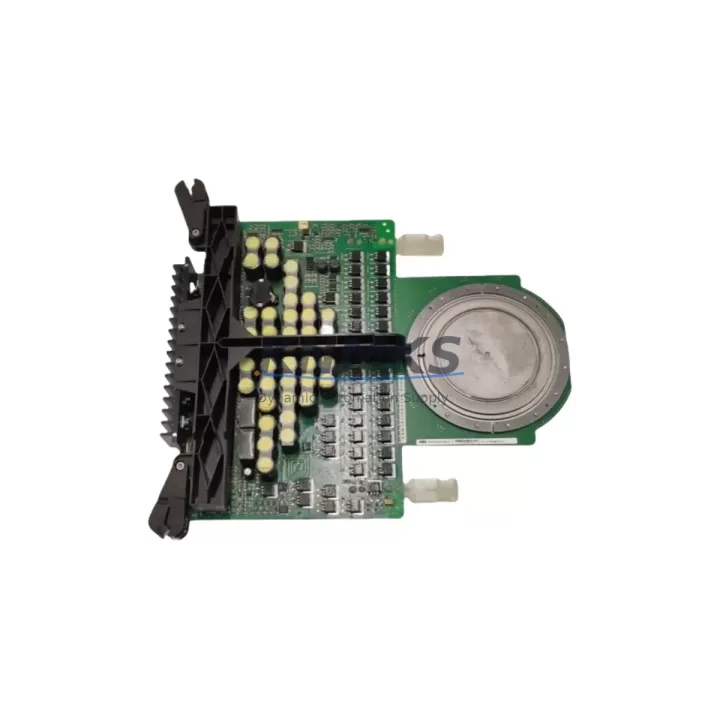
ABB 3BHB011317R0001 Maintenance-Proven Spare Part for Factory Uptime
The ABB 3BHB011317R0001 is a fieldbus communication module engineered for the AC800M controller platform and System 800xA Distributed Control System (DCS). In process-critical environments — from oil & gas separation trains to chemical batch reactors and power generation control rooms — this module serves as the backbone of real-time fieldbus communication between the controller and field instrumentation. When this component fails or degrades, the consequences extend far beyond a single I/O point: entire control loops, safety interlocks, and HART/PROFIBUS device diagnostics can be disrupted simultaneously. Stocking a verified replacement unit is not optional for facilities running continuous or semi-continuous processes.
Maintenance engineers who have worked with the AC800M architecture understand that the 3BHB011317R0001 sits at a critical junction in the control cabinet. Its role in managing fieldbus segment traffic means that any latency, CRC error accumulation, or hardware fault directly impacts loop scan times and alarm response. Procurement engineers sourcing this module should prioritize units that have been powered-on tested against known-good AC800M hardware, not simply visually inspected or relabeled surplus stock.
Spare Maintenance Table
| Field | Details |
|---|---|
| SKU / Part Number | 3BHB011317R0001 |
| Brand | ABB |
| Series / Platform | AC800M / System 800xA DCS |
| Product Type | DCS Fieldbus Communication Module |
| Compatible Controllers | AC800M PM860, PM861, PM864, PM866 series |
| Fieldbus Protocol | PROFIBUS DP / HART (per system configuration) |
| Mounting | DIN rail / backplane slot — AC800M module rack |
| Operating Voltage | 24 VDC (supplied via backplane) |
| Operating Temperature | 0°C to +55°C (storage: -25°C to +70°C) |
| Origin | Sweden (ABB Automation Products) |
| Weight | Approx. 300 g |
| Application Environment | Industrial DCS cabinets, process control rooms, hazardous area marshalling panels (with appropriate barriers) |
| Maintenance Recommendation | Inspect connector pins and backplane contacts every 12 months; replace if CRC error rate exceeds threshold or module fails self-diagnostic |
| Support terms | 12 Months — covers manufacturing defects and functional failure under normal operating conditions |
| Pre-shipment Testing | Powered-on functional test performed before dispatch |
| Availability | availability confirmed by RFQ — ready for immediate dispatch |
Maintenance Planning for Continuous Operation
Replacing the 3BHB011317R0001 in an AC800M cabinet is rarely an isolated task. Experienced maintenance engineers treat a fieldbus module swap as a trigger for a broader cabinet inspection, because the conditions that degrade a communication module — vibration, thermal cycling, power quality issues, and connector oxidation — affect every component sharing the same backplane and power rail.
Begin with the PM860 or PM864 controller module itself: verify firmware version compatibility with the replacement 3BHB011317R0001 and confirm that the controller’s CPU load and memory utilization are within normal bounds before re-commissioning the fieldbus segment. A controller running at high CPU utilization will mask communication errors that only become apparent under full process load.
Next, inspect the AC800M backplane (TB820V2 or equivalent). Backplane connector wear is a common root cause of intermittent fieldbus faults that are incorrectly attributed to the communication module. Clean the backplane slot contacts with approved contact cleaner and verify that module retention clips are fully engaged.
The SD802 or SD803 power supply module feeding the AC800M rack should be load-tested during the maintenance window. A power supply operating near its rated output with degraded capacitors will produce voltage ripple that manifests as sporadic fieldbus communication errors — symptoms that are easily confused with a faulty 3BHB011317R0001.
On the fieldbus segment itself, check the PROFIBUS DP termination resistors at both ends of the segment cable. Missing or degraded termination is one of the most frequent causes of fieldbus instability in aging installations. While the cabinet is open, verify the CI854 or CI857 fieldbus interface module (if present in a parallel segment) for firmware currency and connector integrity.
For installations that include HART multiplexers or signal isolators on the same marshalling panel, confirm that the isolator power supplies are within specification. Signal isolators from the ABB HART infrastructure — or equivalent third-party units — can introduce ground loops that degrade fieldbus signal quality if their power commons are not properly separated.
Finally, review the fuse and circuit breaker ratings for the 24 VDC distribution feeding the module rack. Undersized or aging fuses that have experienced nuisance trips may have degraded contact resistance, introducing voltage drop that affects module initialization. Replace any fuse that shows discoloration or has tripped more than twice without a confirmed overload cause.
Site Replacement Workflow
Step 1 — Pre-replacement verification: Download the current AC800M configuration backup from Control Builder M before touching any hardware. Confirm the 3BHB011317R0001 firmware version required by your system version and verify that the replacement unit matches. Do not assume all 3BHB011317R0001 units are firmware-identical — ABB has released hardware revisions over the product lifecycle.
Step 2 — Safe isolation: Place the affected fieldbus segment in manual or fallback mode at the DCS operator station. Notify the process team and obtain a permit-to-work if required by site safety procedures. De-energize the module slot using the backplane power isolation procedure documented in the AC800M hardware manual.
Step 3 — Physical replacement: Remove the faulty 3BHB011317R0001 by releasing the front locking lever and sliding the module straight out of the backplane slot. Inspect the backplane connector for bent pins or debris before inserting the replacement unit. Seat the new module firmly until the locking lever engages with an audible click.
Step 4 — Re-commissioning: Re-energize the slot and observe the module status LEDs through the initialization sequence. A healthy 3BHB011317R0001 will complete self-diagnostics within 30–60 seconds and report a green RUN status. Use Control Builder M to verify that all fieldbus devices on the segment are communicating and that no new alarms have been generated.
Step 5 — Documentation: Record the replacement in the site maintenance management system (CMMS), including the serial number of the removed module, the replacement unit’s serial number, and the date. Retain the removed module for failure analysis if the root cause has not been confirmed.
This workflow minimizes process downtime, maintains system compatibility, and provides a clear audit trail — critical for facilities operating under IEC 61511 functional safety requirements or ISO 55001 asset management frameworks.
Spare Parts Support FAQ
Q1: Is the 3BHB011317R0001 a direct drop-in replacement for all AC800M configurations?
The 3BHB011317R0001 is designed for the AC800M platform, but compatibility depends on your specific controller firmware version and System 800xA software release. Before ordering, confirm your AC800M hardware generation (S100, S800, or S900 I/O family) and the fieldbus protocol configured on the target segment. Our technical team can assist with compatibility verification based on your system version string.
Q2: What pre-shipment testing is performed on each unit?
Every 3BHB011317R0001 unit is powered on and functionally tested against AC800M hardware before dispatch. We verify module initialization, self-diagnostic completion, and LED status indication. Units that fail any stage of testing are quarantined and not shipped. A test report is available on request for critical installations.
Q3: What does the support terms confirmed by quotation cover, and how is a claim processed?
The support terms confirmed by quotation cover manufacturing defects and functional failure under normal operating conditions from the date of shipment. It does not cover damage caused by incorrect installation, overvoltage events, or physical impact. To initiate a support terms claim, contact admin@knmks.com with your order number, a description of the failure mode, and photographs of the installed unit. We will arrange return shipping and provide a replacement or refund within the agreed lead time.
Q4: Can you support long-term or blanket purchase orders for this module?
Yes. For facilities managing multi-year maintenance contracts or planning annual shutdown spares, we support blanket purchase orders with scheduled release dates. This approach locks in pricing, guarantees stock reservation, and eliminates the risk of sourcing delays during peak demand periods. Contact admin@knmks.com or call +86 18359268345 to discuss volume and scheduling requirements.
© 2026 KNMKS. All rights reserved.
Original Source: https://knmks.com
Contact: admin@knmks.com | +86 18359268345
Product Identification
- Brand / Ecosystem
-
ABB
ABB - Model / Series
-
3BHB011317R0001
AC800M Series - Product Family
- PLCs & Controllers
- Availability Status
- Available on request after model and quantity confirmation
- Inquiry Type
- B2B RFQ, replacement inquiry and project spare-part request
- Pre-Quote Check
- Exact SKU, brand, series, quantity, nameplate photos and destination country are checked before quotation
System Path
Where this product fits in the KNMKS automation structure.
Specification & Inquiry Focus
- Control platform
- PLC, PAC and modular controllers
- Common needs
- CPU, rack, power and I/O expansion
- Project support
- Replacement, cabinet build and maintenance
Buyer Confirmation
Information KNMKS checks before replying.
- Exact model
- 3BHB011317R0001
- Brand / ecosystem
- ABB
- Product family
- PLCs & Controllers
- Application note
- Replacement, maintenance, project build or spare-part list
- Useful photos
- Nameplate, installed unit, cabinet layout or connector side
- Delivery details
- Quantity, destination country and target schedule
Document Support
Files and notes can be confirmed during quotation.
- Product photos or nameplate confirmation when available
- Packing and delivery notes before quotation confirmation
- Support scope and delivery terms confirmed per inquiry
- Export document coordination for qualified B2B requests
Inquiry Support
- Model cross-checking before quotation
- CPU, power, rack and expansion module matching
- Support for replacement and project inquiry
What to Send Us
- Brand and exact model number: ABB 3BHB011317R0001
- Quantity and required delivery time
- Application, replacement requirement or nameplate photo
- Destination country and shipping preference
RFQ Preparation
This is a product inquiry page built for RFQ communication.
Fast Model Check
Send this model to KNMKS for confirmation.
Include quantity, destination country and photos if this is a maintenance replacement. The inquiry will be saved with a reference number after submission.
Brand & Compatibility Note
KNMKS displays automation product information for well-known industrial brand ecosystems and compatible replacement references. Brand names are used for product identification and compatibility reference only; final availability and commercial terms are confirmed per quotation.
 Manufacturing
 Machine Tools
 Packaging
 Energy & Power



 HMI & Displays
 Servo Systems
 Variable Frequency Drives
 Sensors