
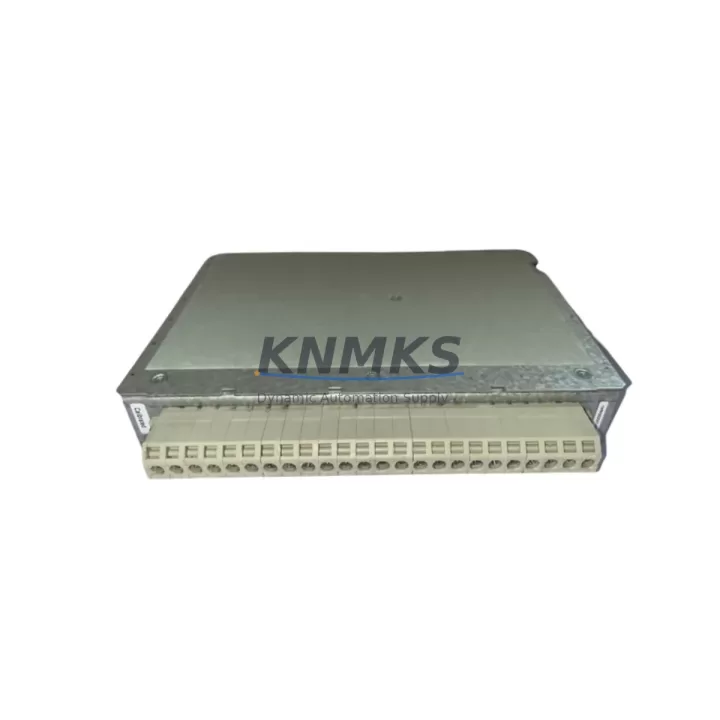
Overview
ABB 1MRK002247-ARr01 Migration-Ready TRM for Legacy Control Systems
The ABB 1MRK002247-ARr01 Transformer Monitoring Module (TRM) is an engineering-grade retrofit solution purpose-built for aging RET-series protection relay installations. As legacy ABB RET 521, RET 523, and RET 670 platforms approach end-of-life, plant engineers and system integrators face mounting pressure to extend operational continuity without triggering full substation redesigns. The 1MRK002247-ARr01 addresses this challenge directly: it slots into existing RET-series backplane positions, preserves original terminal wiring layouts, and maintains IEC 61850 GOOSE messaging compatibility — dramatically reducing the scope of engineering work required during a planned outage window.
Sourced directly from ABB-authorized distribution channels and subject to full factory acceptance testing (FAT) prior to shipment, each unit is backed by a support terms confirmed by quotation covering manufacturing defects and functional performance. Stock is maintained across regional hubs in Europe, North America, and Asia-Pacific to support urgent spare-parts requirements and scheduled maintenance cycles alike.
Migration Compatibility Table
| Parameter | Legacy Reference | 1MRK002247-ARr01 Specification | Migration Note |
|---|---|---|---|
| Compatible Platforms | RET 521, RET 523, RET 670 | RET Series (all variants) | Verify backplane slot assignment before installation |
| Communication Protocol | IEC 61850 Ed.1 / GOOSE | IEC 61850 Ed.1 & Ed.2 compatible | Confirm SCD file version with SCADA integrator |
| Terminal Wiring | X1–X4 terminal blocks (legacy layout) | Identical terminal mapping | No rewiring required; verify torque spec (0.5 Nm) |
| Power Supply Input | 24–250 V DC / 100–240 V AC | 24–250 V DC / 100–240 V AC | Confirm auxiliary supply capacity at panel level |
| Backplane Interface | RET-series optical backplane | Optical backplane (same connector) | Inspect backplane connector for oxidation before swap |
| Module Address | Slot-based addressing | Slot-based (auto-detected) | Re-confirm module address in PCM600 after insertion |
| Firmware Compatibility | RET firmware ≥ 3.0 | Compatible with firmware 3.0–5.x | Upgrade relay firmware if below 3.0 before replacement |
| HMI / SCADA Screens | PCM600 / MicroSCADA Pro | No HMI screen rebuild required | Validate signal mapping in MicroSCADA after commissioning |
| Installation Footprint | Standard RET module bay | Identical form factor | No panel cutout modification needed |
| Support terms | — | 12 months from shipment date | Covers manufacturing defects and functional performance |
Retrofit Planning for Existing Automation Systems
A successful TRM retrofit begins well before the maintenance window opens. Engineers replacing the 1MRK002247-ARr01 in an active substation environment must account for the full scope of interdependent components that share the same protection panel or control cabinet. In a typical RET-series installation, the TRM operates alongside the RET 670 main protection relay, drawing auxiliary power from a shared ABB PSTX DC/DC power supply module mounted in the same rack. Before the swap, confirm that the panel’s auxiliary supply rail can sustain the combined inrush current of the replacement module plus any co-located I/O expansion cards.
Terminal block continuity is a frequent source of commissioning delays. The 1MRK002247-ARr01 uses the same X1–X4 terminal layout as its predecessors, but field teams should photograph and document all existing wiring before disconnection — particularly CT and VT secondary circuits, which must never be left open-circuited. If the installation includes an ABB SRIO 8 binary I/O module sharing the same backplane, verify that its slot address does not conflict with the replacement TRM’s auto-detected address after reinsertion.
Communication link integrity is equally critical. The 1MRK002247-ARr01 supports IEC 61850 GOOSE messaging over the station bus. If the substation LAN connects to a Hirschmann RS20 managed Ethernet switch or equivalent, confirm that VLAN configurations and GOOSE multicast filtering rules remain unchanged after the module swap. For sites running MicroSCADA Pro DS as the SCADA front-end, re-validate all analog and binary signal mappings in the SCD file before returning the bay to service.
Where the retrofit scope extends to upgrading the entire protection bay, the 1MRK002247-ARr01 is commonly paired with the ABB REF 615 feeder protection relay as a complementary upgrade path, allowing engineers to modernize transformer and feeder protection in a single planned outage. For installations requiring additional analog input channels, the ABB AI801 analog input module can be integrated into the same control cabinet without structural modification, provided the backplane has available slots.
Finally, confirm that the engineering workstation running PCM600 (Protection and Control IED Manager) has the correct application template loaded for the 1MRK002247-ARr01 before the maintenance window begins. Downloading an incorrect application template is one of the most common causes of extended commissioning time during TRM replacements.
Downtime Control During System Migration
Minimizing unplanned downtime during a TRM replacement requires a structured pre-outage checklist and a clear rollback plan. Begin by exporting the full PCM600 application configuration from the existing relay to a backup file — this preserves all protection settings, interlocking logic, and GOOSE subscriber/publisher relationships. If the original relay firmware is below version 3.0, schedule the firmware upgrade as a separate, earlier maintenance event rather than combining it with the module swap, as firmware upgrades carry their own commissioning risk.
During the physical swap, keep the outage window focused: disconnect auxiliary power, remove the legacy TRM, insert the 1MRK002247-ARr01, restore power, and immediately verify that the module is recognized by the backplane before proceeding to software commissioning. A module that fails to appear in PCM600’s hardware scan within 60 seconds of power-up typically indicates a backplane connector seating issue — reseat and retry before escalating.
For sites where continuous protection coverage is contractually required, consider deploying a temporary portable protection relay on the transformer secondary during the swap window. This approach, while operationally complex, eliminates the risk of an unprotected transformer interval and is increasingly standard practice in high-availability substation environments.
Post-swap, run a full functional test sequence: inject test currents via a relay test set, verify GOOSE message transmission on the station bus, confirm analog measurement accuracy against a calibrated reference, and validate all binary output contacts before closing the bay. Document all test results and retain them as part of the asset’s maintenance record. Each 1MRK002247-ARr01 unit shipped by KNMKS includes a factory test report confirming pre-shipment functional verification.
Retrofit Support FAQ
Q1: Is the 1MRK002247-ARr01 a direct drop-in replacement for the original TRM in RET 521 and RET 523 installations?
Yes. The 1MRK002247-ARr01 shares the same physical form factor, terminal wiring layout, and backplane connector as the original TRM modules used in RET 521 and RET 523 platforms. No panel modifications or rewiring are required. Firmware version on the host relay should be ≥ 3.0 for full compatibility.
Q2: What commissioning steps are required after installation?
After physical insertion, reconnect auxiliary power and confirm the module appears in PCM600’s hardware inventory. Download the saved application template, verify all protection settings, run a GOOSE communication test on the station bus, and perform a functional injection test using a relay test set. Total commissioning time for an experienced engineer is typically 2–4 hours.
Q3: Does KNMKS provide pre-shipment testing, and what does the support terms confirmed by quotation cover?
Yes. Every 1MRK002247-ARr01 unit undergoes factory acceptance testing (FAT) before shipment, and a test report is included with each delivery. The support terms confirmed by quotation cover manufacturing defects and functional performance failures under normal operating conditions. It does not cover damage resulting from incorrect installation, overvoltage events, or unauthorized firmware modifications.
Q4: What is the typical lead time, and is stock available for urgent requirements?
KNMKS maintains buffer stock of the 1MRK002247-ARr01 across regional distribution hubs to support both planned maintenance schedules and emergency spare-parts requests. Standard orders ship within 3–5 business days. For urgent requirements, expedited shipping options are available — contact the sales team directly to confirm current stock levels and lead times.
© 2026 KNMKS. All rights reserved.
Original Source: https://knmks.com
Contact: admin@knmks.com | +86 18359268345
Product Identification
- Brand / Ecosystem
-
ABB
ABB - Model / Series
-
1MRK002247-ARr01
Legacy Series - Product Family
- Other Components
- Availability Status
- Available on request after model and quantity confirmation
- Inquiry Type
- B2B RFQ, replacement inquiry and project spare-part request
- Pre-Quote Check
- Exact SKU, brand, series, quantity, nameplate photos and destination country are checked before quotation
System Path
Where this product fits in the KNMKS automation structure.
Specification & Inquiry Focus
- Component range
- Breakers, terminals and cabinet accessories
- Common needs
- Model, photo and installation requirement
- Project support
- Maintenance and mixed spare-part inquiry
Buyer Confirmation
Information KNMKS checks before replying.
- Exact model
- 1MRK002247-ARr01
- Brand / ecosystem
- ABB
- Product family
- Other Components
- Application note
- Replacement, maintenance, project build or spare-part list
- Useful photos
- Nameplate, installed unit, cabinet layout or connector side
- Delivery details
- Quantity, destination country and target schedule
Document Support
Files and notes can be confirmed during quotation.
- Product photos or nameplate confirmation when available
- Packing and delivery notes before quotation confirmation
- Support scope and delivery terms confirmed per inquiry
- Export document coordination for qualified B2B requests
Inquiry Support
- Mixed automation spare parts inquiry
- Cabinet component and accessory support
- Model identification from photos or labels
What to Send Us
- Brand and exact model number: ABB 1MRK002247-ARr01
- Quantity and required delivery time
- Application, replacement requirement or nameplate photo
- Destination country and shipping preference
RFQ Preparation
This is a product inquiry page built for RFQ communication.
Fast Model Check
Send this model to KNMKS for confirmation.
Include quantity, destination country and photos if this is a maintenance replacement. The inquiry will be saved with a reference number after submission.
Brand & Compatibility Note
KNMKS displays automation product information for well-known industrial brand ecosystems and compatible replacement references. Brand names are used for product identification and compatibility reference only; final availability and commercial terms are confirmed per quotation.
 Manufacturing
 Machine Tools
 Packaging
 Energy & Power
 PLCs & Controllers
 HMI & Displays
 Servo Systems
 Variable Frequency Drives