
Overview
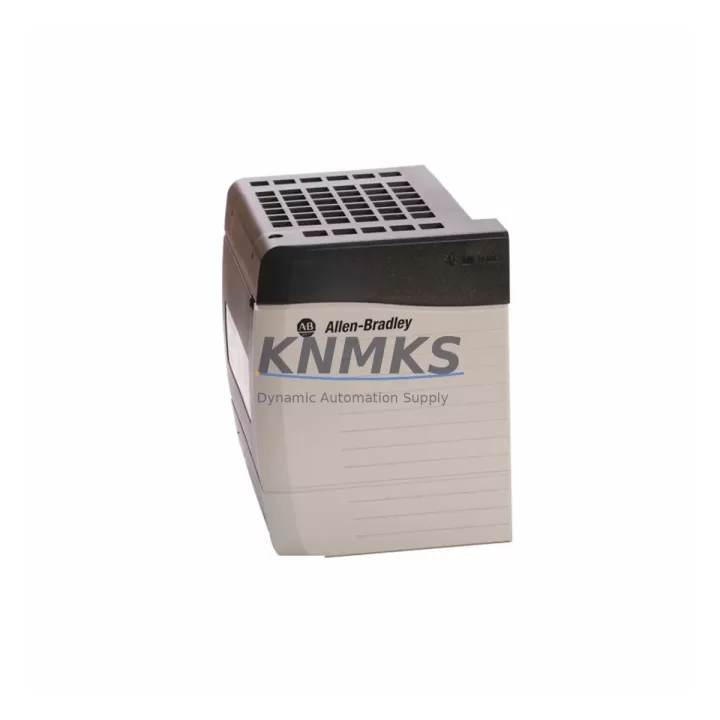
Allen-Bradley 1797-OB4D Migration-Ready IS Digital Output for Legacy Control Systems
The Allen-Bradley 1797-OB4D is a 4-point intrinsically safe (IS) digital output module designed for the FlexEx I/O platform, widely deployed in hazardous-area process control environments across oil & gas, chemical, and pharmaceutical industries. As legacy FlexEx installations approach end-of-life and OEM support windows close, the 1797-OB4D has become a critical spare part for system integrators and maintenance engineers managing long-lifecycle control architectures. KNMKS supplies verified, migration-ready 1797-OB4D modules with full compatibility testing, support terms confirmed by quotation coverage, and documented retrofit support for both direct replacement and platform upgrade scenarios.
Whether you are replacing a failed output module in an existing FlexEx rack, consolidating spare parts inventory ahead of a planned shutdown, or executing a phased migration from a legacy FLEX I/O or FlexEx platform to a modern safety-rated architecture, the 1797-OB4D serves as a reliable, drop-in solution that preserves your existing wiring infrastructure, terminal block assignments, and program logic without requiring immediate controller-level changes.
Migration Compatibility Table
| Parameter | 1797-OB4D Specification | Retrofit / Replacement Notes |
|---|---|---|
| Output Points | 4 x IS Digital Output | Direct replacement for failed 1797-OB4D in existing FlexEx rack |
| Backplane Interface | FlexEx I/O backplane | Verify backplane revision compatibility before installation |
| Communication Protocol | FlexEx proprietary bus via 1797-AENTR or 1797-BUS adapter | Confirm adapter firmware version supports module revision |
| Terminal Wiring | IS-rated field wiring, Zener barrier or galvanic isolator required | Retain existing barrier assignments; verify IS loop calculations |
| Power Requirements | Supplied via FlexEx backplane power bus | Confirm 1797-PS1E or equivalent power supply capacity before adding modules |
| Installation Space | Single FlexEx slot | Verify available slot position in 1797-BPA4 or 1797-BPA8 backplane assembly |
| Firmware Compatibility | Compatible with RSLogix 5000 / Studio 5000 FlexEx add-on profiles | Update AOP to latest revision before commissioning replacement module |
| Replacement Path | Direct swap within FlexEx platform | For platform migration to FLEX 5000 or GuardLogix, I/O mapping and safety program review required |
| Commissioning | Module auto-detected by controller after slot insertion | Verify module status bits and IS loop continuity before returning to service |
| Support terms | support terms confirmed by quotation | Outgoing QC tested | Certificate of conformance available on request | |
Retrofit Planning for Existing Automation Systems
Successful integration of the 1797-OB4D into an existing or upgraded control architecture requires a structured pre-installation review. Engineers should begin by auditing the current FlexEx rack configuration, confirming the slot assignment of the failed or replaced module within the 1797-BPA4 or 1797-BPA8 backplane assembly. The backplane’s power budget must be recalculated if additional modules are being added during the same maintenance window, particularly when the 1797-PS1E power supply is operating near rated capacity.
Field wiring connected to the 1797-OB4D passes through IS barriers — typically Zener diode barriers or galvanic isolators mounted in the marshalling cabinet. Before disconnecting field cables, document the terminal block assignments and verify that the replacement module’s IS parameters are within the certified entity parameters of the installed barriers. This step is mandatory for maintaining hazardous-area certification and avoiding costly re-certification after the retrofit.
On the controller side, the 1797-AENTR EtherNet/IP adapter or the 1797-BUS DeviceNet adapter manages communication between the FlexEx rack and the Logix controller. Confirm that the adapter’s firmware revision supports the 1797-OB4D module revision being installed. In Studio 5000, the FlexEx Add-On Profile (AOP) should be updated to the latest version before the replacement module is commissioned, ensuring that output tag mapping, fault reporting, and diagnostic data are correctly reflected in the controller program.
For sites planning a broader migration from FlexEx to a modern platform such as FLEX 5000 I/O or a GuardLogix safety controller architecture, the 1797-OB4D replacement provides a stable interim solution that maintains production continuity while the migration project is scoped and scheduled. During this transition period, maintaining a documented spare parts inventory — including the 1797-OB4D, the 1797-AENTR adapter, and associated IS barriers — is essential for minimizing unplanned downtime risk. A 1794-OB16 FLEX I/O digital output module may also be evaluated as part of a parallel migration path for non-IS output circuits in the same control cabinet.
HMI screens connected to the process area should be reviewed to confirm that output status indicators, alarm setpoints, and interlock displays correctly reflect the I/O tag addresses associated with the 1797-OB4D slot. If the HMI is running on a legacy PanelView 550 or PanelView Plus 6 terminal, verify that the display logic references the correct controller tags before returning the system to automatic mode.
Downtime Control During System Migration
Minimizing production downtime during a 1797-OB4D replacement or FlexEx platform migration requires careful pre-staging and a disciplined commissioning sequence. The replacement module should be bench-tested and verified against the module revision documented in the plant’s spare parts register before the maintenance window begins. KNMKS provides outgoing QC test documentation with each shipment, confirming that the module has been powered, addressed, and verified against published specifications prior to dispatch.
During the physical swap, the controller should be placed in Program mode to prevent unintended output activation while the module is removed and reinserted. After installation, the module’s status indicators should be checked for normal operation before the controller is returned to Run mode. If the system uses a 1797-AENTR adapter with connection fault detection enabled, the adapter’s connection timeout parameters should be reviewed to prevent nuisance faults during the brief interruption caused by module replacement.
For planned platform migrations, a phased approach — replacing FlexEx I/O modules rack by rack while maintaining the existing Logix controller and network infrastructure — allows engineering teams to validate each segment of the migration independently, reducing the risk of system-wide faults and preserving the original program logic throughout the transition. Signal isolators installed between the legacy FlexEx rack and the new I/O platform can maintain field signal continuity during parallel operation, further reducing the risk of process interruption.
KNMKS maintains in-stock inventory of the 1797-OB4D and related FlexEx components to support emergency replacement scenarios with short lead times. Global shipping with express options is available for critical maintenance situations where extended downtime is not acceptable.
Retrofit Support FAQ
Q1: Is the 1797-OB4D a direct drop-in replacement for a failed module in an existing FlexEx rack?
Yes. The 1797-OB4D is a slot-compatible replacement within the FlexEx I/O platform. No wiring changes are required at the terminal block level, provided the replacement module revision is compatible with the installed backplane and adapter firmware. KNMKS recommends verifying the module catalog number suffix and firmware revision against the plant’s installed base documentation before installation.
Q2: What commissioning steps are required after installing a replacement 1797-OB4D?
After physical installation, confirm that the module is recognized by the controller in Studio 5000 or RSLogix 5000, check module status bits for active faults, verify IS loop continuity at the field terminal, and confirm that output tags are correctly mapped in the controller program. If the FlexEx AOP has been updated, a controller download may be required before the module is fully commissioned.
Q3: Can the 1797-OB4D be used during a phased migration to a FLEX 5000 or GuardLogix platform?
Yes. The 1797-OB4D can remain in service within the existing FlexEx rack while adjacent racks or cabinets are migrated to the new platform. This phased approach allows engineering teams to validate the new platform incrementally without disrupting the entire control system. Once the migration is complete, the FlexEx rack can be decommissioned and the 1797-OB4D retired from service.
Q4: What support terms and quality assurance does KNMKS provide with the 1797-OB4D?
All 1797-OB4D modules supplied by KNMKS are covered by a support terms confirmed by quotation from the date of shipment. Each unit undergoes outgoing QC testing prior to dispatch, and a certificate of conformance is available on request. Modules are sourced from verified supply channels and stored under controlled conditions to maintain long-term reliability for critical spare parts applications.
© 2026 KNMKS. All rights reserved.
Original Source: https://knmks.com
Contact: admin@knmks.com | +86 18359268345
Product Identification
- Brand / Ecosystem
-
Allen-Bradley
Allen-Bradley - Model / Series
-
1797-OB4D
Legacy Control Series - Product Family
- PLCs & Controllers
- Availability Status
- Available on request after model and quantity confirmation
- Inquiry Type
- B2B RFQ, replacement inquiry and project spare-part request
- Pre-Quote Check
- Exact SKU, brand, series, quantity, nameplate photos and destination country are checked before quotation
System Path
Where this product fits in the KNMKS automation structure.
Specification & Inquiry Focus
- Control platform
- PLC, PAC and modular controllers
- Common needs
- CPU, rack, power and I/O expansion
- Project support
- Replacement, cabinet build and maintenance
Buyer Confirmation
Information KNMKS checks before replying.
- Exact model
- 1797-OB4D
- Brand / ecosystem
- Allen-Bradley
- Product family
- PLCs & Controllers
- Application note
- Replacement, maintenance, project build or spare-part list
- Useful photos
- Nameplate, installed unit, cabinet layout or connector side
- Delivery details
- Quantity, destination country and target schedule
Document Support
Files and notes can be confirmed during quotation.
- Product photos or nameplate confirmation when available
- Packing and delivery notes before quotation confirmation
- Support scope and delivery terms confirmed per inquiry
- Export document coordination for qualified B2B requests
Inquiry Support
- Model cross-checking before quotation
- CPU, power, rack and expansion module matching
- Support for replacement and project inquiry
What to Send Us
- Brand and exact model number: Allen-Bradley 1797-OB4D
- Quantity and required delivery time
- Application, replacement requirement or nameplate photo
- Destination country and shipping preference
RFQ Preparation
This is a product inquiry page built for RFQ communication.
Fast Model Check
Send this model to KNMKS for confirmation.
Include quantity, destination country and photos if this is a maintenance replacement. The inquiry will be saved with a reference number after submission.
Brand & Compatibility Note
KNMKS displays automation product information for well-known industrial brand ecosystems and compatible replacement references. Brand names are used for product identification and compatibility reference only; final availability and commercial terms are confirmed per quotation.
 Manufacturing
 Machine Tools
 Packaging
 Energy & Power
 HMI & Displays
 Servo Systems
 Variable Frequency Drives
 Sensors