
Overview
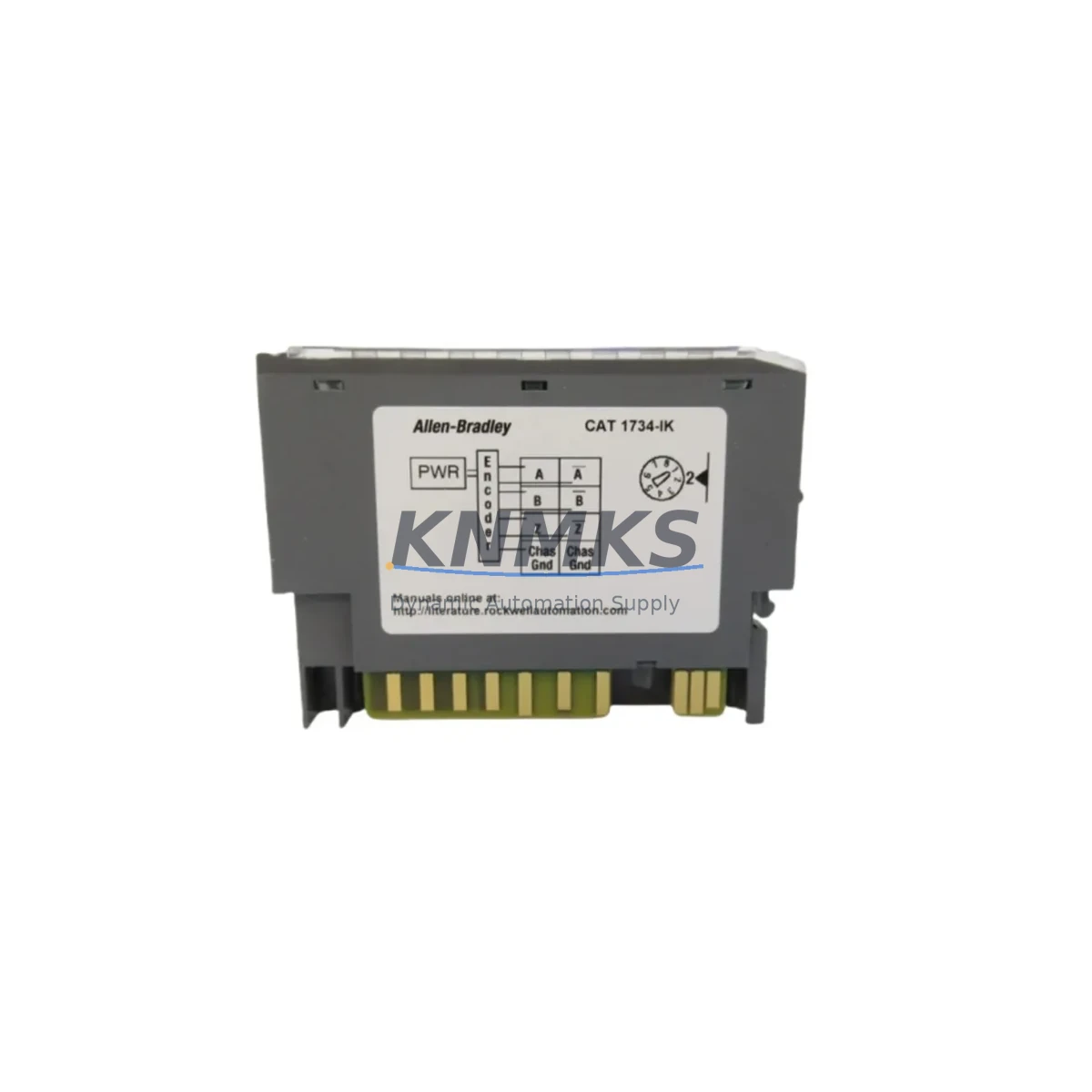
Allen-Bradley 1734-IK/C Migration-Ready Encoder for Legacy Control Systems
The Allen-Bradley 1734-IK/C is a Series C incremental encoder interface module designed for the POINT I/O platform. As legacy POINT I/O installations approach end-of-life or require system-level upgrades, the 1734-IK/C serves as a verified drop-in replacement for earlier Series A and Series B variants, enabling engineers to modernize encoder feedback loops without redesigning the control cabinet or rewriting PLC logic from scratch. Whether you are managing a planned retrofit, responding to an unplanned failure, or building a spare parts buffer for a long-running production line, this module is stocked, tested, and ready for immediate dispatch with a support terms confirmed by quotation.
Migration Compatibility Table
| Parameter | Details |
|---|---|
| Replaces / Supersedes | 1734-IK (Series A), 1734-IK/B (Series B) |
| Platform Compatibility | Allen-Bradley POINT I/O (1734 series backplane) |
| Backplane Interface | POINT I/O standard backplane connector — no adapter required |
| Terminal Wiring | Compatible with existing 1734-TB or 1734-TBS terminal bases; no rewiring required for Series A/B replacements |
| Communication Protocol | EtherNet/IP via 1734-AENT / 1734-AENTR adapter; DeviceNet via 1734-ADN adapter |
| Module Address | Slot-based addressing — retains original slot assignment after swap |
| Firmware Compatibility | Compatible with Studio 5000 / RSLogix 5000 v16 and above; verify AOP version before commissioning |
| Installation Footprint | Standard POINT I/O single-slot module; no additional DIN rail space required |
| Retrofit Recommendation | Direct swap; update I/O configuration tag in controller project if upgrading from Series A |
| Commissioning Focus | Verify encoder counts per revolution, input voltage range, and filter settings post-installation |
| Support terms | support terms confirmed by quotation — covers manufacturing defects and functional failure under normal operating conditions |
Retrofit Planning for Existing Automation Systems
A successful 1734-IK/C retrofit begins well before the module arrives on site. Engineers should start by auditing the existing POINT I/O rack configuration, confirming the 1734-AENT or 1734-AENTR EtherNet/IP adapter firmware version, and verifying that the ControlLogix or CompactLogix controller running the system supports the Series C AOP (Add-On Profile). In most installations, the 1734-IK/C slots directly into the existing 1734-TB terminal base, preserving all field wiring connections and eliminating the need for panel rewiring — a critical advantage when downtime windows are measured in hours rather than days.
Power budget verification is an essential pre-retrofit step. The 1734-IK/C draws its operating power from the POINT I/O backplane, and the total module count on the rack must remain within the current capacity of the 1734-EP24DC or equivalent power supply module. If the existing power supply is already near its rated output, adding or replacing modules may require upgrading to a higher-capacity unit or redistributing modules across a second rack segment. This is particularly relevant in dense I/O configurations where digital input modules such as the 1734-IB8 or 1734-IB16 share the same backplane segment.
For systems communicating over DeviceNet via the 1734-ADN adapter, engineers should confirm that the node address and baud rate settings on the adapter are documented before the swap, as these parameters are not stored in the replacement module itself. In EtherNet/IP environments, the IP address and network configuration reside in the 1734-AENTR adapter, not the encoder module, so network continuity is maintained across the module replacement without additional configuration steps.
HMI screens referencing encoder feedback — such as position displays, speed readouts, or fault indicators on a PanelView Plus terminal — should be reviewed to confirm that tag names and data types remain consistent after the module swap. In most Series A to Series C upgrades, the tag structure is preserved, but engineers should perform a dry-run simulation in Studio 5000 offline mode before going live. Signal isolators or encoder signal conditioners installed upstream of the 1734-IK/C should also be checked for output voltage compatibility with the Series C input specifications.
Downtime Control During System Migration
Minimizing production downtime during a POINT I/O encoder module replacement requires a structured approach. Begin by exporting and archiving the current controller project from Studio 5000 or RSLogix 5000 before any hardware is touched. This preserves the original program logic, tag database, and I/O configuration as a verified restore point. If the system is running a continuous process, coordinate the swap during a scheduled maintenance window and communicate the planned outage to upstream and downstream process teams.
The physical swap of the 1734-IK/C is straightforward: power down the POINT I/O segment (or the full rack if a segment power isolator is not installed), remove the existing module from the terminal base, insert the replacement Series C module, and restore power. The controller will automatically detect the new module and re-establish communication within seconds, provided the AOP version in the project matches the Series C firmware. If a mismatch is detected, Studio 5000 will prompt for an AOP update — this can be completed online without interrupting other I/O modules on the same rack.
Field verification after the swap should include confirming encoder pulse counts at known shaft positions, checking the A/B/Z channel signal integrity with a diagnostic tool or the controller’s online tag monitor, and verifying that any motion control axes referencing the encoder are homing correctly. For systems using the 1734-IK/C in conjunction with a Kinetix servo drive or a PowerFlex variable frequency drive for speed feedback, additional axis tuning verification may be required to confirm that the control loop response matches pre-retrofit performance benchmarks.
Retrofit Support FAQ
Q: Is the 1734-IK/C a direct replacement for the 1734-IK/B without any program changes?
A: In most cases, yes. The Series C module is backward-compatible with Series B terminal bases and wiring. However, if your Studio 5000 project was built with an older AOP version, you may need to update the AOP to the Series C version and perform a minor I/O configuration refresh. No changes to ladder logic or function block code are typically required.
Q: What commissioning steps are required after installing the 1734-IK/C?
A: After installation, verify the encoder counts per revolution match the original configuration, confirm the input voltage range (5V or 12–24V differential) is correctly set, and check the filter frequency setting. Use the controller’s online tag monitor to confirm A, B, and Z channel inputs are registering correctly before returning the system to automatic mode.
Q: How do I confirm wiring compatibility before ordering?
A: The 1734-IK/C uses the standard POINT I/O terminal base (1734-TB or 1734-TBS). If your existing installation uses one of these terminal bases, the field wiring connections are fully compatible and no rewiring is needed. Confirm the terminal base catalog number on your existing installation before ordering if you are unsure.
Q: What does the support terms confirmed by quotation cover, and how is stock availability managed?
A: The support terms confirmed by quotation cover manufacturing defects and functional failure under normal operating conditions from the date of shipment. We maintain dedicated stock buffers for high-demand POINT I/O modules to support both planned retrofit projects and emergency replacement scenarios. Orders are processed and dispatched promptly, with pre-shipment functional testing performed on each unit. Contact our team for lead time confirmation on volume orders.
© 2026 KNMKS. All rights reserved.
Original Source: https://knmks.com
Contact: admin@knmks.com | +86 18359268345
Product Identification
- Brand / Ecosystem
-
Allen-Bradley
Allen-Bradley - Model / Series
-
1734-IK/C
Legacy Control Series - Product Family
- PLCs & Controllers
- Availability Status
- Available on request after model and quantity confirmation
- Inquiry Type
- B2B RFQ, replacement inquiry and project spare-part request
- Pre-Quote Check
- Exact SKU, brand, series, quantity, nameplate photos and destination country are checked before quotation
System Path
Where this product fits in the KNMKS automation structure.
Specification & Inquiry Focus
- Control platform
- PLC, PAC and modular controllers
- Common needs
- CPU, rack, power and I/O expansion
- Project support
- Replacement, cabinet build and maintenance
Buyer Confirmation
Information KNMKS checks before replying.
- Exact model
- 1734-IK/C
- Brand / ecosystem
- Allen-Bradley
- Product family
- PLCs & Controllers
- Application note
- Replacement, maintenance, project build or spare-part list
- Useful photos
- Nameplate, installed unit, cabinet layout or connector side
- Delivery details
- Quantity, destination country and target schedule
Document Support
Files and notes can be confirmed during quotation.
- Product photos or nameplate confirmation when available
- Packing and delivery notes before quotation confirmation
- Support scope and delivery terms confirmed per inquiry
- Export document coordination for qualified B2B requests
Inquiry Support
- Model cross-checking before quotation
- CPU, power, rack and expansion module matching
- Support for replacement and project inquiry
What to Send Us
- Brand and exact model number: Allen-Bradley 1734-IK/C
- Quantity and required delivery time
- Application, replacement requirement or nameplate photo
- Destination country and shipping preference
RFQ Preparation
This is a product inquiry page built for RFQ communication.
Fast Model Check
Send this model to KNMKS for confirmation.
Include quantity, destination country and photos if this is a maintenance replacement. The inquiry will be saved with a reference number after submission.
Brand & Compatibility Note
KNMKS displays automation product information for well-known industrial brand ecosystems and compatible replacement references. Brand names are used for product identification and compatibility reference only; final availability and commercial terms are confirmed per quotation.
 Manufacturing
 Machine Tools
 Packaging
 Energy & Power
 HMI & Displays
 Servo Systems
 Variable Frequency Drives
 Sensors