
Overview
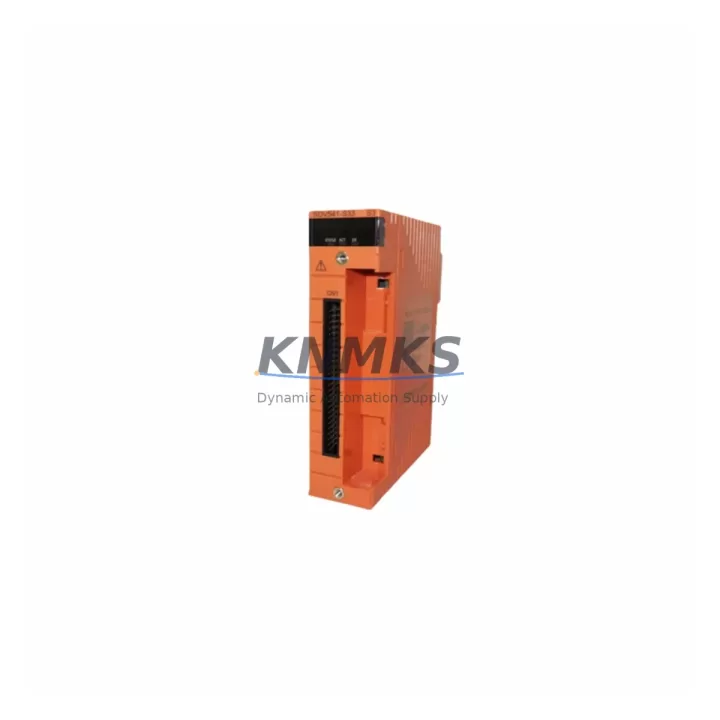
Yokogawa SDV541-S63/PRP S3 Maintenance Spare Part for Factory Uptime
The Yokogawa SDV541-S63/PRP S3 is a 32-channel Digital Output (DO) module designed for the CENTUM CS 3000 Distributed Control System. As a critical field I/O component within the CS 3000 architecture, this module drives discrete output signals to solenoid valves, motor starters, relay coils, and other actuators across process plant environments. Maintaining a verified spare of the SDV541-S63/PRP S3 in your on-site inventory is a proven strategy for minimizing unplanned downtime and protecting production continuity in petrochemical, power generation, pharmaceutical, and general manufacturing facilities.
Each unit supplied by KNMKS is sourced as an original Yokogawa component, subject to pre-shipment functional verification, and covered by a support terms confirmed by quotation. We support both emergency replacement orders and long-term blanket purchase agreements to ensure your maintenance team is never caught without a critical spare.
Spare Maintenance Table
| SKU / Part Number | SDV541-S63/PRP S3 |
| Brand | Yokogawa Electric Corporation |
| Series | CENTUM CS 3000 |
| Module Type | 32-Channel Digital Output (DO) Module |
| Output Channels | 32 channels (transistor sink/source, model-dependent) |
| Communication Interface | Internal CS 3000 V-net / RIO bus |
| Mounting | CS 3000 I/O nest / field control station (FCS) backplane |
| Operating Voltage | 24 VDC field power (typical); internal bus powered |
| Operating Temperature | 0 °C to 55 °C |
| Humidity | 10% to 90% RH (non-condensing) |
| Country of Origin | Japan |
| Compatibility | CENTUM CS 3000 FCS (AFV10D, AFV20D, AFV30D and compatible stations) |
| Replacement Scope | Direct drop-in replacement for same-revision SDV541 variants in CS 3000 cabinets |
| Pre-Shipment Test | Functional verification performed before dispatch |
| Support terms | 12 Months from date of shipment |
| Lead Time | availability confirmed by RFQ — typically ships within 1–3 business days |
| Long-Term Supply | Blanket orders and scheduled releases accepted |
Maintenance Planning for Continuous Operation
When a DO module such as the SDV541-S63/PRP S3 is flagged during a routine control cabinet inspection or fails during a fault isolation exercise, experienced maintenance engineers know that the module itself is rarely the only component that warrants attention. A thorough site replacement workflow should include a parallel review of the surrounding electrical and control infrastructure to prevent repeat failures and ensure the restored system performs reliably through the next planned maintenance window.
Begin by inspecting the 24 VDC field power supply feeding the output circuits. A degraded or undersized power supply is a common root cause of intermittent DO channel faults and can shorten module service life. Verify output voltage under load and check for ripple or transient spikes that may have contributed to the original failure. If the cabinet uses a Yokogawa PW481 or PW482 power supply module, confirm its output is within specification and that the redundant supply (if fitted) is switching correctly.
Next, examine the terminal unit (TU) and field wiring connected to the SDV541 nest position. Loose terminations, corroded screw terminals, or damaged cable shields on the I/O marshalling panel can introduce ground loops or signal noise that stress output drivers. The TB841 or equivalent terminal board associated with this module position should be inspected for mechanical integrity and continuity.
For cabinets operating in environments with high inductive loads — motor starters, solenoid valves, or contactor coils — verify that flyback diodes or RC snubber circuits are correctly installed on each output circuit. Missing or failed suppression components are a leading cause of premature transistor output failure in DO modules.
If the affected FCS station uses a communication bus coupler or RIO (Remote I/O) interface module, confirm that the bus termination resistors are intact and that the V-net communication link shows no error flags in the CENTUM CS 3000 HIS (Human Interface Station). A marginal bus connection can cause sporadic module recognition errors that mimic hardware failure.
Finally, review the FCS backplane and module slot contacts. Oxidized or bent connector pins in the I/O nest are a known issue in aging CS 3000 installations and should be cleaned or replaced as part of any module swap. Keeping a spare SDV541-S63/PRP S3 alongside complementary spares — such as an SDV531 Digital Input module, a SAV541 Analog Output module, or an SAI143 Analog Input module — ensures your maintenance team can address the most common FCS I/O failures without waiting for parts procurement.
Site Replacement Workflow
Step 1 — Preparation: Confirm the replacement SDV541-S63/PRP S3 matches the revision suffix and hardware configuration of the installed module. Cross-reference the CS 3000 engineering database or the cabinet wiring diagram to verify channel assignments and I/O tag mapping before proceeding.
Step 2 — Safe Isolation: Place the affected FCS I/O module in manual mode via the CENTUM CS 3000 HIS or engineering workstation. Notify the control room operator and confirm that all 32 output channels are in a safe state (de-energized or held at last value, per your site safety procedure). Do not remove the module under live field power without confirming the output state.
Step 3 — Module Swap: Release the module locking lever, slide the SDV541 out of the nest, and insert the replacement unit. The CS 3000 architecture supports hot-swap on most FCS configurations — confirm this is enabled for your station type before proceeding without a full shutdown. Seat the module firmly until the locking lever engages.
Step 4 — Verification: From the HIS, confirm the new module is recognized on the V-net bus and that all 32 channels report correct status. Perform a channel-by-channel output test using the CS 3000 test function to verify field device response before returning the loop to automatic control.
Step 5 — Documentation: Record the replacement in your CMMS (Computerized Maintenance Management System), noting the date, module serial number, and any observations about the failed unit. Return the removed module to KNMKS for evaluation if a support terms claim or failure analysis is required.
This workflow is applicable to both emergency breakdown replacements and planned annual overhaul activities. For aging CS 3000 systems approaching end-of-support, KNMKS recommends establishing a minimum stock level of two SDV541-S63/PRP S3 units per FCS cabinet to support multi-year operational continuity without dependency on spot-market availability.
Spare Parts Support FAQ
Q1: Is the SDV541-S63/PRP S3 compatible with all CENTUM CS 3000 FCS station types?
The SDV541-S63/PRP S3 is designed for use within the CENTUM CS 3000 I/O nest architecture and is compatible with standard FCS station types including AFV10D, AFV20D, and AFV30D configurations. Compatibility with specific hardware revisions or custom-engineered stations should be confirmed against your site engineering documentation. KNMKS technical support can assist with cross-referencing if you provide your FCS station model and existing module revision.
Q2: How is the module tested before shipment?
Every SDV541-S63/PRP S3 unit dispatched by KNMKS undergoes a pre-shipment functional verification to confirm power-up integrity, channel output response, and bus communication readiness. Units that do not pass verification are not shipped. A support terms confirmed by quotation from the date of shipment covers defects in materials and workmanship under normal operating conditions.
Q3: Can KNMKS support long-term or blanket purchase agreements for this module?
Yes. KNMKS accepts blanket orders and scheduled release agreements for the SDV541-S63/PRP S3 and other CENTUM CS 3000 spare parts. This arrangement is particularly suited to maintenance teams managing multi-year operational plans for aging DCS installations, where spot-market availability and lead times can be unpredictable. Contact our sales team to discuss volume pricing and delivery scheduling.
Q4: What should I do if the replacement module does not resolve the fault?
If installing a new SDV541-S63/PRP S3 does not clear the fault condition, the issue is likely upstream of the module — most commonly in the field power supply, terminal wiring, backplane connector, or FCS communication bus. Review the CS 3000 alarm log and diagnostic screens on the HIS for bus error codes or power fault flags. KNMKS technical support is available to assist with fault isolation guidance. If the replacement unit itself is suspected to be defective, contact us to initiate a support terms evaluation.
© 2026 KNMKS. All rights reserved.
Original Source: https://knmks.com
Contact: admin@knmks.com | +86 18359268345
Product Identification
- Brand / Ecosystem
-
Yokogawa
Assorted Brands - Model / Series
-
SDV541-S63/PRP S3
Assorted Series - Product Family
- PLCs & Controllers
- Availability Status
- Available on request after model and quantity confirmation
- Inquiry Type
- B2B RFQ, replacement inquiry and project spare-part request
- Pre-Quote Check
- Exact SKU, brand, series, quantity, nameplate photos and destination country are checked before quotation
System Path
Where this product fits in the KNMKS automation structure.
Specification & Inquiry Focus
- Control platform
- PLC, PAC and modular controllers
- Common needs
- CPU, rack, power and I/O expansion
- Project support
- Replacement, cabinet build and maintenance
Buyer Confirmation
Information KNMKS checks before replying.
- Exact model
- SDV541-S63/PRP S3
- Brand / ecosystem
- Yokogawa
- Product family
- PLCs & Controllers
- Application note
- Replacement, maintenance, project build or spare-part list
- Useful photos
- Nameplate, installed unit, cabinet layout or connector side
- Delivery details
- Quantity, destination country and target schedule
Document Support
Files and notes can be confirmed during quotation.
- Product photos or nameplate confirmation when available
- Packing and delivery notes before quotation confirmation
- Support scope and delivery terms confirmed per inquiry
- Export document coordination for qualified B2B requests
Inquiry Support
- Model cross-checking before quotation
- CPU, power, rack and expansion module matching
- Support for replacement and project inquiry
What to Send Us
- Brand and exact model number: Yokogawa SDV541-S63/PRP S3
- Quantity and required delivery time
- Application, replacement requirement or nameplate photo
- Destination country and shipping preference
RFQ Preparation
This is a product inquiry page built for RFQ communication.
Fast Model Check
Send this model to KNMKS for confirmation.
Include quantity, destination country and photos if this is a maintenance replacement. The inquiry will be saved with a reference number after submission.
Brand & Compatibility Note
KNMKS displays automation product information for well-known industrial brand ecosystems and compatible replacement references. Brand names are used for product identification and compatibility reference only; final availability and commercial terms are confirmed per quotation.
 Manufacturing
 Machine Tools
 Packaging
 Energy & Power



 HMI & Displays
 Servo Systems
 Variable Frequency Drives
 Sensors