
Overview
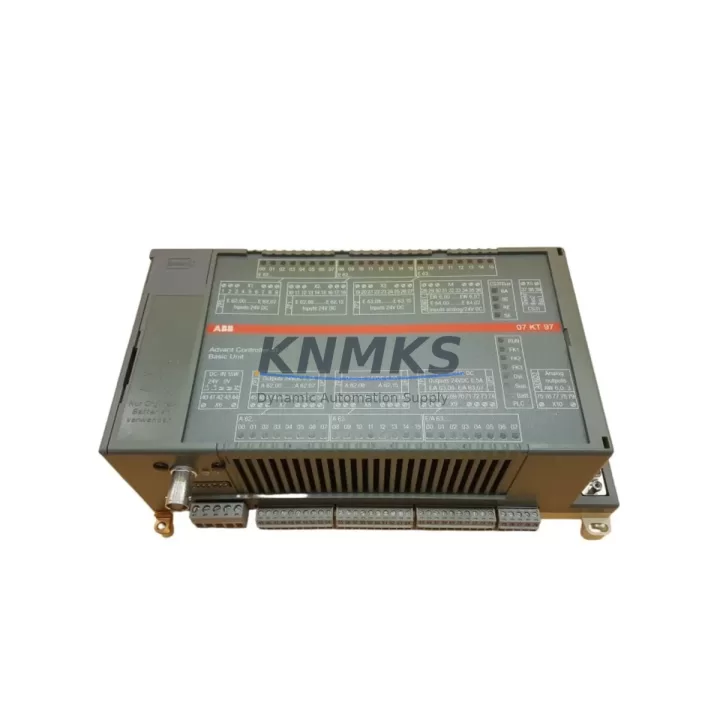
ABB 07KT97 WT97 Migration-Ready CPU for Legacy AC31 Systems
The ABB 07KT97 WT97 is a high-performance CPU module engineered for the AC31 programmable controller platform. As legacy AC31 installations reach end-of-service milestones, the 07KT97 WT97 has become the preferred migration-ready replacement for engineers managing aging control infrastructure across process automation, building management, and discrete manufacturing environments. Whether you are executing a like-for-like spare part swap or planning a phased control system modernization, this module provides the processing headroom, communication flexibility, and backward compatibility required to minimize retrofit risk and protect existing program logic investments.
The 07KT97 WT97 CPU supports the AC31 backplane architecture, allowing direct installation into existing racks without mechanical modification in most configurations. Before committing to installation, engineers should verify rack slot width, backplane bus connector alignment, and available power budget from the PS507 or equivalent AC31 power supply module. The CPU draws regulated 5 V DC from the backplane; total rack power consumption must be recalculated when replacing an older 07KT85 or 07KT98 CPU to confirm the power supply remains within its rated output capacity.
Terminal wiring on field I/O modules — including the 07AI91 analog input module and 07DI92 digital input module — does not require modification when the CPU is swapped, provided the I/O module firmware is compatible with the replacement CPU’s operating system version. Firmware version alignment is a critical pre-installation checkpoint: mismatched firmware between the CPU and I/O modules can cause initialization faults or prevent the rack from entering RUN mode. KNMKS recommends requesting the firmware revision sheet for your specific 07KT97 WT97 unit prior to installation so your engineering team can validate compatibility against the existing rack inventory.
Program migration from the outgoing CPU is straightforward when the original project file is available in Automation Builder or the legacy 907 AC 1131 programming environment. The 07KT97 WT97 retains compatibility with IEC 61131-3 structured text, function block diagram, and ladder diagram program structures used across the AC31 family. If the original program was compiled against an older CPU target, a retarget and recompile step is required before download. Engineers should archive the original compiled binary before any retarget operation to preserve a rollback option.
Communication link continuity is another key consideration during migration. The 07KT97 WT97 supports MODBUS RTU over RS-485 and can interface with CS31 field bus segments via the appropriate coupler module. If the existing installation uses a 07KP90 PROFIBUS DP communication module or a 07KT98 CPU with integrated Ethernet, the migration plan must account for the communication module slot assignment and address configuration to ensure SCADA, DCS, or HMI connectivity is restored without re-engineering the network topology. HMI screen tag bindings referencing the outgoing CPU’s data addresses should be audited and updated in the HMI project before commissioning the replacement unit.
Migration Compatibility Table
| Parameter | Details |
|---|---|
| Compatible Platform | ABB AC31 Series (07KT85, 07KT97, 07KT98 rack systems) |
| Backplane Interface | AC31 parallel backplane bus — verify slot width and connector alignment before installation |
| Power Requirement | 5 V DC via backplane; confirm PS507 or equivalent power supply capacity |
| Communication Ports | RS-232 programming port; RS-485 MODBUS RTU; CS31 field bus via coupler |
| Programming Environment | ABB Automation Builder / 907 AC 1131 (IEC 61131-3 compliant) |
| Firmware Compatibility | Must match I/O module firmware revision — request revision sheet before installation |
| Direct Replacement For | 07KT85, 07KT97 variants; partial compatibility with 07KT98 — verify program retarget requirement |
| Installation Space | Standard AC31 rack slot; no mechanical modification required in most configurations |
| Commissioning Note | Retarget and recompile required if migrating from older CPU target; archive original binary first |
| Support terms | 12 months from date of shipment — covers manufacturing defects and functional failure under normal operating conditions |
Retrofit Planning for Existing Automation Systems
A successful AC31 retrofit begins well before the replacement CPU arrives on site. The engineering team should conduct a full rack audit, documenting every installed module by slot position, model number, and firmware version. In a typical AC31 control cabinet, this audit will cover the CPU slot, the PS507 power supply module, one or more 07AI91 analog input modules, 07DI92 digital input modules, 07DO72 digital output modules, and any installed communication modules such as the 07KP90 PROFIBUS DP adapter. Each of these components has its own firmware dependency chain relative to the CPU, and the retrofit plan must address each dependency explicitly.
I/O expansion requirements should also be evaluated during the planning phase. If the existing rack is operating near its I/O capacity, the migration window is an opportunity to add expansion modules or migrate to a higher-density I/O architecture. The 07KT97 WT97 supports the full range of AC31 I/O modules, so existing field wiring and terminal block assignments on the 07AI91 and 07DI92 modules can be preserved without rewiring, reducing both labor cost and the risk of wiring errors during recommissioning.
Signal isolation requirements should be reviewed for analog loops connected to the 07AI91 module. If the original installation did not include signal isolators on 4–20 mA loops, the retrofit window is an appropriate time to add DIN-rail-mounted signal isolators to protect the new CPU from ground loop interference — a common source of intermittent faults in legacy installations that were not originally designed with isolation in mind.
For installations where the AC31 system communicates with an upstream DCS or SCADA platform via MODBUS RTU, the communication parameters — baud rate, parity, stop bits, and slave address — must be documented before the CPU is removed and verified after the replacement CPU is installed and the program is downloaded. If the installation uses a 07KP90 PROFIBUS DP module, the GSD file and slave address configuration in the PROFIBUS master must be confirmed to match the replacement CPU’s configuration before the network is brought back online.
Downtime Control During System Migration
Minimizing unplanned downtime during a CPU replacement requires a structured pre-outage preparation protocol. Before the maintenance window opens, the engineering team should complete a full program backup from the outgoing CPU using the programming cable and Automation Builder, verify the backup file integrity by performing a compare against the online program, and document all current data values for retentive memory areas that must be restored after the replacement CPU is initialized.
During the replacement window, the sequence should follow a defined order: power down the rack, remove the outgoing CPU, install the 07KT97 WT97, restore rack power, download the program, restore retentive data values, verify I/O module initialization, and perform a controlled transition to RUN mode with field outputs inhibited until the engineering team confirms all I/O readings are consistent with pre-outage values. This inhibit-then-verify approach protects process equipment from unexpected output activation during the commissioning phase.
HMI connectivity should be restored and screen navigation verified before the inhibit is released. If the HMI communicates with the CPU via MODBUS RTU over RS-485, the communication link should be tested using the HMI’s diagnostic screen or a MODBUS polling tool before process control is handed back to the automation system. Maintaining a parallel manual control capability — through local panel switches or bypass valves — during the commissioning phase provides an additional layer of protection against process interruption if unexpected issues arise during the first minutes of automated operation.
KNMKS pre-tests every 07KT97 WT97 unit before shipment to confirm power-on initialization, backplane communication, and programming port functionality. This factory acceptance test reduces the risk of receiving a non-functional unit and shortens the on-site commissioning timeline. All units ship with a support terms confirmed by quotation covering manufacturing defects and functional failure under normal operating conditions.
Retrofit Support FAQ
Q: Is the ABB 07KT97 WT97 a direct drop-in replacement for the 07KT85?
A: In most AC31 rack configurations, yes — the 07KT97 WT97 occupies the same slot position and uses the same backplane connector. However, a program retarget and recompile is required if the original program was compiled against the 07KT85 CPU target. KNMKS recommends verifying the rack power budget and I/O firmware versions before installation.
Q: What commissioning steps are required after installing the replacement CPU?
A: After physical installation, download the retargeted program via the RS-232 programming port using Automation Builder or 907 AC 1131. Restore retentive data values, verify I/O module initialization across all installed modules (including 07AI91 and 07DI92 slots), confirm MODBUS or CS31 communication link status, and perform a controlled RUN mode transition with field outputs inhibited until I/O readings are verified.
Q: Does KNMKS provide tested stock with a support terms?
A: Yes. Every 07KT97 WT97 unit shipped by KNMKS is pre-tested for power-on initialization, backplane communication, and programming port functionality. All units carry a support terms confirmed by quotation from the date of shipment, covering manufacturing defects and functional failure under normal operating conditions. In-stock units are available for immediate dispatch.
Q: What should I verify regarding wiring and terminal compatibility before installation?
A: Field wiring connected to AC31 I/O modules (07AI91, 07DI92, 07DO72) does not require modification when only the CPU is replaced. Verify terminal block assignments match the program’s I/O address map, confirm signal isolator presence on analog loops if ground loop interference is a concern, and check that the backplane power budget from the PS507 power supply module accommodates the 07KT97 WT97’s power draw alongside all installed I/O modules.
© 2026 KNMKS. All rights reserved.
Original Source: https://knmks.com
Contact: admin@knmks.com | +86 18359268345
Product Identification
- Brand / Ecosystem
-
ABB
ABB - Model / Series
-
07KT97 WT97
Assorted Series - Product Family
- PLCs & Controllers
- Availability Status
- Available on request after model and quantity confirmation
- Inquiry Type
- B2B RFQ, replacement inquiry and project spare-part request
- Pre-Quote Check
- Exact SKU, brand, series, quantity, nameplate photos and destination country are checked before quotation
System Path
Where this product fits in the KNMKS automation structure.
Specification & Inquiry Focus
- Control platform
- PLC, PAC and modular controllers
- Common needs
- CPU, rack, power and I/O expansion
- Project support
- Replacement, cabinet build and maintenance
Buyer Confirmation
Information KNMKS checks before replying.
- Exact model
- 07KT97 WT97
- Brand / ecosystem
- ABB
- Product family
- PLCs & Controllers
- Application note
- Replacement, maintenance, project build or spare-part list
- Useful photos
- Nameplate, installed unit, cabinet layout or connector side
- Delivery details
- Quantity, destination country and target schedule
Document Support
Files and notes can be confirmed during quotation.
- Product photos or nameplate confirmation when available
- Packing and delivery notes before quotation confirmation
- Support scope and delivery terms confirmed per inquiry
- Export document coordination for qualified B2B requests
Inquiry Support
- Model cross-checking before quotation
- CPU, power, rack and expansion module matching
- Support for replacement and project inquiry
What to Send Us
- Brand and exact model number: ABB 07KT97 WT97
- Quantity and required delivery time
- Application, replacement requirement or nameplate photo
- Destination country and shipping preference
RFQ Preparation
This is a product inquiry page built for RFQ communication.
Fast Model Check
Send this model to KNMKS for confirmation.
Include quantity, destination country and photos if this is a maintenance replacement. The inquiry will be saved with a reference number after submission.
Brand & Compatibility Note
KNMKS displays automation product information for well-known industrial brand ecosystems and compatible replacement references. Brand names are used for product identification and compatibility reference only; final availability and commercial terms are confirmed per quotation.
 Manufacturing
 Machine Tools
 Packaging
 Energy & Power


 HMI & Displays
 Servo Systems
 Variable Frequency Drives
 Sensors