
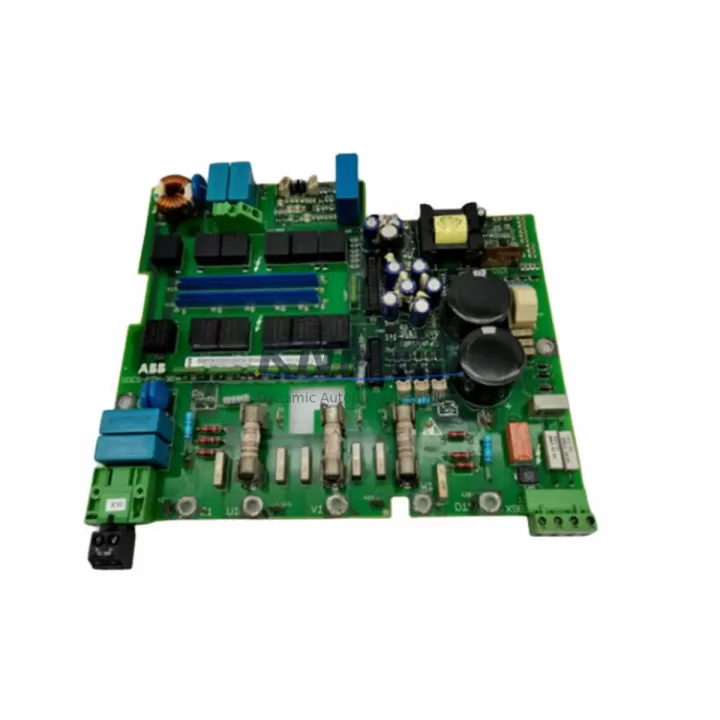
Overview
ABB 086318-001 Migration-Ready CPU for Harmony DCS: Legacy System Retrofit & Compatibility Upgrade
The ABB 086318-001 is a central processing unit module designed for the ABB Harmony DCS (Distributed Control System) platform — one of the most widely deployed process automation architectures in the petrochemical, power generation, and continuous manufacturing industries. As ABB progressively transitions its installed base toward the System 800xA and ABB Ability™ platforms, the 086318-001 CPU remains a critical spare and migration-bridge component for facilities that must maintain operational continuity while planning phased control system upgrades.
This module is engineered to slot into existing Harmony DCS backplane racks without requiring structural cabinet modifications, making it the preferred choice for maintenance engineers managing aging control infrastructure. Whether you are replacing a failed CPU in an emergency shutdown scenario, building a spare parts inventory ahead of a planned turnaround, or executing a staged migration from legacy Harmony hardware to a modern distributed architecture, the 086318-001 provides the reliability and backward compatibility your operation demands.
Each unit supplied by KNMKS undergoes pre-shipment functional verification, including power-on self-test, backplane communication handshake validation, and firmware version confirmation. All units are shipped with a support terms confirmed by quotation covering manufacturing defects and functional failures under normal operating conditions.
Migration Compatibility Table
| Parameter | Details |
|---|---|
| Compatible Platform | ABB Harmony DCS (MOD 300 / INFI 90 series) |
| Backplane Interface | Harmony standard backplane bus; direct slot insertion, no adapter required |
| Communication Protocols | INFI-NET, Modulebus; verify node addressing before replacement |
| Power Supply Requirement | 24 VDC via backplane; confirm rack PSU capacity ≥ rated load + 20% margin |
| Installation Footprint | Standard Harmony single-slot module; confirm slot clearance in existing cabinet |
| Firmware Compatibility | Match firmware revision to existing system baseline; consult ABB release notes |
| Replacement Recommendation | Direct replacement for failed or end-of-life 086318-001 CPUs; no I/O rewiring required |
| Commissioning Focus | Node address DIP switch setting, database download, loop verification, alarm verification |
| Support terms | 12 months from shipment date — manufacturing defects & functional failures |
Retrofit Planning for Existing Automation Systems
A successful Harmony DCS CPU replacement begins well before the module arrives on-site. Retrofit planning for the 086318-001 must account for the full control architecture context, not just the CPU slot itself.
Start by auditing the existing rack configuration. Harmony DCS installations typically combine the CPU module with dedicated I/O modules — analog input, analog output, digital input, and digital output cards — all sharing the same backplane bus. Confirm that the backplane itself is in serviceable condition and that the rack power supply module (PSU) delivers sufficient capacity to support the replacement CPU alongside all co-resident I/O modules. Undersized or aging PSUs are a common source of post-replacement instability.
Communication architecture is equally critical. The 086318-001 CPU communicates over INFI-NET, ABB’s proprietary peer-to-peer control network. Before swapping the CPU, document the existing node address configuration — typically set via DIP switches or jumpers on the module faceplate. An incorrect node address will prevent the replacement CPU from joining the control network, causing immediate process disruption. If the facility also operates ABB Modulebus segments connecting remote I/O stations, verify that the new CPU’s firmware supports the same Modulebus revision as the existing network infrastructure.
For sites running ABB Operate IT or legacy Conductor NT HMI systems, the CPU replacement must be coordinated with the HMI engineering team. HMI display pages, alarm setpoints, and historian tag mappings are tied to the control database resident on the CPU. After the replacement module is installed and the control database is downloaded, perform a full HMI screen walkthrough to confirm that all process variables, faceplates, and trend displays are populating correctly before returning the loop to automatic control.
If the retrofit is part of a broader migration toward ABB System 800xA, the 086318-001 can serve as an interim CPU while S800 I/O modules and AC 800M controllers are staged for installation in parallel racks. This phased approach — maintaining the legacy Harmony CPU in service while commissioning the new control layer — is the most effective strategy for minimizing production impact during a full platform migration. Signal isolators and protocol converters may be required at the I/O boundary to bridge legacy Harmony analog signals to the new S800 I/O bus during the transition period.
Programming cable and engineering workstation compatibility should also be confirmed prior to the maintenance window. ABB’s Control Builder engineering environment requires the correct communication driver and hardware key to connect to Harmony CPUs. Ensure the engineering laptop has the appropriate software version installed and that the programming cable — typically an RS-232 or proprietary serial interface — is available and tested before the planned outage begins.
Downtime Control During System Migration
Minimizing unplanned downtime during a Harmony DCS CPU replacement requires a structured pre-outage preparation protocol. The following practices are recommended for maintenance teams executing this replacement in live production environments.
Pre-outage backup: Export a full backup of the existing CPU’s control database, including all loop configurations, PID tuning parameters, alarm limits, and interlock logic, before initiating any hardware removal. Store the backup on both the engineering workstation and a removable medium kept in the control room. This backup is your recovery baseline if the replacement CPU encounters a commissioning issue.
Parallel verification: Where process safety permits, configure the replacement 086318-001 on a bench test rack using a spare backplane and PSU before the planned outage. Download the control database to the bench unit and verify that all I/O module communications initialize correctly. This step eliminates firmware incompatibility and database corruption as variables during the live replacement window.
Outage window management: A well-prepared Harmony CPU swap — including module removal, replacement installation, database download, node address verification, and initial loop verification — can typically be completed within a two- to four-hour maintenance window. Allocate additional time for HMI verification and historian reconnection if the site runs a continuous data historian linked to the Harmony control network.
Control continuity: For critical process loops that cannot tolerate interruption, coordinate with the process operations team to place affected loops in manual control at the field station level before the CPU is taken offline. This preserves field device setpoints and prevents process upsets during the CPU changeover interval. Restore loops to automatic control only after the replacement CPU has been confirmed stable on the network and all process variable readings have been validated against field instrumentation.
Post-replacement validation: After the replacement 086318-001 is online, conduct a structured loop verification covering all I/O points served by the CPU. Verify analog input scaling, digital output states, interlock logic execution, and alarm annunciation before signing off on the maintenance work order. Document the firmware version, node address, and database revision of the replacement module in the site’s equipment maintenance log.
Retrofit Support FAQ
Q1: Is the ABB 086318-001 a direct drop-in replacement for the existing CPU in my Harmony DCS rack?
Yes, the 086318-001 is designed for direct slot replacement within compatible Harmony DCS backplane racks. No rewiring of I/O terminals or modification of the rack structure is required. However, you must verify the node address DIP switch configuration and download the correct control database revision to the replacement module before returning the system to automatic operation.
Q2: How do I confirm firmware compatibility before installation?
Record the firmware revision label on the faceplate of the module being replaced. Contact KNMKS at admin@knmks.com with your existing firmware revision and system baseline version. We will confirm compatibility of the supplied unit prior to shipment and can source a specific firmware revision if your system requires it.
Q3: What is included with each unit, and what does the support terms confirmed by quotation cover?
Each ABB 086318-001 supplied by KNMKS is shipped after pre-shipment functional testing, including power-on self-test and backplane communication verification. The support terms confirmed by quotation cover manufacturing defects and functional failures under normal operating conditions. It does not cover damage resulting from incorrect installation, overvoltage events, or physical mishandling. Support requests are processed directly through KNMKS with a target response time of two business days.
Q4: Do you maintain stock for ongoing spare parts programs?
Yes. KNMKS maintains inventory of the ABB 086318-001 and related Harmony DCS components to support both emergency replacement orders and planned spare parts programs. For facilities managing multi-year maintenance contracts or scheduled turnaround cycles, we offer reserved stock arrangements. Contact admin@knmks.com or call +86 18359268345 to discuss volume pricing and stock reservation terms.
© 2026 KNMKS. All rights reserved.
Original Source: https://knmks.com
Contact: admin@knmks.com | +86 18359268345
Product Identification
- Brand / Ecosystem
-
ABB
ABB - Model / Series
-
086318-001
Assorted Series - Product Family
- PLCs & Controllers
- Availability Status
- Available on request after model and quantity confirmation
- Inquiry Type
- B2B RFQ, replacement inquiry and project spare-part request
- Pre-Quote Check
- Exact SKU, brand, series, quantity, nameplate photos and destination country are checked before quotation
System Path
Where this product fits in the KNMKS automation structure.
Specification & Inquiry Focus
- Control platform
- PLC, PAC and modular controllers
- Common needs
- CPU, rack, power and I/O expansion
- Project support
- Replacement, cabinet build and maintenance
Buyer Confirmation
Information KNMKS checks before replying.
- Exact model
- 086318-001
- Brand / ecosystem
- ABB
- Product family
- PLCs & Controllers
- Application note
- Replacement, maintenance, project build or spare-part list
- Useful photos
- Nameplate, installed unit, cabinet layout or connector side
- Delivery details
- Quantity, destination country and target schedule
Document Support
Files and notes can be confirmed during quotation.
- Product photos or nameplate confirmation when available
- Packing and delivery notes before quotation confirmation
- Support scope and delivery terms confirmed per inquiry
- Export document coordination for qualified B2B requests
Inquiry Support
- Model cross-checking before quotation
- CPU, power, rack and expansion module matching
- Support for replacement and project inquiry
What to Send Us
- Brand and exact model number: ABB 086318-001
- Quantity and required delivery time
- Application, replacement requirement or nameplate photo
- Destination country and shipping preference
RFQ Preparation
This is a product inquiry page built for RFQ communication.
Fast Model Check
Send this model to KNMKS for confirmation.
Include quantity, destination country and photos if this is a maintenance replacement. The inquiry will be saved with a reference number after submission.
Brand & Compatibility Note
KNMKS displays automation product information for well-known industrial brand ecosystems and compatible replacement references. Brand names are used for product identification and compatibility reference only; final availability and commercial terms are confirmed per quotation.
 Manufacturing
 Machine Tools
 Packaging
 Energy & Power



 HMI & Displays
 Servo Systems
 Variable Frequency Drives
 Sensors