
Overview
YOKOGAWA MX2*D Migration-Ready I/O Module for Legacy DAQ Systems
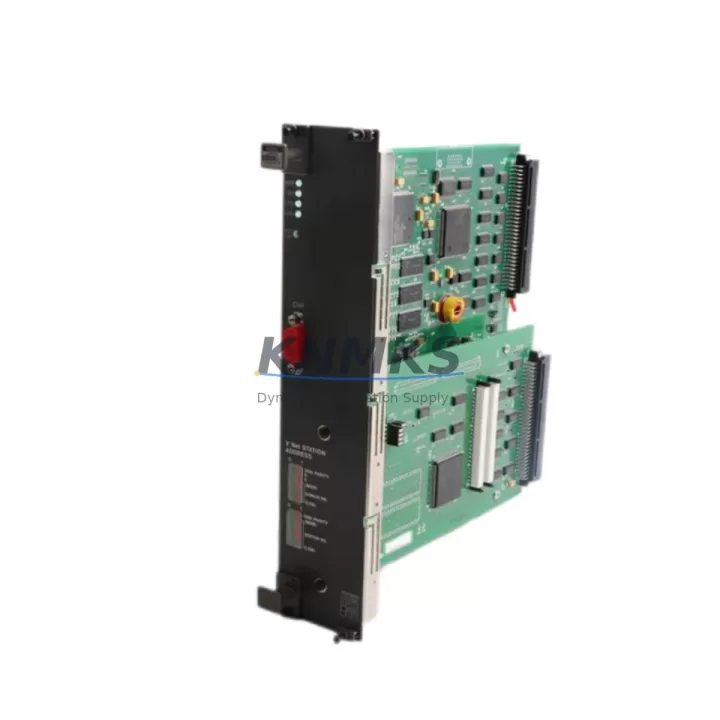
The YOKOGAWA MX2*D is a retrofit-ready I/O module engineered for direct integration into MX100 DAQSTATION platforms and compatible legacy data acquisition architectures. As industrial facilities transition away from discontinued YOKOGAWA MX series hardware, the MX2*D serves as a verified drop-in replacement that preserves existing wiring configurations, backplane addressing, and communication protocol integrity — minimizing retrofit risk and unplanned downtime.
For maintenance engineers and system integrators managing aging control infrastructure, sourcing a compatible MX2*D replacement is often the critical path item in a broader control cabinet modernization project. This module supports the full MX100 series backplane interface, retains compatibility with YOKOGAWA’s proprietary DAQ communication stack, and is suitable for both direct swap-out in operational systems and staged migration scenarios where legacy and modern I/O coexist during transition periods.
Before installation, engineers should confirm power rail capacity on the existing MX100 chassis — particularly when adding modules to a partially populated rack. Terminal wiring from the legacy module should be documented and verified against the MX2*D terminal assignment map to avoid signal inversion or ground loop issues. Backplane slot addressing must be re-confirmed in the DAQSTATION configuration software, as slot-dependent channel numbering affects both data logging templates and HMI display bindings.
In systems where the MX100 communicates upstream via Ethernet or RS-232/RS-422 serial links to a SCADA host or historian, the MX2*D retrofit does not require protocol reconfiguration — the module inherits the existing communication parameters from the chassis controller. However, if the migration also involves upgrading the host controller (for example, transitioning from a legacy MX100 main unit to a current-generation YOKOGAWA data acquisition controller), firmware version alignment between the new main unit and the MX2*D must be validated prior to commissioning.
Installations involving I/O expansion — such as adding thermocouple, voltage, or current input channels to an existing MX100 rack — benefit from the MX2*D’s modular architecture. The module slots directly into available backplane positions without requiring chassis modification, making it well-suited for incremental capacity upgrades in facilities where full system replacement is not yet justified. Engineers working on such expansions should also account for the MX100 power supply module’s total load budget, as adding I/O modules increases chassis current draw.
For control cabinet retrofits where physical space is constrained, the MX2*D’s form factor matches the original MX series module envelope, eliminating the need for panel cutout modifications or DIN rail adapter brackets. This is particularly valuable in skid-mounted or field enclosure installations where cabinet real estate is limited and mechanical rework would extend project timelines.
Firmware compatibility should be verified against the installed DAQSTATION software version. In legacy installations running older DAQSTATION firmware, a firmware update on the main unit may be required to fully utilize all MX2*D channel configuration options. YOKOGAWA’s configuration utility supports offline parameter backup, allowing engineers to export existing channel settings, perform the firmware update, and restore configurations — protecting program logic and reducing recommissioning time.
All units are pre-shipment tested against YOKOGAWA factory acceptance criteria, covering channel accuracy, backplane communication handshake, and terminal isolation. Each MX2*D ships with a support terms confirmed by quotation covering manufacturing defects and functional performance. Stock is maintained for immediate dispatch to support urgent maintenance and unplanned outage recovery scenarios.
Migration Compatibility Table
| Parameter | Legacy MX Series Module | YOKOGAWA MX2*D | Migration Note |
|---|---|---|---|
| Backplane Interface | MX100 proprietary bus | MX100 proprietary bus | Direct drop-in; no adapter required |
| Terminal Wiring | Screw terminal, legacy pitch | Screw terminal, compatible pitch | Verify terminal map before rewiring |
| Communication Protocol | YOKOGAWA DAQ stack (Ethernet / Serial) | YOKOGAWA DAQ stack (Ethernet / Serial) | No protocol reconfiguration required |
| Slot Addressing | Chassis slot-dependent | Chassis slot-dependent | Re-confirm slot address in DAQSTATION config |
| Firmware Compatibility | Legacy DAQSTATION firmware | Current DAQSTATION firmware recommended | Update main unit firmware if required |
| Power Consumption | Per legacy module spec | Per MX2*D datasheet | Verify chassis power supply headroom |
| Physical Form Factor | MX series module envelope | MX series module envelope | No panel modification required |
| Support terms | — | 12 months | Covers manufacturing defects and functional performance |
Retrofit Planning for Existing Automation Systems
A successful MX2*D retrofit begins with a structured audit of the existing MX100 chassis configuration. Engineers should document all occupied backplane slots, current module types, channel assignments, and wiring schedules before any hardware is removed. In multi-chassis installations, the MX100 main unit and any expansion chassis should be inventoried together, as channel numbering is global across the DAQSTATION configuration.
Power infrastructure is a common constraint in legacy retrofits. The MX100 power supply module — typically a dedicated DC supply unit within the chassis — must have sufficient capacity to support the MX2*D alongside any other modules being retained or added. If the existing power supply is already near its rated output, a power supply upgrade should be scoped as part of the retrofit plan rather than discovered during commissioning.
Communication continuity is equally important. In systems where the MX100 connects to a SCADA historian or DCS via Ethernet, the upstream communication link remains unaffected by an I/O module swap. However, in installations using RS-422 serial communication to a legacy HMI or operator panel, engineers should verify that the HMI display tag bindings reference channel names rather than absolute channel numbers — as slot reassignment can shift channel indices if the replacement module is installed in a different backplane position.
For facilities also upgrading associated instrumentation — such as replacing legacy thermocouple transmitters, 4–20 mA current loop sensors, or RTD input devices — the MX2*D’s input channel specifications should be cross-referenced against the new transmitter output ranges to confirm signal compatibility without requiring additional signal conditioning hardware. In some cases, a signal isolator or loop-powered conditioner may be required to bridge legacy field devices with updated I/O specifications.
Where the retrofit scope includes communication protocol migration — for example, transitioning from serial Modbus to Ethernet-based communication — a YOKOGAWA communication module or gateway device may be required alongside the MX2*D to bridge the protocol gap. Programming cables and configuration adapters used during the original system commissioning should be retained for use during the retrofit, as they are often required for firmware updates and offline parameter backup procedures.
Downtime Control During System Migration
Minimizing production downtime during an MX2*D retrofit requires advance preparation and a disciplined changeover sequence. The recommended approach is to perform all pre-installation configuration work — including DAQSTATION parameter backup, firmware update validation, and channel assignment verification — during scheduled maintenance windows before the physical module swap takes place.
Where process continuity is critical, a parallel operation strategy can be employed: the replacement MX2*D is configured and verified in a bench test environment using a spare MX100 chassis or test rack before being introduced to the live system. This approach allows engineers to confirm channel accuracy, backplane communication, and HMI tag binding correctness without exposing the production system to risk.
During the physical changeover, terminal wiring should be transferred one channel at a time using a documented wiring schedule, with each connection verified against the MX2*D terminal map before the next is made. After installation, a channel-by-channel functional test — injecting known signals at each input and confirming correct readings in the DAQSTATION display and historian — provides confidence before returning the system to automatic operation.
Post-retrofit, the original program logic, alarm setpoints, and data logging templates should be restored from the pre-retrofit backup and validated against live process values. HMI screens should be checked for correct tag resolution, and communication link status should be confirmed at both the DAQSTATION level and the upstream SCADA or DCS interface. Retaining the removed legacy module as a temporary spare during the initial post-retrofit operating period provides a rapid fallback option if an unexpected issue is identified during early operation.
Retrofit Support FAQ
Q: Is the YOKOGAWA MX2*D a direct replacement for legacy MX series I/O modules?
A: Yes. The MX2*D is designed as a drop-in replacement for compatible MX series modules within the MX100 DAQSTATION platform. It uses the same backplane interface and module form factor, requiring no chassis modification. Terminal wiring and slot addressing should be verified against the MX2*D specification before installation.
Q: What commissioning steps are required after installing the MX2*D?
A: After physical installation, confirm backplane slot address assignment in the DAQSTATION configuration utility, restore channel parameters from the pre-retrofit backup, and perform a channel-by-channel functional test using known input signals. Verify HMI tag bindings and upstream communication link status before returning the system to automatic operation.
Q: Does the MX2*D require firmware updates on the MX100 main unit?
A: In most cases, the MX2*D is compatible with existing DAQSTATION firmware. However, if the main unit is running a significantly older firmware version, an update may be required to access all MX2*D configuration options. YOKOGAWA’s configuration utility supports offline parameter backup prior to any firmware update, protecting existing channel settings and program logic.
Q: What support terms and supply assurance does the MX2*D carry?
A: Each MX2*D unit is covered by a support terms confirmed by quotation against manufacturing defects and functional performance failures. Units are pre-shipment tested and held availability confirmed by RFQ for immediate dispatch, supporting both planned retrofit projects and urgent unplanned maintenance requirements.
© 2026 KNMKS. All rights reserved.
Original Source: https://knmks.com
Contact: admin@knmks.com | +86 18359268345
Product Identification
- Brand / Ecosystem
-
YOKOGAWA
Assorted Brands - Model / Series
-
MX2*D
Assorted Series - Product Family
- PLCs & Controllers
- Availability Status
- Available on request after model and quantity confirmation
- Inquiry Type
- B2B RFQ, replacement inquiry and project spare-part request
- Pre-Quote Check
- Exact SKU, brand, series, quantity, nameplate photos and destination country are checked before quotation
System Path
Where this product fits in the KNMKS automation structure.
Specification & Inquiry Focus
- Control platform
- PLC, PAC and modular controllers
- Common needs
- CPU, rack, power and I/O expansion
- Project support
- Replacement, cabinet build and maintenance
Buyer Confirmation
Information KNMKS checks before replying.
- Exact model
- MX2*D
- Brand / ecosystem
- YOKOGAWA
- Product family
- PLCs & Controllers
- Application note
- Replacement, maintenance, project build or spare-part list
- Useful photos
- Nameplate, installed unit, cabinet layout or connector side
- Delivery details
- Quantity, destination country and target schedule
Document Support
Files and notes can be confirmed during quotation.
- Product photos or nameplate confirmation when available
- Packing and delivery notes before quotation confirmation
- Support scope and delivery terms confirmed per inquiry
- Export document coordination for qualified B2B requests
Inquiry Support
- Model cross-checking before quotation
- CPU, power, rack and expansion module matching
- Support for replacement and project inquiry
What to Send Us
- Brand and exact model number: YOKOGAWA MX2*D
- Quantity and required delivery time
- Application, replacement requirement or nameplate photo
- Destination country and shipping preference
RFQ Preparation
This is a product inquiry page built for RFQ communication.
Fast Model Check
Send this model to KNMKS for confirmation.
Include quantity, destination country and photos if this is a maintenance replacement. The inquiry will be saved with a reference number after submission.
Brand & Compatibility Note
KNMKS displays automation product information for well-known industrial brand ecosystems and compatible replacement references. Brand names are used for product identification and compatibility reference only; final availability and commercial terms are confirmed per quotation.
 Manufacturing
 Machine Tools
 Packaging
 Energy & Power



 HMI & Displays
 Servo Systems
 Variable Frequency Drives
 Sensors