
Overview
Siemens S55376-C116 Migration-Ready BACnet Module: Legacy System Retrofit & Compatibility Upgrade
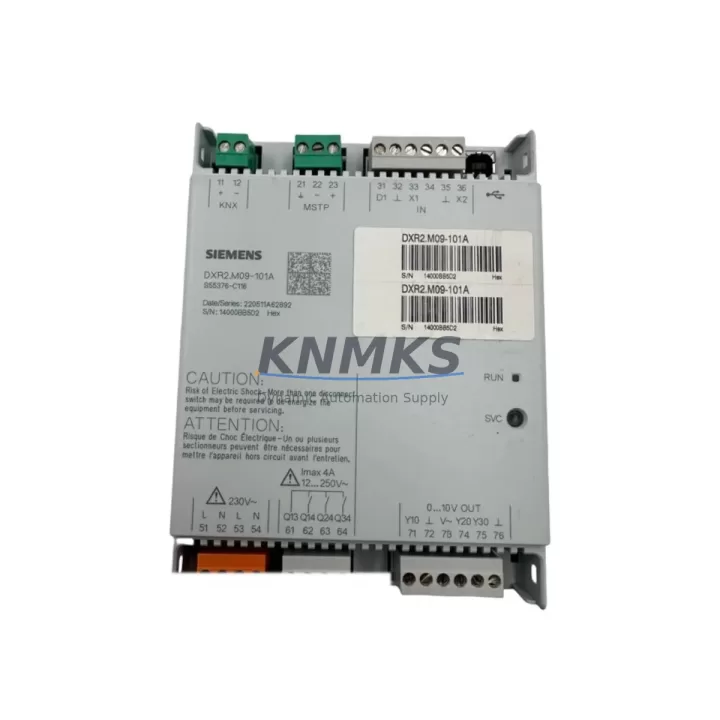
The Siemens S55376-C116 is a BACnet/IP communication module engineered for the Desigo building automation platform. As legacy Desigo PX and Desigo Insight controllers approach end-of-service milestones, facilities teams and system integrators increasingly rely on the S55376-C116 as a direct, migration-ready replacement for discontinued BACnet interface cards within existing control cabinets. This module preserves the original BACnet/IP network topology, eliminates the need for full controller replacement, and significantly reduces retrofit project scope, cost, and downtime exposure.
The S55376-C116 is designed for drop-in installation into Desigo PXC and PXM series controller backplanes. It maintains backward compatibility with existing BACnet object models, device instance assignments, and network segment configurations — meaning your BMS operator workstation, Desigo CC or Desigo Insight SCADA layer, and field-level I/O wiring remain undisturbed during the swap. Engineers replacing aging Desigo PX communication boards will find that the S55376-C116 retains the same physical connector footprint and DIN rail mounting profile, minimizing installation space concerns in densely populated control panels.
Migration Compatibility Table
| Parameter | Details |
|---|---|
| SKU / Part Number | S55376-C116 |
| Brand / Series | Siemens / Desigo |
| Module Type | BACnet/IP Communication Module |
| Compatible Controllers | Desigo PXC, PXM series; Desigo PX legacy backplanes |
| Communication Protocol | BACnet/IP (ISO 16484-5 compliant) |
| Physical Interface | RJ-45 Ethernet; DIN rail mountable |
| Power Supply | Supplied via controller backplane (24 VDC nominal) |
| Installation Space | Standard Desigo module slot; no additional panel space required |
| Firmware Compatibility | Compatible with Desigo PX firmware V5.x and above; verify revision before commissioning |
| Replacement Recommendation | Direct replacement for discontinued Desigo BACnet interface cards; verify device instance and network number before swap |
| Commissioning Focus | BACnet device instance, IP address assignment, subnet mask, BBMD configuration |
| Support terms | support terms confirmed by quotation — tested and verified before shipment |
Retrofit Planning for Existing Automation Systems
A successful S55376-C116 retrofit begins well before the module arrives on site. The first step is a full audit of the existing Desigo controller rack: confirm the backplane slot assignment, verify that the host PXC or PXM controller’s firmware revision supports the S55376-C116 communication stack, and document the current BACnet device instance number and IP network parameters. In multi-controller installations, the Desigo PXC100-E.D or PXC200-E.D automation stations often serve as the BACnet/IP backbone; replacing a communication module on any node in this network requires careful coordination to avoid duplicate device instance conflicts on the BACnet segment.
Terminal wiring for the Ethernet port is straightforward — standard Cat5e or Cat6 patch cable to the building LAN or dedicated BACnet/IP VLAN — but the power feed to the module slot must be confirmed against the controller’s internal power budget. In older Desigo PX installations, the 24 VDC internal bus may already be loaded by multiple I/O expansion modules such as the PXX3.E08 digital input module or PXX3.A04 analog output module. Before inserting the S55376-C116, calculate the total current draw across all installed modules and confirm headroom against the controller’s rated supply capacity.
For sites running Desigo Insight or Desigo CC as the SCADA/BMS front-end, the operator workstation communicates with field controllers exclusively over BACnet/IP. After the S55376-C116 is installed and powered, the Desigo CC server must re-discover the controller at its assigned IP address. If the device instance is preserved from the previous module, all existing graphic pages, trend logs, alarm definitions, and schedule objects in the Desigo CC database will reconnect automatically — eliminating the need to rebuild HMI screens. This is one of the most significant time-saving advantages of a like-for-like BACnet module replacement versus a full controller migration.
In projects where the legacy Desigo system also interfaces with third-party HVAC equipment — such as Siemens CLIMATIX controllers, Synco 700 series room controllers, or KNX-to-BACnet gateways — the S55376-C116 must be confirmed as the BACnet/IP client or server in each communication relationship. Routing tables, BBMD (BACnet Broadcast Management Device) entries, and foreign device registrations should be documented before the swap and restored immediately after commissioning to maintain cross-system data exchange without interruption.
Downtime Control During System Migration
Minimizing unplanned downtime is the primary concern in any live building automation retrofit. For the S55376-C116 replacement, the recommended approach is a scheduled maintenance window during off-peak hours — typically nights or weekends — when HVAC loads are reduced and occupant impact is lowest. Before powering down the Desigo controller, export a full backup of the controller’s application program using Desigo Tool Set (DTS) or the Desigo CC engineering tool. This backup preserves all control logic, setpoints, schedule configurations, and alarm thresholds, and can be reloaded in minutes if the new module requires a controller restart.
During the physical swap, the existing BACnet/IP network segment remains active; only the specific controller node goes offline. Neighboring PXC controllers on the same BACnet/IP network continue to operate independently, so zone-level control in adjacent areas is unaffected. Once the S55376-C116 is seated and the controller restarts, confirm IP connectivity via ping before initiating a Desigo CC re-scan. Validate that all BACnet objects — AI, AO, BI, BO, and schedule objects — are visible and reading correctly before closing the maintenance window. A pre-prepared commissioning checklist covering IP address, subnet mask, default gateway, BACnet device instance, and BBMD table entries reduces the risk of configuration errors under time pressure.
For critical facilities such as hospitals, data centers, or pharmaceutical manufacturing sites where continuous environmental control is non-negotiable, a parallel-run strategy is advisable: install the S55376-C116 in a bench-test rack with a spare PXC controller, validate full BACnet communication with the Desigo CC server in a staging environment, and only proceed with the live swap after all parameters are confirmed. This approach eliminates field debugging time and keeps the production control loop intact throughout the migration process.
Retrofit Support FAQ
Q1: Is the S55376-C116 a direct drop-in replacement for the original Desigo BACnet communication card?
In most Desigo PXC and PXM installations, yes. The S55376-C116 uses the same backplane connector and module slot format as the original Desigo BACnet interface. Before installation, confirm the host controller firmware version and verify that the BACnet device instance and IP parameters from the old module are documented and ready to be re-entered. No rewiring of field terminals or I/O modules is required.
Q2: What commissioning steps are required after installing the S55376-C116?
After seating the module and powering the controller, assign the correct IP address, subnet mask, and default gateway via the controller’s local display or Desigo Tool Set. Set the BACnet device instance to match the previous value to ensure Desigo CC reconnects automatically. Verify BBMD configuration if the controller is on a routed BACnet/IP network. Confirm all BACnet objects are visible in Desigo CC before returning the system to normal operation.
Q3: How do you verify compatibility with existing Desigo firmware before ordering?
Check the firmware revision label on the host PXC or PXM controller. The S55376-C116 is compatible with Desigo PX firmware V5.x and later. If the controller is running an earlier firmware version, a firmware update via Desigo Tool Set may be required prior to module installation. Contact our technical team with your controller model and firmware revision for a pre-order compatibility confirmation.
Q4: What support terms and pre-shipment testing does this module include?
Every S55376-C116 unit is function-tested prior to shipment, covering power-up, BACnet/IP communication initialization, and basic object read/write verification. A support terms confirmed by quotation is included from the date of shipment, covering manufacturing defects and functional failures under normal operating conditions. In-stock units are available for same-week dispatch to minimize project lead times.
© 2026 KNMKS. All rights reserved.
Original Source: https://knmks.com
Contact: admin@knmks.com | +86 18359268345
Product Identification
- Brand / Ecosystem
-
Siemens
Siemens - Model / Series
-
S55376-C116
Assorted Series - Product Family
- PLCs & Controllers
- Availability Status
- Available on request after model and quantity confirmation
- Inquiry Type
- B2B RFQ, replacement inquiry and project spare-part request
- Pre-Quote Check
- Exact SKU, brand, series, quantity, nameplate photos and destination country are checked before quotation
System Path
Where this product fits in the KNMKS automation structure.
Specification & Inquiry Focus
- Control platform
- PLC, PAC and modular controllers
- Common needs
- CPU, rack, power and I/O expansion
- Project support
- Replacement, cabinet build and maintenance
Buyer Confirmation
Information KNMKS checks before replying.
- Exact model
- S55376-C116
- Brand / ecosystem
- Siemens
- Product family
- PLCs & Controllers
- Application note
- Replacement, maintenance, project build or spare-part list
- Useful photos
- Nameplate, installed unit, cabinet layout or connector side
- Delivery details
- Quantity, destination country and target schedule
Document Support
Files and notes can be confirmed during quotation.
- Product photos or nameplate confirmation when available
- Packing and delivery notes before quotation confirmation
- Support scope and delivery terms confirmed per inquiry
- Export document coordination for qualified B2B requests
Inquiry Support
- Model cross-checking before quotation
- CPU, power, rack and expansion module matching
- Support for replacement and project inquiry
What to Send Us
- Brand and exact model number: Siemens S55376-C116
- Quantity and required delivery time
- Application, replacement requirement or nameplate photo
- Destination country and shipping preference
RFQ Preparation
This is a product inquiry page built for RFQ communication.
Fast Model Check
Send this model to KNMKS for confirmation.
Include quantity, destination country and photos if this is a maintenance replacement. The inquiry will be saved with a reference number after submission.
Brand & Compatibility Note
KNMKS displays automation product information for well-known industrial brand ecosystems and compatible replacement references. Brand names are used for product identification and compatibility reference only; final availability and commercial terms are confirmed per quotation.
 Manufacturing
 Machine Tools
 Packaging
 Energy & Power



 HMI & Displays
 Servo Systems
 Variable Frequency Drives
 Sensors