
Overview
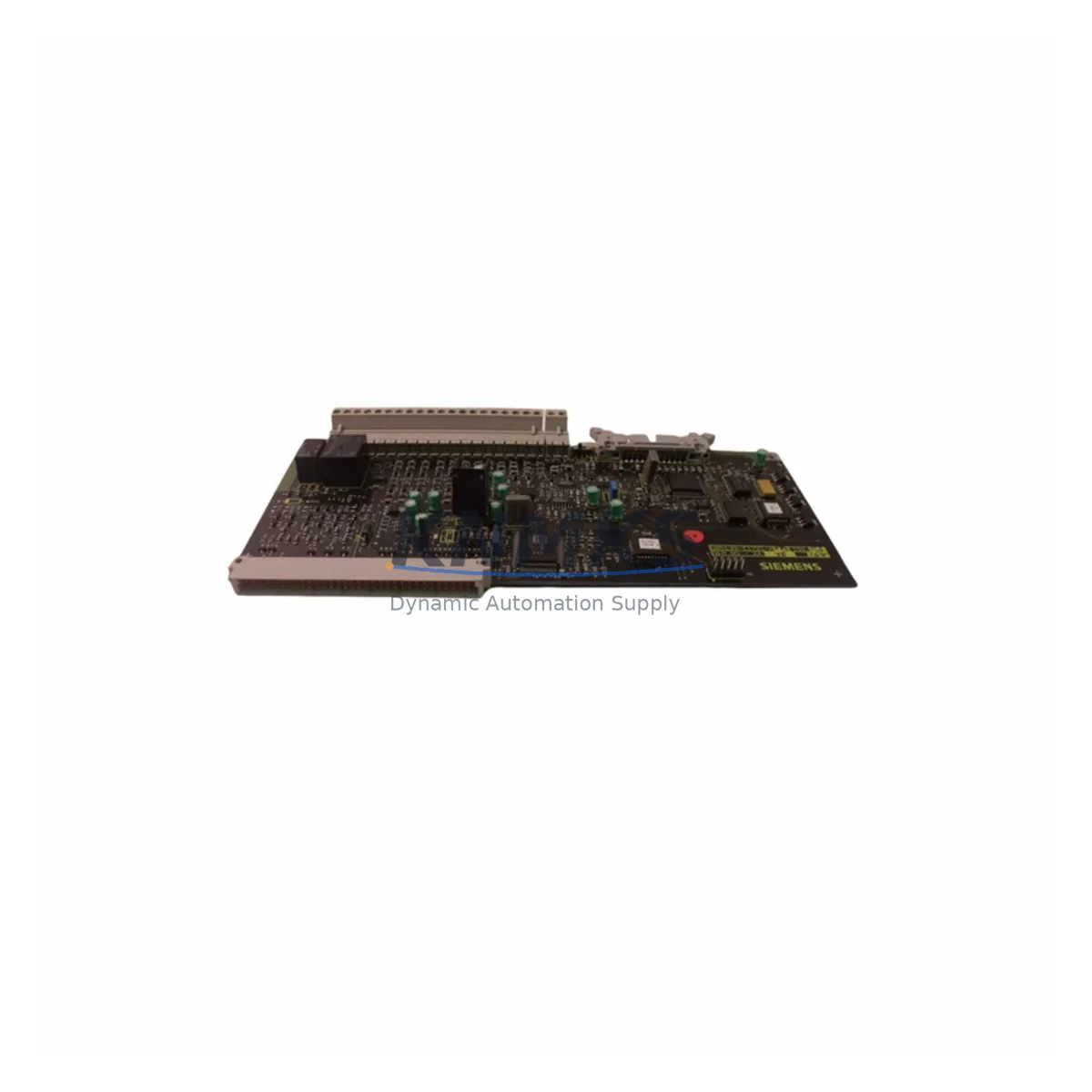
Siemens G85139-E1721-A882 Maintenance-Proven Spare Part for Factory Uptime
The Siemens G85139-E1721-A882 is an original SIMATIC PCB control board engineered for demanding industrial automation environments. Designed and manufactured in Germany to Siemens’ stringent quality standards, this board serves as a critical spare part for maintenance engineers managing SIMATIC-based control systems across manufacturing, energy, petrochemical, and infrastructure sectors. Sourced directly from verified supply channels, each unit is tested before shipment and backed by a support terms confirmed by quotation, ensuring your facility can restore operations quickly and confidently after an unplanned fault or scheduled overhaul.
For maintenance and procurement engineers responsible for minimizing mean time to repair (MTTR), having the G85139-E1721-A882 pre-positioned in your spare parts inventory is a proven strategy. Unplanned downtime caused by PCB-level failures in SIMATIC control cabinets can halt entire production lines. Stocking this board as a ready-to-deploy replacement eliminates lead-time risk and supports your facility’s continuous operation targets.
Spare Maintenance Table
| Parameter | Specification / Detail |
|---|---|
| Part Number / SKU | G85139-E1721-A882 |
| Brand | Siemens |
| Series | SIMATIC Automation |
| Product Type | PCB Control Board |
| Origin | Germany (DE) |
| Compatibility | SIMATIC S5 / S7 series control systems and associated control cabinet assemblies |
| Application Environment | Industrial automation, PLC/DCS control cabinets, manufacturing, energy, petrochemical |
| Installation | Direct board-level replacement; observe ESD precautions and power-down procedures |
| Maintenance Recommendation | Inspect connectors, backplane pins, and adjacent power rails before installation |
| Pre-Shipment Testing | Functional test performed on every unit prior to dispatch |
| Support terms | 12 Months |
| Weight | 500 g (approx.) |
| Long-Term Supply | Available for ongoing MRO and annual maintenance contracts |
Maintenance Planning for Continuous Operation
When replacing the G85139-E1721-A882 in a SIMATIC control cabinet, a thorough site inspection of the surrounding electrical circuit is essential to prevent repeat failures and ensure system stability. Maintenance engineers should begin by verifying the 24 VDC power supply module feeding the board — a degraded SITOP power supply or equivalent regulated DC source can stress PCB components and cause premature failure of a newly installed board. Check input voltage tolerance and ripple before powering up the replacement.
Inspect the backplane connector and rack slot for bent pins, oxidation, or mechanical damage. In SIMATIC S5 and S7 rack assemblies, a damaged backplane can cause intermittent communication faults that are difficult to diagnose and may be misattributed to the control board itself. If the rack shows signs of wear, consider scheduling a backplane inspection or replacement as part of the same maintenance window.
Review the I/O modules connected to the same rack segment. Faulty digital or analog I/O modules — such as a shorted output channel — can generate overcurrent conditions that propagate to the control board. Similarly, inspect any signal isolators or signal conditioning modules in the circuit; degraded isolation barriers can introduce ground loops that corrupt board-level logic. Fuse protection on the 24 VDC rail should also be verified — replace any fuse that shows signs of thermal stress or has blown without a clear root cause.
For systems with active communications, check the PROFIBUS DP or MPI communication cables and termination resistors. A missing or incorrect bus terminator on a PROFIBUS segment can cause the newly installed board to report communication errors immediately after startup, leading to unnecessary re-diagnosis. If the system includes an HMI panel (such as a Siemens TP or MP series touch panel), verify that the HMI communication parameters match the restored controller configuration before returning the line to production.
Finally, review the relay output modules and contactor wiring in the same control cabinet. Relay coil suppression diodes and surge arrestors protect PCB outputs from inductive kickback; if these components are absent or degraded, they represent a recurring risk to any replacement board. Addressing these peripheral components during the same maintenance event maximizes the service life of the G85139-E1721-A882 and reduces the probability of a repeat callout.
Site Replacement Workflow
Follow this structured workflow to minimize downtime and ensure a safe, compatible installation of the G85139-E1721-A882:
1. Pre-Replacement Verification: Confirm the failed board’s part number against the label and system documentation. Cross-reference with the SIMATIC system’s hardware configuration (HW Config in STEP 7 or TIA Portal) to ensure the replacement board matches the expected slot assignment and firmware revision requirements.
2. Safe Isolation: De-energize the control cabinet following your site’s lockout/tagout (LOTO) procedure. Allow capacitors to discharge before handling the PCB. Use an ESD wrist strap and anti-static mat throughout the replacement process.
3. Board Removal and Inspection: Remove the faulty G85139-E1721-A882 and inspect the slot, backplane connector, and adjacent modules for secondary damage. Document any anomalies with photographs for your maintenance records.
4. Installation and Connection Check: Seat the replacement board firmly into the backplane slot. Verify all edge connectors are fully engaged. Re-check all field wiring terminals and communication cable connections before re-energizing.
5. Power-Up and Functional Test: Restore power and monitor the system startup sequence. Confirm that the CPU or controller recognizes the board without fault codes. Run a short functional test cycle before returning the line to full production.
6. Documentation: Update your CMMS or maintenance log with the replacement date, board serial number, and any observations. Schedule a follow-up inspection at the next planned maintenance interval.
Spare Parts Support FAQ
Q1: Is the G85139-E1721-A882 compatible with both SIMATIC S5 and S7 systems?
The G85139-E1721-A882 is a Siemens SIMATIC series PCB control board. Compatibility depends on the specific rack, slot, and system configuration. Always cross-reference the part number against your system’s hardware documentation or STEP 7 / TIA Portal hardware configuration before installation. Our technical team can assist with compatibility verification prior to purchase.
Q2: How is each unit tested before shipment?
Every G85139-E1721-A882 unit undergoes a functional test prior to dispatch. Units that do not pass testing are not shipped. This process ensures that the board you receive is operationally verified and ready for installation, reducing the risk of a failed replacement during a critical maintenance event.
Q3: What does the support terms confirmed by quotation cover?
The support terms confirmed by quotation cover manufacturing defects and functional failures under normal operating conditions. It does not cover damage caused by incorrect installation, overvoltage events, or physical mishandling. Support requests are processed promptly to minimize your facility’s downtime exposure.
Q4: Can we establish a long-term supply agreement for ongoing MRO needs?
Yes. We support long-term supply commitments for maintenance, repair, and operations (MRO) programs. If your facility requires recurring stock of the G85139-E1721-A882 or related SIMATIC spare parts for annual maintenance contracts or aging system life-extension programs, please contact our sales team to discuss volume pricing and scheduled delivery arrangements.
© 2026 KNMKS. All rights reserved.
Original Source: https://knmks.com
Contact: admin@knmks.com | +86 18359268345
Product Identification
- Brand / Ecosystem
-
Siemens
Siemens - Model / Series
- G85139-E1721-A882
- Product Family
- Other Components
- Availability Status
- Available on request after model and quantity confirmation
- Inquiry Type
- B2B RFQ, replacement inquiry and project spare-part request
- Pre-Quote Check
- Exact SKU, brand, series, quantity, nameplate photos and destination country are checked before quotation
System Path
Where this product fits in the KNMKS automation structure.
Specification & Inquiry Focus
- Component range
- Breakers, terminals and cabinet accessories
- Common needs
- Model, photo and installation requirement
- Project support
- Maintenance and mixed spare-part inquiry
Buyer Confirmation
Information KNMKS checks before replying.
- Exact model
- G85139-E1721-A882
- Brand / ecosystem
- Siemens
- Product family
- Other Components
- Application note
- Replacement, maintenance, project build or spare-part list
- Useful photos
- Nameplate, installed unit, cabinet layout or connector side
- Delivery details
- Quantity, destination country and target schedule
Document Support
Files and notes can be confirmed during quotation.
- Product photos or nameplate confirmation when available
- Packing and delivery notes before quotation confirmation
- Support scope and delivery terms confirmed per inquiry
- Export document coordination for qualified B2B requests
Inquiry Support
- Mixed automation spare parts inquiry
- Cabinet component and accessory support
- Model identification from photos or labels
What to Send Us
- Brand and exact model number: Siemens G85139-E1721-A882
- Quantity and required delivery time
- Application, replacement requirement or nameplate photo
- Destination country and shipping preference
RFQ Preparation
This is a product inquiry page built for RFQ communication.
Fast Model Check
Send this model to KNMKS for confirmation.
Include quantity, destination country and photos if this is a maintenance replacement. The inquiry will be saved with a reference number after submission.
Brand & Compatibility Note
KNMKS displays automation product information for well-known industrial brand ecosystems and compatible replacement references. Brand names are used for product identification and compatibility reference only; final availability and commercial terms are confirmed per quotation.
 Manufacturing
 Machine Tools
 Packaging
 Energy & Power
 PLCs & Controllers
 HMI & Displays
 Servo Systems
 Variable Frequency Drives