
Overview
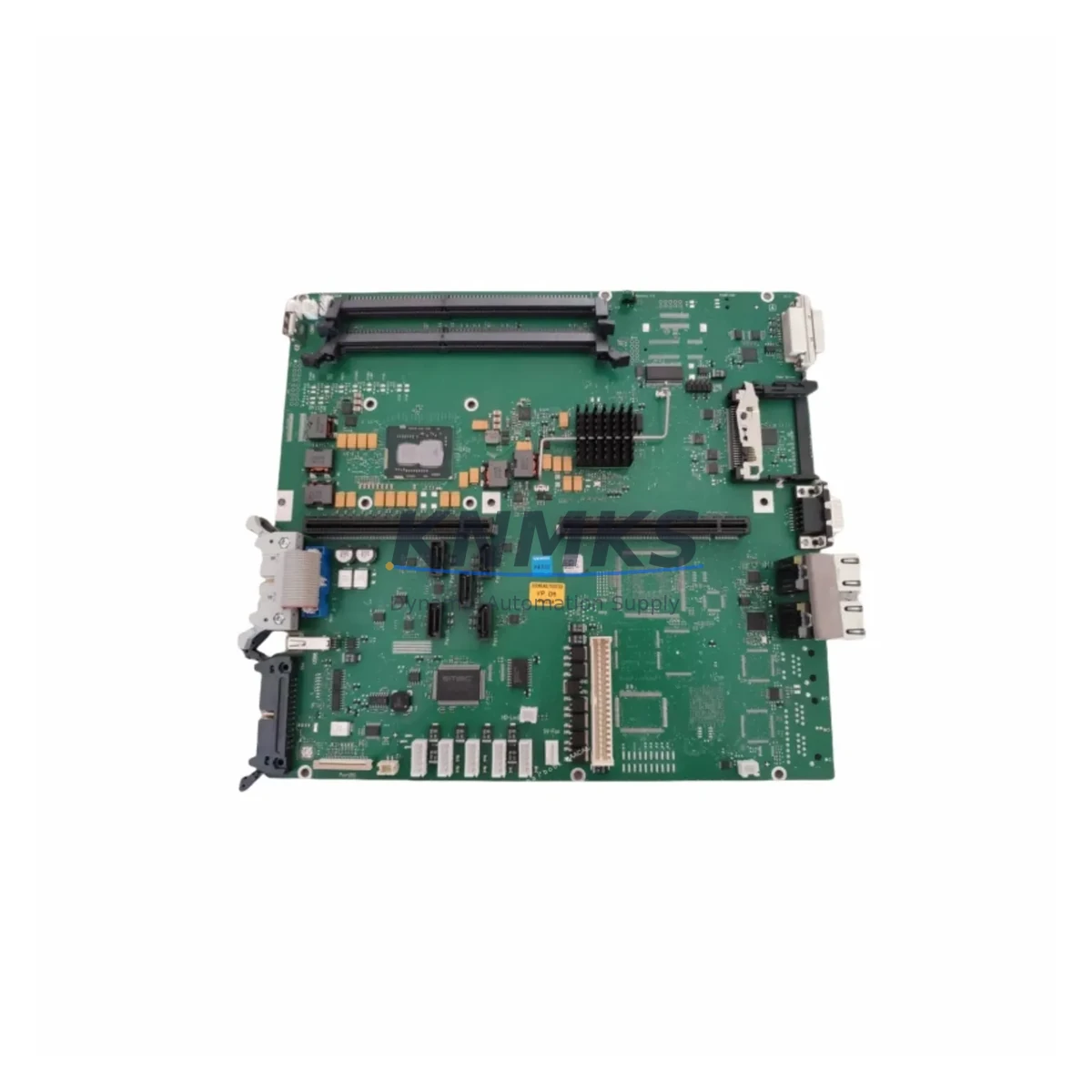
Siemens A5E03383661 Maintenance-Proven Spare Part for Factory Uptime
The Siemens A5E03383661 is an original spare motherboard engineered for the SIMATIC IPC477C industrial panel PC platform. Designed to sustain continuous factory operations, this board supports mission-critical HMI and SCADA workloads in process automation, discrete manufacturing, and energy management environments. Each unit is sourced from verified supply channels, pre-shipment tested under load, and backed by a support terms confirmed by quotation — ensuring your replacement cycle is predictable, auditable, and low-risk.
For maintenance engineers managing aging SIMATIC IPC477C installations, the A5E03383661 represents the lowest-risk path to restoring full panel PC functionality without system redesign. Its direct form-factor compatibility eliminates re-engineering time, and its availability from multi-region stock means emergency dispatch is achievable within standard lead times. Procurement engineers benefit from a single-source supply model with documented traceability, reducing the administrative burden of multi-vendor qualification.
Spare Maintenance Table
| Parameter | Specification |
|---|---|
| Part Number | A5E03383661 |
| Brand | Siemens |
| Series | SIMATIC IPC477C |
| Product Type | Industrial PC Motherboard |
| Form Factor | Embedded / Panel PC Board |
| Compatible Platform | SIMATIC IPC477C (15″, 19″ variants) |
| CPU Architecture | Intel Core i5 / i7 (IPC477C generation) |
| Operating Temperature | 0 °C to +55 °C (operating) |
| Origin | Germany |
| Condition | Original / New or Refurbished-to-OEM-spec |
| Pre-Shipment Test | Yes — functional load test performed |
| Support terms | 12 Months |
| Dispatch | Global, multi-region stock |
| Application | HMI, SCADA, Process Automation, MES |
| Maintenance Scenario | Emergency replacement, planned overhaul, lifecycle extension |
Maintenance Planning for Continuous Operation
When replacing the A5E03383661 motherboard in a SIMATIC IPC477C, a structured inspection of the surrounding electrical and communication environment is essential to prevent repeat failures and ensure stable recommissioning. Maintenance engineers should begin by verifying the 24 VDC panel power supply — typically a SITOP PSU300S or equivalent — for output ripple and voltage stability before powering the replacement board. A degraded power supply is a common root cause of premature motherboard failure in industrial panel PCs.
The IPC477C backplane and riser connectors should be inspected for oxidation, bent pins, and mechanical stress before seating the A5E03383661. If the system uses a PROFINET or PROFIBUS communication card installed in the IPC expansion slot, verify that the card firmware is compatible with the replacement board’s BIOS revision. Communication module mismatches can cause intermittent network dropouts that are difficult to diagnose post-installation.
Storage media — typically a CFast card or industrial SSD — should be cloned or imaged prior to the swap. The SIMATIC IPC477C relies on the OS image stored on this media for WinCC or STEP 7 runtime environments; a failed or incompatible image will prevent the HMI from loading after board replacement. Procurement teams should consider holding a spare CFast card pre-loaded with the validated OS image as part of the IPC477C spare parts kit.
Additionally, inspect the UPS module (if fitted), the front-panel USB and display interface cables, and any installed I/O expansion cards. The SIMATIC IPC DiagMonitor software should be re-enabled after replacement to restore hardware health monitoring. For sites running multiple IPC477C units, a standardized spare parts list should include the A5E03383661 motherboard, a compatible SITOP power supply module, a spare CFast storage card, and a PROFINET communication module — ensuring that any single-point failure can be resolved within one maintenance shift.
Site Replacement Workflow
Step 1 — Isolation & Backup: Place the IPC477C in a controlled shutdown state via WinCC or the OS. Back up the CFast/SSD image and document the current BIOS settings, including boot order, COM port assignments, and any custom hardware configuration.
Step 2 — Power Isolation: Isolate the 24 VDC supply at the panel breaker. Verify zero voltage at the IPC power connector with a calibrated multimeter before opening the enclosure.
Step 3 — Board Removal: Disconnect all internal cables — display, USB, power, and any expansion card ribbon cables — in sequence. Remove the A5E03383661 (or its failed predecessor) using ESD-safe tools. Photograph connector positions before disconnection.
Step 4 — Inspection & Cleaning: Inspect the chassis for dust accumulation, corrosion, or thermal damage. Clean the heatsink contact surface. Check that the cooling fan operates freely.
Step 5 — Installation: Seat the replacement A5E03383661 board, reconnect all cables in reverse order, and verify secure seating of all connectors. Restore BIOS settings from documentation.
Step 6 — Recommissioning: Power up and verify POST completion. Boot the OS, confirm WinCC or STEP 7 runtime loads correctly, and validate PROFINET/PROFIBUS communication with the PLC. Run a 30-minute functional soak test before returning the panel to production.
This workflow minimizes downtime to a single maintenance window and eliminates the need for system redesign, preserving existing wiring, I/O mapping, and HMI configuration.
Spare Parts Support FAQ
Q1: Is the A5E03383661 compatible with all SIMATIC IPC477C variants?
The A5E03383661 is designed for the SIMATIC IPC477C platform. Compatibility should be verified against the specific IPC477C order number (15″ vs. 19″ panel, CPU variant) before ordering. Our technical team can confirm compatibility based on your existing unit’s nameplate data.
Q2: What does the support terms confirmed by quotation cover?
The support terms confirmed by quotation cover functional failure under normal industrial operating conditions. Each unit undergoes a pre-shipment functional load test. Support requests are supported with replacement dispatch and full documentation traceability.
Q3: How quickly can the A5E03383661 be dispatched for emergency replacement?
Units are held in multi-region stock to support emergency dispatch requirements. Lead times depend on destination and customs clearance, but standard emergency orders are processed within one business day of order confirmation.
Q4: Can you supply the A5E03383661 on a long-term or blanket order basis?
Yes. For sites operating multiple SIMATIC IPC477C units or managing a multi-year maintenance contract, long-term supply agreements are available. This ensures price stability, reserved stock allocation, and priority dispatch for planned annual overhauls.
© 2026 KNMKS. All rights reserved.
Original Source: https://knmks.com
Contact: admin@knmks.com | +86 18359268345
Product Identification
- Brand / Ecosystem
-
Siemens
Siemens - Model / Series
- A5E03383661
- Product Family
- Other Components
- Availability Status
- Available on request after model and quantity confirmation
- Inquiry Type
- B2B RFQ, replacement inquiry and project spare-part request
- Pre-Quote Check
- Exact SKU, brand, series, quantity, nameplate photos and destination country are checked before quotation
System Path
Where this product fits in the KNMKS automation structure.
Specification & Inquiry Focus
- Component range
- Breakers, terminals and cabinet accessories
- Common needs
- Model, photo and installation requirement
- Project support
- Maintenance and mixed spare-part inquiry
Buyer Confirmation
Information KNMKS checks before replying.
- Exact model
- A5E03383661
- Brand / ecosystem
- Siemens
- Product family
- Other Components
- Application note
- Replacement, maintenance, project build or spare-part list
- Useful photos
- Nameplate, installed unit, cabinet layout or connector side
- Delivery details
- Quantity, destination country and target schedule
Document Support
Files and notes can be confirmed during quotation.
- Product photos or nameplate confirmation when available
- Packing and delivery notes before quotation confirmation
- Support scope and delivery terms confirmed per inquiry
- Export document coordination for qualified B2B requests
Inquiry Support
- Mixed automation spare parts inquiry
- Cabinet component and accessory support
- Model identification from photos or labels
What to Send Us
- Brand and exact model number: Siemens A5E03383661
- Quantity and required delivery time
- Application, replacement requirement or nameplate photo
- Destination country and shipping preference
RFQ Preparation
This is a product inquiry page built for RFQ communication.
Fast Model Check
Send this model to KNMKS for confirmation.
Include quantity, destination country and photos if this is a maintenance replacement. The inquiry will be saved with a reference number after submission.
Brand & Compatibility Note
KNMKS displays automation product information for well-known industrial brand ecosystems and compatible replacement references. Brand names are used for product identification and compatibility reference only; final availability and commercial terms are confirmed per quotation.
 Manufacturing
 Machine Tools
 Packaging
 Energy & Power
 PLCs & Controllers
 HMI & Displays
 Servo Systems
 Variable Frequency Drives