
Overview
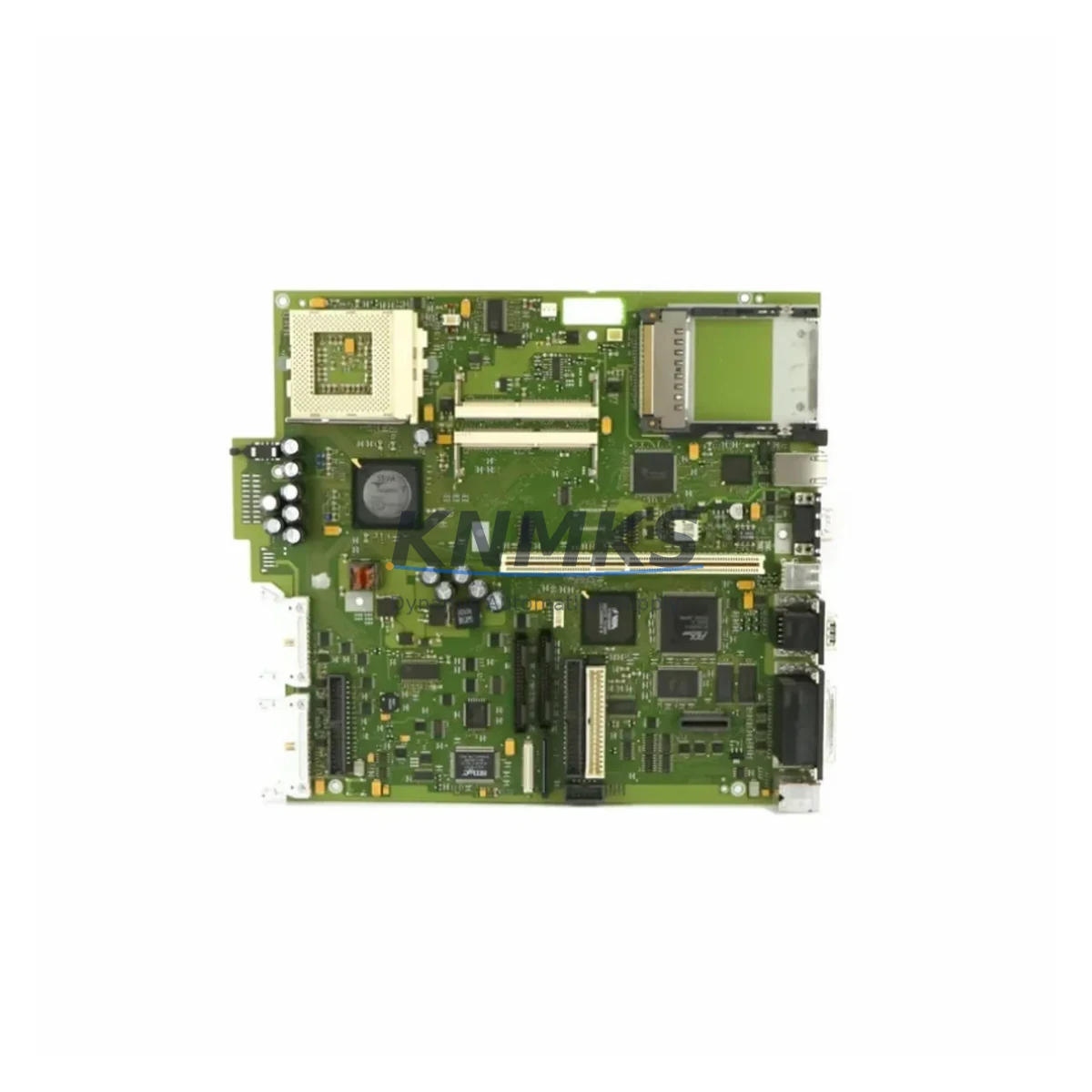
Siemens A5E00104787 Migration-Ready Motherboard for Legacy SIMATIC PC Systems
The Siemens A5E00104787 is a factory-specification motherboard designed for the SIMATIC PC BOX 620 and PC BOX 670 industrial computing platforms. As Siemens progressively phases out legacy SIMATIC PC hardware, maintenance engineers and system integrators face increasing pressure to source verified replacement boards that preserve existing software environments, HMI configurations, and fieldbus communication links without triggering full-system requalification. The A5E00104787 addresses this challenge directly: it is a drop-in retrofit solution that restores platform continuity while eliminating the risk of unplanned downtime caused by motherboard failure in aging control room infrastructure.
Before committing to a motherboard swap, engineers must confirm several critical parameters. Power supply compatibility is the first checkpoint — the SIMATIC PC BOX chassis uses a dedicated internal PSU rated for the original board’s power draw; any deviation in ATX connector pinout or voltage rail sequencing can cause boot failures or silent data corruption. Terminal wiring to peripheral I/O cards, including legacy ISA-slot signal conditioning boards and PCI-based communication adapters, must be re-verified against the original rack layout. Backplane interface alignment, particularly for systems using CP 5611 or CP 5613 PROFIBUS communication cards, requires that PCI slot assignments and IRQ mappings are preserved post-replacement to avoid re-addressing fieldbus nodes across the production network.
Module addressing is equally critical in environments where the SIMATIC PC BOX serves as the host for WinCC Runtime or Step 7 programming stations. If the replacement board changes the hardware fingerprint recognized by the Siemens license manager, software licenses tied to the original hardware ID may require re-activation — a process that must be coordinated with Siemens licensing support in advance of the maintenance window. HMI screen layouts and tag bindings in WinCC projects are unaffected by the motherboard swap itself, but communication link integrity between the PC station and downstream S7-300 or S7-400 PLCs via MPI or PROFIBUS DP must be validated during commissioning.
Firmware version compatibility is another non-negotiable checkpoint. The A5E00104787 must run the BIOS revision validated for the specific PC BOX chassis variant in use. Mismatched BIOS versions can prevent recognition of onboard LAN controllers used for Ethernet-based OPC DA/UA communication to SCADA supervisory layers. Engineers should document the existing BIOS version before removal and confirm the replacement board ships with an equivalent or compatible revision.
Migration Compatibility Table
| Parameter | Specification / Requirement |
|---|---|
| Compatible Chassis | SIMATIC PC BOX 620, SIMATIC PC BOX 670 |
| Form Factor | Proprietary SIMATIC PC BOX form factor (non-standard ATX) |
| Expansion Slots | PCI / ISA hybrid backplane; slot count per chassis variant |
| Communication Compatibility | CP 5611 / CP 5613 PROFIBUS DP; onboard LAN for OPC/Ethernet |
| OS Compatibility | Windows NT 4.0, Windows 2000, Windows XP (legacy SIMATIC environments) |
| Software Environment | Step 7 V5.x, WinCC V6/V7, SIMATIC NET |
| Installation Space | Confirm chassis internal clearance; no modification required for direct replacement |
| Replacement Recommendation | Direct drop-in for failed or degraded A5E00104787 boards; verify BIOS revision match |
| Commissioning Focus | License re-activation check, PROFIBUS node re-scan, HMI tag validation |
| Pre-Shipment Testing | Power-on, POST verification, slot interface check |
| Support terms | support terms confirmed by quotation included |
Retrofit Planning for Existing Automation Systems
A successful A5E00104787 retrofit begins with a structured pre-outage audit of the control cabinet. Engineers should photograph and document all cable routing, PCI card positions, and jumper settings before disassembly. In systems where the PC BOX 620 or 670 hosts a CP 5613 PROFIBUS master card, the PROFIBUS segment topology — including termination resistors and cable lengths — must be recorded to ensure the network is restored identically after the board swap.
In multi-rack control environments, the SIMATIC PC BOX often operates alongside S7-400 CPUs in a shared control cabinet, with the PC station providing supervisory HMI and data logging functions. The A5E00104787 replacement does not affect the S7-400 rack or its I/O modules, but the MPI/PROFIBUS cable connecting the PC station to the PLC rack must be re-verified for continuity and correct termination after the chassis is reassembled. Where the PC BOX also interfaces with a TP 270 or OP 270 operator panel via MPI, the panel’s station address and baud rate settings should be confirmed unchanged before restarting the HMI runtime.
Power supply integrity within the PC BOX chassis is a common failure mode in aging systems. If the internal PSU shows signs of capacitor aging — evidenced by intermittent boot failures or voltage rail instability — it is advisable to replace the PSU alongside the A5E00104787 motherboard during the same maintenance window. Similarly, if the system uses a legacy ISA-based signal isolation card for analog I/O conditioning, its compatibility with the replacement board’s ISA slot timing should be confirmed before the outage window closes.
For sites migrating toward a more modern architecture, the A5E00104787 replacement can serve as a bridge solution while a parallel migration to SIMATIC IPC477E or IPC547G platforms is planned. This phased approach allows production to continue on the legacy SIMATIC PC BOX infrastructure while the new IPC platform is configured, tested, and validated offline — significantly reducing the risk of a rushed cutover under production pressure.
Downtime Control During System Migration
Minimizing downtime during a SIMATIC PC BOX motherboard replacement requires preparation that begins days before the scheduled maintenance window. The existing Step 7 project and WinCC configuration must be backed up to an external storage device — not to the PC BOX internal drive — to ensure recovery options are available if the replacement board encounters unexpected compatibility issues during first boot.
A cold-swap procedure is strongly recommended: power down the PC BOX chassis completely, discharge residual voltage, and follow ESD precautions during board removal and installation. The replacement A5E00104787 should be bench-tested for POST completion before installation in the live cabinet. Once installed, the system should be brought up in a controlled sequence: BIOS verification first, then OS boot, then SIMATIC NET communication stack initialization, and finally WinCC Runtime startup — each step confirmed before proceeding to the next.
If the site operates a redundant SCADA architecture, the switchover to the backup server should be executed before the maintenance window opens, ensuring that process visualization and alarm management remain active throughout the board replacement. Original program logic in the S7-400 or S7-300 PLCs is unaffected by the PC station outage, preserving field control continuity during the replacement procedure. Commissioning time is typically under four hours for experienced engineers with a pre-tested replacement board and a complete pre-outage documentation package.
Retrofit Support FAQ
Q: Is the A5E00104787 a direct replacement for the original SIMATIC PC BOX 620/670 motherboard?
A: Yes. The A5E00104787 is the OEM-specification motherboard for the SIMATIC PC BOX 620 and 670 chassis. It is a direct drop-in replacement requiring no chassis modification. BIOS revision should be confirmed to match the original board before installation.
Q: Will my Step 7 and WinCC licenses remain valid after the motherboard swap?
A: Siemens software licenses tied to hardware fingerprints may require re-activation after a motherboard replacement. We recommend contacting Siemens licensing support before the maintenance window to prepare a re-activation request, minimizing post-swap delays.
Q: Is pre-shipment testing performed on the A5E00104787?
A: Yes. Every unit undergoes power-on POST verification and slot interface inspection before dispatch. Units are shipped with a support terms confirmed by quotation covering hardware defects identified under normal operating conditions.
Q: What is the typical lead time and stock availability?
A: Stock is maintained across multiple regional warehouses to support emergency replacement requirements. Standard dispatch is within 1–3 business days. Contact admin@knmks.com or +86 18359268345 to confirm current inventory and expedited shipping options.
© 2026 KNMKS. All rights reserved.
Original Source: https://knmks.com
Contact: admin@knmks.com | +86 18359268345
Product Identification
- Brand / Ecosystem
-
Siemens
Siemens - Model / Series
- A5E00104787
- Product Family
- Other Components
- Availability Status
- Available on request after model and quantity confirmation
- Inquiry Type
- B2B RFQ, replacement inquiry and project spare-part request
- Pre-Quote Check
- Exact SKU, brand, series, quantity, nameplate photos and destination country are checked before quotation
System Path
Where this product fits in the KNMKS automation structure.
Specification & Inquiry Focus
- Component range
- Breakers, terminals and cabinet accessories
- Common needs
- Model, photo and installation requirement
- Project support
- Maintenance and mixed spare-part inquiry
Buyer Confirmation
Information KNMKS checks before replying.
- Exact model
- A5E00104787
- Brand / ecosystem
- Siemens
- Product family
- Other Components
- Application note
- Replacement, maintenance, project build or spare-part list
- Useful photos
- Nameplate, installed unit, cabinet layout or connector side
- Delivery details
- Quantity, destination country and target schedule
Document Support
Files and notes can be confirmed during quotation.
- Product photos or nameplate confirmation when available
- Packing and delivery notes before quotation confirmation
- Support scope and delivery terms confirmed per inquiry
- Export document coordination for qualified B2B requests
Inquiry Support
- Mixed automation spare parts inquiry
- Cabinet component and accessory support
- Model identification from photos or labels
What to Send Us
- Brand and exact model number: Siemens A5E00104787
- Quantity and required delivery time
- Application, replacement requirement or nameplate photo
- Destination country and shipping preference
RFQ Preparation
This is a product inquiry page built for RFQ communication.
Fast Model Check
Send this model to KNMKS for confirmation.
Include quantity, destination country and photos if this is a maintenance replacement. The inquiry will be saved with a reference number after submission.
Brand & Compatibility Note
KNMKS displays automation product information for well-known industrial brand ecosystems and compatible replacement references. Brand names are used for product identification and compatibility reference only; final availability and commercial terms are confirmed per quotation.
 Manufacturing
 Machine Tools
 Packaging
 Energy & Power
 PLCs & Controllers
 HMI & Displays
 Servo Systems
 Variable Frequency Drives