
Overview
Siemens 6XV1830-0EH10 Migration-Ready PROFIBUS DP Cable: Legacy System Retrofit and Compatibility Upgrade
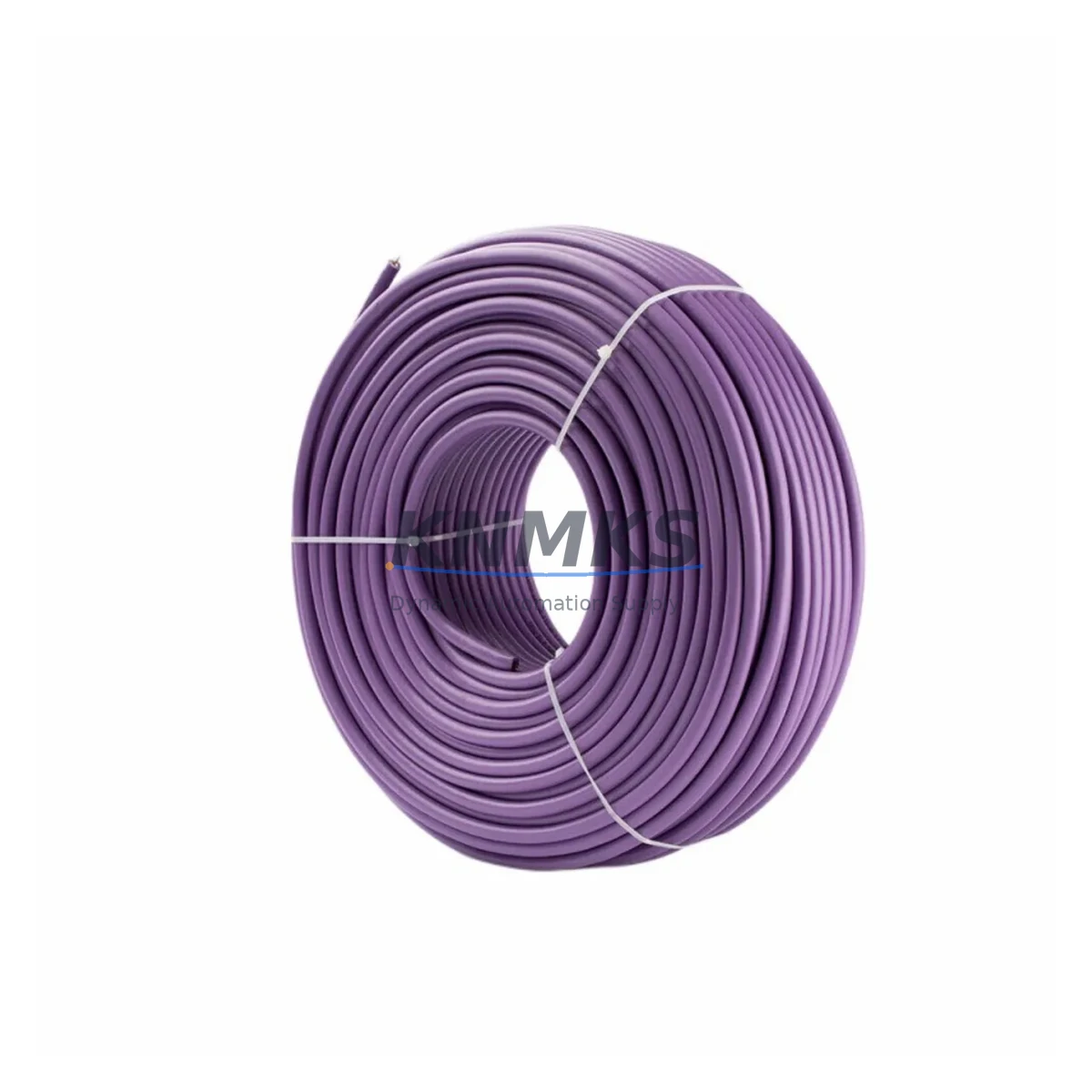
The Siemens 6XV1830-0EH10 is a shielded, twisted-pair PROFIBUS DP fieldbus cable engineered for demanding industrial environments and designed to serve as a direct, migration-ready replacement in legacy SIMATIC NET control architectures. Whether you are modernizing an aging S5 or early S7-300 installation, recovering a failed fieldbus segment, or extending the service life of an existing PROFIBUS DP network, the 6XV1830-0EH10 delivers the electrical and mechanical characteristics required for reliable drop-in substitution without re-engineering the communication backbone.
In retrofit and upgrade projects, the cable is typically deployed alongside the Siemens CP 342-5 PROFIBUS DP communication processor, which manages the DP master/slave protocol stack and interfaces directly with the S7-300 CPU backplane. Engineers replacing degraded cable runs in multi-drop topologies must verify that the total segment length — including all stub lines — remains within the 200-meter limit at 12 Mbps, or up to 1,200 meters at 93.75 kbps, to maintain signal integrity across all connected slaves. The 6XV1830-0EH10 meets the IEC 61158 Type 3 impedance specification of 135–165 Ω, ensuring compatibility with existing PROFIBUS DP terminators and bus connectors such as the Siemens 6ES7 972-0BA52-0XA0 90° connector.
When planning a cable replacement in a live control cabinet, technicians should document the existing terminal block wiring — particularly the A-line (green) and B-line (red) polarity assignments — before disconnecting any segment. Incorrect polarity reversal is one of the most common commissioning errors during fieldbus cable swaps and can cause all slaves on the affected segment to drop offline simultaneously. The 6XV1830-0EH10’s color-coded conductors and foil-plus-braid shielding simplify re-termination and reduce the risk of wiring errors during time-pressured maintenance windows.
For installations migrating from older PROFIBUS FMS or MPI topologies to a unified PROFIBUS DP architecture, the 6XV1830-0EH10 is fully compatible with the Siemens SIMATIC NET OLM (Optical Link Module) for fiber-optic segment bridging, enabling engineers to extend the physical reach of the network beyond copper limitations while preserving the existing DP protocol stack. This is particularly relevant in large-footprint plants where control cabinets are separated by distances that exceed the copper segment maximum.
Retrofit projects involving ET 200M distributed I/O stations or IM 153-x interface modules frequently require cable replacement as part of a broader I/O expansion or rack consolidation effort. In these scenarios, the 6XV1830-0EH10 is used to re-cable the DP segment connecting the central S7-300 or S7-400 CPU to the remote I/O rack, ensuring that newly added I/O modules — such as SM 321 digital input or SM 331 analog input cards — are correctly addressed and polled within the DP cycle time budget. Engineers should confirm that the GSD file for each slave device is loaded in STEP 7 or TIA Portal and that the DP address switches on each IM 153 module are set correctly before powering up the retrofitted segment.
Downtime risk during cable replacement can be further reduced by pre-staging the new cable run alongside the existing one, performing a continuity and shield integrity test with a PROFIBUS tester before cutover, and scheduling the physical swap during a planned maintenance window. Where a hot-standby or redundant DP configuration is in place using a CP 443-5 Extended module, the redundant path can be kept active during the primary cable replacement, maintaining process visibility and control continuity throughout the intervention.
Migration Compatibility Table
| Parameter | Specification / Recommendation |
|---|---|
| SKU / Part Number | 6XV1830-0EH10 |
| Cable Type | PROFIBUS DP Type A, shielded twisted pair (IEC 61158 Type 3) |
| Impedance | 135–165 Ω (matched to standard PROFIBUS DP terminators) |
| Max. Transmission Rate | 12 Mbps |
| Max. Segment Length @ 12 Mbps | 200 m |
| Max. Segment Length @ 93.75 kbps | 1,200 m |
| Conductor Color Code | A-line: Green; B-line: Red |
| Shielding | Foil + tinned copper braid |
| Compatible Connectors | 6ES7 972-0BA52-0XA0 (90°), 6ES7 972-0BB52-0XA0 (35°) |
| Compatible Communication Processors | CP 342-5, CP 443-5 Basic/Extended |
| Compatible I/O Interfaces | IM 153-1, IM 153-2, ET 200M, ET 200S DP |
| Protocol Compatibility | PROFIBUS DP (EN 50170), MPI (passive segment only) |
| Installation Requirement | Terminate shield at both ends; activate bus termination resistors at segment endpoints only |
| Replacement Recommendation | Direct drop-in for degraded or damaged PROFIBUS DP Type A cable segments |
| Commissioning Check | Verify DP address, GSD file, baud rate, and termination before power-up |
| Country of Origin | Germany |
| Support terms | 12 Months |
Retrofit Planning for Existing Automation Systems
A successful PROFIBUS DP cable retrofit begins with a thorough audit of the existing network topology. Before ordering replacement cable, engineers should map every segment, node address, and termination point in the current installation. In a typical S7-300 control cabinet, the DP master — usually a CPU 315-2 DP or CPU 317-2 DP — connects via the integrated DP port or a CP 342-5 communication processor to a daisy-chained bus that may include multiple ET 200M remote I/O stations, variable frequency drives, and intelligent field devices such as Siemens SINAMICS G120 drives or third-party PROFIBUS slaves.
When replacing cable in a multi-drop segment, the 6XV1830-0EH10 should be pulled through the same conduit or cable tray as the original run to minimize installation time and avoid disrupting adjacent wiring. If the original cable was routed through a cable duct shared with power conductors, engineers should verify that the new run maintains adequate separation — typically 200 mm minimum — to prevent electromagnetic interference from affecting the PROFIBUS signal. The foil-plus-braid shielding of the 6XV1830-0EH10 provides robust EMI rejection, but physical separation remains a best practice in high-noise environments such as those containing large motor starters or frequency converters.
For projects that also involve upgrading the I/O infrastructure, the cable replacement is often performed in conjunction with adding SM 321 digital input modules, SM 322 digital output modules, or SM 331 analog input modules to existing ET 200M racks. In these cases, the DP cycle time must be recalculated in STEP 7 HW Config or TIA Portal to account for the additional I/O data volume. If the cycle time budget is exceeded, the baud rate may need to be reduced — which in turn affects the maximum allowable segment length and may require the 6XV1830-0EH10 to be deployed in shorter runs with repeaters.
HMI panels connected to the PROFIBUS DP segment — such as Siemens SIMATIC TP 177B or MP 277 units — should be taken offline or switched to a backup communication path during the cable replacement to prevent spurious alarm generation or screen freezes that could confuse operators. After the new cable is installed and terminated, the HMI connection should be re-established and all process variable tags verified against the PLC data blocks before returning the system to automatic mode.
Downtime Control During System Migration
Minimizing unplanned downtime during a PROFIBUS DP cable replacement requires a structured pre-outage preparation protocol. The first step is to export and archive the current STEP 7 or TIA Portal project, including all hardware configuration files, symbol tables, and data block contents, to a secure backup location. This ensures that if the replacement introduces unexpected communication errors, the original configuration can be restored quickly without relying on memory or incomplete documentation.
Before disconnecting the existing cable, technicians should use a PROFIBUS diagnostic tool — such as the Siemens SIMATIC NET PROFIBUS Tester or a third-party bus monitor — to capture a baseline network scan showing all active node addresses, response times, and error counters. This baseline serves as the acceptance criterion for the post-replacement commissioning check: the new cable installation is considered successful only when all previously active nodes are visible, response times are within specification, and the error counter remains at zero under normal operating load.
Where process continuity is critical and a redundant DP path is not available, the replacement should be staged in segments rather than performed as a single full-segment swap. By replacing one cable section at a time — from the DP master to the first repeater, then from the repeater to the next node cluster — the scope of each individual outage is limited to a subset of the total I/O, allowing other parts of the process to remain under automatic control. This approach is particularly effective in large installations where the PROFIBUS segment spans multiple control panels or field junction boxes.
After the new 6XV1830-0EH10 cable is fully installed and terminated, a final pre-power-up checklist should confirm: shield continuity from end to end, correct A/B polarity at every connector, bus termination resistors active only at the two physical endpoints of the segment, and all DP slave addresses matching the hardware configuration in the PLC project. Only after this checklist is complete should the segment be energized and the DP master restarted. All units are shipped pre-tested and covered by a support terms confirmed by quotation, supporting rapid deployment with confidence in out-of-box reliability.
Retrofit Support FAQ
Q1: Is the 6XV1830-0EH10 a direct replacement for older Siemens PROFIBUS DP cable part numbers?
Yes. The 6XV1830-0EH10 meets the IEC 61158 Type 3 / EN 50170 PROFIBUS DP Type A cable specification and is electrically and mechanically compatible with all standard PROFIBUS DP connectors and terminators. It can replace any degraded or discontinued PROFIBUS DP Type A cable segment without changes to the network configuration, provided the total segment length and baud rate remain within specification.
Q2: What commissioning steps are required after installing the new cable?
After installation, verify shield continuity, A/B conductor polarity, and bus termination at both segment endpoints. Power up the DP master and perform a network scan using STEP 7, TIA Portal, or a PROFIBUS diagnostic tool to confirm that all slave nodes are online and responding within the expected cycle time. Check the diagnostic buffer of the CPU for any DP communication faults and clear them once the network is confirmed stable.
Q3: Can this cable be used in installations that mix PROFIBUS DP and MPI on the same physical network?
The 6XV1830-0EH10 is optimized for PROFIBUS DP (EN 50170) and can be used for MPI passive segments at low baud rates. However, MPI and PROFIBUS DP should not share the same physical segment in active operation. If your installation requires both protocols, use separate cable runs and ensure that the MPI network is isolated from the DP segment at the connector level.
Q4: What support terms and stock availability can I expect?
All 6XV1830-0EH10 units supplied by KNMKS are covered by a support terms confirmed by quotation against manufacturing defects and are pre-tested prior to shipment. Stock is maintained across multiple regional warehouses to support urgent retrofit and breakdown replacement requirements. For volume orders or blanket purchase agreements to support long-term maintenance programs, contact the sales team directly to confirm lead times and reserve allocation.
© 2026 KNMKS. All rights reserved.
Original Source: https://knmks.com
Contact: admin@knmks.com | +86 18359268345
Product Identification
- Brand / Ecosystem
-
Siemens
Siemens - Model / Series
- 6XV1830-0EH10
- Product Family
- Cables & Connectors
- Availability Status
- Available on request after model and quantity confirmation
- Inquiry Type
- B2B RFQ, replacement inquiry and project spare-part request
- Pre-Quote Check
- Exact SKU, brand, series, quantity, nameplate photos and destination country are checked before quotation
System Path
Where this product fits in the KNMKS automation structure.
Specification & Inquiry Focus
- Cable range
- Sensor, servo, network and circular connectors
- Common needs
- Length, pin count, shielding and plug type
- Project support
- Machine wiring and installation kits
Buyer Confirmation
Information KNMKS checks before replying.
- Exact model
- 6XV1830-0EH10
- Brand / ecosystem
- Siemens
- Product family
- Cables & Connectors
- Application note
- Replacement, maintenance, project build or spare-part list
- Useful photos
- Nameplate, installed unit, cabinet layout or connector side
- Delivery details
- Quantity, destination country and target schedule
Document Support
Files and notes can be confirmed during quotation.
- Product photos or nameplate confirmation when available
- Packing and delivery notes before quotation confirmation
- Support scope and delivery terms confirmed per inquiry
- Export document coordination for qualified B2B requests
Inquiry Support
- Cable length and connector type confirmation
- Servo, sensor and network cable inquiry
- Accessory kits for installation teams
What to Send Us
- Brand and exact model number: Siemens 6XV1830-0EH10
- Quantity and required delivery time
- Application, replacement requirement or nameplate photo
- Destination country and shipping preference
RFQ Preparation
This is a product inquiry page built for RFQ communication.
Fast Model Check
Send this model to KNMKS for confirmation.
Include quantity, destination country and photos if this is a maintenance replacement. The inquiry will be saved with a reference number after submission.
Brand & Compatibility Note
KNMKS displays automation product information for well-known industrial brand ecosystems and compatible replacement references. Brand names are used for product identification and compatibility reference only; final availability and commercial terms are confirmed per quotation.
 Manufacturing
 Machine Tools
 Packaging
 Energy & Power
 PLCs & Controllers
 HMI & Displays
 Servo Systems
 Variable Frequency Drives