
Overview
Siemens 6XV1440-2KH32 Migration-Ready PROFIBUS Cable for Legacy Control Systems
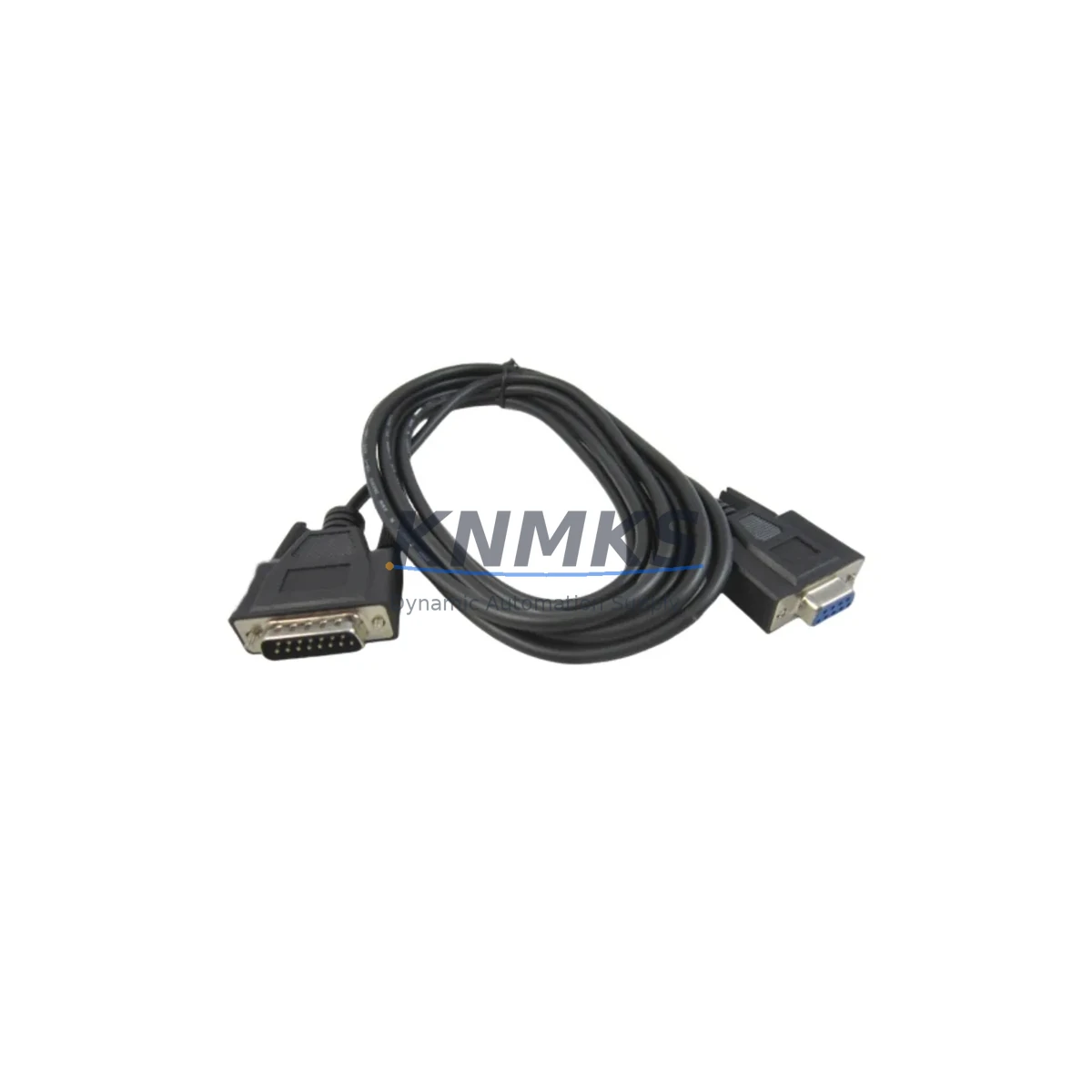
The Siemens 6XV1440-2KH32 is a PROFIBUS/MPI/PPI communication cable engineered for SIMATIC NET environments and widely deployed across S7-300 and S7-400 control architectures. As legacy automation systems approach end-of-life or require infrastructure renewal, this cable remains a critical link between PLCs, HMI panels, programming devices, and distributed I/O nodes. Our stock of 6XV1440-2KH32 is sourced, pre-shipment tested, and backed by a support terms confirmed by quotation — making it a reliable choice for both emergency spare parts replenishment and planned retrofit projects.
In aging control cabinets where PROFIBUS DP remains the backbone communication protocol, cable degradation, connector fatigue, and EMI-induced signal loss are among the most common causes of unplanned downtime. The 6XV1440-2KH32 provides a direct, drop-in replacement path without requiring firmware changes, address reassignment, or modifications to the existing network topology. Engineers managing multi-drop PROFIBUS segments connecting ET 200M remote I/O stations, CP 342-5 communication processors, or IM 153 interface modules will find this cable fully compatible with existing bus termination resistors and connector housings.
For sites running STEP 7 v5.x or TIA Portal in legacy mode, no software reconfiguration is required when replacing the physical cable. The bus address structure, GSD file assignments, and DP master/slave relationships remain intact, significantly reducing commissioning time during a cable swap. This is particularly valuable in continuous-process industries — petrochemicals, power generation, water treatment — where even a 30-minute unplanned outage carries significant operational cost.
Migration Compatibility Table
| Parameter | 6XV1440-2KH32 Specification | Retrofit Notes |
|---|---|---|
| Protocol Support | PROFIBUS DP / MPI / PPI | Compatible with all three protocols; no hardware switching required |
| Compatible Controllers | S7-300, S7-400, S7-200 (PPI), C7 | Verify MPI/DP port type on CPU faceplate before installation |
| Connector Interface | 9-pin Sub-D (DB9) male, standard PROFIBUS pinout | Direct replacement for existing 6XV1440 series connectors |
| Cable Length | 3.2 m (standard) | Confirm segment length budget; total DP segment ≤ 1200 m at 187.5 kbps |
| Communication Speed | Up to 12 Mbps (PROFIBUS DP) | Match baud rate to existing network configuration in HW Config |
| Installation Space | Flexible sheath; bend radius ≥ 40 mm | Suitable for cable duct routing in compact control cabinets |
| Termination | Bus termination resistor integrated in connector | Enable termination only on first and last node of each segment |
| HMI Compatibility | TP/OP panels via MPI; WinCC flexible / TIA Portal HMI | No HMI screen reconfiguration required for cable replacement |
| Firmware Dependency | None — passive cable assembly | No firmware update required; plug-and-play replacement |
| Support terms | support terms confirmed by quotation | Covered from date of shipment; pre-shipment continuity and signal integrity tested |
Retrofit Planning for Existing Automation Systems
A successful PROFIBUS cable retrofit begins well before the maintenance window opens. Site engineers should document the full network topology — including the number of DP slaves, assigned station addresses, and the location of active bus terminators — before removing any existing cabling. In systems where the S7-400 CPU 414 or CPU 416 serves as the DP master, the hardware configuration stored in STEP 7 or TIA Portal should be exported and archived as a baseline. This ensures that if any slave device loses its address during the cable swap, recovery is straightforward.
When the 6XV1440-2KH32 is used to reconnect a programming device (PG/PC) to the MPI port of an S7-300 CPU 315 or CPU 317, engineers should confirm that the PC adapter — such as a CP 5611 or USB/MPI adapter — is configured to the correct baud rate. MPI networks typically operate at 187.5 kbps, while PROFIBUS DP segments may run at higher speeds. Mismatched baud rates are a common commissioning error that can be avoided by verifying the network settings in the SIMATIC Manager or TIA Portal device configuration before going online.
In control cabinets where ET 200S or ET 200M distributed I/O racks are connected via PROFIBUS DP, the cable routing path should be inspected for EMI sources — variable frequency drives, contactors, and transformer enclosures are common interference generators. The 6XV1440-2KH32’s shielded construction provides adequate protection in most industrial environments, but proper shield grounding at one end of each cable segment remains essential. For cabinets undergoing a broader upgrade that includes replacing IM 153-2 interface modules or adding new DP slaves, the new station addresses must be assigned and downloaded to the DP master before the cable is reconnected.
Projects that combine a PROFIBUS cable replacement with a broader migration — for example, transitioning from S7-300 to S7-1500 while retaining legacy ET 200M I/O via a DP/PN coupler — require careful sequencing. The DP/PN coupler must be configured in TIA Portal with the correct GSD file, and the existing PROFIBUS segment (including the 6XV1440-2KH32 cable) can remain in service during the transition period, reducing the scope of simultaneous changes and limiting exposure to commissioning risk.
Downtime Control During System Migration
Minimizing downtime during a PROFIBUS cable replacement requires a structured approach that protects the existing program logic and maintains field control continuity. Before disconnecting any cable, the CPU should be placed in STOP mode and the current program — including all data blocks, organization blocks, and hardware configuration — should be uploaded and saved to the programming device. For S7-300 and S7-400 systems, this upload can be performed via the existing MPI or PROFIBUS connection using STEP 7 or TIA Portal, providing a verified backup that can be restored if any issue arises during the cable swap.
In processes where a brief interruption is unavoidable, pre-staging the replacement 6XV1440-2KH32 cable with connectors already assembled and termination resistors set to the correct position (enabled or disabled, depending on node location) allows the physical swap to be completed in under five minutes. Once the new cable is connected, the CPU can be returned to RUN mode and the PROFIBUS diagnostic buffer checked for any slave communication errors. If all slaves report OK status within the first scan cycle, the migration is complete without requiring any program modification or HMI screen update.
For sites where continuous operation is mandatory — such as DCS-integrated PROFIBUS segments in a refinery or power plant — a hot-standby approach using a redundant S7-400H system allows the cable replacement to be performed on the standby channel while the active channel maintains process control. After the cable is replaced and verified on the standby side, a controlled switchover transfers control without process interruption. This approach is fully compatible with the 6XV1440-2KH32 and requires no special cable configuration beyond standard PROFIBUS wiring practice.
Retrofit Support FAQ
Q1: Is the 6XV1440-2KH32 a direct replacement for other cables in the 6XV1440 series?
Yes. The 6XV1440-2KH32 shares the same connector pinout, cable impedance (150 Ω), and shielding specification as other cables in the 6XV1440 family. It can replace worn or damaged cables in existing PROFIBUS DP and MPI segments without any network reconfiguration. Confirm the cable length (3.2 m) is sufficient for your installation before ordering.
Q2: What commissioning steps are required after installing the replacement cable?
For a like-for-like cable replacement, commissioning is minimal: reconnect the cable, power up the CPU, and verify that all PROFIBUS slaves report active status in the diagnostic buffer. If any slave shows a communication fault, check that the bus termination resistor is correctly enabled at the segment endpoints and that the connector is fully seated. No program download or HMI reconfiguration is required.
Q3: How is the 6XV1440-2KH32 tested before shipment?
Each unit undergoes pre-shipment continuity testing and signal integrity verification to confirm that all conductors and the shield are intact and that connector contacts meet specification. A test report is available upon request. All units are covered by a support terms confirmed by quotation from the date of shipment.
Q4: What is the lead time and availability for the 6XV1440-2KH32?
We maintain stock of the 6XV1440-2KH32 to support urgent spare parts requirements and planned retrofit projects. Standard orders ship within 1–3 business days. For large-quantity orders or multi-site procurement programs, contact our sales team to confirm availability and arrange consolidated shipment.
© 2026 KNMKS. All rights reserved.
Original Source: https://knmks.com
Contact: admin@knmks.com | +86 18359268345
Product Identification
- Brand / Ecosystem
-
Siemens
Siemens - Model / Series
- 6XV1440-2KH32
- Product Family
- Cables & Connectors
- Availability Status
- Available on request after model and quantity confirmation
- Inquiry Type
- B2B RFQ, replacement inquiry and project spare-part request
- Pre-Quote Check
- Exact SKU, brand, series, quantity, nameplate photos and destination country are checked before quotation
System Path
Where this product fits in the KNMKS automation structure.
Specification & Inquiry Focus
- Cable range
- Sensor, servo, network and circular connectors
- Common needs
- Length, pin count, shielding and plug type
- Project support
- Machine wiring and installation kits
Buyer Confirmation
Information KNMKS checks before replying.
- Exact model
- 6XV1440-2KH32
- Brand / ecosystem
- Siemens
- Product family
- Cables & Connectors
- Application note
- Replacement, maintenance, project build or spare-part list
- Useful photos
- Nameplate, installed unit, cabinet layout or connector side
- Delivery details
- Quantity, destination country and target schedule
Document Support
Files and notes can be confirmed during quotation.
- Product photos or nameplate confirmation when available
- Packing and delivery notes before quotation confirmation
- Support scope and delivery terms confirmed per inquiry
- Export document coordination for qualified B2B requests
Inquiry Support
- Cable length and connector type confirmation
- Servo, sensor and network cable inquiry
- Accessory kits for installation teams
What to Send Us
- Brand and exact model number: Siemens 6XV1440-2KH32
- Quantity and required delivery time
- Application, replacement requirement or nameplate photo
- Destination country and shipping preference
RFQ Preparation
This is a product inquiry page built for RFQ communication.
Fast Model Check
Send this model to KNMKS for confirmation.
Include quantity, destination country and photos if this is a maintenance replacement. The inquiry will be saved with a reference number after submission.
Brand & Compatibility Note
KNMKS displays automation product information for well-known industrial brand ecosystems and compatible replacement references. Brand names are used for product identification and compatibility reference only; final availability and commercial terms are confirmed per quotation.
 Manufacturing
 Machine Tools
 Packaging
 Energy & Power
 PLCs & Controllers
 HMI & Displays
 Servo Systems
 Variable Frequency Drives