
Overview
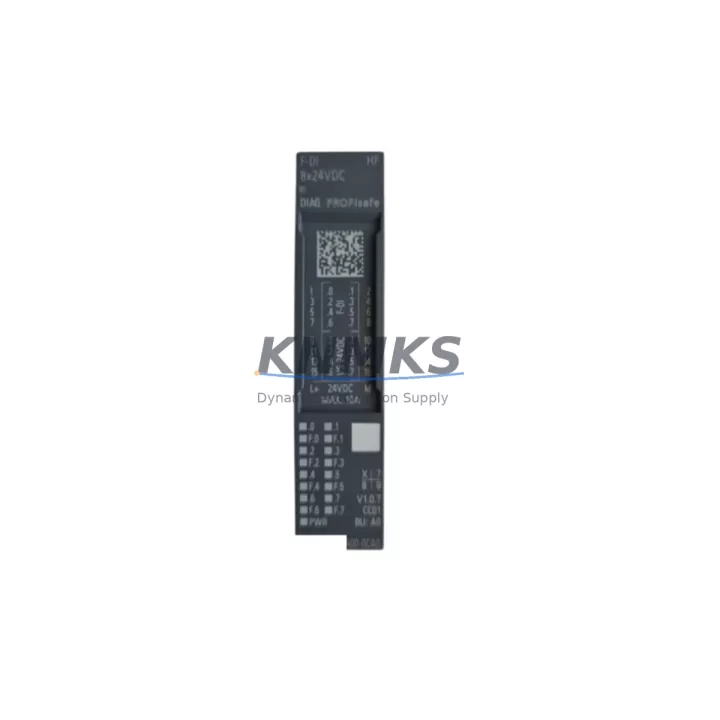
Siemens 6ES7136-6BA00-0CA0 F-DI for ET 200SP Legacy Systems: Migration-Ready Failsafe Digital Input Module
The Siemens 6ES7136-6BA00-0CA0 is a Failsafe Digital Input (F-DI) module designed for the ET 200SP distributed I/O platform, rated for SIL 2/SIL 3 safety applications under IEC 61508. With a growing number of legacy S7-300 and early ET 200S installations reaching end-of-life, this module has become a critical component in safety-rated retrofit projects across process automation, machine safety, and discrete manufacturing environments. Whether you are replacing a discontinued 6ES7138-4FB03-0AB0 ET 200S F-DI module or migrating an entire safety island from an older DP-based architecture to PROFINET, the 6ES7136-6BA00-0CA0 provides a validated upgrade path with minimal program rework.
This module accepts 2 × 24 VDC failsafe digital inputs and integrates directly into the ET 200SP backplane via the BaseUnit BU15-P16+A0+2D or BU20-P16+A0+2D. Before installation, engineers must confirm that the correct BaseUnit variant is already mounted in the control cabinet — the module is not compatible with standard non-failsafe BaseUnits. Terminal wiring from the field device (emergency stop, light curtain, or safety door switch) must be re-verified against the new terminal assignment diagram, as pin mapping may differ from the predecessor module in the ET 200S family.
Power budget planning is essential during retrofit. The ET 200SP head station — typically a CPU 1512SP-1 PN or IM 155-6 PN interface module — must be checked for available load current on the 24 VDC backplane bus. Adding F-DI modules to an existing rack may require inserting an additional PM-E power module to maintain bus voltage stability across the full I/O island. Slot addressing and module order within TIA Portal’s hardware configuration must be updated to reflect the new module position, and the F-address assignment in the F-runtime group must be re-validated before the safety program is re-compiled and downloaded.
For installations migrating from PROFIBUS DP to PROFINET, the IM 155-6 PN ST interface module replaces the older IM 151-3 PN or IM 151-1 DP head station. This change requires updating the GSD/GSDML device file in TIA Portal, reassigning the IP address and device name, and verifying that the PROFINET ring or line topology supports the additional node. Communication latency and watchdog timeout settings in the F-runtime group should be reviewed to ensure they remain within the certified safety response time for the application.
HMI screens connected via WinCC or a TP700 Comfort Panel that display F-DI channel status must be updated to reference the new DB variable addresses generated after the hardware reconfiguration. Operators should be briefed on any changes to alarm tag names or channel numbering before the system is returned to production. Signal isolators or intrinsic safety barriers upstream of the F-DI inputs should also be inspected for compatibility with the 6ES7136-6BA00-0CA0 input impedance and threshold voltage specifications.
All units supplied by KNMKS are pre-shipment tested under load conditions, firmware-verified, and shipped with a support terms confirmed by quotation. Stock is maintained for immediate dispatch to support unplanned shutdowns and emergency spare part requirements.
Migration Compatibility Table
| Parameter | 6ES7136-6BA00-0CA0 (This Module) | Predecessor / Legacy Reference |
|---|---|---|
| Platform | ET 200SP | ET 200S / S7-300 SM |
| Input Channels | 2 × F-DI, 24 VDC | 2–4 × F-DI, 24 VDC |
| Safety Rating | SIL 2 / SIL 3, Cat. 4 / PLe | SIL 2 / SIL 3 (model-dependent) |
| Communication | PROFINET (via IM 155-6 PN) | PROFIBUS DP / PROFINET |
| BaseUnit Required | BU15-P16+A0+2D or BU20-P16+A0+2D | Terminal module TM-E (ET 200S) |
| TIA Portal Version | V14 SP1 and above | STEP 7 V5.x / TIA Portal V13+ |
| F-Address Assignment | Required in F-runtime group | Required in F-runtime group |
| Installation Space | ET 200SP slim form factor | ET 200S wider module pitch |
| Retrofit Recommendation | Direct replacement with BaseUnit swap | Wiring re-termination required |
| Pre-Shipment Test | Yes — functional + firmware check | N/A (new supply) |
| Support terms | 12 Months | N/A |
Retrofit Planning for Existing Automation Systems
A successful retrofit of the 6ES7136-6BA00-0CA0 into an existing safety system requires a structured approach that accounts for every layer of the control architecture. Begin with a full audit of the existing ET 200SP or ET 200S island: document the current module order, BaseUnit types, F-address assignments, and power module positions. If the legacy system uses an IM 151-3 PN head station, plan for its replacement with an IM 155-6 PN ST or IM 155-6 PN HF to maintain PROFINET connectivity and enable PROFIsafe communication for the F-DI module.
Within TIA Portal, open the existing hardware configuration and insert the 6ES7136-6BA00-0CA0 at the correct slot position. The software will prompt for a BaseUnit assignment — select the appropriate BU15 or BU20 variant based on the wiring method (1-wire or 2-wire connection). Assign a unique F-address within the F-runtime group and ensure the PROFIsafe address on the physical module DIP switch matches the TIA Portal configuration. Compile the safety program and run a consistency check before downloading to the CPU 1512SP-1 PN or equivalent failsafe CPU.
Field wiring from safety devices — including Pilz PNOZ safety relays, Sick light curtains, or Schmersal door interlock switches — must be re-terminated to the new BaseUnit terminal block. Verify input signal levels and cable shielding continuity. If signal isolators such as the Phoenix Contact MINI MCR series are installed between the field device and the F-DI input, confirm that the isolator output voltage and current remain within the 6ES7136-6BA00-0CA0 input specification. For installations with intrinsic safety requirements in Zone 1 or Zone 2 areas, verify ATEX/IECEx certification compatibility of all upstream components.
After wiring, perform a channel-by-channel functional test using the TIA Portal online diagnostic view. Confirm that each F-DI channel reports the correct safe state and that the F-runtime group acknowledges the module without passivation errors. Update the TP700 Comfort Panel or WinCC SCADA screens to reflect any changes in DB variable addresses or alarm tag names resulting from the hardware reconfiguration.
Downtime Control During System Migration
Minimizing production downtime during a safety module retrofit requires careful pre-staging and a disciplined changeover sequence. Before the maintenance window opens, pre-configure the replacement 6ES7136-6BA00-0CA0 and its BaseUnit on a bench setup, verify the F-address DIP switch setting, and confirm firmware compatibility with the target CPU version. Export the existing TIA Portal project and create a backup of the current safety program, including all F-runtime group parameters and F-address assignments.
During the changeover, follow a structured de-energization sequence: isolate the 24 VDC supply to the affected ET 200SP island, remove the legacy module, swap the BaseUnit if required, and install the new 6ES7136-6BA00-0CA0. Re-terminate field wiring according to the updated terminal diagram and restore power. Download the updated TIA Portal configuration to the CPU and perform a controlled restart of the F-runtime group. Use the online diagnostic view to confirm that all F-DI channels are in the expected state before releasing the safety function for production.
Where a hot-standby or redundant CPU configuration is in place — such as a paired S7-1500H system — coordinate the module swap with the redundancy switchover procedure to maintain control continuity. Document all changes in the plant modification record and update the safety validation report to reflect the new module revision and F-address assignment. A post-retrofit functional safety test, including proof-test of all connected safety devices, should be completed and signed off before the system is returned to normal operation.
Retrofit Support FAQ
Q1: Is the 6ES7136-6BA00-0CA0 a direct replacement for the ET 200S F-DI module 6ES7138-4FB03-0AB0?
A: It is a functional replacement for the same safety input role, but it is not a plug-in swap. The ET 200SP platform uses a different BaseUnit and backplane system compared to ET 200S terminal modules. A BaseUnit (BU15-P16+A0+2D or BU20-P16+A0+2D) must be installed, and field wiring must be re-terminated. The TIA Portal hardware configuration must be updated and the safety program recompiled and downloaded.
Q2: What firmware version is required on the CPU for compatibility?
A: The 6ES7136-6BA00-0CA0 requires TIA Portal V14 SP1 or higher for hardware configuration. The target failsafe CPU (e.g., CPU 1512SP-1 PN or CPU 1516F-3 PN/DP) should be running firmware V2.1 or above. Always verify the specific firmware compatibility matrix in the Siemens Industry Online Support portal for your exact CPU and TIA Portal version combination before committing to the retrofit.
Q3: Are units pre-tested before shipment?
A: Yes. All 6ES7136-6BA00-0CA0 units supplied by KNMKS undergo functional testing under 24 VDC load conditions and firmware version verification prior to dispatch. A support terms confirmed by quotation is provided from the date of shipment, covering manufacturing defects and functional failures under normal operating conditions.
Q4: What is the typical lead time and stock availability?
A: KNMKS maintains buffer stock of the 6ES7136-6BA00-0CA0 to support emergency spare part requirements and planned retrofit projects. Standard orders are dispatched within 1–3 business days. For large-quantity orders or long-term supply agreements (12–36 months), contact the sales team to discuss dedicated stock allocation and pricing.
© 2026 KNMKS. All rights reserved.
Original Source: https://knmks.com
Contact: admin@knmks.com | +86 18359268345
Product Identification
- Brand / Ecosystem
-
Siemens
Siemens - Model / Series
-
6ES7136-6BA00-0CA0
SIMATIC Series - Product Family
- I/O Modules
- Availability Status
- Available on request after model and quantity confirmation
- Inquiry Type
- B2B RFQ, replacement inquiry and project spare-part request
- Pre-Quote Check
- Exact SKU, brand, series, quantity, nameplate photos and destination country are checked before quotation
System Path
Where this product fits in the KNMKS automation structure.
Specification & Inquiry Focus
- I/O range
- Digital, analog and remote I/O modules
- Common needs
- Channel count, signal and bus type
- Project support
- PLC expansion and distributed control
Buyer Confirmation
Information KNMKS checks before replying.
- Exact model
- 6ES7136-6BA00-0CA0
- Brand / ecosystem
- Siemens
- Product family
- I/O Modules
- Application note
- Replacement, maintenance, project build or spare-part list
- Useful photos
- Nameplate, installed unit, cabinet layout or connector side
- Delivery details
- Quantity, destination country and target schedule
Document Support
Files and notes can be confirmed during quotation.
- Product photos or nameplate confirmation when available
- Packing and delivery notes before quotation confirmation
- Support scope and delivery terms confirmed per inquiry
- Export document coordination for qualified B2B requests
Inquiry Support
- Digital and analog signal matching
- Remote station and rack expansion support
- Spare module inquiry for downtime recovery
What to Send Us
- Brand and exact model number: Siemens 6ES7136-6BA00-0CA0
- Quantity and required delivery time
- Application, replacement requirement or nameplate photo
- Destination country and shipping preference
RFQ Preparation
This is a product inquiry page built for RFQ communication.
Fast Model Check
Send this model to KNMKS for confirmation.
Include quantity, destination country and photos if this is a maintenance replacement. The inquiry will be saved with a reference number after submission.
Brand & Compatibility Note
KNMKS displays automation product information for well-known industrial brand ecosystems and compatible replacement references. Brand names are used for product identification and compatibility reference only; final availability and commercial terms are confirmed per quotation.
 Manufacturing
 Machine Tools
 Packaging
 Energy & Power
 PLCs & Controllers
 HMI & Displays
 Servo Systems
 Variable Frequency Drives