
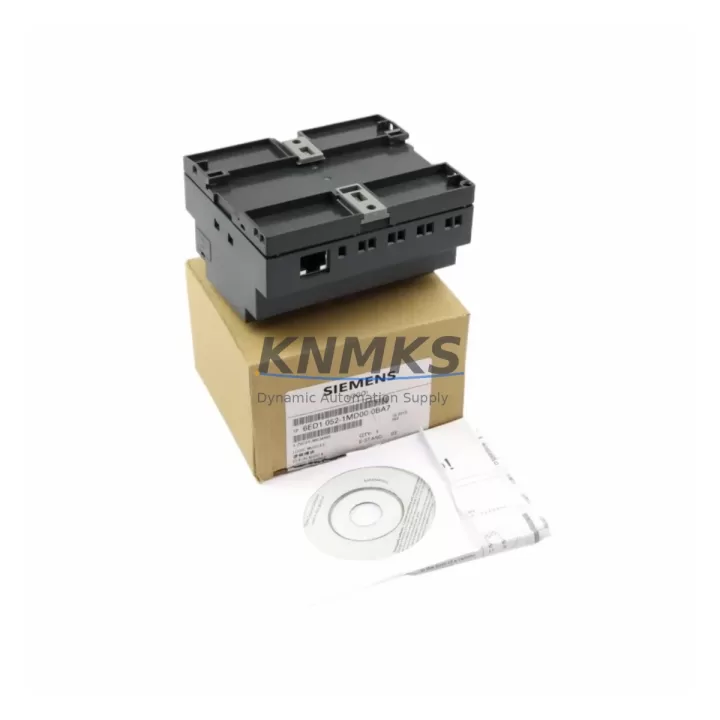
Overview
Siemens 6ED1052-1FB00-0BA5 Migration-Ready Logic Module for Legacy Control Systems
The Siemens 6ED1052-1FB00-0BA5 is a compact, Ethernet-enabled logic module from the LOGO! 8 series, purpose-built for engineers managing legacy control system upgrades, discontinued PLC replacements, and control cabinet modernization projects. With 8 digital inputs and 4 digital relay outputs, 24 V DC supply voltage, and integrated Ethernet communication, this module delivers a validated drop-in migration path for aging LOGO! 0BA4 and 0BA5 generation installations that have reached end-of-life or are no longer supported under current Siemens firmware maintenance cycles.
For facilities running legacy LOGO! 6ED1052-1FB00-0BA4 or earlier 0BA3 variants in petrochemical skids, water treatment panels, building automation cabinets, and small-machine control enclosures, the 6ED1052-1FB00-0BA5 provides a direct hardware replacement with minimal rewiring. The terminal block layout is compatible with standard 35 mm DIN rail mounting, and the module’s 12-block program memory supports direct migration of existing LOGO!Soft Comfort ladder logic projects with minimal reprogramming effort.
Before committing to a field swap, engineers should verify the following migration checkpoints: confirm 24 V DC power supply capacity (minimum 4 W at full I/O load), inspect existing terminal wiring for compatibility with the 6ED1052-1FB00-0BA5’s screw-terminal pitch, validate that the installed LOGO!Soft Comfort version supports 0BA5 firmware export, and confirm that any connected LOGO! TD (text display) or LOGO! TDE operator panel is compatible with the 0BA5 communication protocol. If the legacy installation uses a LOGO! 6ED1052-1MD00-0BA5 expansion module for additional analog inputs, verify that the expansion bus connector on the replacement unit is seated correctly before powering up.
Communication link integrity is a critical migration checkpoint. The 6ED1052-1FB00-0BA5 supports Ethernet-based LOGO! Web Server access and peer-to-peer communication with up to 8 LOGO! 8 network nodes. If the legacy system relied on serial AS-Interface or point-to-point wiring to a SIMATIC S7-200 or S7-300 controller for supervisory data exchange, the migration plan must include a protocol bridge or updated communication module to maintain SCADA or HMI data continuity. Facilities using a SIMATIC HMI KTP400 Basic or similar panel should validate tag address mapping before go-live to avoid screen update failures during commissioning.
Installation space confirmation is essential for panel retrofits. The 6ED1052-1FB00-0BA5 occupies 72 mm of DIN rail width. If the legacy module was a wider 0BA4 variant or a third-party equivalent, verify that adjacent terminal blocks, cable ducts, and neighboring devices such as a LOGO! Power 6EP1331-1SH03 24 V DC power supply or a LOGO! Contact 6ED1055-1MA00-0BA0 relay output expansion leave adequate clearance for the replacement unit and its Ethernet patch cable routing.
All units supplied by KNMKS undergo pre-shipment functional verification, including I/O channel continuity checks, Ethernet port link-up confirmation, and firmware version validation against the 0BA5 baseline. Each module ships with a support terms confirmed by quotation covering manufacturing defects and is supported by in-stock inventory for immediate dispatch to global destinations including EU, North America, Southeast Asia, and the Middle East.
Migration Compatibility Table
| Parameter | Legacy (0BA4 / 0BA3) | 6ED1052-1FB00-0BA5 | Migration Note |
|---|---|---|---|
| Supply Voltage | 24 V DC | 24 V DC | Direct replacement; verify PSU capacity ≥ 4 W |
| Digital Inputs | 8 DI | 8 DI | Terminal pitch compatible; re-use existing wiring |
| Digital Outputs | 4 DO (Relay) | 4 DO (Relay, 10 A) | Verify load current per channel before energizing |
| Communication | None / Serial | Ethernet (RJ45) | Update HMI tag addresses; configure IP before swap |
| Expansion Bus | 0BA4 expansion connector | 0BA5 expansion connector | Confirm expansion module (e.g. 6ED1055-1NB10-0BA2) compatibility |
| Programming Tool | LOGO!Soft Comfort V7 | LOGO!Soft Comfort V8+ | Export project from V7; re-import and validate in V8 |
| Firmware Version | 0BA4 baseline | 0BA5 (factory default) | No field firmware update required; ships ready |
| DIN Rail Width | 72 mm | 72 mm | Direct panel fit; no enclosure modification needed |
| Support terms | — | 12 Months | Covers manufacturing defects; pre-shipment tested |
Retrofit Planning for Existing Automation Systems
A successful retrofit of the 6ED1052-1FB00-0BA5 into an existing control cabinet requires a structured pre-migration audit. Begin by documenting the existing I/O wiring schedule and cross-referencing terminal numbers against the 0BA5 pinout diagram. In most legacy LOGO! 0BA4 installations, the 8 digital input terminals (I1–I8) and 4 relay output terminals (Q1–Q4) map directly, eliminating the need for rewiring. However, if the legacy panel includes a LOGO! 6ED1052-1MD00-0BA5 analog expansion module or a LOGO! 6ED1055-1NB10-0BA2 digital expansion block, the expansion bus connector must be inspected for physical compatibility before the replacement module is seated on the DIN rail.
Power distribution within the control cabinet should be reviewed before energizing the replacement module. The LOGO! Power 6EP1331-1SH03 24 V DC / 1.3 A power supply is a common companion unit in legacy LOGO! panels and provides sufficient capacity for the 6ED1052-1FB00-0BA5 base module plus one expansion block. If the panel also powers field sensors, solenoid valves, or indicator lamps from the same 24 V DC rail, calculate total current draw to confirm the power supply is not operating at its derating limit.
For installations where the legacy LOGO! module communicated with a SIMATIC S7-200 CPU or a third-party Modbus RTU master via serial RS-232, the migration to the Ethernet-native 6ED1052-1FB00-0BA5 requires a communication architecture update. A LOGO! CMR2020 cellular module or a dedicated protocol converter may be required to bridge legacy serial supervisory links. If the supervisory system is a SIMATIC WinCC flexible or a SIMATIC HMI KTP700 Basic panel, update the HMI project’s communication driver and tag database to reflect the new Ethernet IP address and LOGO! 8 variable mapping before the cutover window.
Programming cable and software readiness should be confirmed at least one week before the planned maintenance window. LOGO!Soft Comfort V8.3 or later is required to open, edit, and download programs to the 0BA5 generation module. If the existing program was created in LOGO!Soft Comfort V7 for a 0BA4 device, export the project as a .lsc file, open it in V8.3, and perform a device-type conversion. Validate all function block parameters, timer settings, and analog threshold values after conversion, as some legacy function blocks may require manual reconfiguration in the updated software environment.
Downtime Control During System Migration
Minimizing unplanned downtime during a LOGO! module swap requires a disciplined cutover protocol. The recommended approach is a parallel commissioning strategy: configure and test the replacement 6ED1052-1FB00-0BA5 on a bench test rig using the converted LOGO!Soft Comfort V8 program before the scheduled maintenance window. Simulate all I/O states, verify timer logic, and confirm Ethernet communication with the supervisory system in a controlled environment. This eliminates the risk of discovering firmware incompatibilities or program conversion errors during the live cutover.
During the physical swap, de-energize the control cabinet following the site’s lockout/tagout procedure. Photograph the existing terminal wiring before disconnecting any conductors. Remove the legacy LOGO! module from the DIN rail, seat the 6ED1052-1FB00-0BA5 in the same position, and reconnect terminals in sequence using the wiring photograph as reference. If the panel includes a LOGO! TD text display connected via the display port, reconnect it to the 0BA5 display interface and verify that the display program pages load correctly after power-up.
After energizing the replacement module, perform a structured I/O verification sequence: activate each digital input in turn and confirm the corresponding program response, then command each relay output and verify field device actuation. Confirm Ethernet link-up on the RJ45 port and ping the module’s configured IP address from the supervisory workstation. If the installation uses LOGO! Web Server for remote monitoring, log in via browser to confirm that all variable values are updating correctly. Document the commissioning results and retain the pre-swap wiring photographs and program backup files as part of the site’s maintenance record.
Retrofit Support FAQ
Q1: Is the 6ED1052-1FB00-0BA5 a direct replacement for the 6ED1052-1FB00-0BA4?
Yes. The 0BA5 generation uses the same 24 V DC supply voltage, identical terminal block layout, and the same DIN rail footprint as the 0BA4. The primary differences are the addition of Ethernet communication and the updated 0BA5 expansion bus connector. Existing field wiring can be reused without modification in the vast majority of installations.
Q2: What programming software is required, and is my existing program compatible?
LOGO!Soft Comfort V8.3 or later is required for the 0BA5 module. Programs created in V7 for 0BA4 devices can be imported and converted using the built-in device-type conversion wizard. After conversion, verify all timer, counter, and analog function block parameters before downloading to the replacement module. KNMKS recommends performing a full I/O simulation in LOGO!Soft Comfort before the live cutover.
Q3: Does KNMKS perform pre-shipment testing, and what does the support terms confirmed by quotation cover?
Yes. Every 6ED1052-1FB00-0BA5 unit supplied by KNMKS undergoes pre-shipment functional verification including I/O channel continuity, Ethernet port link-up, and firmware baseline confirmation. The support terms confirmed by quotation cover manufacturing defects identified under normal operating conditions. Units are shipped with full ESD packaging and are available from in-stock inventory for immediate global dispatch.
Q4: Can this module communicate with a SIMATIC S7 controller or third-party SCADA system?
The 6ED1052-1FB00-0BA5 supports Ethernet-based LOGO! Web Server access and peer-to-peer communication with up to 8 LOGO! 8 network nodes. For integration with SIMATIC S7-1200 or S7-1500 controllers, the module supports PUT/GET communication over Ethernet. For legacy serial SCADA links, a protocol converter or LOGO! CMR2020 cellular module is required. KNMKS technical support can advise on communication architecture options for specific site configurations.
© 2026 KNMKS. All rights reserved.
Original Source: https://knmks.com
Contact: admin@knmks.com | +86 18359268345
Product Identification
- Brand / Ecosystem
-
Siemens
Siemens - Model / Series
-
6ED1052-1FB00-0BA5
Assorted Series - Product Family
- PLCs & Controllers
- Availability Status
- Available on request after model and quantity confirmation
- Inquiry Type
- B2B RFQ, replacement inquiry and project spare-part request
- Pre-Quote Check
- Exact SKU, brand, series, quantity, nameplate photos and destination country are checked before quotation
System Path
Where this product fits in the KNMKS automation structure.
Specification & Inquiry Focus
- Control platform
- PLC, PAC and modular controllers
- Common needs
- CPU, rack, power and I/O expansion
- Project support
- Replacement, cabinet build and maintenance
Buyer Confirmation
Information KNMKS checks before replying.
- Exact model
- 6ED1052-1FB00-0BA5
- Brand / ecosystem
- Siemens
- Product family
- PLCs & Controllers
- Application note
- Replacement, maintenance, project build or spare-part list
- Useful photos
- Nameplate, installed unit, cabinet layout or connector side
- Delivery details
- Quantity, destination country and target schedule
Document Support
Files and notes can be confirmed during quotation.
- Product photos or nameplate confirmation when available
- Packing and delivery notes before quotation confirmation
- Support scope and delivery terms confirmed per inquiry
- Export document coordination for qualified B2B requests
Inquiry Support
- Model cross-checking before quotation
- CPU, power, rack and expansion module matching
- Support for replacement and project inquiry
What to Send Us
- Brand and exact model number: Siemens 6ED1052-1FB00-0BA5
- Quantity and required delivery time
- Application, replacement requirement or nameplate photo
- Destination country and shipping preference
RFQ Preparation
This is a product inquiry page built for RFQ communication.
Fast Model Check
Send this model to KNMKS for confirmation.
Include quantity, destination country and photos if this is a maintenance replacement. The inquiry will be saved with a reference number after submission.
Brand & Compatibility Note
KNMKS displays automation product information for well-known industrial brand ecosystems and compatible replacement references. Brand names are used for product identification and compatibility reference only; final availability and commercial terms are confirmed per quotation.
 Manufacturing
 Machine Tools
 Packaging
 Energy & Power



 HMI & Displays
 Servo Systems
 Variable Frequency Drives
 Sensors