
Overview
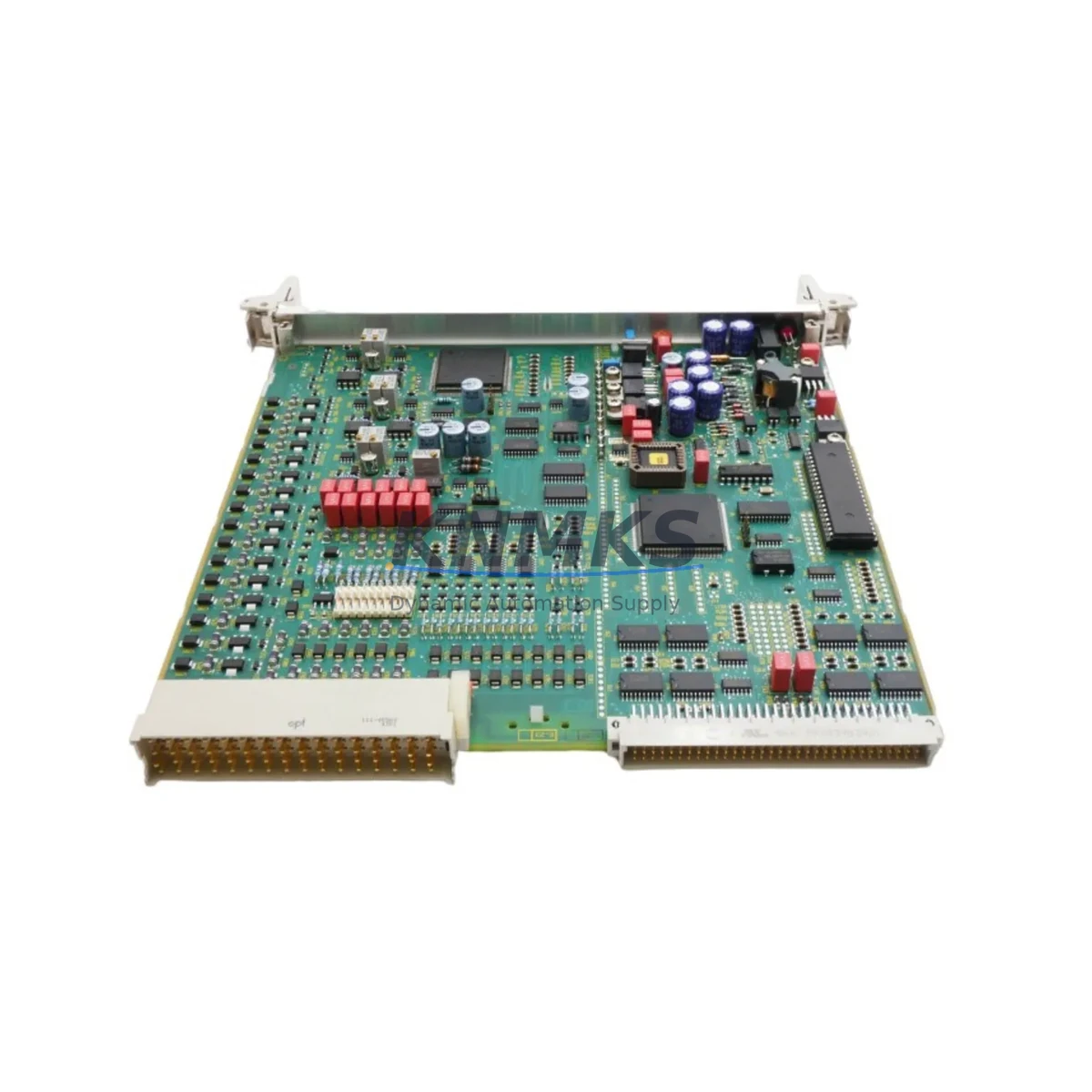
Siemens 6DP1280-8AA Maintenance-Proven Spare Part for Factory Uptime
The Siemens 6DP1280-8AA is a Function Module (FUM 280) designed for the Teleperm XP distributed control system — one of Siemens’ most widely deployed DCS platforms in power generation, chemical processing, and heavy industrial facilities. For maintenance engineers managing aging Teleperm XP installations, securing a verified, original-grade 6DP1280-8AA spare is a critical step in protecting plant uptime and avoiding unplanned shutdowns that can cost thousands of dollars per hour.
This module handles function processing tasks within the Teleperm XP architecture, interfacing with the system bus and coordinating signal processing across the control loop. When a FUM 280 fails or degrades, the impact is immediate: process loops go open, alarms cascade, and operators lose visibility into critical plant parameters. Having a tested replacement on the shelf — or being able to source one within 24–48 hours — is the difference between a controlled maintenance window and an emergency shutdown.
At KNMKS, every 6DP1280-8AA unit is inspected, function-tested, and shipped with full documentation. We maintain stock specifically for Teleperm XP legacy system support, recognizing that many plants continue to operate these systems well beyond their original design life. Our supply chain is built for long-term availability, not spot-market opportunism.
Spare Maintenance Table
| Parameter | Specification |
|---|---|
| Part Number | 6DP1280-8AA |
| Module Type | FUM 280 — Function Module |
| Compatible System | Siemens Teleperm XP DCS |
| Series | Teleperm XP (6DP1xxx) |
| Product Type | DCS Function Module |
| Origin | Germany |
| Weight | Approx. 2,400 g |
| Installation | Rack-mounted, Teleperm XP subrack / backplane |
| Application Environment | Power plants, chemical plants, refineries, heavy industry |
| Maintenance Recommendation | Replace on failure or at scheduled overhaul; keep one unit in cold standby |
| Testing | Function-tested prior to shipment |
| Support terms | 12 Months |
Maintenance Planning for Continuous Operation
Replacing a 6DP1280-8AA in the field is rarely an isolated task. Experienced maintenance engineers know that a FUM 280 failure often signals stress across adjacent components in the same subrack or control loop. Before returning the system to service, a thorough inspection of the surrounding hardware is strongly recommended.
Start with the Teleperm XP subrack backplane — connector pins and bus contacts should be cleaned and inspected for oxidation or mechanical damage. A faulty backplane connection can cause a replacement module to fail prematurely or produce intermittent faults that are difficult to diagnose. Next, verify the 6DP1232-8AA or equivalent power supply module feeding the subrack: check output voltage stability under load, as an aging PSU with marginal regulation is a common root cause of function module failures.
Inspect all I/O modules connected to the same process loop — particularly analog input modules in the 6DP13xx series — for signal drift or calibration errors that may have contributed to the original fault condition. If the plant uses 6DP1610-8AA communication modules for inter-system data exchange, verify their link status and error counters, as communication faults can cascade into function module alarms.
For plants with SIMATIC S5 or S7 PLCs integrated alongside the Teleperm XP system, confirm that the inter-system interface is operating correctly after the module swap. Check terminal blocks and field wiring at the marshalling cabinet for loose connections, especially on signal cables that pass through the affected control loop. Finally, review the fuse protection for the subrack power rail — a blown or weakened fuse is often overlooked and can cause the replacement module to appear faulty on first power-up.
Keeping a documented spare parts list that includes the 6DP1280-8AA alongside its associated power, I/O, and communication modules is a best practice for any facility running Teleperm XP. Proactive stock management reduces mean time to repair (MTTR) and supports the long-term viability of legacy DCS installations.
Site Replacement Workflow
When replacing the 6DP1280-8AA on-site, follow a structured procedure to minimize downtime and ensure system integrity. Begin by placing the affected control loop in manual mode at the operator station to prevent process upsets during the swap. Document the current module configuration and any parameter settings stored in the FUM 280 before removal — Teleperm XP function modules may retain configuration data that must be reloaded after replacement.
Power down the subrack following the plant’s lockout/tagout (LOTO) procedure. Remove the faulty 6DP1280-8AA by releasing the front panel locking mechanism and sliding the module out of the subrack. Inspect the subrack slot and backplane connector before inserting the replacement unit. Seat the new module firmly, restore power, and allow the system to complete its self-test sequence before returning the loop to automatic control.
After reinstatement, monitor the loop for at least one full process cycle to confirm stable operation. Update the plant’s maintenance log with the replacement date, module serial number, and any observations from the inspection. This record supports future troubleshooting and helps justify spare parts inventory decisions to procurement management.
For facilities transitioning away from Teleperm XP toward modern DCS platforms, the 6DP1280-8AA remains a cost-effective solution for extending system life during the migration period — avoiding the capital expenditure of a full system replacement while the upgrade project is planned and funded.
Spare Parts Support FAQ
Q: Is the 6DP1280-8AA compatible with all Teleperm XP subrack configurations?
A: The 6DP1280-8AA FUM 280 is designed for the Teleperm XP DCS platform and is compatible with standard Teleperm XP subracks. Compatibility should be verified against your specific system revision and subrack type before installation. Contact our technical team with your system details for confirmation.
Q: How is each unit tested before shipment?
A: Every 6DP1280-8AA is function-tested on a compatible test bench prior to dispatch. Units that do not pass functional verification are not shipped. A test report is available upon request for critical applications.
Q: What is the support terms coverage and what does it include?
A: All units carry a support terms confirmed by quotation from the date of shipment. The support terms covers functional failures under normal operating conditions. It does not cover damage resulting from incorrect installation, overvoltage events, or physical mishandling. Support requests are processed promptly with replacement or refund options.
Q: Can you support long-term or repeat supply of the 6DP1280-8AA?
A: Yes. KNMKS maintains dedicated stock for Teleperm XP legacy components and can support scheduled procurement programs, annual maintenance contracts, and emergency orders. Contact us to discuss volume pricing and reserved stock arrangements for your facility.
© 2026 KNMKS. All rights reserved.
Original Source: https://knmks.com
Contact: admin@knmks.com | +86 18359268345
Product Identification
- Brand / Ecosystem
-
Siemens
Siemens - Model / Series
- 6DP1280-8AA
- Product Family
- Other Components
- Availability Status
- Available on request after model and quantity confirmation
- Inquiry Type
- B2B RFQ, replacement inquiry and project spare-part request
- Pre-Quote Check
- Exact SKU, brand, series, quantity, nameplate photos and destination country are checked before quotation
System Path
Where this product fits in the KNMKS automation structure.
Specification & Inquiry Focus
- Component range
- Breakers, terminals and cabinet accessories
- Common needs
- Model, photo and installation requirement
- Project support
- Maintenance and mixed spare-part inquiry
Buyer Confirmation
Information KNMKS checks before replying.
- Exact model
- 6DP1280-8AA
- Brand / ecosystem
- Siemens
- Product family
- Other Components
- Application note
- Replacement, maintenance, project build or spare-part list
- Useful photos
- Nameplate, installed unit, cabinet layout or connector side
- Delivery details
- Quantity, destination country and target schedule
Document Support
Files and notes can be confirmed during quotation.
- Product photos or nameplate confirmation when available
- Packing and delivery notes before quotation confirmation
- Support scope and delivery terms confirmed per inquiry
- Export document coordination for qualified B2B requests
Inquiry Support
- Mixed automation spare parts inquiry
- Cabinet component and accessory support
- Model identification from photos or labels
What to Send Us
- Brand and exact model number: Siemens 6DP1280-8AA
- Quantity and required delivery time
- Application, replacement requirement or nameplate photo
- Destination country and shipping preference
RFQ Preparation
This is a product inquiry page built for RFQ communication.
Fast Model Check
Send this model to KNMKS for confirmation.
Include quantity, destination country and photos if this is a maintenance replacement. The inquiry will be saved with a reference number after submission.
Brand & Compatibility Note
KNMKS displays automation product information for well-known industrial brand ecosystems and compatible replacement references. Brand names are used for product identification and compatibility reference only; final availability and commercial terms are confirmed per quotation.
 Manufacturing
 Machine Tools
 Packaging
 Energy & Power
 PLCs & Controllers
 HMI & Displays
 Servo Systems
 Variable Frequency Drives