
Overview
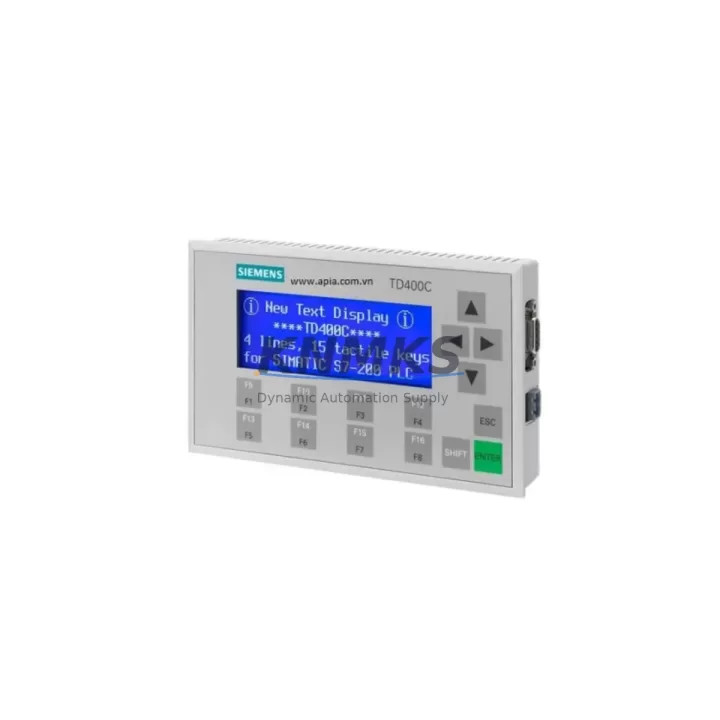
Siemens 6AV6640-0AA00-0AX0 Maintenance-Proven Spare Part for Factory Uptime
The Siemens 6AV6640-0AA00-0AX0 SIMATIC TD 400C is a compact text display unit designed for direct integration with the SIMATIC S7-200 series PLC. As a maintenance-proven spare part, it plays a critical role in sustaining operator visibility and machine control continuity across a wide range of industrial automation environments — from discrete manufacturing lines to process control panels and utility substations. Sourced as an original Siemens component, each unit undergoes pre-shipment functional testing and ships with a support terms confirmed by quotation, giving maintenance engineers and procurement teams the confidence needed for both emergency replacements and planned spare parts inventory.
In facilities running SIMATIC S7-200 controllers, the TD 400C serves as the primary operator interface for displaying process values, alarm messages, and system status. When this display fails or degrades — whether due to backlight failure, connector wear, or firmware incompatibility — production visibility is immediately compromised. Rapid replacement with a verified original spare minimizes unplanned downtime and restores operator control without requiring PLC reprogramming or panel rewiring.
Spare Maintenance Table
| Parameter | Specification |
|---|---|
| SKU / Part Number | 6AV6640-0AA00-0AX0 |
| Series | SIMATIC TD 400C |
| Compatible PLC | SIMATIC S7-200 (CPU 221, 222, 224, 224XP, 226) |
| Display Type | Text Display, 4-line × 12 characters |
| Supply Voltage | 24 V DC (via S7-200 PLC port) |
| Communication Interface | RS-485 (PPI protocol via S7-200 port) |
| Operating Temperature | 0 °C to +55 °C |
| Protection Rating | IP65 (front panel) |
| Mounting | Panel cut-out, snap-fit installation |
| Weight | 613 g |
| Country of Origin | Germany |
| Support terms | 12 Months |
| Pre-Shipment Test | Yes — functional and communication verified |
| Condition | Original Spare / New Old Stock |
Maintenance Planning for Continuous Operation
When replacing the 6AV6640-0AA00-0AX0 TD 400C in the field, a thorough inspection of the surrounding electrical circuit is essential to prevent repeat failures and ensure system stability. Maintenance engineers should begin by verifying the 24 V DC supply rail feeding the S7-200 CPU — a degraded or noisy power supply such as the Siemens SITOP PSU100S 6EP1334-2BA20 can cause intermittent display dropouts that are often misdiagnosed as HMI faults.
The RS-485 communication cable connecting the TD 400C to the S7-200 PPI port should be inspected for insulation damage, connector oxidation, and correct termination resistance. Shielded twisted-pair cable with proper grounding is mandatory in environments with high electromagnetic interference. If the S7-200 CPU itself is under review, companion modules such as the EM 221 digital input module (6ES7221-1BF22-0XA0) or the EM 222 digital output module should be checked for correct addressing and I/O mapping, as a misconfigured I/O expansion can generate false alarms on the TD 400C display.
For control cabinets housing the S7-200 system, the annual inspection checklist should also include the CPU 224 (6ES7214-1AD23-0XB0) battery backup status, terminal block torque verification, and the condition of the SIMATIC S7-200 PC/PPI cable (6ES7901-3CB30-0XA0) used for programming and diagnostics. In older installations, the EM 231 analog input module connected to process sensors should be recalibrated to ensure signal accuracy is not masking underlying process deviations that appear as operator alarms on the TD 400C.
Procurement engineers building a spare parts buffer for S7-200-based lines should consider stocking at least one TD 400C alongside a CPU module, a power supply unit, and a set of I/O expansion modules to cover the most common failure scenarios. This approach reduces mean time to repair (MTTR) and eliminates the risk of extended lead times for discontinued or end-of-life Siemens components.
Site Replacement Workflow
Step 1 — Isolation: De-energize the control cabinet and lock out the 24 V DC supply. Document the current TD 400C configuration using the STEP 7 Micro/WIN software before disconnecting.
Step 2 — Removal: Disconnect the PPI communication cable from the S7-200 CPU port. Release the panel snap-fit clips and remove the TD 400C from the front panel cut-out.
Step 3 — Inspection: Inspect the panel cut-out gasket for compression set or damage. Check the PPI port on the CPU for bent pins or corrosion. Verify the 24 V DC supply voltage at the CPU terminals with a calibrated multimeter.
Step 4 — Installation: Insert the replacement 6AV6640-0AA00-0AX0 into the panel cut-out and secure the snap-fit clips. Reconnect the PPI cable. Restore power and verify the display initializes correctly and communicates with the CPU.
Step 5 — Verification: Confirm all configured text messages, alarm screens, and function key assignments are displayed correctly. Run a short functional test cycle to validate operator interaction. Update the maintenance log with the replacement date and new unit serial number.
This workflow is compatible with both direct replacement of a failed unit and proactive swap-out during scheduled annual maintenance shutdowns, minimizing system downtime and maintaining full S7-200 system compatibility.
Spare Parts Support FAQ
Q1: Is the 6AV6640-0AA00-0AX0 compatible with all S7-200 CPU variants?
The TD 400C is designed for use with the full SIMATIC S7-200 CPU range, including CPU 221, 222, 224, 224XP, and 226. Communication is established via the PPI protocol over the RS-485 port. No additional configuration hardware is required for basic text display operation.
Q2: What does the support terms confirmed by quotation cover?
The support terms confirmed by quotation cover manufacturing defects and functional failures under normal operating conditions. Each unit is pre-shipment tested for power-on, display function, and PPI communication. Support requests are supported with replacement or refund, subject to inspection of the returned unit.
Q3: How do I verify compatibility before installation?
Confirm the S7-200 CPU firmware version supports TD 400C operation (STEP 7 Micro/WIN V4.0 or later recommended). Check that the PPI cable type matches the CPU port specification. Review the existing TD 400C project file in Micro/WIN to ensure the replacement unit will load the correct configuration on first power-up.
Q4: Can you support long-term supply for ongoing maintenance programs?
Yes. We maintain stock of the 6AV6640-0AA00-0AX0 and related S7-200 spare components to support annual maintenance contracts and multi-year spare parts programs. Contact our team to discuss volume pricing, reserved stock agreements, and scheduled delivery options for your facility.
© 2026 KNMKS. All rights reserved.
Original Source: https://knmks.com
Contact: admin@knmks.com | +86 18359268345
Product Identification
- Brand / Ecosystem
-
Siemens
Siemens - Model / Series
-
6AV6640-0AA00-0AX0
Assorted Series - Product Family
- HMI & Displays
- Availability Status
- Available on request after model and quantity confirmation
- Inquiry Type
- B2B RFQ, replacement inquiry and project spare-part request
- Pre-Quote Check
- Exact SKU, brand, series, quantity, nameplate photos and destination country are checked before quotation
System Path
Where this product fits in the KNMKS automation structure.
Specification & Inquiry Focus
- Display range
- Operator panels and touch screens
- Common needs
- Screen size, interface and version matching
- Project support
- Retrofit, spare unit and panel replacement
Buyer Confirmation
Information KNMKS checks before replying.
- Exact model
- 6AV6640-0AA00-0AX0
- Brand / ecosystem
- Siemens
- Product family
- HMI & Displays
- Application note
- Replacement, maintenance, project build or spare-part list
- Useful photos
- Nameplate, installed unit, cabinet layout or connector side
- Delivery details
- Quantity, destination country and target schedule
Document Support
Files and notes can be confirmed during quotation.
- Product photos or nameplate confirmation when available
- Packing and delivery notes before quotation confirmation
- Support scope and delivery terms confirmed per inquiry
- Export document coordination for qualified B2B requests
Inquiry Support
- Panel size and interface confirmation
- Replacement unit inquiry for discontinued HMIs
- Protective packaging for display shipment
What to Send Us
- Brand and exact model number: Siemens 6AV6640-0AA00-0AX0
- Quantity and required delivery time
- Application, replacement requirement or nameplate photo
- Destination country and shipping preference
RFQ Preparation
This is a product inquiry page built for RFQ communication.
Fast Model Check
Send this model to KNMKS for confirmation.
Include quantity, destination country and photos if this is a maintenance replacement. The inquiry will be saved with a reference number after submission.
Brand & Compatibility Note
KNMKS displays automation product information for well-known industrial brand ecosystems and compatible replacement references. Brand names are used for product identification and compatibility reference only; final availability and commercial terms are confirmed per quotation.
 Manufacturing
 Machine Tools
 Packaging
 Energy & Power
 PLCs & Controllers
 Servo Systems
 Variable Frequency Drives
 Sensors