
Overview
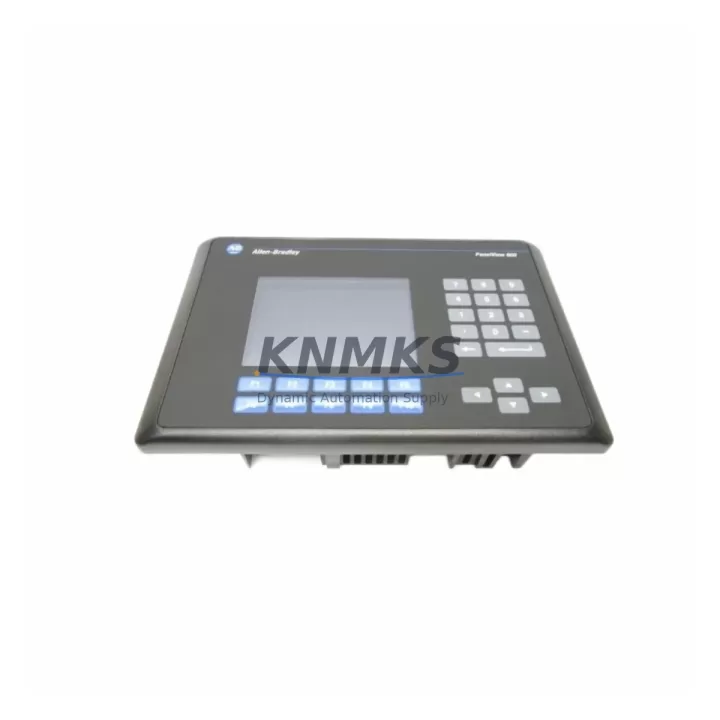
Allen-Bradley 2711-B6C5 Migration-Ready HMI for Legacy Control Systems
The Allen-Bradley 2711-B6C5 is a 6-inch monochrome HMI terminal from the PanelView 600 series, designed for operator interface in legacy Allen-Bradley and Rockwell Automation control environments. As original equipment reaches end-of-life and spare parts become increasingly scarce, the 2711-B6C5 serves as a proven migration-ready replacement for aging PanelView 550 and PanelView 600 installations still operating on DH-485 and DH+ communication networks.
For maintenance engineers and system integrators managing retrofit projects, the 2711-B6C5 offers a reliable path to extend the operational life of existing control cabinets without requiring a full PLC platform migration. Its compatibility with Allen-Bradley SLC 500 and MicroLogix controller families makes it a practical choice for facilities that need to replace a failed or discontinued HMI while preserving existing ladder logic programs and I/O configurations.
Before proceeding with a replacement, engineers should verify the following: the existing panel cutout dimensions to confirm the 2711-B6C5 fits the control cabinet opening; the communication port type (DH-485 RJ45 or RS-232) to match the existing wiring harness; the power supply voltage (120V AC or 24V DC) to ensure compatibility with the panel’s power distribution module; and the PanelView application file version to confirm it can be transferred or re-compiled using RSView32 or PanelBuilder 1400e software. In many retrofit scenarios, the original application file stored on a memory card or PC backup can be loaded directly into the replacement unit, significantly reducing commissioning time and minimizing downtime risk.
When planning a broader control system upgrade, the 2711-B6C5 is frequently deployed alongside the Allen-Bradley 1747-L553 SLC 5/05 processor, which provides Ethernet connectivity for remote monitoring while retaining DH-485 compatibility for the HMI link. For I/O expansion within the same rack, the 1746-IB16 digital input module and 1746-OB16 digital output module are common additions that allow engineers to extend the system’s I/O capacity without replacing the existing 1746 chassis or power supply. In installations where signal isolation is required between field devices and the SLC rack, DIN-rail mounted signal isolators are typically inserted at the terminal block level to protect the controller from voltage transients common in older industrial environments.
For facilities running legacy Remote I/O (RIO) networks, the 2711-B6C5 can coexist with existing 1771 I/O racks connected through a 1747-SN Scanner Module, allowing a phased migration approach where the HMI is replaced first while the I/O infrastructure is upgraded in subsequent maintenance windows. This strategy is particularly effective in continuous process environments where stopping the entire line for a full system overhaul is not operationally feasible.
Communication link verification is a critical step during commissioning. Engineers should confirm the DH-485 network node address assigned to the 2711-B6C5 does not conflict with other devices on the network, including the SLC processor, any 1747-AIC Advanced Interface Converters, or additional HMI nodes. The maximum node count on a DH-485 network is 32 devices, and address conflicts will prevent the HMI from establishing a reliable data link with the controller. After addressing is confirmed, the communication rate (typically 19.2 Kbps for DH-485) should be matched across all network nodes before powering up the replacement unit.
Each 2711-B6C5 unit supplied by KNMKS undergoes pre-shipment functional testing, including power-on verification, display integrity check, keypad response validation, and communication port continuity. Units are shipped with a support terms confirmed by quotation covering manufacturing defects and operational failures under normal industrial use conditions. Inventory is maintained to support urgent replacement orders, with same-day dispatch available for in-stock units.
Migration Compatibility Table
| Parameter | 2711-B6C5 Specification | Retrofit Notes |
|---|---|---|
| Display Size | 6-inch STN Monochrome | Verify panel cutout: 192 × 138 mm |
| Communication | DH-485 (RJ45), RS-232 | Match existing cable type; confirm node address |
| Power Supply | 120V AC / 24V DC | Confirm panel power module output voltage |
| Compatible Controllers | SLC 500, MicroLogix 1000/1100/1500 | Verify processor firmware supports PanelView 600 |
| Application Software | PanelBuilder 1400e, RSView32 | Backup original .PBA file before replacement |
| Replaces | PanelView 550 (2711-B5A5), PanelView 600 variants | Confirm keypad layout matches operator workflow |
| Installation Standard | NEMA 4/4X (front face) | Check gasket condition on existing panel cutout |
| Support terms | 12 Months | Covers manufacturing defects; full functional test included |
Retrofit Planning for Existing Automation Systems
A successful 2711-B6C5 retrofit begins with a thorough audit of the existing control cabinet. Engineers should document the current HMI model number, communication wiring color codes, terminal block assignments, and the location of the DH-485 network termination resistors. In many legacy installations, the termination resistors are located inside the HMI terminal itself, and removing the old unit without noting this detail can introduce network reflection errors that are difficult to diagnose after the replacement is installed.
The 1746 series power supply module should be checked for available capacity before adding any new modules to the rack. If the existing power supply is operating near its rated output, a replacement or supplemental 1746-P4 power supply may be required to support the additional load from the new HMI and any planned I/O expansion modules. For installations where the control cabinet also houses a 1785-L80E PLC-5 processor communicating over DH+, a separate 1784-PKTX or 1784-U2DHP programming cable will be needed to access the processor for program backup and verification before the HMI is swapped.
Where the retrofit scope includes updating the operator interface screens, engineers should allocate time for HMI screen validation with the operations team before the maintenance window begins. Screen layout changes, tag name updates, and alarm setpoint revisions should be completed and tested in a simulation environment using PanelBuilder 1400e prior to loading the application onto the replacement 2711-B6C5 unit. This approach eliminates the risk of discovering screen errors during the live commissioning window when production pressure is highest.
Downtime Control During System Migration
Minimizing unplanned downtime during an HMI replacement requires a structured pre-outage preparation process. Before the maintenance window opens, the following steps should be completed: back up the existing HMI application file to a PC or memory card; photograph all terminal block wiring connections on the rear of the existing unit; confirm the replacement 2711-B6C5 is pre-configured with the correct node address and communication rate; and verify that the PLC program is saved and accessible in case a processor restart is required during commissioning.
During the physical swap, the DH-485 cable should be disconnected from the old unit before power is removed to avoid introducing voltage transients onto the network. The replacement unit should be mounted, wired, and powered up in isolation before reconnecting the network cable. Once the 2711-B6C5 is confirmed to be communicating with the SLC processor and all screen tags are updating correctly, the system can be returned to normal operation. A post-commissioning checklist covering all critical control functions, alarm acknowledgements, and operator screen navigation should be completed and signed off before the maintenance window is closed.
For facilities with strict change management requirements, KNMKS can provide pre-shipment configuration documentation including the unit’s tested communication settings, firmware version, and functional test report. This documentation supports internal validation processes and reduces the administrative burden on the engineering team during the commissioning phase.
Retrofit Support FAQ
Q: Is the 2711-B6C5 a direct drop-in replacement for the PanelView 550 (2711-B5A5)?
A: The 2711-B6C5 uses the same DH-485 communication protocol and is compatible with the same SLC 500 and MicroLogix controller families, but the display size and panel cutout dimensions differ. Verify the panel cutout size before ordering. The application file may require minor screen layout adjustments to accommodate the larger 6-inch display.
Q: Can the existing PanelBuilder application file be loaded directly onto the replacement unit?
A: Yes, provided the application was created with PanelBuilder 1400e and the firmware version on the replacement unit is compatible. KNMKS recommends backing up the original .PBA file and testing the application in PanelBuilder simulation mode before the maintenance window to confirm all tags and screen transitions function correctly.
Q: What communication settings need to be verified before installation?
A: Confirm the DH-485 node address (must be unique on the network, 0–31), the communication rate (19.2 Kbps standard), and the cable type (RJ45 for DH-485 or DB9 for RS-232). If the existing unit was the network terminator, ensure the termination resistor is correctly placed on the replacement unit or at the cable end.
Q: Does KNMKS provide functional testing and support terms coverage for the 2711-B6C5?
A: Yes. Every unit undergoes pre-shipment functional testing including power-on, display, keypad, and communication port verification. A support terms confirmed by quotation is included, covering manufacturing defects and operational failures under normal industrial use. In-stock units are available for same-day dispatch to support urgent replacement requirements.
© 2026 KNMKS. All rights reserved.
Original Source: https://knmks.com
Contact: admin@knmks.com | +86 18359268345
Product Identification
- Brand / Ecosystem
-
Allen-Bradley
Allen-Bradley - Model / Series
-
2711-B6C5
Assorted Series - Product Family
- HMI & Displays
- Availability Status
- Available on request after model and quantity confirmation
- Inquiry Type
- B2B RFQ, replacement inquiry and project spare-part request
- Pre-Quote Check
- Exact SKU, brand, series, quantity, nameplate photos and destination country are checked before quotation
System Path
Where this product fits in the KNMKS automation structure.
Specification & Inquiry Focus
- Display range
- Operator panels and touch screens
- Common needs
- Screen size, interface and version matching
- Project support
- Retrofit, spare unit and panel replacement
Buyer Confirmation
Information KNMKS checks before replying.
- Exact model
- 2711-B6C5
- Brand / ecosystem
- Allen-Bradley
- Product family
- HMI & Displays
- Application note
- Replacement, maintenance, project build or spare-part list
- Useful photos
- Nameplate, installed unit, cabinet layout or connector side
- Delivery details
- Quantity, destination country and target schedule
Document Support
Files and notes can be confirmed during quotation.
- Product photos or nameplate confirmation when available
- Packing and delivery notes before quotation confirmation
- Support scope and delivery terms confirmed per inquiry
- Export document coordination for qualified B2B requests
Inquiry Support
- Panel size and interface confirmation
- Replacement unit inquiry for discontinued HMIs
- Protective packaging for display shipment
What to Send Us
- Brand and exact model number: Allen-Bradley 2711-B6C5
- Quantity and required delivery time
- Application, replacement requirement or nameplate photo
- Destination country and shipping preference
RFQ Preparation
This is a product inquiry page built for RFQ communication.
Fast Model Check
Send this model to KNMKS for confirmation.
Include quantity, destination country and photos if this is a maintenance replacement. The inquiry will be saved with a reference number after submission.
Brand & Compatibility Note
KNMKS displays automation product information for well-known industrial brand ecosystems and compatible replacement references. Brand names are used for product identification and compatibility reference only; final availability and commercial terms are confirmed per quotation.
 Manufacturing
 Machine Tools
 Packaging
 Energy & Power
 PLCs & Controllers
 Servo Systems
 Variable Frequency Drives
 Sensors