
Overview
Siemens 6AV2123-2JB03-0AX0 Maintenance-Proven Spare Part for Factory Uptime
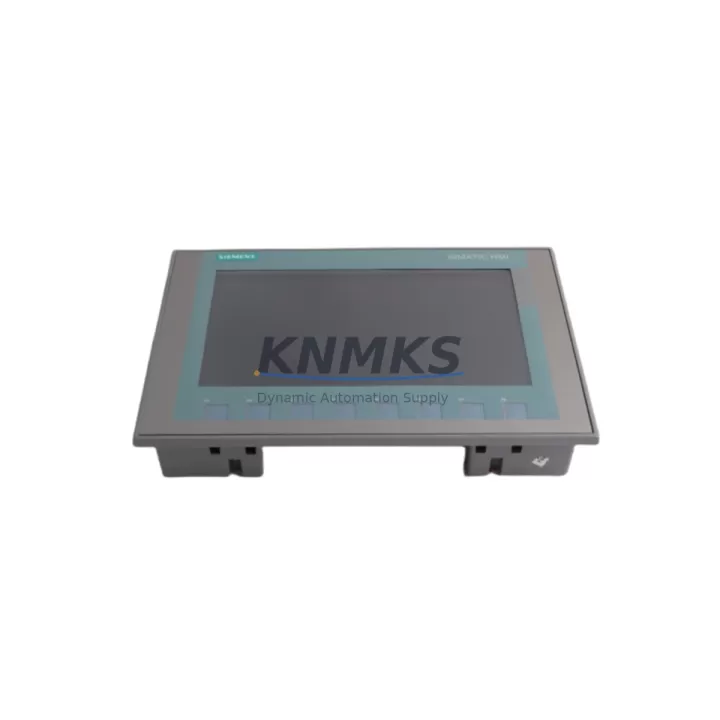
The Siemens 6AV2123-2JB03-0AX0 is an original SIMATIC KTP700 Basic 7-inch HMI panel engineered for continuous industrial operation. As a maintenance-proven spare part, it is stocked and dispatched to support rapid on-site replacement, minimize unplanned downtime, and sustain production continuity across SIMATIC S7-1200, S7-1500, and legacy S7-300 control architectures. Maintenance engineers and procurement teams managing panel replacement cycles rely on this unit for its direct PROFINET integration, proven compatibility with TIA Portal V13 SP1 and above, and its ability to restore operator interface functionality without system reconfiguration.
This unit is sourced as an original Siemens component, pre-shipment tested, and dispatched with a support terms confirmed by quotation covering manufacturing defects under normal industrial operating conditions. Multi-region stock availability supports urgent replacement orders with short lead times, reducing the risk of extended production halts caused by HMI failure in critical control stations.
Spare Maintenance Table
| Parameter | Specification |
|---|---|
| SKU / Order No. | 6AV2123-2JB03-0AX0 |
| Series | SIMATIC KTP700 Basic |
| Display Size | 7″ TFT widescreen, 800 × 480 px |
| Touch Type | Resistive touch + 8 function keys |
| Communication | PROFINET (1× RJ45) |
| Supply Voltage | DC 24 V (20.4–28.8 V) |
| Power Consumption | Typ. 4.5 W |
| Protection Rating | IP65 (front panel) |
| Operating Temperature | 0 °C to +50 °C |
| Storage Temperature | −20 °C to +60 °C |
| Configuration Software | TIA Portal WinCC Basic V13 SP1+ |
| Compatible Controllers | S7-1200, S7-1500, S7-300 (via PN) |
| Mounting | Panel cutout 214 × 158 mm |
| Weight | 530 g |
| Origin | Germany |
| Support terms | 12 Months — Manufacturing Defects |
| Condition | Original New / Tested Before Shipment |
Maintenance Planning for Continuous Operation
When replacing the 6AV2123-2JB03-0AX0 in a live control cabinet, a structured inspection of the surrounding electrical environment is essential to prevent repeat failures and confirm system integrity. Begin by verifying the 24 VDC supply rail feeding the HMI — a Siemens SITOP PSU100S or equivalent regulated power supply should deliver stable voltage within the 20.4–28.8 V operating range. Voltage ripple or transient spikes are a common root cause of HMI display corruption and premature panel failure.
Inspect the PROFINET cable and RJ45 connector at the panel port. In high-vibration environments, connector fatigue and cable shielding degradation are frequent contributors to communication loss between the KTP700 and the S7-1200 or S7-1500 CPU. Replace the PROFINET patch cable if continuity or shielding integrity cannot be confirmed. Where the control cabinet includes a Siemens SCALANCE X005 or X108 unmanaged switch, verify port status LEDs and check for packet loss before reconnecting the replacement panel.
Review the 24 VDC circuit protection — a blown or degraded fuse upstream of the HMI supply can cause intermittent power loss that mimics panel hardware failure. Confirm fuse ratings match the panel’s inrush and steady-state current draw. If the cabinet includes a Siemens ET 200SP distributed I/O station or a SM 1231 analog input module sharing the same supply bus, verify that total current draw remains within the power supply’s rated output.
For cabinets running mixed signal environments, check for ground loops or inadequate shielding between the HMI signal lines and adjacent relay output modules such as the Siemens SM 1222 DO relay. Relay switching transients can induce noise on the PROFINET segment if cable routing is not properly separated. Signal isolation barriers or ferrite cores on communication cables are recommended where relay density is high.
Finally, confirm that the TIA Portal project file version is compatible with the replacement panel’s firmware. If the existing project was compiled under TIA Portal V15 or later, verify that the 6AV2123-2JB03-0AX0 firmware version supports the configured screen objects and communication drivers before commissioning.
Site Replacement Workflow
Step 1 — Isolate and de-energize. Switch off the 24 VDC supply to the HMI panel. Confirm zero voltage at the panel supply terminals before proceeding. Do not rely solely on the main cabinet isolator if sub-circuits are independently fused.
Step 2 — Disconnect communications. Unplug the PROFINET RJ45 cable and label it clearly. If the panel is connected to a PROFINET ring topology, note the port assignment before disconnection to avoid network reconfiguration errors after replacement.
Step 3 — Remove the failed panel. Release the panel mounting clamps from the rear of the cutout. Slide the panel forward and clear of the cutout. Retain all mounting hardware for reuse with the replacement unit.
Step 4 — Inspect the cutout and gasket. Check the panel cutout dimensions (214 × 158 mm) for deformation. Inspect the IP65 gasket condition. Replace the gasket if compression set or damage is observed to maintain ingress protection rating.
Step 5 — Install the replacement 6AV2123-2JB03-0AX0. Insert the new panel into the cutout, secure mounting clamps evenly to the specified torque, and reconnect the PROFINET cable and 24 VDC supply leads.
Step 6 — Power-on and commission. Apply 24 VDC and confirm the panel boots to the loader screen. Transfer the TIA Portal project to the panel via PROFINET or USB. Verify all screen pages, tag connections, and alarm displays function correctly before returning the line to production.
Step 7 — Document and update spare inventory. Record the replacement date, panel serial number, and firmware version in the maintenance log. Replenish the spare parts buffer to maintain at least one unit of 6AV2123-2JB03-0AX0 availability confirmed by RFQ for the next replacement cycle.
Spare Parts Support FAQ
Q1: Is the 6AV2123-2JB03-0AX0 compatible with TIA Portal V16 and V17 projects?
Yes. The SIMATIC KTP700 Basic panel supports TIA Portal WinCC Basic from V13 SP1 onward. Projects compiled under V16 or V17 can be downloaded to this panel provided the firmware is updated to the corresponding version using the Siemens Automation Tool or TIA Portal device update function. Always verify firmware compatibility before site deployment.
Q2: What is the recommended spare parts buffer quantity for a production line with multiple KTP700 panels?
For lines operating 24/7 with three or more KTP700 panels, a minimum buffer of one spare unit per five installed panels is recommended, with a floor of one unit regardless of installed quantity. Given typical OEM lead times of 8–16 weeks for new Siemens HMI panels, maintaining a 12-month forward stock position significantly reduces the risk of extended downtime caused by supply chain delays.
Q3: How is the 6AV2123-2JB03-0AX0 tested before shipment?
Each unit undergoes pre-shipment functional verification including power-on boot confirmation, display pixel integrity check, touch calibration test, and PROFINET port continuity check. Units that do not pass all test criteria are quarantined and not dispatched. Test records are retained and available upon request for quality audit purposes.
Q4: What does the support terms confirmed by quotation cover, and how is a support terms claim initiated?
The support terms confirmed by quotation cover manufacturing defects and component failures under normal industrial operating conditions as defined by Siemens product specifications. It does not cover damage resulting from incorrect installation voltage, physical impact, liquid ingress beyond the panel’s IP rating, or unauthorized modification. To initiate a support terms claim, contact the sales team with the order reference, panel serial number, and a description of the fault. Replacement or repair will be coordinated within the agreed service timeline.
© 2026 KNMKS. All rights reserved.
Original Source: https://knmks.com
Contact: admin@knmks.com | +86 18359268345
Product Identification
- Brand / Ecosystem
-
Siemens
Assorted Brands - Model / Series
-
6AV2123-2JB03-0AX0
Assorted Series - Product Family
- HMI & Displays
- Availability Status
- Available on request after model and quantity confirmation
- Inquiry Type
- B2B RFQ, replacement inquiry and project spare-part request
- Pre-Quote Check
- Exact SKU, brand, series, quantity, nameplate photos and destination country are checked before quotation
System Path
Where this product fits in the KNMKS automation structure.
Specification & Inquiry Focus
- Display range
- Operator panels and touch screens
- Common needs
- Screen size, interface and version matching
- Project support
- Retrofit, spare unit and panel replacement
Buyer Confirmation
Information KNMKS checks before replying.
- Exact model
- 6AV2123-2JB03-0AX0
- Brand / ecosystem
- Siemens
- Product family
- HMI & Displays
- Application note
- Replacement, maintenance, project build or spare-part list
- Useful photos
- Nameplate, installed unit, cabinet layout or connector side
- Delivery details
- Quantity, destination country and target schedule
Document Support
Files and notes can be confirmed during quotation.
- Product photos or nameplate confirmation when available
- Packing and delivery notes before quotation confirmation
- Support scope and delivery terms confirmed per inquiry
- Export document coordination for qualified B2B requests
Inquiry Support
- Panel size and interface confirmation
- Replacement unit inquiry for discontinued HMIs
- Protective packaging for display shipment
What to Send Us
- Brand and exact model number: Siemens 6AV2123-2JB03-0AX0
- Quantity and required delivery time
- Application, replacement requirement or nameplate photo
- Destination country and shipping preference
RFQ Preparation
This is a product inquiry page built for RFQ communication.
Fast Model Check
Send this model to KNMKS for confirmation.
Include quantity, destination country and photos if this is a maintenance replacement. The inquiry will be saved with a reference number after submission.
Brand & Compatibility Note
KNMKS displays automation product information for well-known industrial brand ecosystems and compatible replacement references. Brand names are used for product identification and compatibility reference only; final availability and commercial terms are confirmed per quotation.
 Manufacturing
 Machine Tools
 Packaging
 Energy & Power
 PLCs & Controllers
 Servo Systems
 Variable Frequency Drives
 Sensors