
Overview
SIEMENS 39ACM14CAN Maintenance-Proven Spare Part for Factory Uptime
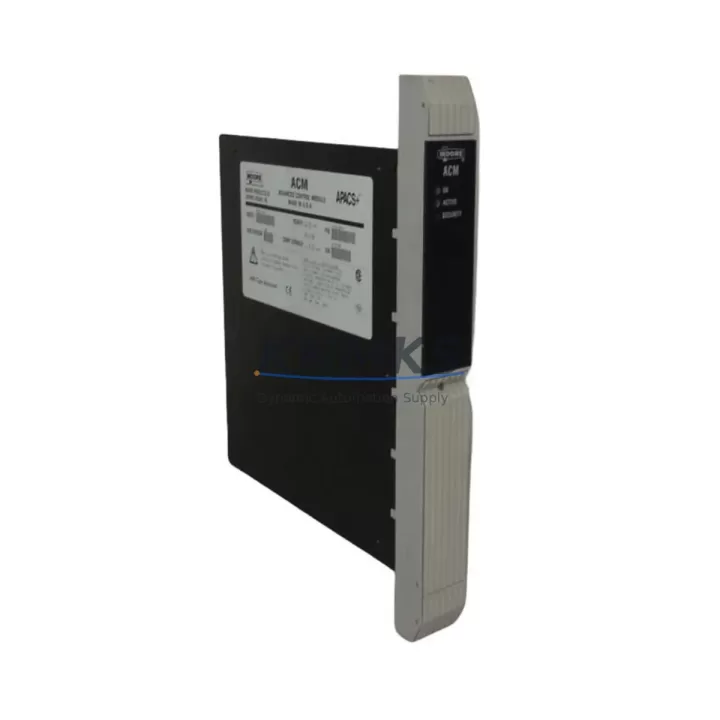
The SIEMENS 39ACM14CAN is an original ACM (Axis Control Module) spare part designed for SINUMERIK CNC automation systems. In high-demand manufacturing environments — from automotive body shops to precision machining centers — unplanned downtime caused by a failed axis control module can halt an entire production line within minutes. Stocking the 39ACM14CAN as a verified spare ensures your maintenance team can execute a rapid swap, restore axis control, and return the machine to full operation without waiting days for emergency procurement.
Each unit supplied by KNMKS is sourced from authorized channels, undergoes pre-shipment functional testing, and is backed by a support terms confirmed by quotation. Whether you are managing a single CNC cell or a multi-axis transfer line, the 39ACM14CAN is a critical line item on any responsible SINUMERIK spare parts list.
From the perspective of a maintenance engineer, replacing an ACM module is rarely an isolated task. The 39ACM14CAN interfaces directly with the SINUMERIK NCU (Numerical Control Unit), the SINAMICS drive system, and the machine’s I/O infrastructure. A thorough replacement workflow must account for the health of every connected component — not just the module itself.
Spare Maintenance Table
| Parameter | Detail |
|---|---|
| SKU / Part Number | 39ACM14CAN |
| Brand | SIEMENS |
| Series | SINUMERIK |
| Product Type | ACM Control Module |
| Country of Origin | Germany |
| Weight | 2,270 g |
| Compatibility | SINUMERIK CNC systems; verify NCU and drive firmware revision before installation |
| Application Environment | Industrial CNC machining centers, transfer lines, multi-axis automation cells |
| Installation Notes | Follow SINUMERIK commissioning guide; back up NC data and PLC program before module swap |
| Maintenance Recommendation | Inspect connector pins, bus termination, and shielding integrity at each annual overhaul |
| Pre-Shipment Testing | Functional test performed on every unit before dispatch |
| Support terms | 12 Months from date of shipment |
Maintenance Planning for Continuous Operation
A disciplined spare parts strategy for SINUMERIK-based machines extends well beyond the 39ACM14CAN itself. When scheduling an annual overhaul or responding to an axis fault alarm, maintenance engineers should simultaneously inspect the following components to prevent cascading failures and reduce the risk of a second unplanned stoppage:
NCU Communication and Backplane Integrity: The 39ACM14CAN communicates with the SINUMERIK NCU over the internal DRIVE-CLiQ or CAN bus. During any ACM replacement, inspect the DRIVE-CLiQ cables and connectors for fraying, bent pins, or moisture ingress. A degraded cable can cause intermittent axis faults that are difficult to diagnose and may be misattributed to the module itself. Backplane slot contacts should be cleaned and inspected for oxidation.
SINAMICS Drive Modules: The ACM works in close coordination with SINAMICS S120 or equivalent drive modules. If the 39ACM14CAN failed due to an overcurrent or overvoltage event, the associated drive module — such as a SINAMICS power module or motor module — may have sustained damage as well. Verify drive status via the operator panel and check for stored fault codes before declaring the system restored.
I/O Modules and Terminal Blocks: Axis enable signals, limit switch inputs, and encoder feedback all pass through the machine’s I/O infrastructure. During a module swap, verify that ET 200 distributed I/O modules or equivalent terminal-block assemblies are correctly wired and that no signal lines have been disturbed. Loose terminal connections are a common source of post-maintenance faults.
Power Supply Modules: Confirm that the 24 VDC control supply feeding the ACM and its associated logic circuits is within specification. A marginal SITOP or equivalent industrial power supply can cause erratic module behavior that mimics hardware failure. Measure output voltage under load before and after the replacement.
Signal Isolation and Fusing: Check any signal isolators or fuse holders in the axis control circuit. A blown fuse protecting the ACM’s supply rail is often the first indicator of an upstream fault. Replace fuses with the correct rating and investigate the root cause before re-energizing.
HMI and Operator Panel: After restoring the ACM, perform a full axis reference cycle and verify that the SINUMERIK HMI (OP or TCU panel) correctly displays axis positions and status. An HMI that fails to communicate with the NCU after a module swap may indicate a bus configuration issue rather than a hardware fault.
Procurement engineers should treat the 39ACM14CAN as a fast-moving spare for any facility running SINUMERIK-controlled equipment. Maintaining at least one unit on-site — alongside a matched set of DRIVE-CLiQ cables and a spare SINAMICS motor module — reduces mean time to repair (MTTR) from days to hours.
Site Replacement Workflow
Step 1 — Pre-Replacement Preparation: Before powering down the machine, back up the NC program, PLC data, and drive parameters using the SINUMERIK commissioning tool or a USB backup. Document the current axis configuration and any machine-specific parameter sets.
Step 2 — Safe Isolation: Follow your site’s lockout/tagout (LOTO) procedure. Isolate the main power supply and confirm that the DC bus has fully discharged before opening the control cabinet. Verify with a calibrated multimeter.
Step 3 — Module Removal: Disconnect DRIVE-CLiQ cables, CAN bus connectors, and any I/O wiring from the existing ACM. Label all connectors before removal to prevent miswiring. Remove the module from its backplane slot using the release lever — do not force.
Step 4 — Installation of 39ACM14CAN: Seat the replacement module firmly into the backplane slot. Reconnect all cables in the documented order. Verify that bus termination resistors are correctly positioned if this module occupies an end position on the CAN bus.
Step 5 — Commissioning and Verification: Power up the system and allow the NCU to perform its self-test sequence. Restore the backed-up parameters if prompted. Execute a controlled axis reference run at reduced feedrate and verify position feedback on the HMI before returning the machine to production.
Step 6 — Documentation: Record the replacement in the machine’s maintenance log, including the date, replaced part number, technician name, and post-replacement test results. Update your spare parts inventory accordingly.
This workflow is applicable whether you are replacing a failed unit on an emergency basis or performing a scheduled swap during a planned maintenance window. The 39ACM14CAN’s compatibility with existing SINUMERIK system configurations means no re-engineering is required — restoring uptime is the sole objective.
Spare Parts Support FAQ
Q1: Is the SIEMENS 39ACM14CAN a new original part or a refurbished unit?
All 39ACM14CAN units supplied by KNMKS are original SIEMENS spare parts sourced from authorized supply channels. Each unit undergoes pre-shipment functional testing. A support terms confirmed by quotation is provided from the date of shipment, covering manufacturing defects and functional failures under normal operating conditions.
Q2: How do I confirm compatibility with my existing SINUMERIK system before ordering?
Compatibility depends on your NCU hardware revision, firmware version, and machine configuration. We recommend providing your machine’s nameplate data, NCU part number, and current software version when placing an inquiry. Our technical team will cross-reference these details against the 39ACM14CAN’s specification to confirm a direct fit before shipment.
Q3: What is the recommended stock quantity for a facility running multiple SINUMERIK machines?
For facilities operating three or more SINUMERIK CNC machines, maintaining a minimum of two 39ACM14CAN units on-site is advisable. ACM failures, while not frequent, are high-impact events. Pairing the ACM stock with a set of spare DRIVE-CLiQ cables and a backup SINAMICS module provides a comprehensive first-response kit that covers the majority of axis-related downtime scenarios.
Q4: Can KNMKS support long-term supply of the 39ACM14CAN for multi-year maintenance contracts?
Yes. KNMKS maintains ongoing sourcing relationships to support long-term spare parts programs. We can provide scheduled delivery agreements, reserved stock arrangements, and documentation packages to support your maintenance contract requirements. Contact our sales team to discuss volume pricing and supply continuity options.
© 2026 KNMKS. All rights reserved.
Original Source: https://knmks.com
Contact: admin@knmks.com | +86 18359268345
Product Identification
- Brand / Ecosystem
-
SIEMENS
Siemens - Model / Series
-
39ACM14CAN
Assorted Series - Product Family
- PLCs & Controllers
- Availability Status
- Available on request after model and quantity confirmation
- Inquiry Type
- B2B RFQ, replacement inquiry and project spare-part request
- Pre-Quote Check
- Exact SKU, brand, series, quantity, nameplate photos and destination country are checked before quotation
System Path
Where this product fits in the KNMKS automation structure.
Specification & Inquiry Focus
- Control platform
- PLC, PAC and modular controllers
- Common needs
- CPU, rack, power and I/O expansion
- Project support
- Replacement, cabinet build and maintenance
Buyer Confirmation
Information KNMKS checks before replying.
- Exact model
- 39ACM14CAN
- Brand / ecosystem
- SIEMENS
- Product family
- PLCs & Controllers
- Application note
- Replacement, maintenance, project build or spare-part list
- Useful photos
- Nameplate, installed unit, cabinet layout or connector side
- Delivery details
- Quantity, destination country and target schedule
Document Support
Files and notes can be confirmed during quotation.
- Product photos or nameplate confirmation when available
- Packing and delivery notes before quotation confirmation
- Support scope and delivery terms confirmed per inquiry
- Export document coordination for qualified B2B requests
Inquiry Support
- Model cross-checking before quotation
- CPU, power, rack and expansion module matching
- Support for replacement and project inquiry
What to Send Us
- Brand and exact model number: SIEMENS 39ACM14CAN
- Quantity and required delivery time
- Application, replacement requirement or nameplate photo
- Destination country and shipping preference
RFQ Preparation
This is a product inquiry page built for RFQ communication.
Fast Model Check
Send this model to KNMKS for confirmation.
Include quantity, destination country and photos if this is a maintenance replacement. The inquiry will be saved with a reference number after submission.
Brand & Compatibility Note
KNMKS displays automation product information for well-known industrial brand ecosystems and compatible replacement references. Brand names are used for product identification and compatibility reference only; final availability and commercial terms are confirmed per quotation.
 Manufacturing
 Machine Tools
 Packaging
 Energy & Power



 HMI & Displays
 Servo Systems
 Variable Frequency Drives
 Sensors