
Overview
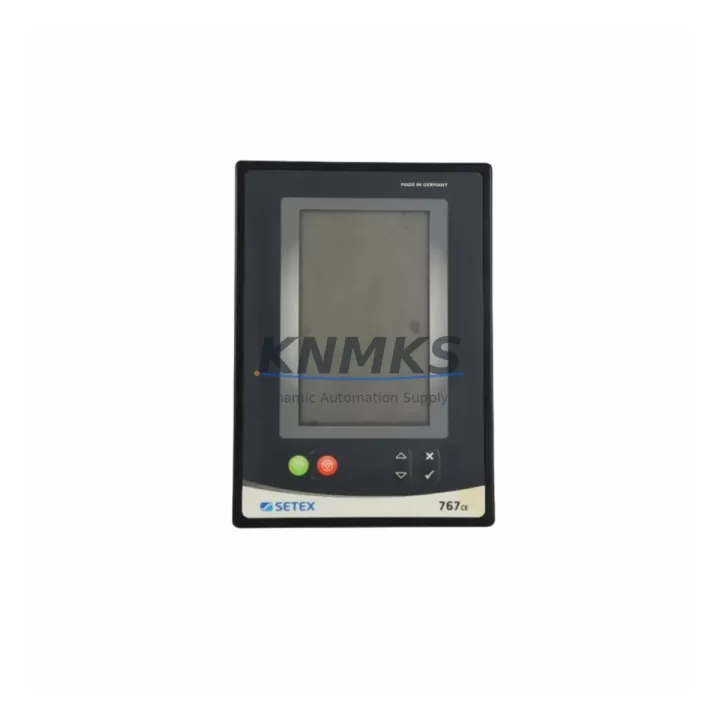
SETEX 767CE Migration-Ready HMI Panel for Legacy Control Systems
The SETEX 767CE is a migration-ready HMI operator panel engineered for direct replacement and retrofit integration within SETEX 700 Series legacy control systems. As industrial facilities face increasing pressure to modernize aging automation infrastructure, the 767CE provides a reliable, field-proven upgrade path that preserves existing control logic, minimizes rewiring effort, and reduces unplanned downtime. Whether you are replacing a failed unit on an active production line or executing a planned control cabinet modernization, the 767CE is stocked for immediate dispatch with pre-shipment functional testing completed on every unit.
Facilities operating legacy SETEX 700 Series panels frequently encounter challenges including discontinued firmware support, unavailable spare parts, and degraded display performance. The 767CE addresses these pain points directly: it maintains dimensional compatibility with the original panel cutout, supports the same terminal wiring layout, and communicates over the established serial and fieldbus protocols used across the 700 Series platform. Engineers can complete a panel swap without modifying the PLC program or reconfiguring the HMI screen layout, provided the firmware version on the replacement unit is matched to the existing controller revision during commissioning.
Before installation, maintenance teams should verify the supply voltage specification against the control cabinet’s 24 VDC or 115/230 VAC power rail, confirm the communication port type (RS-232, RS-485, or Profibus DP), and check the backplane connector pinout against the original wiring diagram. Where the original 700 Series panel was connected to a SETEX 700 Series PLC controller or a compatible third-party controller via a proprietary programming cable, the same cable interface is retained on the 767CE, simplifying the firmware upload and parameter restore procedure.
Migration Compatibility Table
| Parameter | Details |
|---|---|
| SKU / Model | SETEX 767CE |
| Series Compatibility | SETEX 700 Series HMI Platform |
| Panel Cutout | Compatible with original 700 Series cutout dimensions |
| Communication Interfaces | RS-232, RS-485, Profibus DP (verify against installed variant) |
| Power Supply | 24 VDC / 115–230 VAC (confirm cabinet power rail before installation) |
| Terminal Wiring | Matches original 700 Series terminal layout; no rewiring required in standard retrofit |
| Backplane / Rack Interface | Direct backplane mount; confirm slot position and module address assignment |
| Firmware Compatibility | Match firmware revision to connected PLC controller version prior to commissioning |
| HMI Screen Migration | Existing screen layouts transferable; verify tag mapping after firmware restore |
| Installation Space | Standard DIN rail or panel mount; confirm depth clearance in cabinet |
| Pre-Shipment Testing | Full functional test completed on every unit before dispatch |
| Replacement Recommendation | Direct drop-in for failed or end-of-life 700 Series HMI panels |
| Support terms | 12 Months from date of shipment |
Retrofit Planning for Existing Automation Systems
A successful 767CE retrofit begins with a thorough audit of the existing control cabinet. Maintenance engineers should document the current SETEX 700 Series panel’s wiring diagram, confirm the power supply module output capacity, and identify all connected I/O modules before removing the original unit. In multi-rack installations, the 767CE must be assigned the correct module address to avoid conflicts with adjacent I/O expansion modules or communication modules already present on the backplane.
Where the control system includes a SETEX 700 Series power supply module, verify that the output current rating is sufficient to support the 767CE alongside any additional loads introduced during the upgrade. If the cabinet also houses a Profibus DP communication module or a serial gateway, confirm that the 767CE’s communication port settings — baud rate, parity, and station address — are configured to match the network parameters before reconnecting the fieldbus segment.
For facilities that have integrated signal isolators between the HMI panel and field instruments, check that the isolator output range remains within the 767CE’s input specification. In systems where the original panel was connected to a third-party SCADA host via an RS-485 multi-drop network, the 767CE’s node address must be set to match the address previously assigned to the replaced unit to avoid disrupting the SCADA polling sequence. Programming cables compatible with the 700 Series platform can be reused for firmware upload and parameter configuration, reducing the tooling requirement during commissioning.
Where the retrofit scope extends beyond the HMI panel to include controller replacement, the 767CE is compatible with migration paths involving updated SETEX controller modules and select third-party PLC platforms that support the same communication protocol stack. In these cases, HMI screen tag mapping should be reviewed and validated against the new controller’s variable table before the system is returned to service.
Downtime Control During System Migration
Minimizing production downtime during a 767CE panel replacement requires preparation before the maintenance window begins. The recommended approach is to back up the existing HMI project file and PLC program to an offline storage device prior to removing the original panel. This ensures that if the firmware restore or tag mapping validation reveals discrepancies, the original configuration can be reloaded without delay.
During the physical swap, the control system’s power should be isolated at the cabinet’s main disconnect, and the terminal wiring should be photographed or labeled before disconnection. Because the 767CE maintains the same terminal layout as the original 700 Series panel, reconnection follows the existing wiring diagram directly. After reconnection, power the cabinet and verify the communication link between the 767CE and the connected PLC controller before enabling field outputs.
Firmware upload and parameter restore typically complete within minutes using the standard programming cable. Once the HMI screens are confirmed operational and the SCADA communication link is re-established, a short functional test of critical control loops — including setpoint entry, alarm acknowledgment, and trend display — should be completed before returning the line to full production. This structured approach consistently achieves panel replacement within a single planned maintenance shift, protecting both program logic integrity and field control continuity.
Retrofit Support FAQ
Q: Is the SETEX 767CE a direct replacement for all 700 Series HMI panel variants?
A: The 767CE is designed as a drop-in replacement for the primary 700 Series HMI panel form factor. Confirm the communication port type and power supply specification of your installed variant before ordering to ensure full compatibility with your specific cabinet configuration.
Q: What commissioning steps are required after installing the 767CE?
A: After physical installation and wiring reconnection, upload the backed-up firmware and HMI project file via the programming cable, verify the communication link to the PLC controller, confirm module address assignment, and perform a functional test of all operator screens and alarm functions before returning the system to service.
Q: Has the unit been tested before shipment?
A: Yes. Every SETEX 767CE unit undergoes a full functional pre-shipment test prior to dispatch. Units are verified for display operation, communication port function, and power supply performance. A support terms confirmed by quotation is included from the date of shipment.
Q: What is the stock availability and lead time?
A: The 767CE is maintained availability confirmed by RFQ for immediate dispatch. Standard orders are processed and shipped within 1–3 business days. For urgent replacement requirements, contact the sales team directly to confirm current inventory and expedited shipping options.
© 2026 KNMKS. All rights reserved.
Original Source: https://knmks.com
Contact: admin@knmks.com | +86 18359268345
Product Identification
- Brand / Ecosystem
-
Other Brands
Assorted Brands - Model / Series
-
767CE
Assorted Series - Product Family
- HMI & Displays
- Availability Status
- Available on request after model and quantity confirmation
- Inquiry Type
- B2B RFQ, replacement inquiry and project spare-part request
- Pre-Quote Check
- Exact SKU, brand, series, quantity, nameplate photos and destination country are checked before quotation
System Path
Where this product fits in the KNMKS automation structure.
Specification & Inquiry Focus
- Display range
- Operator panels and touch screens
- Common needs
- Screen size, interface and version matching
- Project support
- Retrofit, spare unit and panel replacement
Buyer Confirmation
Information KNMKS checks before replying.
- Exact model
- 767CE
- Brand / ecosystem
- Other Brands
- Product family
- HMI & Displays
- Application note
- Replacement, maintenance, project build or spare-part list
- Useful photos
- Nameplate, installed unit, cabinet layout or connector side
- Delivery details
- Quantity, destination country and target schedule
Document Support
Files and notes can be confirmed during quotation.
- Product photos or nameplate confirmation when available
- Packing and delivery notes before quotation confirmation
- Support scope and delivery terms confirmed per inquiry
- Export document coordination for qualified B2B requests
Inquiry Support
- Panel size and interface confirmation
- Replacement unit inquiry for discontinued HMIs
- Protective packaging for display shipment
What to Send Us
- Brand and exact model number: Other Brands 767CE
- Quantity and required delivery time
- Application, replacement requirement or nameplate photo
- Destination country and shipping preference
RFQ Preparation
This is a product inquiry page built for RFQ communication.
Fast Model Check
Send this model to KNMKS for confirmation.
Include quantity, destination country and photos if this is a maintenance replacement. The inquiry will be saved with a reference number after submission.
Brand & Compatibility Note
KNMKS displays automation product information for well-known industrial brand ecosystems and compatible replacement references. Brand names are used for product identification and compatibility reference only; final availability and commercial terms are confirmed per quotation.
 Manufacturing
 Machine Tools
 Packaging
 Energy & Power
 PLCs & Controllers
 Servo Systems
 Variable Frequency Drives
 Sensors