
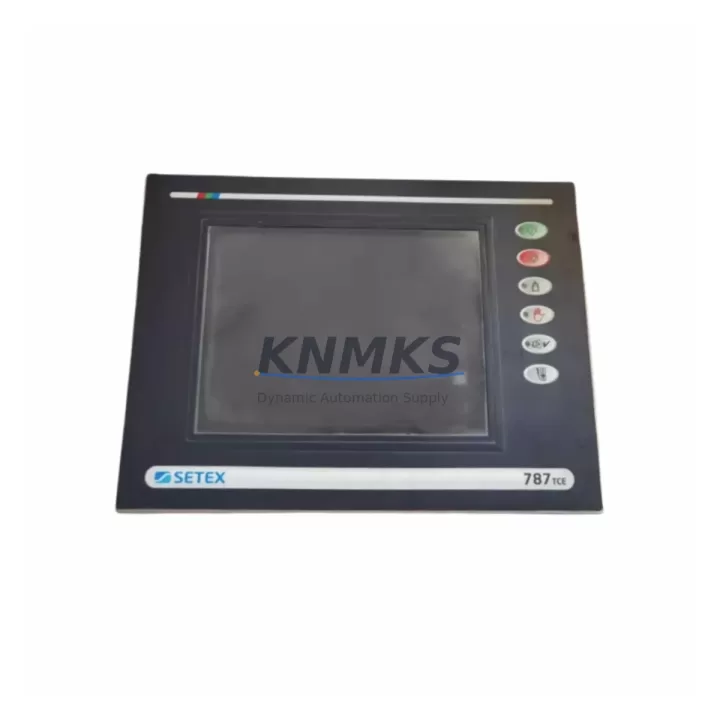
Overview
SECOM 787TCE Maintenance-Proven Spare Part for Factory Uptime
The SECOM 787TCE is a field-proven HMI input panel spare designed to support continuous operation in 787 Series automation environments. Whether you are responding to an unplanned fault, executing a scheduled annual overhaul, or building a proactive spare parts inventory, the 787TCE delivers the compatibility, reliability, and supply assurance that maintenance and procurement engineers depend on. Each unit is sourced as an original SECOM component, subjected to pre-shipment functional testing, and backed by a support terms confirmed by quotation — giving your team the confidence to restore production without compromise.
In industrial facilities running SECOM 787 Series control systems, HMI input panels are critical interface nodes between operators and the underlying PLC or DCS logic. A failed or degraded 787TCE can halt operator visibility, disable alarm acknowledgment, and prevent manual override — all of which directly extend downtime. Stocking a verified replacement eliminates the lead-time risk that often turns a two-hour fault into a two-day outage.
Spare Maintenance Table
| Parameter | Specification |
|---|---|
| Part Number / SKU | 787TCE |
| Brand | SECOM |
| Series | 787 Series |
| Product Type | HMI Input Panel |
| Compatibility | SECOM 787 Series automation systems; drop-in replacement for legacy 787TCE installations |
| Supply Voltage | Per SECOM 787 Series specification (confirm with system documentation) |
| Interface | HMI operator input; integrates with 787 Series backplane and I/O bus |
| Installation | Panel-mount; compatible with existing 787 Series cabinet cutout and wiring harness |
| Operating Environment | Industrial control cabinet; standard IEC 61010 installation conditions |
| Origin | China (CN) |
| Pre-Shipment Testing | Yes — functional verification before dispatch |
| Support terms | 12 Months |
| Dispatch | Fast global dispatch; multi-region stock available |
| Supply Type | Original SECOM spare part |
Maintenance Planning for Continuous Operation
Replacing the SECOM 787TCE in the field is rarely an isolated task. Experienced maintenance engineers treat an HMI input panel replacement as an opportunity to inspect the broader control cabinet health and reduce the risk of secondary failures. When pulling the 787TCE for replacement, the following components in the same electrical circuit and control enclosure should be inspected or staged as companion spares.
Begin with the 787 Series power supply module: verify output voltage stability and check for capacitor bulge or thermal discoloration, as a degraded power rail is a common root cause of HMI panel faults. Next, inspect the backplane or bus connector that the 787TCE seats into — oxidized or bent pins will cause intermittent communication errors even after a panel swap. If the system uses a dedicated SECOM 787 Series communication module (such as a Profibus DP or Modbus RTU card), confirm firmware version compatibility with the replacement panel before energizing.
On the I/O side, check the digital input terminal blocks connected to the operator pushbuttons and selector switches wired through the 787TCE. Loose terminations or corroded ferrules at these points are a frequent source of nuisance faults that get misdiagnosed as panel failures. If the cabinet includes signal isolation relays between field devices and the HMI input circuit, test their coil resistance and contact continuity — these components age in parallel with the panel and are inexpensive to replace proactively.
For facilities with older 787 Series installations, also review the panel fuse or circuit protection assembly feeding the HMI input rail. A slow-blow fuse that has been thermally stressed over years of operation may pass continuity testing but fail under inrush current during panel startup. Staging a matched replacement fuse alongside the 787TCE spare is a low-cost insurance measure. Finally, if the system includes a SECOM 787 Series HMI display module paired with the input panel, verify display backlight hours and touchscreen calibration status — a worn display paired with a new input panel can create operator confusion during the transition period.
Site Replacement Workflow
The 787TCE is designed for direct substitution within the SECOM 787 Series platform, minimizing the engineering effort required during an emergency replacement. Follow this sequence to ensure a clean swap with minimal downtime exposure:
Step 1 — Isolation and documentation: De-energize the control cabinet following your site LOTO procedure. Photograph the existing wiring harness and connector orientation on the 787TCE before disconnection. Label all cables if not already tagged.
Step 2 — Panel removal: Disconnect the HMI input panel from the backplane connector and any dedicated wiring harness. Inspect the connector pins on both the panel and the backplane for damage or contamination before installing the replacement unit.
Step 3 — Replacement installation: Seat the new 787TCE firmly into the backplane connector. Reconnect the wiring harness in the documented orientation. Verify that all terminal screws are torqued to specification.
Step 4 — Power-up and verification: Re-energize the cabinet and confirm that the 787 Series system recognizes the replacement panel without configuration changes. Verify all operator inputs are functional and that alarm acknowledgment paths are active. Document the replacement in your maintenance log with the new unit’s serial number and installation date.
This workflow supports a target return-to-service time of under two hours for a prepared maintenance team with the spare on hand — compared to days or weeks waiting for an unplanned procurement cycle.
Spare Parts Support FAQ
Q1: Is the SECOM 787TCE a direct drop-in replacement for the existing unit in my 787 Series cabinet?
Yes. The 787TCE is an original SECOM spare part designed for direct substitution in 787 Series installations. No firmware re-flashing or configuration changes are required in standard replacement scenarios. Always confirm your system’s hardware revision against the part number before installation if your cabinet has been modified from its original specification.
Q2: What pre-shipment testing is performed on the 787TCE before dispatch?
Each 787TCE unit undergoes functional verification testing prior to shipment. This includes power-on self-test confirmation and input interface checks. A test report is available upon request for quality-critical procurement processes. Units that do not pass verification are not dispatched.
Q3: How should I structure my spare parts inventory strategy for the SECOM 787 Series?
For facilities with three or more 787 Series cabinets in continuous operation, we recommend maintaining a minimum of one 787TCE on-site as a hot spare. For single-cabinet installations, a shared regional spare arrangement or a confirmed lead-time agreement with your supplier is an acceptable risk mitigation strategy. Annual inventory reviews aligned with your planned shutdown schedule help prevent emergency procurement situations.
Q4: What is the support terms coverage and long-term supply commitment for the 787TCE?
All 787TCE units supplied carry a support terms confirmed by quotation covering manufacturing defects and functional failures under normal operating conditions. Long-term supply availability is maintained through multi-region stock. For facilities planning system life extensions beyond five years, we recommend establishing a blanket purchase agreement to lock in availability and pricing against potential market shortages for legacy SECOM 787 Series components.
© 2026 KNMKS. All rights reserved.
Original Source: https://knmks.com
Contact: admin@knmks.com | +86 18359268345
Product Identification
- Brand / Ecosystem
-
Other Brands
Assorted Brands - Model / Series
-
787TCE
Assorted Series - Product Family
- HMI & Displays
- Availability Status
- Available on request after model and quantity confirmation
- Inquiry Type
- B2B RFQ, replacement inquiry and project spare-part request
- Pre-Quote Check
- Exact SKU, brand, series, quantity, nameplate photos and destination country are checked before quotation
System Path
Where this product fits in the KNMKS automation structure.
Specification & Inquiry Focus
- Display range
- Operator panels and touch screens
- Common needs
- Screen size, interface and version matching
- Project support
- Retrofit, spare unit and panel replacement
Buyer Confirmation
Information KNMKS checks before replying.
- Exact model
- 787TCE
- Brand / ecosystem
- Other Brands
- Product family
- HMI & Displays
- Application note
- Replacement, maintenance, project build or spare-part list
- Useful photos
- Nameplate, installed unit, cabinet layout or connector side
- Delivery details
- Quantity, destination country and target schedule
Document Support
Files and notes can be confirmed during quotation.
- Product photos or nameplate confirmation when available
- Packing and delivery notes before quotation confirmation
- Support scope and delivery terms confirmed per inquiry
- Export document coordination for qualified B2B requests
Inquiry Support
- Panel size and interface confirmation
- Replacement unit inquiry for discontinued HMIs
- Protective packaging for display shipment
What to Send Us
- Brand and exact model number: Other Brands 787TCE
- Quantity and required delivery time
- Application, replacement requirement or nameplate photo
- Destination country and shipping preference
RFQ Preparation
This is a product inquiry page built for RFQ communication.
Fast Model Check
Send this model to KNMKS for confirmation.
Include quantity, destination country and photos if this is a maintenance replacement. The inquiry will be saved with a reference number after submission.
Brand & Compatibility Note
KNMKS displays automation product information for well-known industrial brand ecosystems and compatible replacement references. Brand names are used for product identification and compatibility reference only; final availability and commercial terms are confirmed per quotation.
 Manufacturing
 Machine Tools
 Packaging
 Energy & Power
 PLCs & Controllers
 Servo Systems
 Variable Frequency Drives
 Sensors