
Overview
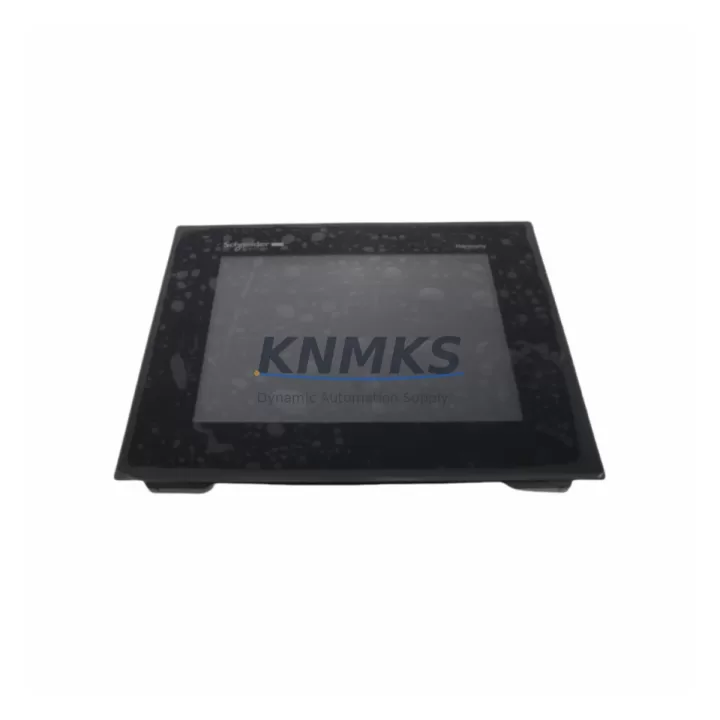
Schneider HMIGTO5310 Migration-Ready HMI for Legacy Control Systems
The Schneider Electric HMIGTO5310 is a high-performance Magelis GTO series HMI touch panel engineered for seamless integration into legacy automation environments. Whether you are replacing an end-of-life panel, upgrading a discontinued control cabinet, or migrating from an older SCADA-linked display, the HMIGTO5310 delivers the compatibility, reliability, and field-proven performance that industrial retrofit projects demand. With a 10.4-inch SVGA TFT color touchscreen, 800 × 600 resolution, and support for over 200 communication drivers, this unit is purpose-built to slot into existing Magelis GTO footprints without requiring panel cutout modification or extensive rewiring.
For engineers managing legacy system transitions, the HMIGTO5310 addresses the most critical pain points in HMI replacement projects: physical fit, electrical compatibility, communication protocol continuity, and program migration. The unit retains the same 310 mm × 248 mm panel cutout dimensions as earlier Magelis GTO models, eliminating the need for sheet metal rework. Its dual Ethernet ports and built-in serial interfaces (RS-232C and RS-485) ensure backward compatibility with Modbus RTU, Modbus TCP/IP, and Uni-Telway protocols commonly found in legacy Schneider Modicon M340, Premium, and Quantum PLC platforms.
Before committing to a replacement, retrofit planners should verify several key parameters. Power supply capacity must be confirmed — the HMIGTO5310 operates on 24 VDC (±20%), and the existing cabinet power rail should be assessed for sufficient current headroom, particularly when the panel is co-located with a Schneider TM5 distributed I/O module or a Modicon M580 CPU rack. Terminal wiring should be mapped against the original panel’s connector pinout; in most Magelis GTO-to-GTO replacements, the 24 VDC power connector and the serial communication terminal block are pin-compatible, but field verification is always recommended before energizing. Backplane interface and module addressing are not applicable to standalone HMI panels, but communication link configuration — including IP address assignment, PLC station number, and driver version — must be re-established in Vijeo Designer during commissioning.
Program compatibility is a central concern in any HMI migration. Existing Vijeo Designer projects developed for earlier Magelis GTO panels (such as the HMIGTO4310 or HMIGTO3510) can typically be imported into the HMIGTO5310 project environment with minimal modification, provided the target resolution and communication driver settings are updated. HMI screen layouts, alarm pages, trend displays, and recipe management screens generally transfer cleanly. However, any screens that reference hardware-specific features — such as a built-in printer port or a compact flash slot present on older models — will require adjustment. Firmware version compatibility between the HMIGTO5310 runtime and the Vijeo Designer build version should be confirmed prior to project download; mismatched firmware can cause driver initialization failures or screen rendering anomalies during first power-up.
Communication link integrity is equally important. In systems where the HMIGTO5310 replaces a panel connected to a Modicon Premium TSX P57 CPU via Uni-Telway, the communication cable pinout and baud rate settings must be preserved. In Ethernet-connected architectures — common in plants running Modicon M340 or M580 controllers — the replacement panel should be assigned the same IP address as the original unit to avoid PLC communication timeout alarms and to maintain SCADA polling continuity. Where the original HMI communicated with a third-party drive or soft starter via a dedicated serial port, the driver configuration and station addressing must be re-entered manually in Vijeo Designer.
Installation space confirmation is straightforward for like-for-like Magelis GTO replacements, but becomes more complex in mixed-generation cabinets. The HMIGTO5310 has a panel depth of approximately 68 mm behind the mounting surface; cabinets with rear-mounted terminal blocks or cable trays should be measured carefully. The unit ships with a standard mounting clamp kit compatible with panel thicknesses from 1.5 mm to 6 mm. For cabinets originally designed around a Magelis XBT GT or an older Magelis GTO with a different depth profile, a spacer bracket may be required.
On-site commissioning typically follows a structured sequence: power-on verification, communication link establishment, project download, I/O simulation, alarm acknowledgment testing, and operator acceptance. For plants running continuous processes, pre-staging the replacement panel on a bench with a laptop running Vijeo Designer — and completing the project download and communication test before the maintenance window — is the most effective strategy for minimizing downtime. The HMIGTO5310 supports USB project transfer, allowing rapid on-site loading without a dedicated programming cable.
Migration Compatibility Table
| Parameter | HMIGTO5310 (Replacement) | Typical Legacy Model | Notes |
|---|---|---|---|
| Panel Cutout (W × H) | 310 mm × 248 mm | 310 mm × 248 mm | Direct drop-in for Magelis GTO series |
| Power Supply | 24 VDC ±20% | 24 VDC | Verify cabinet rail current capacity |
| Display | 10.4″ SVGA TFT, 800×600 | 10.4″ TFT, 640×480 (older) | Resolution update may require screen layout adjustment |
| Communication Ports | 2× Ethernet, RS-232C, RS-485, USB | 1× Ethernet, RS-232C, RS-485 | Dual Ethernet supports redundant network topologies |
| Supported Protocols | Modbus RTU/TCP, Uni-Telway, EtherNet/IP, 200+ drivers | Modbus RTU/TCP, Uni-Telway | Confirm driver version in Vijeo Designer |
| PLC Compatibility | Modicon M340, M580, Premium, Quantum | Modicon Premium, Quantum | Full backward compatibility confirmed |
| Programming Software | Vijeo Designer 6.2+ | Vijeo Designer 6.0+ | Import existing project; update driver and resolution settings |
| Firmware | Latest runtime pre-installed | Varies | Verify Vijeo Designer build compatibility before download |
| Mounting | Panel clamp, 1.5–6 mm thickness | Panel clamp | Confirm cabinet depth ≥ 68 mm behind panel surface |
| Support terms | 12 Months | — | Covers manufacturing defects; includes pre-shipment function test |
| Replacement Recommendation | Direct replacement for HMIGTO4310, HMIGTO3510 | HMIGTO4310, HMIGTO3510 | Confirm communication driver and project resolution before cutover |
Retrofit Planning for Existing Automation Systems
A successful HMIGTO5310 retrofit begins well before the maintenance window. The first step is a full audit of the existing control cabinet: document the HMI’s current IP address, PLC station number, communication driver version, and all connected peripheral devices. In cabinets where the HMI shares a DIN rail with a Schneider TSXPSY2600M power supply module or a Modicon TM5 distributed I/O head module, confirm that the 24 VDC rail can sustain the additional 30 W load of the HMIGTO5310 without triggering the power supply’s overload protection.
Terminal wiring documentation is equally critical. In most Magelis GTO installations, the HMI power connector is a removable screw-terminal block; photograph or sketch the existing wiring before disconnection. Serial communication cables — particularly those running to a Modicon TSX SCY 21601 communication module or a third-party variable frequency drive — should be labeled at both ends. Ethernet patch cables should be tagged with their switch port assignments to ensure the replacement panel is reconnected to the correct network segment.
For systems where the HMIGTO5310 will communicate with a Modicon M340 BMX P34 2020 CPU via Ethernet, the PLC’s Ethernet configuration should be reviewed to confirm that the HMI’s IP address is not reserved by a DHCP lease or blocked by a firewall rule. In older Premium PLC architectures using a TSX ETY 110 Ethernet module, the module’s connection table may need to be updated to recognize the replacement HMI’s MAC address.
Where the retrofit involves I/O expansion — for example, adding a Schneider TM3 expansion module to an existing TM221 Modicon M221 controller in the same cabinet — the I/O address mapping in the PLC program should be verified before the HMI project is updated. Mismatched I/O addresses between the PLC program and the HMI data dictionary are a common source of commissioning delays. A Vijeo Designer data dictionary export, cross-referenced against the PLC’s Unity Pro or EcoStruxure Machine Expert variable table, is the most reliable way to catch these discrepancies before the maintenance window begins.
For plants using a Schneider XBTGT5330 or similar legacy Magelis XBT GT panel in an adjacent cabinet, the HMIGTO5310 can be configured to share the same PLC communication link, simplifying the overall network architecture and reducing the number of Ethernet switch ports required.
Downtime Control During System Migration
Minimizing downtime during an HMI replacement requires a disciplined pre-staging process. The HMIGTO5310 should be fully configured — project downloaded, communication parameters set, and basic I/O simulation completed — before the production line is stopped. Using Vijeo Designer’s offline simulation mode, operators can verify screen navigation, alarm display, and recipe management functions without connecting to the live PLC. This pre-validation step typically reduces on-site commissioning time from several hours to under 30 minutes for straightforward like-for-like replacements.
During the physical swap, the original HMI’s project file should be backed up to a USB drive before the unit is removed. Even if the replacement project has been pre-staged, having the original project available on-site provides a rapid fallback option if an unexpected compatibility issue is discovered during commissioning. The HMIGTO5310’s USB host port supports direct project loading from a standard USB flash drive, eliminating the need for a laptop during the final download step.
Communication link re-establishment is typically the longest single step in the commissioning sequence. To accelerate this process, assign the HMIGTO5310 the same IP address as the original panel before installation. This ensures that the PLC’s communication configuration requires no modification, and that any SCADA system polling the HMI’s data gateway function continues to operate without interruption. Once the panel is physically installed and powered, a single ping test from the engineering laptop confirms network connectivity before the Vijeo Designer project is downloaded.
For processes where even a brief loss of HMI visibility is unacceptable — such as continuous chemical dosing or temperature-controlled curing — consider staging a temporary Magelis HMIGTO2310 or similar compact panel as a monitoring-only display during the cutover window. This approach maintains operator visibility of critical process variables while the primary HMI is being replaced, and can be removed once the HMIGTO5310 is fully commissioned and accepted by the operations team.
Post-commissioning, a structured acceptance test should cover: all alarm conditions, all recipe load/save functions, all trend displays, all communication links, and all operator input functions. Document the test results and retain them as part of the plant’s maintenance record. The HMIGTO5310’s support terms confirmed by quotation cover manufacturing defects identified during this acceptance period, and all units are function-tested prior to shipment to minimize the risk of DOA failures on-site.
Retrofit Support FAQ
Q: Is the HMIGTO5310 a direct replacement for the HMIGTO4310 and HMIGTO3510?
A: Yes. The HMIGTO5310 shares the same 310 mm × 248 mm panel cutout dimensions as the HMIGTO4310 and HMIGTO3510, making it a physical drop-in replacement. Communication drivers and power supply connections are compatible. The primary difference is the higher display resolution (800×600 vs. 640×480 on older models), which may require minor screen layout adjustments in Vijeo Designer before the project is downloaded to the replacement panel.
Q: Can I import my existing Vijeo Designer project into the HMIGTO5310?
A: In most cases, yes. Vijeo Designer projects created for earlier Magelis GTO panels can be imported and retargeted to the HMIGTO5310. You will need to update the target panel type, adjust the screen resolution settings, and verify that all communication drivers are available in your version of Vijeo Designer. Features that rely on hardware not present on the HMIGTO5310 (such as a built-in printer port on some older models) will need to be removed or reconfigured. We recommend completing a full offline simulation before downloading the project to the replacement panel.
Q: What communication protocols does the HMIGTO5310 support for legacy PLC connections?
A: The HMIGTO5310 supports over 200 communication drivers, including Modbus RTU (RS-232C/RS-485), Modbus TCP/IP (Ethernet), Uni-Telway, EtherNet/IP, and Schneider-specific protocols for Modicon M340, M580, Premium, and Quantum platforms. For legacy serial connections to older Modicon Premium or Quantum PLCs, the existing RS-232C or RS-485 cable and connector can typically be reused without modification.
Q: What does the support terms confirmed by quotation cover, and is pre-shipment testing included?
A: The support terms confirmed by quotation cover manufacturing defects in materials and workmanship from the date of shipment. All HMIGTO5310 units undergo a pre-shipment function test — including power-on verification, touchscreen calibration, communication port check, and display quality inspection — before dispatch. Units that fail any element of the pre-shipment test are not shipped. In the unlikely event of a DOA or early-life failure, contact our support team for rapid replacement coordination. Support requests require the original order reference and a description of the fault observed during commissioning.
© 2026 KNMKS. All rights reserved.
Original Source: https://knmks.com
Contact: admin@knmks.com | +86 18359268345
Product Identification
- Brand / Ecosystem
-
Schneider Electric
Assorted Brands - Model / Series
-
HMIGTO5310
Assorted Series - Product Family
- HMI & Displays
- Availability Status
- Available on request after model and quantity confirmation
- Inquiry Type
- B2B RFQ, replacement inquiry and project spare-part request
- Pre-Quote Check
- Exact SKU, brand, series, quantity, nameplate photos and destination country are checked before quotation
System Path
Where this product fits in the KNMKS automation structure.
Specification & Inquiry Focus
- Display range
- Operator panels and touch screens
- Common needs
- Screen size, interface and version matching
- Project support
- Retrofit, spare unit and panel replacement
Buyer Confirmation
Information KNMKS checks before replying.
- Exact model
- HMIGTO5310
- Brand / ecosystem
- Schneider Electric
- Product family
- HMI & Displays
- Application note
- Replacement, maintenance, project build or spare-part list
- Useful photos
- Nameplate, installed unit, cabinet layout or connector side
- Delivery details
- Quantity, destination country and target schedule
Document Support
Files and notes can be confirmed during quotation.
- Product photos or nameplate confirmation when available
- Packing and delivery notes before quotation confirmation
- Support scope and delivery terms confirmed per inquiry
- Export document coordination for qualified B2B requests
Inquiry Support
- Panel size and interface confirmation
- Replacement unit inquiry for discontinued HMIs
- Protective packaging for display shipment
What to Send Us
- Brand and exact model number: Schneider Electric HMIGTO5310
- Quantity and required delivery time
- Application, replacement requirement or nameplate photo
- Destination country and shipping preference
RFQ Preparation
This is a product inquiry page built for RFQ communication.
Fast Model Check
Send this model to KNMKS for confirmation.
Include quantity, destination country and photos if this is a maintenance replacement. The inquiry will be saved with a reference number after submission.
Brand & Compatibility Note
KNMKS displays automation product information for well-known industrial brand ecosystems and compatible replacement references. Brand names are used for product identification and compatibility reference only; final availability and commercial terms are confirmed per quotation.
 Manufacturing
 Machine Tools
 Packaging
 Energy & Power
 PLCs & Controllers
 Servo Systems
 Variable Frequency Drives
 Sensors