
Overview
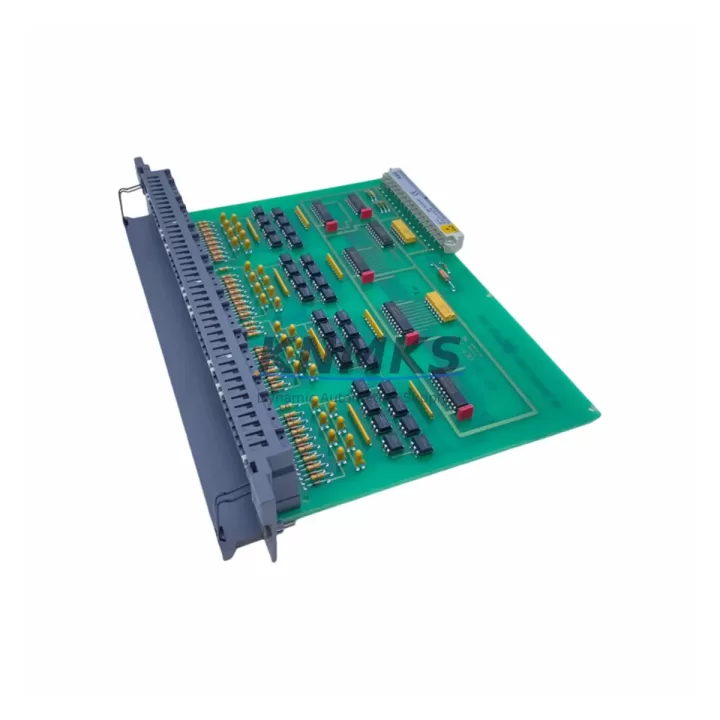
Schneider Electric DEP112 Maintenance-Proven Spare Part for Factory Uptime
The Schneider Electric DEP112 is a 12-point 24VDC digital input module designed for the Modicon TSX series of programmable logic controllers. As a direct original replacement spare, the DEP112 is engineered to restore full I/O functionality in TSX Premium and TSX Micro control architectures without requiring software reconfiguration or rack modification. For maintenance engineers managing aging automation infrastructure, holding a verified DEP112 in the spare parts cabinet is one of the most cost-effective strategies to eliminate unplanned downtime caused by input module failure.
Industrial facilities running Schneider Electric Modicon TSX platforms — including food and beverage lines, water treatment stations, packaging machinery, and discrete manufacturing cells — depend on reliable digital input acquisition for process interlocks, sensor feedback, and safety logic. A failed DEP112 can halt an entire production segment within minutes. With a pre-tested, original DEP112 on hand, site engineers can execute a hot-swap replacement in under 30 minutes, restoring normal operation before the next shift.
Each unit supplied by KNMKS is sourced from verified industrial channels, subjected to pre-shipment functional testing, and backed by a support terms confirmed by quotation. Multi-region stock availability supports emergency dispatch to Asia-Pacific, Europe, and the Middle East, with same-day or next-business-day shipping for in-stock orders.
Spare Maintenance Table
| SKU / Part Number | DEP112 |
| Brand | Schneider Electric |
| Series | Modicon TSX (TSX Premium / TSX Micro) |
| Module Type | Digital Input Module |
| Number of Input Points | 12 points |
| Input Voltage | 24VDC |
| Input Logic | Sink / Source compatible (IEC Type 1/2) |
| Isolation | Optical isolation between field and backplane |
| Backplane Compatibility | TSX RKY rack series (4, 8, 12 slot) |
| Communication Interface | TSX backplane bus |
| Operating Temperature | 0°C to +60°C |
| Protection Rating | IP20 (panel-mounted) |
| Origin | France |
| Weight | 890 g |
| Pre-Shipment Testing | Yes — functional I/O verification |
| Support terms | 12 Months |
| Condition | Original / New-equivalent industrial grade |
| Dispatch | Multi-region stock — Asia-Pacific, Europe, Middle East |
Maintenance Planning for Continuous Operation
When a DEP112 module is flagged during a control cabinet inspection or fails during a production run, experienced maintenance engineers know that the digital input module rarely fails in isolation. A thorough site replacement workflow should include inspection of the following components within the same TSX rack and electrical circuit:
Begin with the TSX RKY rack and backplane bus — a damaged backplane connector or corroded slot can cause intermittent input faults that mimic module failure. Inspect the rack for physical damage, oxidation, and secure module seating before condemning the DEP112. Next, verify the 24VDC power supply rail feeding the input field side; a sagging or noisy supply (common in aging panels) can cause false input states and accelerate module wear. The TSX PSY power supply module in the same rack should be checked for output voltage stability and ripple under load.
On the field wiring side, inspect the terminal blocks and field wiring harness connected to the DEP112’s input terminals. Loose terminations, corroded conductors, or undersized wire gauge are frequent contributors to input signal degradation. If the system uses signal isolators or signal conditioners between field sensors and the DEP112 inputs, verify that isolation barriers are functioning correctly — a failed isolator can inject noise or block valid signals entirely.
For facilities using TSX SAZ10 or equivalent I/O extension cables to connect remote sub-racks, inspect cable continuity and connector integrity. Extended I/O runs are particularly vulnerable to ground loops and EMI-induced faults. Additionally, check any input protection fuses or miniature circuit breakers on the 24VDC field supply circuit — a blown fuse on the input common line will disable all 12 input points simultaneously, which can be misdiagnosed as a module failure.
Finally, if the TSX system communicates via Modbus or Uni-Telway serial links, verify that the communication module (such as the TSX SCM 21601 or TSX SCP 111) is operating normally after the module swap, as backplane disturbances during hot-swap can occasionally reset communication parameters. A brief review of the TSX PLC CPU module diagnostic LEDs post-replacement will confirm that the new DEP112 has been recognized and is reporting input states correctly.
Site Replacement Workflow
Step 1 — Preparation: Confirm the replacement DEP112 SKU matches the installed module label. Verify rack slot address in the PL7 Pro or Unity Pro configuration file. Ensure the 24VDC field supply to the module is isolated before removal.
Step 2 — Module Removal: With the rack powered down or the slot isolated (if hot-swap is supported in your TSX configuration), release the module locking tab and slide the DEP112 out of the rack slot. Label and photograph the field wiring terminal block before disconnection.
Step 3 — Inspection: Inspect the vacated rack slot for backplane pin damage, debris, or moisture. Clean with dry compressed air if necessary. Inspect the removed module for burn marks, swollen components, or physical damage to identify root cause.
Step 4 — Installation: Slide the replacement DEP112 firmly into the rack slot until the locking tab engages. Reconnect the field wiring terminal block in the original configuration. Restore the 24VDC field supply.
Step 5 — Verification: Power up the rack and observe the DEP112 status LED. In PL7 Pro or Unity Pro, navigate to the I/O module diagnostic screen and confirm all 12 input channels are reporting correctly. Perform a functional test by activating each field device connected to the module inputs and verifying the corresponding PLC input bit state.
Step 6 — Documentation: Record the replacement in the site maintenance log, including date, technician, old module serial number, and new module serial number. Update the spare parts inventory to trigger reorder of a replacement DEP112 for the next event.
Spare Parts Support FAQ
Q1: Is the DEP112 supplied by KNMKS an original Schneider Electric part?
Yes. All DEP112 units are sourced from verified industrial supply channels and are original Schneider Electric manufacture. Each unit undergoes pre-shipment functional testing to confirm I/O performance before dispatch. A support terms confirmed by quotation is included with every unit.
Q2: How do I confirm DEP112 compatibility with my existing TSX rack configuration?
The DEP112 is compatible with the TSX RKY rack series (4, 8, and 12 slot variants) used in TSX Premium and TSX Micro systems. Compatibility can be confirmed by cross-referencing the module reference number on the installed unit label with the DEP112 part number in your PL7 Pro or Unity Pro hardware configuration. If you require compatibility verification support, contact KNMKS with your rack reference and CPU model.
Q3: What is the recommended spare parts stocking strategy for DEP112 modules?
For facilities with 3 or more TSX racks in service, maintaining a minimum of 1–2 DEP112 units in the on-site spare parts cabinet is recommended. For critical production lines with no redundancy, a 1:1 hot-spare ratio per rack is advisable. KNMKS offers long-term supply agreements and scheduled replenishment to support annual maintenance planning cycles.
Q4: Can KNMKS support emergency same-day dispatch for DEP112?
Yes. KNMKS maintains multi-region stock across Asia-Pacific, Europe, and the Middle East to support emergency replacement scenarios. Same-day or next-business-day dispatch is available for in-stock orders placed before the daily cut-off time. Contact the KNMKS sales team directly for urgent requirements.
© 2026 KNMKS. All rights reserved.
Original Source: https://knmks.com
Contact: admin@knmks.com | +86 18359268345
Product Identification
- Brand / Ecosystem
-
Schneider Electric
Assorted Brands - Model / Series
-
DEP112
Assorted Series - Product Family
- PLCs & Controllers
- Availability Status
- Available on request after model and quantity confirmation
- Inquiry Type
- B2B RFQ, replacement inquiry and project spare-part request
- Pre-Quote Check
- Exact SKU, brand, series, quantity, nameplate photos and destination country are checked before quotation
System Path
Where this product fits in the KNMKS automation structure.
Specification & Inquiry Focus
- Control platform
- PLC, PAC and modular controllers
- Common needs
- CPU, rack, power and I/O expansion
- Project support
- Replacement, cabinet build and maintenance
Buyer Confirmation
Information KNMKS checks before replying.
- Exact model
- DEP112
- Brand / ecosystem
- Schneider Electric
- Product family
- PLCs & Controllers
- Application note
- Replacement, maintenance, project build or spare-part list
- Useful photos
- Nameplate, installed unit, cabinet layout or connector side
- Delivery details
- Quantity, destination country and target schedule
Document Support
Files and notes can be confirmed during quotation.
- Product photos or nameplate confirmation when available
- Packing and delivery notes before quotation confirmation
- Support scope and delivery terms confirmed per inquiry
- Export document coordination for qualified B2B requests
Inquiry Support
- Model cross-checking before quotation
- CPU, power, rack and expansion module matching
- Support for replacement and project inquiry
What to Send Us
- Brand and exact model number: Schneider Electric DEP112
- Quantity and required delivery time
- Application, replacement requirement or nameplate photo
- Destination country and shipping preference
RFQ Preparation
This is a product inquiry page built for RFQ communication.
Fast Model Check
Send this model to KNMKS for confirmation.
Include quantity, destination country and photos if this is a maintenance replacement. The inquiry will be saved with a reference number after submission.
Brand & Compatibility Note
KNMKS displays automation product information for well-known industrial brand ecosystems and compatible replacement references. Brand names are used for product identification and compatibility reference only; final availability and commercial terms are confirmed per quotation.
 Manufacturing
 Machine Tools
 Packaging
 Energy & Power



 HMI & Displays
 Servo Systems
 Variable Frequency Drives
 Sensors