
Overview
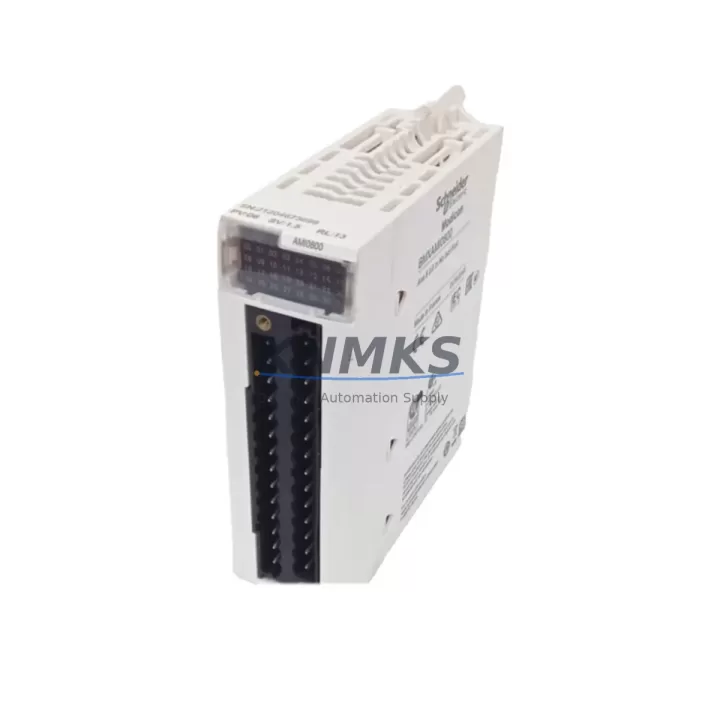
Schneider BMXAMI0800 Maintenance-Proven Spare Part for Factory Uptime
The Schneider Electric BMXAMI0800 is an 8-channel analog input module designed for the Modicon M340 PLC platform — one of the most widely deployed mid-range automation controllers in process, discrete, and hybrid manufacturing environments. For maintenance engineers managing aging control systems, and procurement engineers building resilient spare parts inventories, the BMXAMI0800 represents a critical line item: a module whose failure can halt an entire production line, and whose timely replacement is the difference between a two-hour recovery and a two-day outage.
At KNMKS, every BMXAMI0800 unit is sourced from verified supply channels, inspected prior to dispatch, and shipped with a support terms confirmed by quotation. We support long-term supply continuity for customers running Modicon M340 systems in facilities where the original integrator may no longer be active and where OEM lead times are unacceptable during emergency downtime events.
Spare Maintenance Table
| Parameter | Specification |
|---|---|
| Part Number / SKU | BMXAMI0800 |
| Brand | Schneider Electric |
| Series | Modicon M340 |
| Module Type | Analog Input Module |
| Number of Channels | 8 Channels |
| Input Signal Types | Voltage (±10V, 0–10V) / Current (0–20mA, 4–20mA) |
| Resolution | 16-bit |
| Supply Voltage | 24 VDC (via backplane) |
| Isolation | Channel-to-bus isolation |
| Operating Temperature | 0°C to +60°C |
| Mounting | Modicon M340 backplane (BMX XBP series) |
| Compatibility | Modicon M340 CPU modules (BMXP341000, BMXP342000, BMXP342020, BMXP3420302) |
| Origin | France |
| Product Category | Industrial Automation > PLC Modules > Analog Input Modules |
| Support terms | 12 Months |
| Condition | Original, New or Tested Surplus |
| Shipping | Inspected & tested before dispatch |
Maintenance Planning for Continuous Operation
When a BMXAMI0800 fails or is flagged during a scheduled inspection, the replacement workflow rarely ends with the module itself. Experienced maintenance engineers know that analog input failures are often symptomatic of broader issues in the signal chain or power distribution architecture. Before returning the line to service, a thorough site assessment should include the following components.
The BMXCPS2000 or BMXCPS3500 power supply module should be checked for output voltage stability — an unstable 24 VDC rail is a common root cause of intermittent analog signal errors that are misdiagnosed as module faults. Similarly, the BMXXBP0800 or BMXXBP1200 backplane should be inspected for oxidized bus connectors or mechanical damage that could cause poor module seating and erratic channel behavior.
Field wiring connected to the BMXAMI0800’s terminal blocks should be verified for correct shielding and grounding. In environments with variable-frequency drives or high-current switching loads nearby, unshielded signal cables can introduce noise that corrupts 4–20mA readings. A signal isolator or signal conditioner (such as those in the Schneider Zelio Analog or equivalent third-party DIN-rail isolator range) should be considered for any channel carrying signals from sensors located more than 30 meters from the control cabinet.
The BMXNOE0100 or BMXNOE0110 Ethernet communication module should also be verified during the maintenance window — firmware mismatches between the CPU and communication modules can cause configuration loss after a module swap. Confirm that the Unity Pro or EcoStruxure Control Expert project file reflects the correct module address and channel configuration before restarting the PLC.
For facilities running mixed analog and digital I/O racks, the adjacent BMXDDI1602 or BMXDDO1602 digital I/O modules should be inspected for blown fuses or tripped protection circuits, particularly if the analog fault was preceded by a surge event. Fuse holders on the terminal base and any upstream circuit breakers or miniature fuses in the 24 VDC distribution panel should be tested and replaced as part of the corrective maintenance record.
Finally, if the facility operates an HMIGTO or XBTGT series HMI connected to the M340 CPU, verify that the HMI communication link is restored and that analog trend displays are reading correctly after the module replacement — this confirms end-to-end signal integrity from field sensor to operator interface.
Site Replacement Workflow
Step 1 — Isolate and de-energize. Switch the M340 rack to STOP mode via the CPU front panel or Unity Pro / EcoStruxure Control Expert. De-energize the 24 VDC supply to the I/O rack before removing the BMXAMI0800. Do not hot-swap analog input modules unless the system documentation explicitly supports it.
Step 2 — Document the existing configuration. Before removal, photograph or record the terminal wiring layout, channel assignments, and any field calibration offsets stored in the CPU project. Export the Unity Pro project file as a backup if not already version-controlled.
Step 3 — Remove and inspect. Slide the BMXAMI0800 out of the backplane slot. Inspect the backplane connector pins for corrosion or mechanical damage. Clean with isopropyl alcohol if necessary before inserting the replacement unit.
Step 4 — Install the replacement BMXAMI0800. Seat the new module firmly into the same slot. Reconnect all field wiring according to the documented layout. Verify terminal torque to manufacturer specification (typically 0.5–0.6 Nm for M3 screws).
Step 5 — Power up and validate. Restore 24 VDC power and switch the CPU to RUN mode. Monitor all 8 analog channels in the Unity Pro / EcoStruxure animation table. Confirm that each channel reads within the expected engineering unit range. Document the replacement in the site maintenance log with the new module serial number and date.
Compatibility note: The BMXAMI0800 is a direct replacement for itself across all M340 rack configurations. It is not cross-compatible with Modicon Quantum (140 series) or Modicon Premium (TSX series) racks. Always verify the target rack series before ordering to avoid installation delays.
Spare Parts Support FAQ
Q1: Is the BMXAMI0800 supplied by KNMKS a new or refurbished unit?
KNMKS supplies BMXAMI0800 units that are either new-in-box from verified distributor stock or tested surplus units that have passed functional inspection. Each unit is clearly identified by condition at the time of quotation. All units — regardless of condition — are covered by a support terms confirmed by quotation from the date of shipment.
Q2: How do I verify compatibility with my existing M340 rack before ordering?
The BMXAMI0800 is compatible with all standard Modicon M340 backplanes (BMXXBP0400, BMXXBP0800, BMXXBP1200) and all M340 CPU variants. Provide your CPU part number and rack configuration when contacting KNMKS sales, and our technical team will confirm slot compatibility and any firmware considerations before the order is placed.
Q3: What is the lead time and how is the unit tested before shipment?
In-stock units are typically dispatched within 1–3 business days. Prior to shipment, each BMXAMI0800 undergoes a visual inspection and, where test equipment is available, a functional power-on check. A test report or inspection certificate can be provided upon request for quality-critical procurement processes.
Q4: Can KNMKS support long-term supply for facilities running legacy M340 systems?
Yes. KNMKS maintains ongoing sourcing relationships for Modicon M340 spare parts, including modules that are discontinued or on extended lead time from the OEM. We recommend that facilities running M340 systems beyond their original design life establish a standing spare parts agreement covering critical modules such as the BMXAMI0800, CPU modules, and power supplies to avoid emergency procurement delays during unplanned outages.
© 2026 KNMKS. All rights reserved.
Original Source: https://knmks.com
Contact: admin@knmks.com | +86 18359268345
Product Identification
- Brand / Ecosystem
-
Schneider Electric
Assorted Brands - Model / Series
-
BMXAMI0800
Assorted Series - Product Family
- PLCs & Controllers
- Availability Status
- Available on request after model and quantity confirmation
- Inquiry Type
- B2B RFQ, replacement inquiry and project spare-part request
- Pre-Quote Check
- Exact SKU, brand, series, quantity, nameplate photos and destination country are checked before quotation
System Path
Where this product fits in the KNMKS automation structure.
Specification & Inquiry Focus
- Control platform
- PLC, PAC and modular controllers
- Common needs
- CPU, rack, power and I/O expansion
- Project support
- Replacement, cabinet build and maintenance
Buyer Confirmation
Information KNMKS checks before replying.
- Exact model
- BMXAMI0800
- Brand / ecosystem
- Schneider Electric
- Product family
- PLCs & Controllers
- Application note
- Replacement, maintenance, project build or spare-part list
- Useful photos
- Nameplate, installed unit, cabinet layout or connector side
- Delivery details
- Quantity, destination country and target schedule
Document Support
Files and notes can be confirmed during quotation.
- Product photos or nameplate confirmation when available
- Packing and delivery notes before quotation confirmation
- Support scope and delivery terms confirmed per inquiry
- Export document coordination for qualified B2B requests
Inquiry Support
- Model cross-checking before quotation
- CPU, power, rack and expansion module matching
- Support for replacement and project inquiry
What to Send Us
- Brand and exact model number: Schneider Electric BMXAMI0800
- Quantity and required delivery time
- Application, replacement requirement or nameplate photo
- Destination country and shipping preference
RFQ Preparation
This is a product inquiry page built for RFQ communication.
Fast Model Check
Send this model to KNMKS for confirmation.
Include quantity, destination country and photos if this is a maintenance replacement. The inquiry will be saved with a reference number after submission.
Brand & Compatibility Note
KNMKS displays automation product information for well-known industrial brand ecosystems and compatible replacement references. Brand names are used for product identification and compatibility reference only; final availability and commercial terms are confirmed per quotation.
 Manufacturing
 Machine Tools
 Packaging
 Energy & Power



 HMI & Displays
 Servo Systems
 Variable Frequency Drives
 Sensors