
Overview
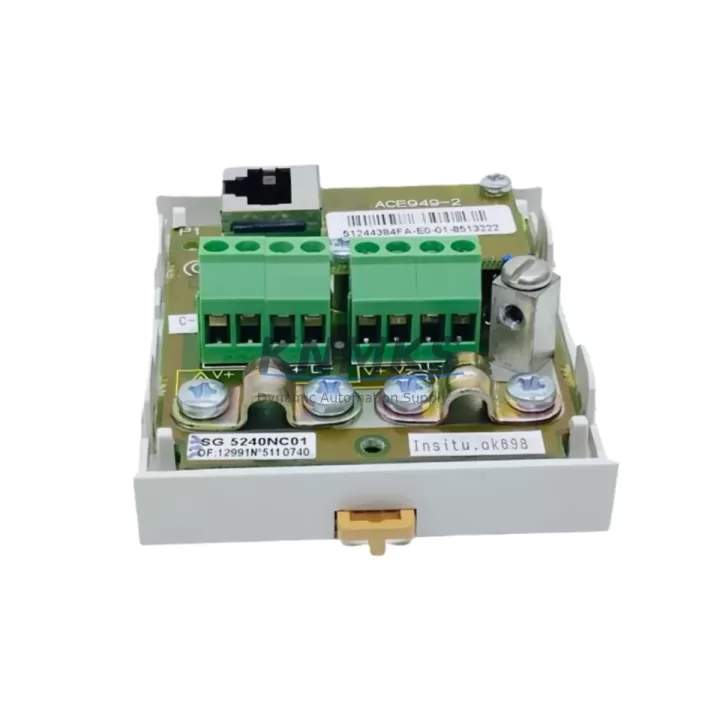
Schneider ACE949-2 Migration-Ready RS485 Card for Legacy Drive Systems
The Schneider Electric ACE949-2 is a Modbus RS485 communication interface card engineered for seamless integration into Altivar variable speed drive platforms, including the widely deployed ATV31 and ATV71 series. As industrial facilities accelerate legacy control system modernization programs, the ACE949-2 has become a critical component in retrofit projects where existing Modbus RTU networks must be preserved while aging drive hardware is replaced or upgraded. Its plug-in form factor eliminates the need for external signal converters, reducing panel wiring complexity and shortening commissioning time during planned maintenance windows.
For engineers managing the transition from discontinued drive generations, the ACE949-2 provides a verified drop-in replacement path that maintains full Modbus RTU protocol compatibility with upstream PLCs, SCADA systems, and HMI terminals. The card slots directly into the option card bay of compatible Altivar drives, preserving the original RS485 network topology and allowing the host controller — whether a Modicon M340, a Twido compact PLC, or a third-party Modbus master — to continue polling drive parameters without modification to the communication program or register map.
Migration Compatibility Table
| Parameter | ACE949-2 Specification | Retrofit Notes |
|---|---|---|
| Compatible Drives | ATV31, ATV71, ATV312 | Verify option card bay type before ordering |
| Communication Protocol | Modbus RTU (RS485) | Compatible with existing Modbus master programs |
| Interface Connector | RJ45 / Terminal block (drive-dependent) | Confirm terminal pinout against existing cable harness |
| Baud Rate Support | 4800 – 19200 bps | Match to existing network baud rate setting |
| Installation Method | Direct plug-in to drive option slot | No additional mounting hardware required |
| Power Supply | Powered by host drive (no external supply) | Confirm drive firmware supports ACE949-2 card ID |
| Firmware Compatibility | ATV31 V1.6+, ATV71 V1.8+ | Update drive firmware if below minimum version |
| Address Configuration | DIP switch or drive keypad menu | Set node address before powering up network |
| Replacement For | ACE949, VW3A8306, legacy RS485 option cards | Register map identical; no PLC program changes needed |
| Support terms | 12 Months | Covered from date of shipment; includes DOA replacement |
Retrofit Planning for Existing Automation Systems
A successful ACE949-2 retrofit begins well before the card arrives on site. The first step is auditing the existing control cabinet to confirm available space in the drive’s option card bay and to document the current RS485 wiring configuration — including cable shielding, termination resistors, and the physical routing of the Modbus trunk line. In multi-drive networks, each node must be assigned a unique Modbus address, and the ACE949-2’s DIP switch settings should be recorded and pre-configured on the bench to avoid address conflicts during live commissioning.
Power budget verification is equally important. Although the ACE949-2 draws its operating power directly from the host Altivar drive, the drive’s internal 24 VDC auxiliary supply must be confirmed as sufficient when multiple option cards are installed simultaneously — for example, when an encoder feedback card or a safety option module such as the VW3A3210 is already occupying a second slot. In such configurations, the total option card current draw must remain within the drive’s published auxiliary supply limit.
For sites running Modicon M340 or Premium PLC platforms as the Modbus master, the Unity Pro or PL7 program should be reviewed to confirm that the drive’s Modbus register addresses — particularly the control word (CMD), speed reference (LFRD), and status word (ETA) — are correctly mapped. If the legacy drive used a different communication card such as the VW3A8306 or an older ACE949 variant, the register map is typically identical, meaning no changes to the PLC ladder logic or function block program are required. This register-level compatibility is one of the primary reasons the ACE949-2 is favored in brownfield retrofit projects over alternative communication solutions that require full re-mapping of drive parameters.
HMI screens connected via the same Modbus RS485 network — whether running on a Magelis XBTGT terminal or a third-party panel PC — should be tested in simulation mode before the physical card swap to confirm that all drive status displays, fault code readbacks, and speed reference write functions operate correctly with the ACE949-2 in place. This pre-validation step is particularly valuable when the HMI program cannot be easily modified on site.
In I/O-intensive retrofit scenarios, the ACE949-2 is frequently installed alongside TM5 distributed I/O modules or TeSys motor starter modules that share the same Modbus RS485 segment. Ensuring correct bus termination at both ends of the RS485 trunk — and verifying that the ACE949-2’s termination resistor jumper is set appropriately based on its physical position on the network — prevents reflection-induced communication errors that can be difficult to diagnose after the system is returned to production.
Downtime Control During System Migration
Minimizing production downtime during a drive communication card replacement requires a structured approach that begins with a complete backup of the existing drive parameter set. Using the SoMove configuration software or the drive’s integrated keypad, all motor control parameters, ramp settings, protection thresholds, and communication configuration values should be saved to a PC or a portable parameter storage device before the old card is removed. This backup ensures that if the drive requires a factory reset during the card installation process, the original configuration can be restored in minutes rather than hours.
The physical card swap itself is typically completed in under fifteen minutes for a trained technician familiar with the Altivar option card bay mechanism. The ACE949-2 locks into the bay with a positive click, and the RS485 cable can be reconnected to the card’s terminal block or RJ45 port using the previously documented wiring diagram. Once the drive is powered up with the new card installed, the Modbus node address should be confirmed via the drive’s HMI menu before the network master is re-enabled.
For critical production lines where even a brief communication interruption is unacceptable, a parallel commissioning strategy is recommended: install and configure the replacement drive with the ACE949-2 card pre-fitted on a test bench, verify full Modbus communication with a laptop running a Modbus diagnostic tool, and then perform the physical swap during a scheduled micro-shutdown. This approach reduces live commissioning time to the minimum required for mechanical installation and cable reconnection, keeping the production line offline for the shortest possible period.
All ACE949-2 units supplied by KNMKS are function-tested prior to shipment, with communication response verified at 9600 bps Modbus RTU as a standard outgoing quality check. Units are shipped with original or equivalent packaging to prevent ESD damage during transit, and each shipment includes a test report confirming communication functionality. The support terms confirmed by quotation cover manufacturing defects and DOA failures, with replacement units dispatched within 24 hours of confirmed fault diagnosis.
Retrofit Support FAQ
Q: Is the ACE949-2 a direct replacement for the older ACE949 and VW3A8306 communication cards?
A: Yes. The ACE949-2 uses the same Modbus RTU RS485 protocol and identical drive register map as the ACE949 and VW3A8306. No changes to the PLC program or HMI configuration are required in the vast majority of retrofit applications. The physical connector and option bay interface are also compatible with the same Altivar drive models.
Q: What firmware version does the host drive need to support the ACE949-2?
A: ATV31 drives require firmware V1.6 or higher, and ATV71 drives require V1.8 or higher. The drive firmware version can be checked via the keypad menu or SoMove software. If the installed firmware is below the minimum version, a firmware update should be performed before installing the ACE949-2 to ensure correct card recognition and parameter access.
Q: Can the ACE949-2 be used in a network with mixed Altivar drive models and other Modbus RS485 devices?
A: Yes. The ACE949-2 operates as a standard Modbus RTU slave device and is fully compatible with mixed RS485 networks that include other Altivar drives, TeSys motor starters, TM5 I/O modules, or third-party Modbus devices. Each device must be assigned a unique node address, and the network baud rate and parity settings must be consistent across all devices on the segment.
Q: What does the support terms confirmed by quotation cover, and how quickly can a replacement be dispatched?
A: The support terms confirmed by quotation cover manufacturing defects and dead-on-arrival (DOA) failures from the date of shipment. If a fault is confirmed through standard diagnostic procedures, a replacement unit is dispatched within 24 hours. KNMKS maintains stock of ACE949-2 units to support urgent retrofit and emergency replacement requirements without extended lead times.
© 2026 KNMKS. All rights reserved.
Original Source: https://knmks.com
Contact: admin@knmks.com | +86 18359268345
Product Identification
- Brand / Ecosystem
-
Schneider Electric
Assorted Brands - Model / Series
-
ACE949-2
Assorted Series - Product Family
- PLCs & Controllers
- Availability Status
- Available on request after model and quantity confirmation
- Inquiry Type
- B2B RFQ, replacement inquiry and project spare-part request
- Pre-Quote Check
- Exact SKU, brand, series, quantity, nameplate photos and destination country are checked before quotation
System Path
Where this product fits in the KNMKS automation structure.
Specification & Inquiry Focus
- Control platform
- PLC, PAC and modular controllers
- Common needs
- CPU, rack, power and I/O expansion
- Project support
- Replacement, cabinet build and maintenance
Buyer Confirmation
Information KNMKS checks before replying.
- Exact model
- ACE949-2
- Brand / ecosystem
- Schneider Electric
- Product family
- PLCs & Controllers
- Application note
- Replacement, maintenance, project build or spare-part list
- Useful photos
- Nameplate, installed unit, cabinet layout or connector side
- Delivery details
- Quantity, destination country and target schedule
Document Support
Files and notes can be confirmed during quotation.
- Product photos or nameplate confirmation when available
- Packing and delivery notes before quotation confirmation
- Support scope and delivery terms confirmed per inquiry
- Export document coordination for qualified B2B requests
Inquiry Support
- Model cross-checking before quotation
- CPU, power, rack and expansion module matching
- Support for replacement and project inquiry
What to Send Us
- Brand and exact model number: Schneider Electric ACE949-2
- Quantity and required delivery time
- Application, replacement requirement or nameplate photo
- Destination country and shipping preference
RFQ Preparation
This is a product inquiry page built for RFQ communication.
Fast Model Check
Send this model to KNMKS for confirmation.
Include quantity, destination country and photos if this is a maintenance replacement. The inquiry will be saved with a reference number after submission.
Brand & Compatibility Note
KNMKS displays automation product information for well-known industrial brand ecosystems and compatible replacement references. Brand names are used for product identification and compatibility reference only; final availability and commercial terms are confirmed per quotation.
 Manufacturing
 Machine Tools
 Packaging
 Energy & Power



 HMI & Displays
 Servo Systems
 Variable Frequency Drives
 Sensors