
Overview
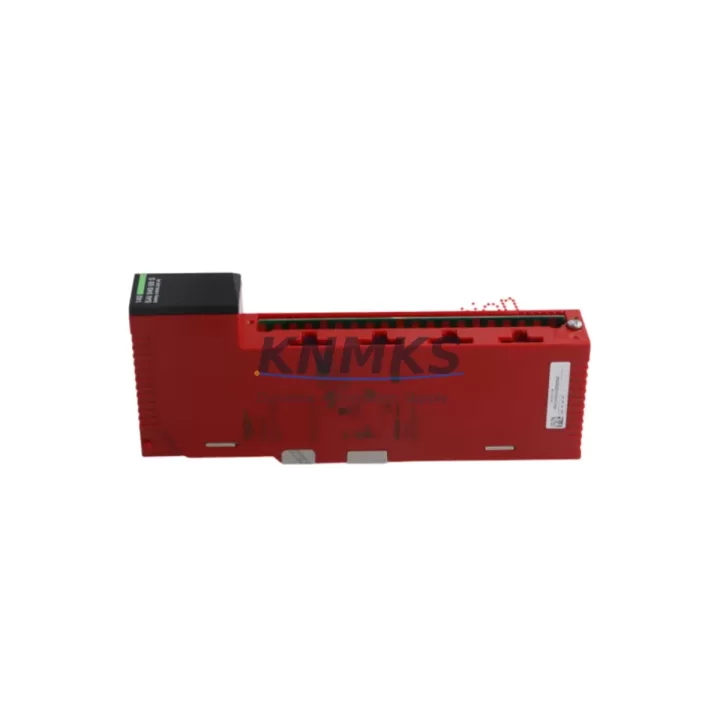
SCHNEIDER 140SAI94000S Migration-Ready Analog Safety Input for Legacy Control Systems
The SCHNEIDER 140SAI94000S is a SIL 2-rated analog safety input module designed for the Modicon Quantum PLC platform. As legacy Quantum systems approach end-of-life and spare parts become increasingly scarce, the 140SAI94000S remains a critical component for facilities that must maintain functional safety loops without undertaking a full control system overhaul. Whether you are replacing a failed module in a running safety instrumented system, extending the operational life of an existing Quantum rack, or preparing a phased migration to a newer platform, this module provides the electrical and functional compatibility required to minimize risk and downtime.
The 140SAI94000S accepts standard analog input signals (4–20 mA or 1–5 V) from field instruments such as pressure transmitters, flow meters, and temperature sensors connected to safety loops. Before installation, engineers should verify the existing field wiring termination against the module’s terminal block pinout, confirm that the Quantum backplane slot assignment matches the address configured in the safety application, and review the firmware version of the Quantum CPU — such as the 140CPU67160 or 140CPU65150 — to ensure compatibility with the safety I/O driver. Mismatched firmware between the CPU and safety I/O modules is a common source of diagnostic faults during retrofit commissioning.
When integrating the 140SAI94000S into an existing Quantum rack, the physical installation space must be confirmed: the module occupies a single Quantum backplane slot and requires no additional mounting hardware. However, if the target rack is a 140XBP01600 or similar extended backplane, slot numbering and I/O map offsets must be re-verified in the Unity Pro or Concept programming environment before the safety application is downloaded. Any change to the I/O map — even a slot swap — requires a full safety application validation cycle per IEC 61511 requirements.
For sites running Modicon Quantum safety architectures, the 140SAI94000S is frequently deployed alongside the 140SDO84100 safety digital output module and the 140CPS11420 power supply module. When the power supply is being replaced concurrently, engineers should confirm that the new PSU’s output current capacity covers the combined load of all installed I/O modules, including the safety analog inputs. Undersized power supplies are a leading cause of intermittent faults in retrofitted Quantum cabinets. The 140CPS11420 provides 11 A at 5 VDC and is the standard replacement for earlier Quantum PSU variants.
Communication continuity is another key consideration. The Quantum safety system typically communicates over Modbus Plus or Ethernet I/P via the NOE771x network option module. During a module swap, the network configuration stored in the CPU should not be altered. If the HMI — such as a Magelis XBTGT or a SCADA system connected via OPC — is actively polling safety status tags, a brief I/O module replacement can trigger nuisance alarms. Coordinating the swap during a planned maintenance window and placing the safety loop in bypass mode per the site’s Management of Change procedure is strongly recommended.
All 140SAI94000S units supplied by KNMKS are sourced from verified industrial channels, subjected to pre-shipment functional testing under simulated field conditions, and covered by a support terms confirmed by quotation from the date of delivery. Stock is maintained to support urgent replacement orders with short lead times.
Migration Compatibility Table
| Parameter | Details |
|---|---|
| SKU / Part Number | 140SAI94000S |
| Brand / Manufacturer | SCHNEIDER ELECTRIC |
| Series | Modicon Quantum |
| Module Type | Analog Safety Input (SIL 2) |
| Input Signal | 4–20 mA / 1–5 V (field-selectable) |
| Safety Integrity Level | SIL 2 (IEC 61508) |
| Backplane Interface | Modicon Quantum single-slot backplane |
| Compatible CPUs | 140CPU67160, 140CPU65150, 140CPU65160 |
| Programming Environment | Unity Pro, Concept |
| Communication Protocol | Modbus Plus, Ethernet I/P (via NOE module) |
| Installation Space | 1 × Quantum backplane slot |
| Origin | France |
| Retrofit Recommendation | Direct slot replacement; verify I/O map and firmware before download |
| Commissioning Focus | Safety application validation, I/O address confirmation, PSU load check |
| Support terms | 12 Months from delivery date |
Retrofit Planning for Existing Automation Systems
A successful 140SAI94000S retrofit requires a structured pre-installation checklist. Begin by documenting the current slot assignment and I/O address of the module being replaced. Export the existing safety application from the Quantum CPU using Unity Pro or Concept and archive it before any hardware changes are made. This backup protects the original program logic and allows rapid recovery if commissioning issues arise.
Next, inspect the terminal block wiring. The 140SAI94000S uses a removable screw-terminal connector; confirm that field cable labels match the new module’s pinout before reconnecting. If the existing wiring uses a 140XTS00200 terminal strip adapter, verify that the adapter is compatible with the safety module variant — standard I/O adapters are not rated for safety-loop use.
Power budget verification is essential. Calculate the total current draw of all modules in the rack, including the 140SAI94000S (typically 250 mA at 5 VDC), and confirm that the installed 140CPS11420 or equivalent power supply has sufficient headroom. If the rack also houses a 140NOE77101 Ethernet network module and multiple 140ACI04000 analog input modules, the cumulative load can approach the PSU’s rated capacity.
For sites using a Magelis HMI or third-party SCADA connected via Modbus TCP, confirm that the safety input tags mapped to the 140SAI94000S channels are correctly referenced in the HMI project. A slot change without updating the HMI tag database will result in stale or incorrect safety status displays — a critical issue in SIL 2 applications. After hardware installation, perform a loop check on each analog input channel using a calibrated 4–20 mA signal source before enabling the safety function.
Downtime Control During System Migration
Minimizing unplanned downtime during a Quantum safety I/O module replacement requires preparation at three levels: program, hardware, and process. At the program level, ensure the safety application is fully backed up and that the CPU’s memory card contains the latest validated version. If the Quantum system uses a hot-standby configuration with a 140CPU67160 primary and a redundant CPU, the module swap can often be performed on the standby rack without interrupting the running process — consult the Quantum Hot Standby User Guide for slot-replacement procedures specific to safety I/O.
At the hardware level, pre-stage the replacement 140SAI94000S module in the control room before the maintenance window begins. Confirm that the module’s firmware label matches the version expected by the safety application. If a firmware update is required, perform it on the bench using the Quantum firmware update utility before rack installation — in-rack firmware updates on safety modules are not supported in all CPU firmware versions.
At the process level, coordinate with the operations team to place affected safety loops in manual bypass or inhibit mode per the site’s safety management plan. Document the bypass activation and restoration times. Once the module is installed and the safety application is downloaded and validated, perform a channel-by-channel functional test before releasing the bypass. This structured approach consistently achieves module replacement within a two- to four-hour maintenance window, even in complex multi-rack Quantum architectures.
Retrofit Support FAQ
Q: Is the 140SAI94000S a direct replacement for the 140SAI94000?
A: The 140SAI94000S is the safety-rated variant of the Quantum analog input family. It is not interchangeable with the standard 140SAI94000 in safety-loop applications. Confirm the exact part number required by your safety application before ordering.
Q: What firmware version is required on the Quantum CPU for compatibility?
A: The 140SAI94000S requires Unity Pro 4.1 or later for full safety function configuration. CPU firmware version requirements vary by CPU model; refer to the Quantum Safety System User Guide (SE reference 35010533) for the compatibility matrix.
Q: Does KNMKS provide pre-shipment testing for this module?
A: Yes. All 140SAI94000S units are functionally tested prior to dispatch, including analog input channel verification and backplane communication checks. A test report is available upon request.
Q: What is the support terms coverage?
A: KNMKS provides a support terms confirmed by quotation from the date of delivery, covering manufacturing defects and functional failures under normal operating conditions. Expedited replacement is available for critical safety system applications.
© 2026 KNMKS. All rights reserved.
Original Source: https://knmks.com
Contact: admin@knmks.com | +86 18359268345
Product Identification
- Brand / Ecosystem
-
Schneider
Assorted Brands - Model / Series
-
140SAI94000S
Assorted Series - Product Family
- PLCs & Controllers
- Availability Status
- Available on request after model and quantity confirmation
- Inquiry Type
- B2B RFQ, replacement inquiry and project spare-part request
- Pre-Quote Check
- Exact SKU, brand, series, quantity, nameplate photos and destination country are checked before quotation
System Path
Where this product fits in the KNMKS automation structure.
Specification & Inquiry Focus
- Control platform
- PLC, PAC and modular controllers
- Common needs
- CPU, rack, power and I/O expansion
- Project support
- Replacement, cabinet build and maintenance
Buyer Confirmation
Information KNMKS checks before replying.
- Exact model
- 140SAI94000S
- Brand / ecosystem
- Schneider
- Product family
- PLCs & Controllers
- Application note
- Replacement, maintenance, project build or spare-part list
- Useful photos
- Nameplate, installed unit, cabinet layout or connector side
- Delivery details
- Quantity, destination country and target schedule
Document Support
Files and notes can be confirmed during quotation.
- Product photos or nameplate confirmation when available
- Packing and delivery notes before quotation confirmation
- Support scope and delivery terms confirmed per inquiry
- Export document coordination for qualified B2B requests
Inquiry Support
- Model cross-checking before quotation
- CPU, power, rack and expansion module matching
- Support for replacement and project inquiry
What to Send Us
- Brand and exact model number: Schneider 140SAI94000S
- Quantity and required delivery time
- Application, replacement requirement or nameplate photo
- Destination country and shipping preference
RFQ Preparation
This is a product inquiry page built for RFQ communication.
Fast Model Check
Send this model to KNMKS for confirmation.
Include quantity, destination country and photos if this is a maintenance replacement. The inquiry will be saved with a reference number after submission.
Brand & Compatibility Note
KNMKS displays automation product information for well-known industrial brand ecosystems and compatible replacement references. Brand names are used for product identification and compatibility reference only; final availability and commercial terms are confirmed per quotation.
 Manufacturing
 Machine Tools
 Packaging
 Energy & Power



 HMI & Displays
 Servo Systems
 Variable Frequency Drives
 Sensors