
Overview
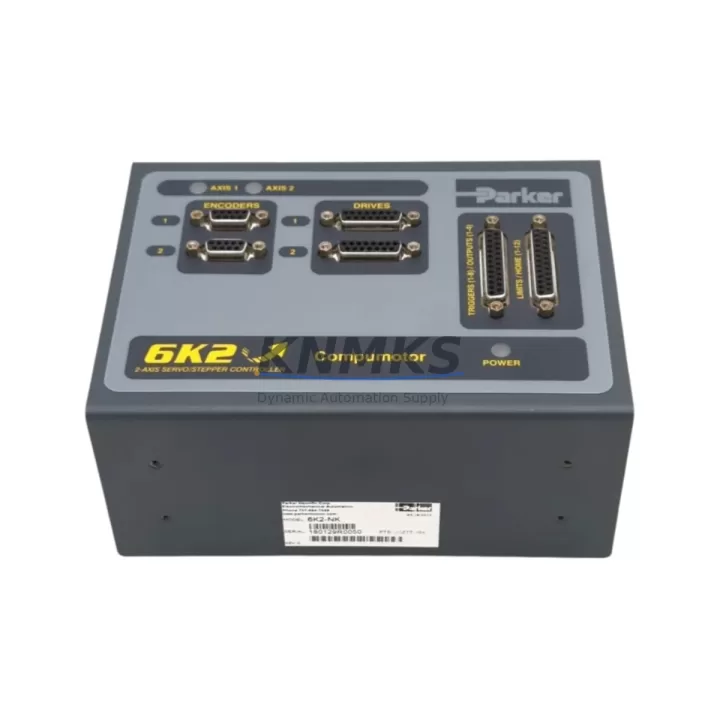
Parker 6K2-NK 1061926 Spare Part for Factory Uptime
The Parker 6K2-NK (Part No. 1061926) is a 2-axis motion controller from Parker Hannifin’s 6K Series — a platform widely deployed across precision manufacturing, semiconductor handling, packaging automation, and multi-axis CNC systems. Sourced as an original spare, this unit is inspection-tested, function-verified, and ready for immediate deployment to minimize unplanned downtime in critical production environments.
For maintenance engineers managing aging 6K Series installations, securing a verified 6K2-NK spare is a foundational step in any preventive maintenance or emergency recovery plan. Parker’s 6K architecture is known for its deterministic motion execution and robust I/O integration, making the controller a long-service component — but one that must be replaced with a compatible, tested unit to preserve system integrity and avoid costly re-commissioning.
Whether you are responding to a controller fault alarm, executing a scheduled overhaul, or building a strategic spare parts buffer for a multi-axis production line, the 6K2-NK 1061926 is a direct-fit replacement that supports continuity of operations without firmware re-engineering or hardware adaptation.
Spare Maintenance Table
| SKU | 6K2-NK 1061926 |
| Brand | Parker Hannifin |
| Series | Parker 6K Series |
| Product Type | Motion Controller (2-Axis) |
| Part Number | 1061926 |
| Axes Supported | 2-Axis coordinated motion |
| Communication Interface | RS-232 / RS-485 serial; optional Ethernet (6K Series dependent) |
| I/O Compatibility | Compatible with 6K Series I/O expansion modules and digital I/O racks |
| Power Supply Requirement | 24 VDC control power (verify with system wiring diagram) |
| Operating Environment | Industrial panel mount; 0–55°C operating range (typical 6K Series) |
| Firmware | 6K Series native firmware; verify revision compatibility before installation |
| Origin | USA (Parker Hannifin) |
| Condition | Original spare; function-tested prior to shipment |
| Support terms | support terms confirmed by quotation |
| Shipping | Inspected, anti-static packaged, express logistics available |
Maintenance Planning for Continuous Operation
When replacing the 6K2-NK 1061926 in a live production environment, a disciplined maintenance approach requires evaluating the entire motion control circuit — not just the controller itself. Experienced maintenance engineers know that a controller fault is frequently a symptom of upstream or downstream component stress.
Begin with the 24 VDC control power supply feeding the 6K controller. Verify output voltage stability under load; a degraded power supply can cause intermittent controller resets that mimic controller failure. If the system uses a Parker AC10 or AC30 series drive alongside the 6K2-NK, inspect drive fault logs and encoder feedback wiring before condemning the controller.
Next, audit the I/O expansion modules connected to the 6K backplane. Parker 6K Series I/O racks communicate over a dedicated bus; a failed I/O module or loose backplane connector can generate axis faults that appear as controller errors. Check each I/O module’s status LED and reseat all backplane connectors during the replacement window.
Inspect RS-232/RS-485 communication cables between the 6K2-NK and the host PC or HMI. Cable degradation, ground loops, or incorrect termination resistors are common causes of communication timeouts that trigger controller alarms. Replace shielded communication cables if continuity or insulation resistance is marginal.
For systems using a Parker HMI or operator panel (such as the Parker IPC or a third-party touchscreen running 6K SCADA software), verify that the HMI firmware version is compatible with the replacement controller’s firmware revision. Mismatched firmware can cause parameter read errors or axis configuration loss after replacement.
Also inspect encoder feedback cables and connectors on each axis. Encoder signal degradation is a leading cause of position error faults in 6K Series systems. During the controller swap, clean encoder connectors and verify cable shielding continuity. If the system uses signal isolators on encoder or analog command lines, test isolator output accuracy — a drifting isolator can cause velocity instability that is incorrectly attributed to the controller.
Finally, check fuse and circuit protection on the 24 VDC control circuit and any axis enable relay circuits. A blown fuse or welded relay contact can prevent the replacement controller from enabling axes, leading to unnecessary troubleshooting delays. Replacing fuses and testing relay coil resistance during planned maintenance is a low-cost step that prevents post-replacement surprises.
Site Replacement Workflow
Step 1 — Pre-Replacement Documentation: Before powering down, capture the current 6K2-NK configuration using Parker’s 6K Series programming software (6K Servo Tuner or Motion Planner). Save the full program, axis parameters, I/O assignments, and communication settings to a backup file. Confirm the firmware revision on the existing unit.
Step 2 — Power Isolation: Follow site LOTO (Lockout/Tagout) procedures. Isolate 24 VDC control power and AC drive power. Discharge bus capacitors on any connected servo drives before handling the controller or wiring.
Step 3 — Hardware Swap: Remove the faulty 6K2-NK from the panel. Install the replacement 1061926 unit in the same mounting position. Reconnect all I/O, communication, encoder, and power wiring per the original wiring diagram. Verify terminal torque on all screw-type connectors.
Step 4 — Firmware and Parameter Restore: Connect the programming PC via RS-232 or Ethernet. Verify the replacement unit’s firmware revision matches the backup. Restore the saved program and axis parameters. Do not power axes until parameter restore is confirmed complete.
Step 5 — Commissioning Verification: Enable axes in sequence. Run a low-speed jog test on each axis before executing production programs. Verify position feedback, velocity limits, and I/O response. Confirm HMI communication is re-established and all axis status displays are normal.
Step 6 — Return to Production: Log the replacement in the site maintenance record. Update the spare parts inventory and initiate a reorder for the consumed 6K2-NK spare to maintain buffer stock.
Spare Parts Support FAQ
Q1: Is the 6K2-NK 1061926 compatible with all 6K Series systems?
The 6K2-NK is designed for 2-axis 6K Series applications. Compatibility depends on the firmware revision and the specific 6K host system (6K2, 6K4, 6K6, 6K8 family). Always verify the firmware version of your existing system before installation. Our team can assist with compatibility confirmation prior to shipment.
Q2: How is the unit tested before shipment?
Each 6K2-NK 1061926 unit undergoes a function verification test covering power-on self-test, communication port response, and I/O status checks. Units are shipped in anti-static packaging with inspection documentation. A support terms confirmed by quotation cover defects in materials and workmanship from the date of shipment.
Q3: Can you support long-term or blanket orders for 6K Series spare parts?
Yes. KNMKS supports long-term supply agreements for critical spare parts including the 6K2-NK and related 6K Series components. Blanket orders and scheduled releases are available for customers managing multi-site maintenance programs or annual MRO budgets. Contact our team to discuss volume pricing and lead time commitments.
Q4: What if my system requires a specific firmware version that differs from stock?
Firmware version requirements should be confirmed before ordering. Provide your existing controller’s firmware revision and system model, and our technical team will verify compatibility or advise on firmware update procedures. We do not recommend installing a replacement controller with an incompatible firmware version without prior validation.
© 2026 KNMKS. All rights reserved.
Original Source: https://knmks.com
Contact: admin@knmks.com | +86 18359268345
Product Identification
- Brand / Ecosystem
-
Parker Hannifin
Assorted Brands - Model / Series
-
6K2-NK 1061926
Assorted Series - Product Family
- PLCs & Controllers
- Availability Status
- Available on request after model and quantity confirmation
- Inquiry Type
- B2B RFQ, replacement inquiry and project spare-part request
- Pre-Quote Check
- Exact SKU, brand, series, quantity, nameplate photos and destination country are checked before quotation
System Path
Where this product fits in the KNMKS automation structure.
Specification & Inquiry Focus
- Control platform
- PLC, PAC and modular controllers
- Common needs
- CPU, rack, power and I/O expansion
- Project support
- Replacement, cabinet build and maintenance
Buyer Confirmation
Information KNMKS checks before replying.
- Exact model
- 6K2-NK 1061926
- Brand / ecosystem
- Parker Hannifin
- Product family
- PLCs & Controllers
- Application note
- Replacement, maintenance, project build or spare-part list
- Useful photos
- Nameplate, installed unit, cabinet layout or connector side
- Delivery details
- Quantity, destination country and target schedule
Document Support
Files and notes can be confirmed during quotation.
- Product photos or nameplate confirmation when available
- Packing and delivery notes before quotation confirmation
- Support scope and delivery terms confirmed per inquiry
- Export document coordination for qualified B2B requests
Inquiry Support
- Model cross-checking before quotation
- CPU, power, rack and expansion module matching
- Support for replacement and project inquiry
What to Send Us
- Brand and exact model number: Parker Hannifin 6K2-NK 1061926
- Quantity and required delivery time
- Application, replacement requirement or nameplate photo
- Destination country and shipping preference
RFQ Preparation
This is a product inquiry page built for RFQ communication.
Fast Model Check
Send this model to KNMKS for confirmation.
Include quantity, destination country and photos if this is a maintenance replacement. The inquiry will be saved with a reference number after submission.
Brand & Compatibility Note
KNMKS displays automation product information for well-known industrial brand ecosystems and compatible replacement references. Brand names are used for product identification and compatibility reference only; final availability and commercial terms are confirmed per quotation.
 Manufacturing
 Machine Tools
 Packaging
 Energy & Power



 HMI & Displays
 Servo Systems
 Variable Frequency Drives
 Sensors