
Overview
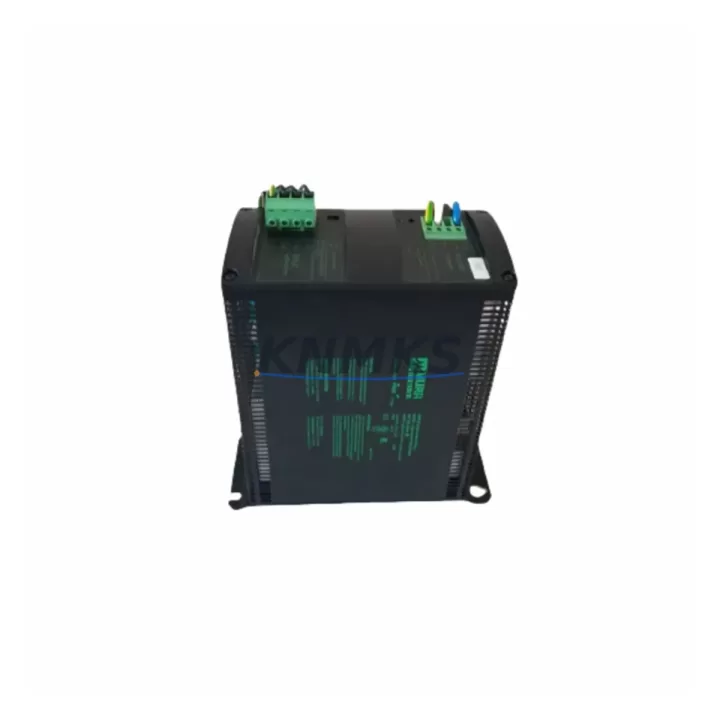
Murrelektronik MCS20-230/24 Maintenance-Proven Spare Part for Factory Uptime
The Murrelektronik MCS20-230/24 is a compact, single-phase DIN rail power supply delivering a regulated 24 VDC output at 20 W from a 230 VAC input. Designed for continuous-duty industrial environments, this unit is a cornerstone spare in control cabinets across manufacturing, process automation, and building management systems. Holding a verified replacement unit in your spare parts inventory eliminates the risk of extended downtime when the primary supply degrades or fails — a scenario that becomes increasingly likely as MCS Series installations age beyond their rated service life.
KNMKS stocks the MCS20-230/24 as an original Murrelektronik component, pre-tested prior to shipment and backed by a support terms confirmed by quotation. Multi-region inventory ensures fast global dispatch to support both emergency replacements and scheduled annual maintenance windows.
Spare Maintenance Table
| Parameter | Specification |
|---|---|
| Part Number / SKU | MCS20-230/24 |
| Brand | Murrelektronik |
| Series | MCS |
| Product Type | DIN Rail Power Supply |
| Input Voltage | 230 VAC, 50/60 Hz, single-phase |
| Output Voltage | 24 VDC (regulated) |
| Output Power | 20 W |
| Output Current | ~0.83 A continuous |
| Mounting | 35 mm DIN rail (EN 60715) |
| Protection Class | IP20 (panel-mounted) |
| Operating Temperature | -25 °C to +70 °C |
| Compliance | CE, UL (series-level) |
| Country of Origin | Germany |
| Compatibility | Direct replacement for MCS20-230/24 in MCS Series control cabinets |
| Condition | Original, new, pre-shipment tested |
| Support terms | 12 months from date of dispatch |
| Typical Application | PLC 24 VDC bus supply, sensor/actuator rail, relay coil power, HMI auxiliary supply |
| Maintenance Interval | Inspect annually; replace proactively at 8–10 years of service |
Maintenance Planning for Continuous Operation
When a maintenance engineer identifies a failing or end-of-life MCS20-230/24 during a control cabinet inspection, the replacement scope rarely ends at the power supply itself. The 24 VDC rail fed by this unit typically powers a cluster of interdependent components, and a thorough site assessment should cover each of them before the cabinet is returned to service.
Begin with the input wiring and fusing: verify that the upstream miniature circuit breaker or fuse protecting the 230 VAC feed is within its rated interrupting capacity and shows no signs of thermal stress. A degraded fuse holder or loose terminal can cause nuisance trips that mimic a power supply fault. Next, inspect the 24 VDC output terminals and DIN rail bus bars — oxidised or loose connections introduce voltage drop that can cause intermittent resets in downstream PLCs and I/O modules.
The 24 VDC bus supplied by the MCS20-230/24 commonly feeds Murrelektronik MCS Series relay output modules and digital I/O terminal blocks. If the power supply has been running in a degraded state, these modules may have experienced sustained undervoltage; inspect their status LEDs and perform a functional output test before closing the cabinet. Similarly, any signal isolators or loop-powered transmitters on the same rail should be verified for correct output scaling after the supply is replaced.
In cabinets where the MCS20-230/24 also provides auxiliary power to an HMI panel or operator terminal, confirm that the HMI boots cleanly and that its backlight and touchscreen calibration are unaffected. For installations with a Murrelektronik MCS Series communication gateway or fieldbus coupler, check that the device re-establishes its network connection and that no persistent fault codes remain in the PLC diagnostic buffer.
Finally, review the 24 VDC UPS module or buffer capacitor if one is installed in the cabinet. A failing primary supply often masks a simultaneously degraded buffer unit; replacing both during the same maintenance window avoids a repeat callout within weeks. Document all findings in the site maintenance log and update the spare parts inventory to reflect the consumed unit — maintaining at least one MCS20-230/24 on the shelf is the minimum recommended stock level for any facility running more than two MCS Series cabinets.
Site Replacement Workflow
1. Isolate and verify de-energisation. Switch off the upstream 230 VAC circuit breaker feeding the cabinet. Use a calibrated voltage tester to confirm zero volts at the MCS20-230/24 input terminals before proceeding. Follow site LOTO (Lockout/Tagout) procedures.
2. Document the existing wiring. Photograph or sketch the input (L, N, PE) and output (+24 V, 0 V) terminal connections. Note the wire colours, ferrule sizes, and terminal numbers. This is especially important in older MCS Series cabinets where as-built drawings may not reflect field modifications.
3. Remove the failed unit. Loosen the output terminals first, then the input terminals. Slide the unit off the DIN rail using the release lever at the base. Inspect the rail clip for deformation — replace the rail section if the clip has been stressed.
4. Install the replacement MCS20-230/24. Snap the new unit onto the DIN rail and confirm it is fully seated. Reconnect input terminals (L, N, PE) and output terminals (+24 V, 0 V) to the documented positions. Torque all terminals to the manufacturer’s specification (typically 0.5–0.6 Nm for this class of terminal).
5. Energise and verify. Re-close the upstream circuit breaker. Measure the output voltage at the terminal block — it should read 24.0 ± 0.5 VDC under no-load, and remain within ±2% under full cabinet load. Confirm that all downstream PLC I/O modules, relay outputs, and HMI panels have resumed normal operation and that no fault codes are active.
6. Update records. Log the replacement date, the serial number of the removed unit, and the batch number of the installed spare. Reorder a replacement MCS20-230/24 to restore minimum stock levels immediately after the repair.
Spare Parts Support FAQ
Q1: Is the MCS20-230/24 still in production, and can KNMKS guarantee long-term supply?
The MCS Series is a mature Murrelektronik product line. KNMKS maintains multi-region buffer stock of the MCS20-230/24 to support customers through end-of-production transitions. Where original stock is exhausted, we qualify and disclose compatible alternatives before shipment. Contact admin@knmks.com to discuss long-term supply agreements for high-volume or critical-infrastructure requirements.
Q2: How is the MCS20-230/24 tested before shipment?
Every unit undergoes a pre-shipment functional test: input voltage application at rated 230 VAC, output voltage measurement under a representative load, and visual inspection for physical damage. Test records are retained and available on request. The support terms confirmed by quotation cover defects in materials and workmanship from the date of dispatch.
Q3: Can the MCS20-230/24 directly replace older MCS Series power supplies with the same output rating?
In most cases, yes — the MCS20-230/24 is dimensionally and electrically compatible with earlier MCS Series units of the same 24 VDC / 20 W rating. However, always verify the terminal layout and DIN rail footprint against the installed unit before ordering, particularly in cabinets that have not been updated since original commissioning. KNMKS technical support can assist with compatibility confirmation if you provide the nameplate data of the unit being replaced.
Q4: What is the recommended spare parts stocking strategy for MCS Series power supplies?
For facilities operating 1–5 MCS Series cabinets, a minimum of one MCS20-230/24 on the shelf is recommended. For larger installations or those in remote locations with long logistics lead times, a two-unit buffer is advisable. Pair the power supply spare with at least one set of replacement fuses for the upstream 230 VAC feed and a spare 24 VDC bus terminal block to cover the most common failure modes in a single maintenance kit.
© 2026 KNMKS. All rights reserved.
Original Source: https://knmks.com
Contact: admin@knmks.com | +86 18359268345
Product Identification
- Brand / Ecosystem
-
Other Brands
Assorted Brands - Model / Series
-
MCS20-230/24
Assorted Series - Product Family
- Power Supplies
- Availability Status
- Available on request after model and quantity confirmation
- Inquiry Type
- B2B RFQ, replacement inquiry and project spare-part request
- Pre-Quote Check
- Exact SKU, brand, series, quantity, nameplate photos and destination country are checked before quotation
System Path
Where this product fits in the KNMKS automation structure.
Specification & Inquiry Focus
- Power range
- DIN rail and switching power supplies
- Common needs
- Voltage, current and mounting style
- Project support
- Control cabinet and panel-builder inquiries
Buyer Confirmation
Information KNMKS checks before replying.
- Exact model
- MCS20-230/24
- Brand / ecosystem
- Other Brands
- Product family
- Power Supplies
- Application note
- Replacement, maintenance, project build or spare-part list
- Useful photos
- Nameplate, installed unit, cabinet layout or connector side
- Delivery details
- Quantity, destination country and target schedule
Document Support
Files and notes can be confirmed during quotation.
- Product photos or nameplate confirmation when available
- Packing and delivery notes before quotation confirmation
- Support scope and delivery terms confirmed per inquiry
- Export document coordination for qualified B2B requests
Inquiry Support
- 24VDC and cabinet power selection support
- Stable power support for PLC and HMI systems
- Batch inquiry support for panel builders
What to Send Us
- Brand and exact model number: Other Brands MCS20-230/24
- Quantity and required delivery time
- Application, replacement requirement or nameplate photo
- Destination country and shipping preference
RFQ Preparation
This is a product inquiry page built for RFQ communication.
Fast Model Check
Send this model to KNMKS for confirmation.
Include quantity, destination country and photos if this is a maintenance replacement. The inquiry will be saved with a reference number after submission.
Brand & Compatibility Note
KNMKS displays automation product information for well-known industrial brand ecosystems and compatible replacement references. Brand names are used for product identification and compatibility reference only; final availability and commercial terms are confirmed per quotation.
 Manufacturing
 Machine Tools
 Packaging
 Energy & Power
 PLCs & Controllers
 HMI & Displays
 Servo Systems
 Variable Frequency Drives