
Overview
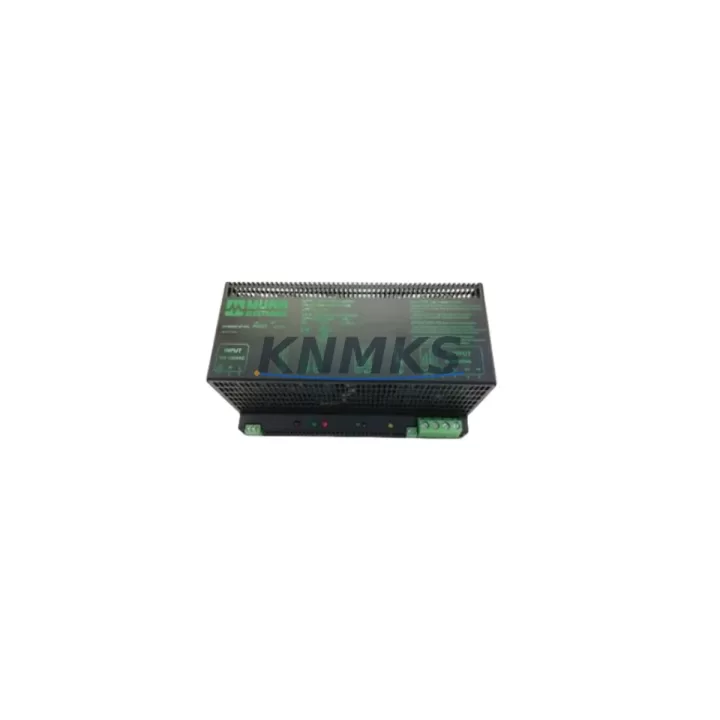
Murrelektronik 857833 Maintenance-Proven Spare Part for Factory Uptime
The Murrelektronik 857833 is a primary-switched, regulated 24 VDC DIN-rail power supply from the MPS Series, engineered for continuous-duty industrial environments where unplanned downtime is not an option. Whether you are executing a scheduled annual overhaul, responding to an emergency shutdown, or building a proactive spare-parts buffer for a multi-line facility, the 857833 delivers the electrical stability and mechanical reliability that maintenance and procurement engineers depend on.
Murrelektronik’s MPS Series is a proven platform across automotive assembly, food and beverage processing, packaging machinery, and discrete manufacturing. The 857833 variant is widely deployed in 24 VDC control cabinets alongside PLCs, safety relays, I/O modules, and field bus communication nodes. Its wide-range AC input (85–264 VAC), active power factor correction, and built-in output capacitor boost make it a direct drop-in replacement for aging or failed units without requiring cabinet rewiring or parameter reconfiguration.
Every unit supplied by KNMKS is sourced from authorized channels, subjected to pre-shipment functional testing under load, and covered by a support terms confirmed by quotation from the date of delivery. We maintain forward stock to support long-term supply agreements of 12–36 months, ensuring your maintenance schedule is never interrupted by lead-time uncertainty.
Spare Maintenance Table
| Parameter | Specification |
|---|---|
| Part Number / SKU | 857833 |
| Brand / Series | Murrelektronik / MPS Series |
| Output Voltage | 24 VDC (adjustable 22–28 VDC) |
| Output Current | 10 A continuous |
| Output Power | 240 W |
| Input Voltage Range | 85–264 VAC, 47–63 Hz (universal input) |
| Power Factor Correction | Active PFC (>0.95 at full load) |
| Efficiency | ≥ 91% at full load |
| Mounting | 35 mm DIN rail (EN 60715) |
| Protection Class | IP20 (panel/cabinet installation) |
| Operating Temperature | -25 °C to +70 °C (derating above 60 °C) |
| Certifications | CE, UL, cUL, ATEX Zone 2 (class I div 2) |
| Origin | Germany |
| Product Type | DIN-Rail Power Supply |
| Support terms | 12 Months from delivery date (KNMKS) |
| Pre-Shipment Test | Full-load functional test performed before dispatch |
| Compatibility | Direct replacement for MPS Series 24 VDC / 10 A variants; compatible with Siemens S7-300/400, Beckhoff CX/EK, Phoenix Contact ILC, Wago 750 series control cabinets |
Maintenance Planning for Continuous Operation
When replacing the 857833 in a live control cabinet, a disciplined inspection of the surrounding electrical circuit is essential to prevent repeat failures and ensure the replacement unit operates within its rated parameters from day one.
Begin with the AC input side: verify the upstream miniature circuit breaker (MCB) or fuse — typically a 10 A type-C breaker — is within its rated trip curve and shows no signs of thermal discoloration or contact erosion. A degraded MCB can allow transient overcurrents that stress the new power supply’s input rectifier stage. If the cabinet uses a Murrelektronik MF series line filter or an equivalent EMC input filter upstream of the PSU, inspect it for capacitor leakage and verify its rated current matches the load.
On the 24 VDC output bus, check the terminal block strip — commonly a Phoenix Contact UK 2.5 or Weidmüller WDU 2.5 series — for loose connections, oxidized contacts, or overheated insulation. A single high-resistance terminal joint can cause voltage drop that triggers PLC under-voltage faults and masks the true source of the fault. Measure bus voltage at the far end of the distribution rail, not just at the PSU output terminals.
Inspect all 24 VDC branch fuses or electronic circuit breakers (such as the Murrelektronik 9000-41000-0100000 MBT series or equivalent) protecting individual I/O segments, solenoid valve groups, and sensor loops. A blown branch fuse that went undetected may have been drawing excess current from the original 857833, contributing to its failure. Replace any fuse that shows signs of thermal stress even if it has not yet opened.
For cabinets integrating Profibus DP, Profinet, or EtherCAT communication nodes, confirm that the 24 VDC supply to the communication module (e.g., a Siemens ET 200SP IM 155-6 PN interface module or a Beckhoff EK1100 EtherCAT coupler) is within the ±1% tolerance required for stable fieldbus operation. Communication dropouts after a PSU replacement are frequently caused by marginal supply voltage rather than a network fault.
Finally, if the cabinet houses safety relays or safety PLCs (such as a Pilz PNOZ X series or Sick Flexi Soft), verify that the 24 VDC safety circuit supply is isolated from the standard I/O supply and that the new 857833 is not powering both rails simultaneously — a common wiring error during emergency replacements that can compromise SIL integrity.
Site Replacement Workflow
Step 1 — Isolation and lockout: De-energize the cabinet following your site LOTO procedure. Confirm zero energy on both AC input and 24 VDC output rails with a calibrated multimeter before touching any wiring.
Step 2 — Document existing wiring: Photograph or sketch the AC input terminal connections (L, N, PE) and the 24 VDC output connections (+V, -V, PE) before disconnecting. The 857833 uses standard screw-cage terminals; note the wire cross-sections to confirm they match the replacement unit’s terminal ratings (0.2–6 mm²).
Step 3 — DIN rail removal: Release the DIN rail locking tab at the base of the unit and slide it off the rail. If the unit is seized due to thermal expansion, use a flat-blade screwdriver in the release slot — do not lever against adjacent modules.
Step 4 — Inspect and clean: Before mounting the replacement 857833, clean the DIN rail segment with isopropyl alcohol to remove oxidation. Check that the rail is mechanically straight; a bowed rail can cause intermittent contact with the PSU’s mounting clip.
Step 5 — Mount and reconnect: Snap the new unit onto the rail, reconnect AC input and DC output wiring to the same terminal positions, and torque screw terminals to 0.5–0.6 Nm as specified in the Murrelektronik MPS installation guide.
Step 6 — Energize and verify: Apply AC power and measure output voltage at the PSU terminals and at the far end of the 24 VDC distribution bus. Confirm the output is within 23.8–24.2 VDC under normal load before releasing the system to production.
This workflow supports a typical cabinet swap in under 30 minutes, minimizing production downtime while maintaining full system compatibility and safety compliance.
Spare Parts Support FAQ
Q1: Is the 857833 a direct drop-in replacement for older MPS Series units with the same output rating?
Yes. The 857833 maintains dimensional, terminal, and electrical compatibility with earlier MPS Series 24 VDC / 10 A variants. No cabinet modifications or PLC parameter changes are required for a like-for-like swap. Always verify the output voltage trim setting on the original unit and replicate it on the replacement before energizing.
Q2: What pre-shipment testing does KNMKS perform on the 857833?
Each unit undergoes a full-load functional test at 24 VDC / 10 A output, output voltage accuracy verification, and visual inspection for mechanical damage before dispatch. Test records are available on request. Units that do not pass are not shipped.
Q3: Can KNMKS support a long-term supply agreement for the 857833?
Yes. We offer forward-stocking arrangements for 12–36 month supply horizons, suitable for multi-site maintenance programs or OEM service contracts. Contact admin@knmks.com to discuss volume, lead time, and pricing terms.
Q4: What does the support terms confirmed by quotation cover, and how is a claim processed?
The support terms confirmed by quotation cover manufacturing defects and functional failures under normal operating conditions. It does not cover damage caused by incorrect installation, overvoltage events, or physical impact. To initiate a support terms claim, contact admin@knmks.com with the order reference, a description of the fault, and photographic evidence. KNMKS will arrange return shipping and either repair or replace the unit within the agreed service window.
© 2026 KNMKS. All rights reserved.
Original Source: https://knmks.com
Contact: admin@knmks.com | +86 18359268345
Product Identification
- Brand / Ecosystem
-
Other Brands
Assorted Brands - Model / Series
-
857833
Assorted Series - Product Family
- Power Supplies
- Availability Status
- Available on request after model and quantity confirmation
- Inquiry Type
- B2B RFQ, replacement inquiry and project spare-part request
- Pre-Quote Check
- Exact SKU, brand, series, quantity, nameplate photos and destination country are checked before quotation
System Path
Where this product fits in the KNMKS automation structure.
Specification & Inquiry Focus
- Power range
- DIN rail and switching power supplies
- Common needs
- Voltage, current and mounting style
- Project support
- Control cabinet and panel-builder inquiries
Buyer Confirmation
Information KNMKS checks before replying.
- Exact model
- 857833
- Brand / ecosystem
- Other Brands
- Product family
- Power Supplies
- Application note
- Replacement, maintenance, project build or spare-part list
- Useful photos
- Nameplate, installed unit, cabinet layout or connector side
- Delivery details
- Quantity, destination country and target schedule
Document Support
Files and notes can be confirmed during quotation.
- Product photos or nameplate confirmation when available
- Packing and delivery notes before quotation confirmation
- Support scope and delivery terms confirmed per inquiry
- Export document coordination for qualified B2B requests
Inquiry Support
- 24VDC and cabinet power selection support
- Stable power support for PLC and HMI systems
- Batch inquiry support for panel builders
What to Send Us
- Brand and exact model number: Other Brands 857833
- Quantity and required delivery time
- Application, replacement requirement or nameplate photo
- Destination country and shipping preference
RFQ Preparation
This is a product inquiry page built for RFQ communication.
Fast Model Check
Send this model to KNMKS for confirmation.
Include quantity, destination country and photos if this is a maintenance replacement. The inquiry will be saved with a reference number after submission.
Brand & Compatibility Note
KNMKS displays automation product information for well-known industrial brand ecosystems and compatible replacement references. Brand names are used for product identification and compatibility reference only; final availability and commercial terms are confirmed per quotation.
 Manufacturing
 Machine Tools
 Packaging
 Energy & Power
 PLCs & Controllers
 HMI & Displays
 Servo Systems
 Variable Frequency Drives