
Overview
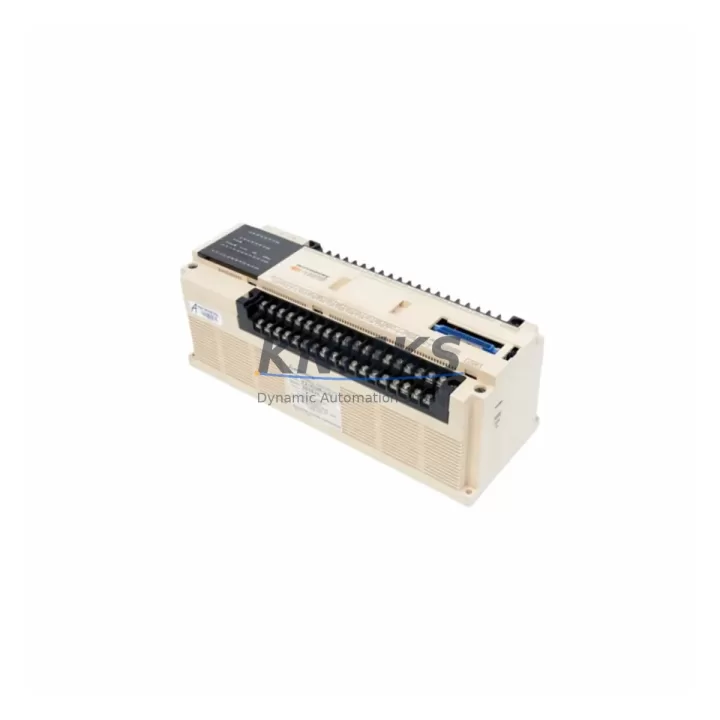
Mitsubishi F2-40MR Migration-Ready Relay Output PLC: Legacy System Retrofit & Compatibility Upgrade
The Mitsubishi F2-40MR is a relay output PLC module from the MELSEC F2 series, designed for industrial control applications where reliable discrete output switching is critical. As legacy MELSEC F2 systems approach end-of-life and spare parts become increasingly scarce, the F2-40MR remains one of the most sought-after replacement units for engineers managing aging production lines, control cabinets, and distributed automation networks across manufacturing, petrochemical, energy, and infrastructure sectors.
Whether you are executing a like-for-like spare part replacement, planning a phased control system modernization, or bridging an interim solution while a full migration to a newer platform is underway, the F2-40MR provides the electrical and mechanical compatibility required to restore system operation with minimal downtime. Each unit supplied by KNMKS is sourced from verified channels, functionally tested prior to shipment, and backed by a support terms confirmed by quotation covering manufacturing defects and operational failures under normal industrial use conditions.
Migration Compatibility Table
| Parameter | F2-40MR Specification | Retrofit / Migration Notes |
|---|---|---|
| Output Type | Relay (MR) | Confirm load type (AC/DC) matches existing field wiring; relay contacts support both AC and DC loads |
| I/O Points | 40 points (24 IN / 16 OUT) | Verify I/O address mapping in existing ladder program before replacement |
| Power Supply | 100–240V AC | Confirm cabinet power rail voltage; check PSU capacity if adding supplementary modules |
| Backplane / Rack Interface | MELSEC F2 dedicated backplane | Unit must seat on original F2 backplane; not compatible with FX or Q-series racks |
| Communication Protocol | Proprietary MELSEC F2 bus | If migrating to Ethernet or CC-Link, a protocol converter or gateway module is required |
| Terminal Wiring | Screw terminal block | Retain original wiring diagram; verify terminal pitch and conductor gauge before reconnection |
| Module Address | Set via DIP switch on unit | Match DIP switch configuration to original module address to avoid program re-mapping |
| Firmware | Factory-embedded, no field update | No firmware flashing required; functional test recommended post-installation |
| Installation Space | Standard F2 module footprint | Confirm slot availability on existing backplane; no panel modification required for direct swap |
| Replacement Recommendation | Direct drop-in for F2-40MR | For full platform migration, consider MELSEC FX5U or iQ-R series with I/O adapter modules |
| Support terms | support terms confirmed by quotation | Covers manufacturing defects and operational failure under normal industrial use |
Retrofit Planning for Existing Automation Systems
Successful integration of the F2-40MR into an existing control architecture requires a structured pre-installation review. Before removing the failed or end-of-life unit, engineers should document the complete I/O wiring schedule from the original terminal block, photograph the DIP switch configuration, and export a backup of the PLC program using a compatible programming cable such as the SC-09 or USB-SC09-FX interface cable. This step is non-negotiable — program loss during a hot swap is one of the most common causes of extended unplanned downtime in legacy system maintenance.
In multi-module control cabinets, the F2-40MR typically operates alongside an F2-60M or F2-20GM motion controller on the same backplane, sharing a common power supply module such as the F2-PA2 or F2-PA4. When replacing the relay output module, verify that the power supply’s total output current budget accommodates the replacement unit, particularly if additional I/O expansion modules have been added to the rack since the original system commissioning. Overloading the power rail is a silent failure mode that can cause intermittent faults difficult to diagnose in the field.
For systems that include analog signal conditioning, the F2-40MR relay outputs are often paired with signal isolator modules or interposing relay panels to protect the PLC outputs from inductive load transients generated by motors, solenoids, and contactors. Inspect the surge suppression components on the output terminal block before energizing the replacement module. If the original suppression diodes or RC snubbers are degraded, replace them as part of the retrofit to protect the new relay contacts and extend service life.
Where the control system includes an HMI panel — commonly a Mitsubishi GOT1000 or GOT2000 series display connected via RS-422 or RS-232 — verify that the HMI screen tags and device addresses remain consistent with the replacement module’s I/O mapping. If the original program used symbolic addressing, a full tag audit against the HMI project file is recommended before returning the system to production. Communication link integrity between the HMI and the F2 CPU should be confirmed with a loop test before handover.
Downtime Control During System Migration
Minimizing production interruption during a relay output module replacement on a live MELSEC F2 system requires advance preparation and a disciplined execution sequence. The recommended approach is to schedule the swap during a planned maintenance window, pre-stage the replacement F2-40MR with the correct DIP switch settings, and prepare a printed copy of the terminal wiring diagram for the technician performing the physical swap.
Before de-energizing the control cabinet, place the PLC in STOP mode from the programming console or HMI to prevent spurious output activation during the module removal. If the system controls safety-critical actuators — such as emergency stop circuits, valve interlocks, or conveyor drives — confirm with the process operator that the field equipment is in a safe state before proceeding. Document the current output status of all 16 relay channels to facilitate rapid verification after the replacement module is seated and powered.
Once the F2-40MR is installed and the system is re-energized, perform a forced output test on each relay channel using the programming software’s monitor function before returning the PLC to RUN mode. This step confirms contact integrity and wiring continuity without relying on the process to exercise each output. For systems with long scan cycles or infrequent output activation, forced testing is the only reliable method to verify full channel functionality within the maintenance window. Total swap time for an experienced technician with pre-staged documentation is typically 30 to 90 minutes, depending on terminal count and cabinet accessibility.
Retrofit Support FAQ
Q: Is the F2-40MR a direct replacement for all MELSEC F2 relay output variants?
A: The F2-40MR is a direct replacement for units with the same model designation. Variants with different I/O counts (such as the F2-20MR or F2-60MR) are not pin-compatible and require program modification and wiring adaptation. Confirm the exact model number on the nameplate of the unit being replaced before ordering.
Q: What programming cable and software are required to back up the existing program before replacement?
A: The MELSEC F2 series is programmed using GX Developer or the legacy MEDOC software. The SC-09 RS-232 programming cable is the standard interface for F2 CPU connection. Ensure the programming PC has a working COM port or use a USB-to-RS232 adapter with verified driver compatibility before the maintenance window begins.
Q: Does KNMKS perform pre-shipment functional testing on the F2-40MR?
A: Yes. Each F2-40MR unit undergoes functional verification prior to dispatch, including relay contact continuity testing and power-on self-test confirmation. A test report is available upon request. All units are shipped with ESD-protective packaging and are covered by a support terms confirmed by quotation from the date of delivery.
Q: What is the typical lead time and stock availability for the F2-40MR?
A: KNMKS maintains inventory of the F2-40MR to support urgent replacement requirements. Standard orders are dispatched within 1–3 business days. For large-quantity procurement or long-term supply agreements covering multiple sites or planned maintenance schedules, contact our sales team to discuss dedicated stock allocation and pricing.
© 2026 KNMKS. All rights reserved.
Original Source: https://knmks.com
Contact: admin@knmks.com | +86 18359268345
Product Identification
- Brand / Ecosystem
-
Mitsubishi
Assorted Brands - Model / Series
-
F2-40MR
Assorted Series - Product Family
- PLCs & Controllers
- Availability Status
- Available on request after model and quantity confirmation
- Inquiry Type
- B2B RFQ, replacement inquiry and project spare-part request
- Pre-Quote Check
- Exact SKU, brand, series, quantity, nameplate photos and destination country are checked before quotation
System Path
Where this product fits in the KNMKS automation structure.
Specification & Inquiry Focus
- Control platform
- PLC, PAC and modular controllers
- Common needs
- CPU, rack, power and I/O expansion
- Project support
- Replacement, cabinet build and maintenance
Buyer Confirmation
Information KNMKS checks before replying.
- Exact model
- F2-40MR
- Brand / ecosystem
- Mitsubishi
- Product family
- PLCs & Controllers
- Application note
- Replacement, maintenance, project build or spare-part list
- Useful photos
- Nameplate, installed unit, cabinet layout or connector side
- Delivery details
- Quantity, destination country and target schedule
Document Support
Files and notes can be confirmed during quotation.
- Product photos or nameplate confirmation when available
- Packing and delivery notes before quotation confirmation
- Support scope and delivery terms confirmed per inquiry
- Export document coordination for qualified B2B requests
Inquiry Support
- Model cross-checking before quotation
- CPU, power, rack and expansion module matching
- Support for replacement and project inquiry
What to Send Us
- Brand and exact model number: Mitsubishi F2-40MR
- Quantity and required delivery time
- Application, replacement requirement or nameplate photo
- Destination country and shipping preference
RFQ Preparation
This is a product inquiry page built for RFQ communication.
Fast Model Check
Send this model to KNMKS for confirmation.
Include quantity, destination country and photos if this is a maintenance replacement. The inquiry will be saved with a reference number after submission.
Brand & Compatibility Note
KNMKS displays automation product information for well-known industrial brand ecosystems and compatible replacement references. Brand names are used for product identification and compatibility reference only; final availability and commercial terms are confirmed per quotation.
 Manufacturing
 Machine Tools
 Packaging
 Energy & Power



 HMI & Displays
 Servo Systems
 Variable Frequency Drives
 Sensors