
Overview
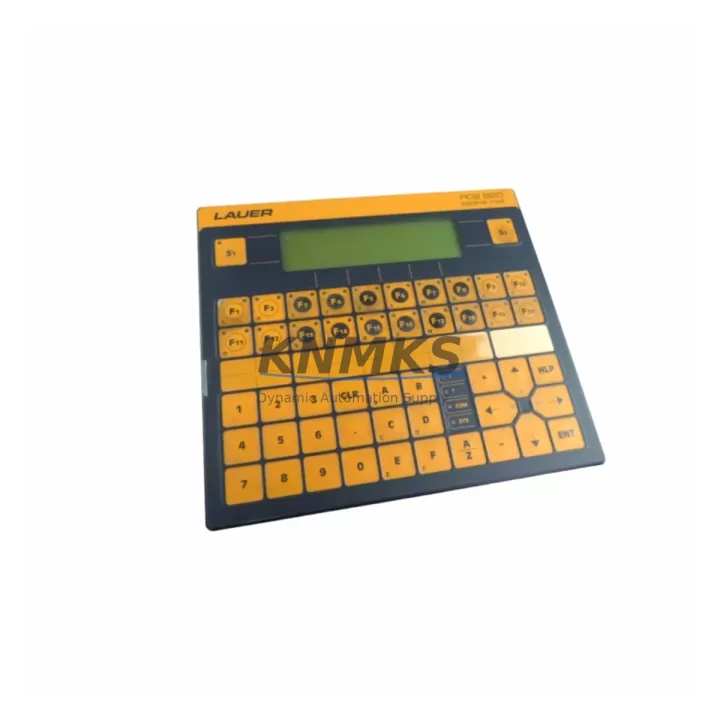
LAUER 920.100.2 Maintenance-Proven Spare Part for Factory Uptime
The LAUER 920.100.2 is an original spare part designed for the PCS Series Human-Machine Interface (HMI) platform — a widely deployed operator panel family found across discrete manufacturing, process automation, and machine-level control environments. As industrial facilities continue to extend the operational life of legacy control systems, maintaining a verified stock of the LAUER 920.100.2 is a critical element of any proactive maintenance strategy. This unit supports uninterrupted factory uptime by enabling rapid field replacement without requiring system reconfiguration or software migration.
Maintenance engineers and procurement teams working with LAUER PCS-based control cabinets recognize the 920.100.2 as a high-priority spare. Its role in operator-level interaction — process visualization, alarm acknowledgment, parameter input, and status monitoring — means that failure of this component directly impacts production visibility and response capability. Sourcing a pre-tested, original replacement unit with documented compatibility is the most reliable path to minimizing mean time to repair (MTTR) in HMI-dependent production lines.
Every unit dispatched from our warehouse undergoes pre-shipment functional testing and is backed by a support terms confirmed by quotation, ensuring that your maintenance team receives a field-ready component with full traceability and quality assurance.
Spare Maintenance Table
| SKU / Part Number | 920.100.2 |
| Brand | LAUER |
| Series | PCS Series |
| Product Type | Industrial HMI Touch Panel |
| Country of Origin | Germany |
| Weight | 3,700 g (approx.) |
| Application Environment | Industrial control cabinets, machine panels, process automation stations |
| Compatibility | LAUER PCS Series HMI platforms; compatible with standard 24 VDC panel supply architectures |
| Interface | Operator touch/keypad interface; serial or fieldbus communication depending on configuration |
| Installation | Panel-mount; cutout dimensions per LAUER PCS Series mechanical specification |
| Maintenance Recommendation | Inspect display, keypad response, and communication link integrity during scheduled shutdowns; replace proactively at first sign of display degradation or input latency |
| Pre-Shipment Testing | Yes — functional verification prior to dispatch |
| Support terms | 12 Months |
| Dispatch | Global rapid dispatch; multi-region stock availability |
Maintenance Planning for Continuous Operation
When scheduling replacement of the LAUER 920.100.2 in a PCS Series control cabinet, a thorough site inspection of the surrounding electrical and communication infrastructure is essential to prevent repeat failures and ensure stable post-replacement operation. Maintenance engineers should treat this HMI replacement as an opportunity to audit the full operator station assembly.
Begin by verifying the 24 VDC panel power supply feeding the HMI. Voltage ripple, insufficient current capacity, or aging capacitors in the power supply module can cause premature HMI failure or erratic display behavior — replacing the HMI without addressing an unstable supply will result in recurring faults. Check the power supply output terminals and wiring harness for corrosion, loose crimps, or insulation degradation, particularly in high-vibration or high-humidity environments.
Inspect the serial communication cable connecting the 920.100.2 to the host PLC or controller. Cable shielding integrity, connector pin condition, and correct termination resistance are critical for reliable data exchange. In PCS Series installations using RS-232 or RS-485 links, a degraded cable is a common root cause of HMI communication faults that are misdiagnosed as panel failures. If the system uses a LAUER PCS communication module or protocol converter, verify firmware compatibility and connector seating before commissioning the replacement unit.
For control cabinets integrating I/O expansion modules or relay output boards alongside the HMI, confirm that all signal wiring to the operator panel is correctly routed and that no ground loops have developed. Where signal isolators are used between the HMI and field instrumentation, test isolation resistance and verify that analog input scaling remains within calibrated range.
Check the cabinet fuse block and circuit protection for the HMI supply circuit. A blown or weakened fuse protecting the panel supply is often overlooked during emergency HMI replacements. Similarly, inspect any terminal blocks or DIN rail connectors associated with the operator station for signs of thermal stress or contact oxidation.
Finally, if the control system includes a LAUER PCS programming interface or configuration software dongle, ensure that the replacement HMI is loaded with the correct project file and that all screen configurations, alarm setpoints, and communication parameters are validated before returning the line to production. Maintaining a backup of the HMI project file as part of your spare parts documentation package is strongly recommended for long-term supply resilience.
Site Replacement Workflow
Step 1 — Isolate and Document: De-energize the control cabinet following site LOTO procedures. Photograph the existing LAUER 920.100.2 installation, including cable routing, connector labels, and mounting orientation, before removal.
Step 2 — Remove Legacy Unit: Disconnect all communication cables and power connectors from the existing panel. Release panel-mount clamps or fasteners per LAUER PCS Series mechanical guidelines. Remove the unit from the cutout without stressing the display assembly.
Step 3 — Inspect Mounting Cutout and Gasket: Check the panel cutout for deformation or corrosion. Replace the IP-rated gasket if compression set or damage is observed to maintain enclosure ingress protection rating.
Step 4 — Install Replacement Unit: Insert the LAUER 920.100.2 replacement into the cutout. Secure mounting clamps evenly to achieve uniform gasket compression. Reconnect all communication and power cables in the documented sequence.
Step 5 — Load Configuration and Verify: Power up the cabinet and confirm HMI boot sequence completes without error. Load the backed-up project file if required. Verify all screen pages, alarm displays, and communication links are functional before releasing the system to operations.
Step 6 — Update Maintenance Records: Log the replacement date, unit serial number, and post-installation test results in the site maintenance management system. Update spare parts inventory to trigger reorder of a replacement stock unit.
Spare Parts Support FAQ
Q1: Is the LAUER 920.100.2 an original part or a compatible substitute?
Every unit we supply is sourced as an original LAUER spare part. We do not supply uncertified substitutes or rebranded alternatives. Each unit is individually tested prior to shipment and accompanied by documentation confirming part number and functional verification.
Q2: What is the recommended inventory strategy for the 920.100.2 in a multi-line facility?
For facilities operating multiple PCS Series HMI stations, we recommend maintaining a minimum of one exchange unit per production zone. Given the lead time sensitivity of legacy HMI components, holding a pre-tested spare on-site eliminates the risk of extended downtime while awaiting procurement. Annual inventory review aligned with scheduled shutdowns is the most cost-effective approach.
Q3: How is compatibility with my existing PCS Series installation confirmed before shipment?
Compatibility is verified against the SKU, series designation, and application context provided at the time of order. Our technical team cross-references the 920.100.2 part number against known PCS Series hardware revisions and communication configurations. If your installation includes non-standard firmware or modified communication parameters, please provide this information at the time of inquiry to ensure full compatibility confirmation.
Q4: What does the support terms confirmed by quotation cover, and what is the support process?
The support terms confirmed by quotation cover manufacturing defects and functional failures under normal operating conditions. It does not cover damage resulting from incorrect installation, overvoltage events, or physical impact. In the event of a support terms claim, contact our support team with the order reference and a description of the fault. We will arrange priority replacement dispatch to minimize site downtime.
© 2026 KNMKS. All rights reserved.
Original Source: https://knmks.com
Contact: admin@knmks.com | +86 18359268345
Product Identification
- Brand / Ecosystem
-
Other Brands
Assorted Brands - Model / Series
-
920.100.2
Assorted Series - Product Family
- HMI & Displays
- Availability Status
- Available on request after model and quantity confirmation
- Inquiry Type
- B2B RFQ, replacement inquiry and project spare-part request
- Pre-Quote Check
- Exact SKU, brand, series, quantity, nameplate photos and destination country are checked before quotation
System Path
Where this product fits in the KNMKS automation structure.
Specification & Inquiry Focus
- Display range
- Operator panels and touch screens
- Common needs
- Screen size, interface and version matching
- Project support
- Retrofit, spare unit and panel replacement
Buyer Confirmation
Information KNMKS checks before replying.
- Exact model
- 920.100.2
- Brand / ecosystem
- Other Brands
- Product family
- HMI & Displays
- Application note
- Replacement, maintenance, project build or spare-part list
- Useful photos
- Nameplate, installed unit, cabinet layout or connector side
- Delivery details
- Quantity, destination country and target schedule
Document Support
Files and notes can be confirmed during quotation.
- Product photos or nameplate confirmation when available
- Packing and delivery notes before quotation confirmation
- Support scope and delivery terms confirmed per inquiry
- Export document coordination for qualified B2B requests
Inquiry Support
- Panel size and interface confirmation
- Replacement unit inquiry for discontinued HMIs
- Protective packaging for display shipment
What to Send Us
- Brand and exact model number: Other Brands 920.100.2
- Quantity and required delivery time
- Application, replacement requirement or nameplate photo
- Destination country and shipping preference
RFQ Preparation
This is a product inquiry page built for RFQ communication.
Fast Model Check
Send this model to KNMKS for confirmation.
Include quantity, destination country and photos if this is a maintenance replacement. The inquiry will be saved with a reference number after submission.
Brand & Compatibility Note
KNMKS displays automation product information for well-known industrial brand ecosystems and compatible replacement references. Brand names are used for product identification and compatibility reference only; final availability and commercial terms are confirmed per quotation.
 Manufacturing
 Machine Tools
 Packaging
 Energy & Power
 PLCs & Controllers
 Servo Systems
 Variable Frequency Drives
 Sensors